Why AI Coding Skills Pack Infrastructure Is Replacing DIY Setups
An AI coding skills pack is a structured collection of task-specific instructions, resources, and workflows that transform general-purpose AI assistants into specialized coding agents for your development team. Instead of manually configuring your AI tools each time or relying on vague prompts, a skills pack delivers pre-compiled domain knowledge in a standardized format that works across major platforms like Claude Code, OpenAI Codex, and Gemini CLI.
Quick Answer: What You Get with an AI Coding Skills Pack
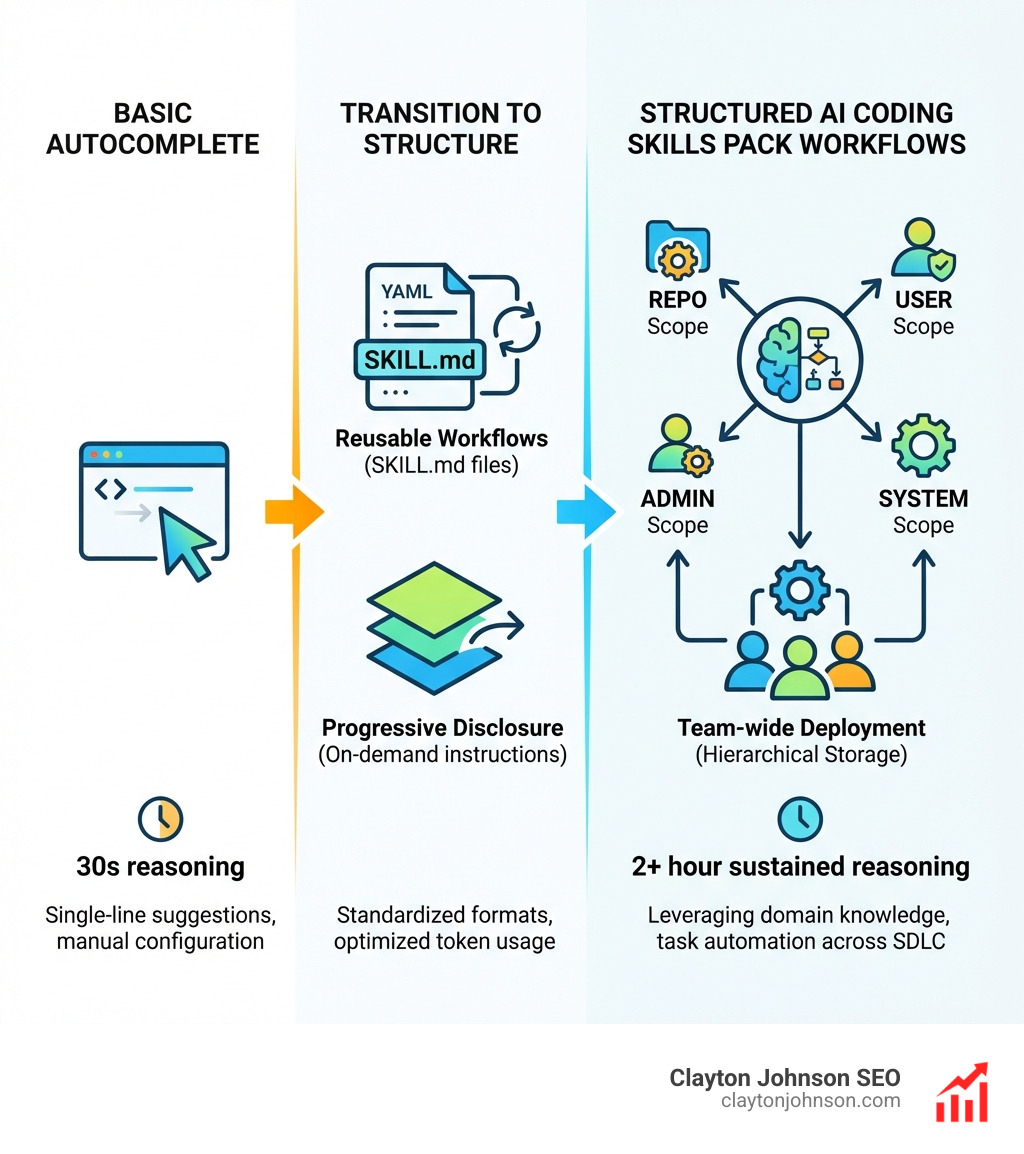
- Reusable workflows packaged as self-contained SKILL.md files with YAML frontmatter
- Progressive disclosure that loads instructions on-demand to optimize token usage
- Team-wide sharing through hierarchical storage (REPO, USER, ADMIN, SYSTEM scopes)
- Cross-platform compatibility with major coding agents via standardized formats
- Productivity gains like 2+ hour sustained reasoning windows and task automation across the full SDLC
The shift from autocomplete suggestions to multi-agent systems happened fast. Early AI coding tools could handle 30 seconds of reasoning for single-line completions. Today’s frontier models sustain over 2 hours of continuous work at roughly 50% success rates, with task length doubling every seven months. But raw model power means nothing without the right infrastructure to direct it.
That’s where skills packs come in. They turn “cool personal tool” into actual team infrastructure by standardizing how your AI agents understand tasks, access resources, and execute workflows. One engineer setting up a custom code review process is interesting. That same setup packaged as a skill and deployed across your entire team in minutes? That’s leverage.
The research is clear: developers spend 2-5 hours weekly on code reviews alone, and AlphaCode achieved top 54% ranking in competitive programming by combining strong models with structured problem-solving approaches. Skills packs apply that same principle to your daily workflows—packaging your team’s best practices into AI-executable instructions that scale.
I’m Clayton Johnson, and I’ve spent years building AI-assisted marketing workflows and structured strategy systems that turn fragmented efforts into scalable infrastructure. The same principles that work for content operations—clarity, structure, leverage—apply directly to AI coding skills pack deployment for engineering teams.
Basic AI coding skills pack terms:
What is an AI Coding Skills Pack?
At its core, an AI coding skills pack is a bundle of capabilities that extend the baseline intelligence of a large language model (LLM). Think of it like a “plugin” or an “app” for your AI agent. While a standard AI model knows how to write Python, a skill pack teaches it how your team writes Python, which libraries you prefer, and how to interact with your specific project management tools.
Skills vs Tools
The distinction between a “tool” and a “skill” is subtle but critical. A tool is usually a piece of software (like a debugger or a compiler). A skill is the “knowledge” of how to use those tools within a specific workflow. For example, a skill might package the instructions for “Deploying a Hotfix,” which involves running a test suite (tool), checking a Trello board (tool), and pushing to a specific branch (workflow).
The SKILL.md Format
The industry is coalescing around the SKILL.md structure. This is a simple Markdown file that serves as the source of truth for the agent. It typically includes:
- Name: A clear identifier for the skill.
- Description: A semantic trigger that tells the AI when to use this skill.
- Instructions: Step-by-step imperative guidance for the agent.
This structure is part of the open agent skills standard, ensuring that if you build a skill today, it won’t be obsolete when a new model drops tomorrow.
The Power of Semantic Routers
In a massive AI coding skills pack, you don’t want the AI reading every single instruction at once. That would burn through your “context window” (the AI’s short-term memory) in seconds. Instead, skills use semantic routers. The AI looks at the short descriptions of all available skills and only “opens” the full instruction set of the one that matches your current request.
The Difference Between General Tools and an AI Coding Skills Pack
General AI tools are like a Swiss Army knife—useful, but sometimes the blade is too small for the job. An AI coding skills pack provides task-specific capabilities that are “pre-compiled.”
- Domain Knowledge: General tools don’t know your internal API naming conventions. Skills do.
- Workflow Reliability: Vague prompts lead to “vibe-coding,” where code looks right but fails. Skills provide rigid, executable steps.
- Authentication: Skills can pre-package the logic for connecting to your JIRA, Slack, or AWS environments via MCP servers.
As we discuss in our look at the real truth of coding AI growth, the move toward structured “agentic” workflows is what separates the hobbyists from the professional engineering teams.
How Progressive Disclosure Optimizes an AI Coding Skills Pack
One of the biggest problems in AI development is token efficiency. Every word the AI reads costs money and takes up space in its memory.
Progressive disclosure is the secret sauce. By only loading the full contents of a skill when it is explicitly or implicitly triggered, the agent stays fast and accurate.
- On-demand loading: The agent only sees the “Trello Manager” instructions when you mention a task list.
- Reasoning cycles: Because the context is clean, the agent can spend more “brain power” on solving the actual code logic rather than sifting through irrelevant documentation.
Core Components and Integration of Modern Skills
Integrating an AI coding skills pack into your workflow requires understanding how different agents handle them. While the formats are becoming standardized, each platform has its own flavor.
| Feature | Claude Code | OpenAI Codex | Gemini CLI |
|---|---|---|---|
| Primary Format | SKILL.md / MCP | AGENTS.md / SKILL.md | gemini-extension.json |
| Integration Method | Native Plugin System | $skill-installer | CLI Extensions |
| Scope Support | Project-level / Global | REPO, USER, SYSTEM | Extension-based |
| Best For | Complex agentic loops | High-speed CLI tasks | Google Cloud workflows |
Integrating Your AI Coding Skills Pack with Major Agents
We’ve seen a massive shift toward cross-platform portability. If you’re using Claude Code, you can leverage the agent skills specification to ensure your skills are portable.
For those looking to dive deeper, we have a guide on how to extend Claude with custom agent skills that breaks down the terminal commands needed to get up and running. The goal is to create a “write once, run anywhere” infrastructure for your team’s logic.
The Role of MCPs and Plugins in Skill Functionality
The Model Context Protocol (MCP) is a game-changer for skill packs. It acts as a standardized bridge between the AI and external data.
- External Tool Access: Want your AI to check a Hugging Face model’s performance? Use a skill.
- API Authentication: MCP handles the “handshake” so the skill can focus on the “work.”
- Data Bridging: It allows a skill to pull data from a database and use it to refactor a React component in one go.
The Hugging Face skills repository is a prime example of this, offering standardized skills for ML tasks that work across Cursor, Windsurf, and Claude.
How to Build and Manage Custom Skills
Building your own AI coding skills pack doesn’t require a PhD in Machine Learning. It requires a clear understanding of your own manual workflows.
The Skill Creation Workflow
- Identify the Trigger: When should the AI do this? (e.g., “When I ask to review a PR”).
- Define the Metadata: Use YAML frontmatter to give the skill a name and a version.
- Write Imperative Instructions: Don’t say “Try to find bugs.” Say “Check for race conditions in the database handler.”
- Test with $skill-creator: Many platforms provide interactive scripts to validate your skill logic.
The latest research from DeepMind on AlphaCode shows that AI performs best when it can filter through multiple potential solutions. Your skills should guide the AI to generate, test, and then refine its output.
Best Practices for Writing an AI Coding Skills Pack
To get the most out of your AI coding skills pack, follow these rules of thumb:
- Single Responsibility: One skill = one job. Don’t make a “General Helper” skill. Make a “CSS Flexbox Fixer” skill.
- Explicit Inputs/Outputs: Tell the agent exactly what it needs to start and what the final result should look like.
- Output Optimization: Instead of asking for raw JSON (which is token-heavy), ask for a compact Markdown list.
For more on refining these outputs, check out our guide on mastering the Claude AI code generator.
Installing and Managing Team-Wide Skills
Scaling a skill pack to a team of 50 engineers requires more than just a shared folder.
- $skill-installer: Use CLI tools to pull skills from a central Git repo.
- Symlinks: Allow developers to “link” to a central library of skills while keeping local overrides.
- Scopes: Use REPO scope for project-specific logic and SYSTEM scope for company-wide standards (like security linting).
Real-World Applications Across the SDLC
The true power of an AI coding skills pack is seen when it supports the entire Software Development Lifecycle (SDLC).
Using an AI Coding Skills Pack for Spec-Driven Development
One of the most exciting trends is Spec-Driven Development. Tools like Spec Kit allow you to make the specification the center of your engineering process.
- Specify Phase: The agent helps you define the “what” and “why.”
- Technical Planning: The agent suggests the tech stack and architecture.
- Task Breakdown: The agent creates a checklist of atomic, testable tasks.
This approach moves us from “vibe-coding” to “intent-as-truth.” You can see this in action with the complete Claude skill pack for modern developers, which automates the transition from a rough idea to a structured technical plan.
Supporting the Full Software Development Lifecycle
An AI coding skills pack isn’t just for writing code. It supports:
- Legacy Modernization: Skills that can “read” old COBOL or jQuery and “translate” it to modern TypeScript.
- Design-to-Code: Multi-modal skills that take a screenshot of a Figma file and generate a Tailwind component.
- Automated Code Review: Catching race conditions and database bottlenecks before a human even opens the PR.
Research published in Science regarding AlphaCode highlights that AI can now solve novel problems that require a combination of critical thinking and logic—provided the instructions are structured correctly.
Scaling from Individual DIY to Team Infrastructure
Most developers start with a “DIY” setup—a few custom prompts saved in a Notion doc. But that doesn’t scale. When one person updates a prompt, the rest of the team is still using the old, buggy version.
Why DIY Fails at Scale
- Inconsistency: Every dev gets different results from the AI.
- Setup Overhead: New hires spend days configuring their environment.
- Bottlenecks: Code reviews become a slog because the AI isn’t helping standardize the output.
As we explore in why every developer needs AI tools for programming, the transition to shared AI coding skills pack infrastructure is what allows teams to actually ship faster.
Measuring the ROI of an AI Coding Skills Pack
How do you know if it’s working? Look at the metrics:
- Continuous Work Confidence: Leading models can now handle over 2 hours of continuous work with 50% confidence. Skills packs increase this by providing better guardrails.
- Time Savings: Developers spend 2–5 hours a week on reviews. A skill pack can cut that in half by pre-reviewing code.
- Task Length: The complexity of tasks AI can handle is doubling every seven months. If your team isn’t using skills, you’re falling behind that curve.
For a deeper dive into which tools provide the most “bang for your buck,” read our breakdown of the best AI for coding and debugging.
Frequently Asked Questions about AI Coding Skills Packs
What is the difference between a skill and a prompt?
A prompt is a one-off question. A skill is a packaged workflow. A skill includes a trigger (so the AI knows when to use it), specific instructions, and often scripts or API connections that a simple prompt lacks.
How do I share my custom skills with my engineering team?
The best way is to store them in a .agents/skills directory in your main Git repository. This way, when a developer clones the repo, the AI coding skills pack is automatically available to their local agent (like Claude Code or Codex).
Can I use the same skills pack across different AI models?
Mostly, yes! By following the open agent skills standard, you write your instructions in Markdown. While some “fine-tuning” might be needed for specific models, the core logic remains portable across Claude, GPT, and Gemini.
Conclusion
The era of “copy-pasting prompts” is ending. To stay competitive, engineering teams need to treat their AI interactions as infrastructure, not just as a chat box. An AI coding skills pack provides the structure, reliability, and scalability needed to turn AI agents into true teammates.
At Clayton Johnson SEO, we focus on building these kinds of high-leverage, AI-assisted workflows. Whether it’s for marketing operations or engineering strategy, the goal is always the same: reduce the distance between intention and execution. Through our Demandflow framework, we help teams in Minneapolis and beyond diagnose growth problems and execute with measurable results.
If you’re ready to stop “vibe-coding” and start building a scalable AI strategy, you can scale your growth with SEO content marketing and structured AI workflows today. Let’s build something that actually works.