🎯 AI vs. Human: The strategic decision framework
When to use AI is one of the most critical strategic decisions facing modern organizations. AI excels at summarization, pattern recognition, automation of repetitive tasks, data analysis, and generating initial drafts—but struggles with nuanced judgment, emotional intelligence, high-stakes decision-making, and tasks requiring deep contextual understanding or ethical reasoning.
Here’s when to use each approach:
| Use AI for: | Keep human for: |
|---|---|
| Summarizing long documents | Original creative thinking |
| Finding patterns in data | Ethical decisions |
| Drafting initial content | Professional judgment calls |
| Automating repetitive tasks | Emotional intelligence |
| Brainstorming ideas | High-stakes decisions |
| Code generation and debugging | Contextual nuance |
| Data extraction and analysis | Final responsibility |
The adoption curve is steep. In just two years, 39% of U.S. adults have used AI—compared to only 20% internet adoption in its first two years. AI leaders are seeing 1.5x faster revenue growth and 1.6x higher shareholder returns than their less advanced peers. Yet 92% of companies plan to increase AI investment while only 1% believe their initiatives have reached full maturity.
This gap reveals the core challenge: knowing when to deploy AI versus when to rely on human expertise.
The answer isn’t binary. The most effective approach treats AI as augmentation, not replacement. AI should amplify human capabilities—handling volume, speed, and pattern recognition—while humans provide judgment, creativity, and accountability.
The framework is task-based, not job-based. Instead of asking “Can AI do this job?”, break work into individual tasks and evaluate each one. Some tasks within any role are highly amenable to AI assistance. Others require irreplaceable human oversight.
Consider the research from Brynjolfsson, Mitchell, and Rock: even jobs like programming and radiology—often cited as automation targets—involve dozens of distinct tasks. Some are perfect for AI augmentation (code debugging, image pattern detection). Others require human expertise (architectural decisions, patient communication).
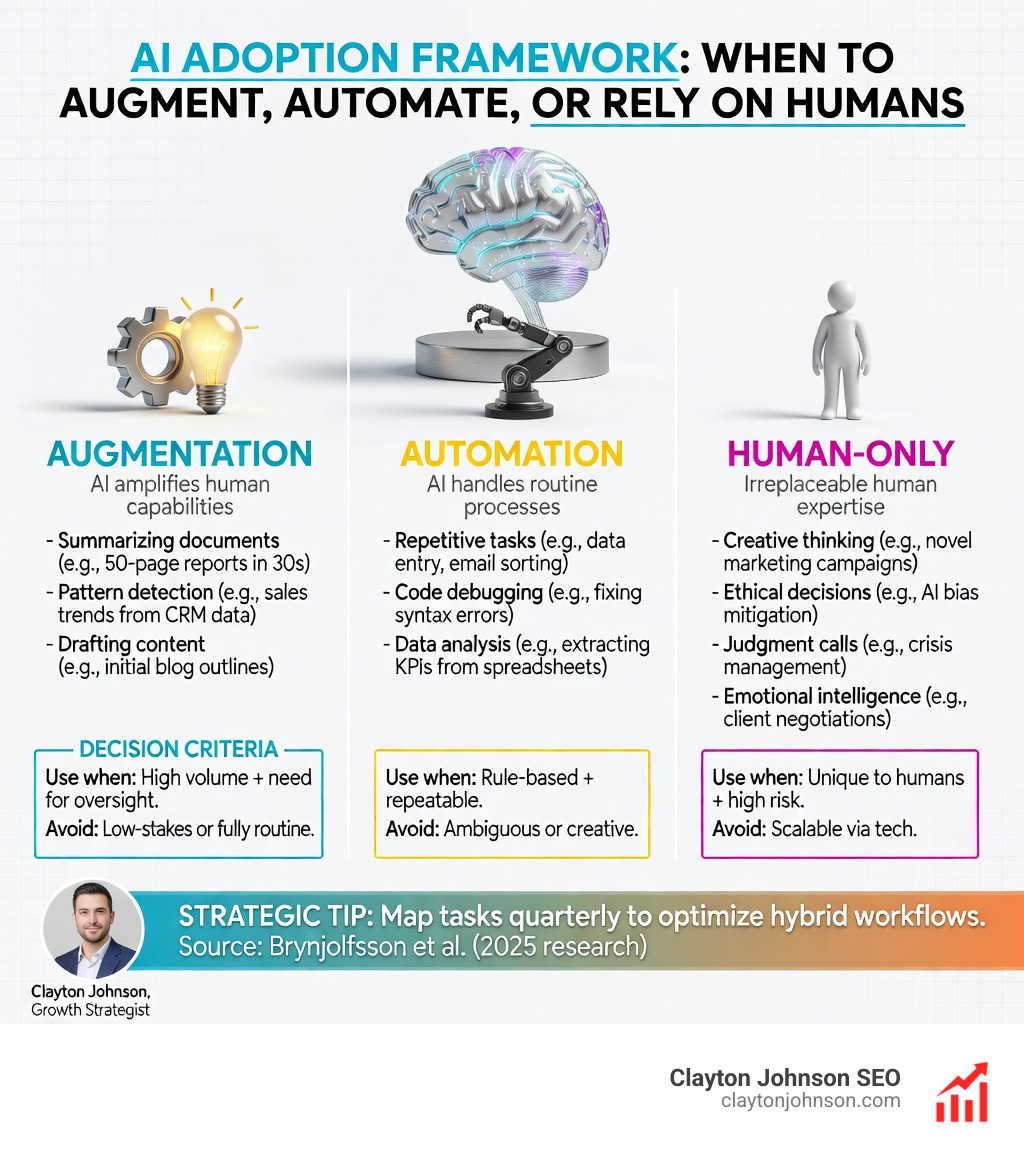
Three categories emerge:
- Augmentation – AI enhances your process, you stay in control (most valuable for judgment-heavy work)
- Automation – AI completes the task, you review the output (ideal for repetitive, rule-based tasks)
- Human-only – AI stays out entirely (critical thinking, ethical reasoning, high-stakes decisions)
The strategic opportunity lies in systematically identifying which tasks fall into each category—then building workflows that combine AI efficiency with human oversight.
I’m Clayton Johnson, an SEO and growth strategist who helps organizations architect scalable demand systems by determining when to use AI as strategic leverage and when to preserve human judgment. Over the past several years, I’ve worked with enterprise teams to map AI opportunities across content workflows, technical infrastructure, and competitive positioning—always anchoring decisions in measurable outcomes rather than hype.
When to use ai vocab explained:
Understanding when to use AI: A strategic framework
To move beyond the “playing around” phase, we need a structured way to identify value. We often suggest looking at jobs as collections of tasks rather than monolithic roles. For example, a programmer doesn’t just “write code”; they perform roughly 17 distinct tasks, including debugging, documentation, and architectural planning. By breaking these down, we can see exactly where the impact of generative AI is most beneficial.

The Six AI Primitives
When we talk about Enterprise AI Strategy 101, we focus on six fundamental “primitives” where AI consistently adds value:
- Content Creation: Summarizing, drafting, and repurposing.
- Automation: Handling multi-step, repeatable workflows.
- Research: Rapidly synthesizing information from internal or external sources.
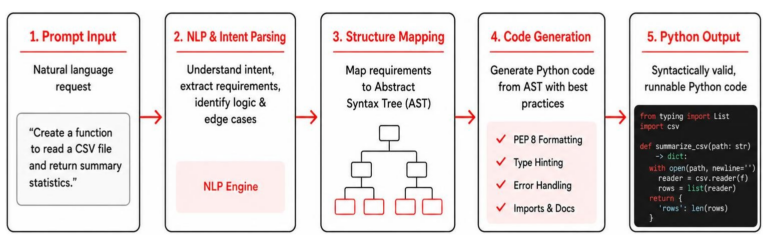
- Coding: Generating syntax, debugging, and porting languages.
- Data Analysis: Identifying trends and harmonizing unstructured data.
- Ideation/Strategy: Brainstorming and structuring initial document outlines.
By mapping these primitives to your existing workflows, you can begin Scaling AI: A Strategic Framework for Modern Organizations. The goal is to identify “quick wins”—tasks that are high impact but low effort—to build momentum before tackling complex, high-effort integrations.
Generative vs. Traditional AI: Choosing the right tool
One of the most common mistakes we see is trying to use a chatbot for a problem that requires a calculator. Understanding when to use ai effectively requires distinguishing between Generative AI and Traditional (Predictive) AI.
| Feature | Traditional AI | Generative AI |
|---|---|---|
| Primary Goal | Predict or Classify | Create or Summarize |
| Data Type | Structured (Numbers, Categories) | Unstructured (Text, Images, Audio) |
| Common Use Case | Spam filtering, price prediction | Draft emails, generate images |
| Logic | Mathematical/Statistical | Associative/Probabilistic |
Traditional AI is your go-to for classification and regression. If you need to predict house prices or identify which customers are likely to churn based on historical data, traditional models are more reliable and controllable.
Generative AI, on the other hand, excels at “document and data understanding.” It uses associative reasoning to find hidden correlations in human language. According to Google Cloud’s guide on When to use generative AI or traditional AI, the magic often happens when you combine them. For instance, traditional AI can flag a high-risk security threat, and generative AI can immediately draft a mitigation report and a notification email to the IT team. Exploring different Artificial Intelligence / AI Models allows you to pick the specific “brain” required for the task at hand.
Where humans excel: Creativity, emotion, and ethics
While AI can be “novel,” it is rarely “original.” One scientific paper notes that AI can be programmed to create ideas that are new within a set of parameters, but it cannot create truly unexpected solutions that break the mold. This is where the human element is irreplaceable.
The “Heart” Gap
AI lacks emotional intelligence and an inherent moral compass. It makes decisions based on mathematical optimization, not human empathy. In this study, researchers found that AI emotion-reading tech often exhibited racial bias, assigning negative emotions more frequently to non-white individuals.
When a decision involves:
- Emotional Ramifications: How will this layoff affect the team’s morale?
- Nuanced Judgment: Is this “technically” correct but “socially” tone-deaf?
- Ethical Reasoning: Does this data use violate the spirit of our privacy policy?
…you must keep it human. Building a Responsible AI Framework: 5 Key Principles for Success emphasizes that professional judgment and accountability cannot be outsourced to an algorithm.
Navigating the risks of AI implementation
If you treat AI like a search engine that’s always right, you’re headed for trouble. AI hallucinations)—where the model confidently presents false information as fact—remain a serious concern.
Security and Privacy
We must be incredibly cautious with sensitive data. The fame that Samsung got for using AI serves as a warning: sensitive code leaked into public training data because employees didn’t understand that public chatbots “learn” from what you tell them. For organizations in Minneapolis and beyond, implementing AI Infrastructure Best Practices for Smart Organizations means using enterprise-grade tools with strict data silos.
The “Plausibility” Trap
AI errors are sneaky because they sound perfectly reasonable. Just ask the lawyer who used ChatGPT to prepare court filings and ended up citing completely fictional cases. To mitigate this, we recommend a “human-in-the-loop” verification step for every output intended for external or high-stakes use.
High-impact applications for professional workflows
When used correctly, AI is a “super-assistant” that never gets tired. It can help you reclaim hours of your week by automating the “chore” tasks of modern business. For marketers, mastering these 8 Essential AI Skills Every Marketer Needs to Survive is no longer optional—it’s the baseline for staying competitive. Every brand today needs an AI Growth Strategy Right Now to handle the sheer volume of content and data required to scale.

When to use AI for content and SEO
In search, AI is a force multiplier. We use Best AI SEO Services not to replace writers, but to enhance their research capabilities.
- Summarization: Turning a 60-minute webinar into a concise blog post.
- Data Synthesis: Using Claude for Data Science is the Lab Partner You Always Wanted to find patterns in keyword rankings.
- Research: Tools like Perplexity allow for cited, real-time information gathering that traditional search engines struggle to match.
- Content Architecture: Mapping out how 50 different articles should link together to build topical authority.
When to use AI for coding and technical tasks
For developers, AI has fundamentally changed the “inner loop” of coding. Finding The Best AI for Coding and Debugging can increase productivity by 20% or more.
- Syntax Generation: The Complete Guide to How Claude Helps Your Coding Workflow shows how AI can draft boilerplate code in seconds.
- Automation: Why You Need an AI Code Generator Right Now isn’t just about speed; it’s about reducing the cognitive load of repetitive syntax.
- No-Code Apps: You can even Use Artifacts to Visualize and Create AI Apps Without Code, allowing non-technical team members to build functional prototypes.
Frequently Asked Questions about AI usage
Is AI better than humans at creative tasks?
Not exactly. AI is better at volume and novelty (combining existing things in new ways). However, One scientific paper argues that AI cannot achieve true “originality” because it lacks the lived human experience and emotional context that drives artistic breakthroughs. AI is a great “sparring partner” for brainstorming, but the human must deliver the soul of the work.
How do I prevent AI hallucinations in business reports?
The key is verification. Never copy-paste AI output directly into a report without a “sense check.”
- Ask for Sources: Explicitly tell the AI to cite its sources.
- Use “Deep Research” Modes: Use models that can browse the live web.
- Human-in-the-loop: Always have a subject matter expert review the final data. hallucinations) are most common when the AI is asked for specific facts it wasn’t trained on.
Can AI replace professional judgment?
No. AI can provide “data-driven insights,” but it cannot weigh the complex social, ethical, and long-term strategic factors that define professional judgment. Building a Responsible AI Framework: 5 Key Principles for Success makes it clear: humans must retain final responsibility for all high-stakes decisions.
Conclusion: Building a structured growth architecture
At Demandflow, we believe that the future of business isn’t about AI replacing people—it’s about people using AI to build better infrastructure. Most companies don’t lack tactics; they lack a structured growth architecture.
By understanding when to use ai, you gain the leverage needed to move from manual execution to compounding growth. Whether you are looking for AI Services and Consulting: From Sci-Fi Dreams to Scalable Realities or you want to Learn more about AI SEO strategy, the path forward is clear: automate the routine, augment the expert, and always keep the human in the loop.