Use Artifacts to Visualize and Create AI Apps Without Code

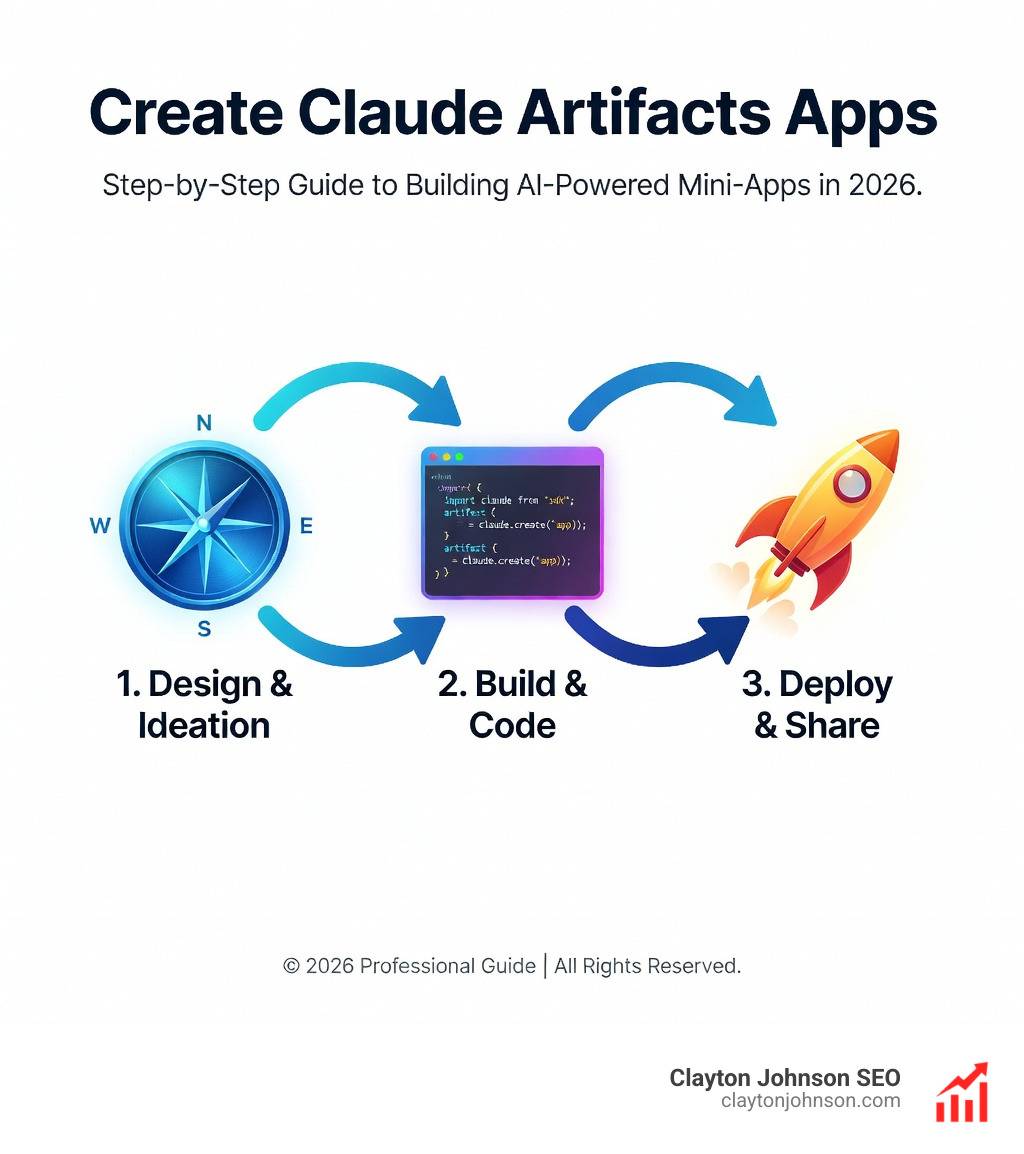
Create Claude Artifacts apps to transform ideas into interactive prototypes in minutes—no coding skills required. Claude Artifacts is a feature that lets you build shareable web applications, interactive tools, and AI-powered experiences through simple conversation with Claude.
Quick Start: Create Claude Artifacts apps in 3 Steps
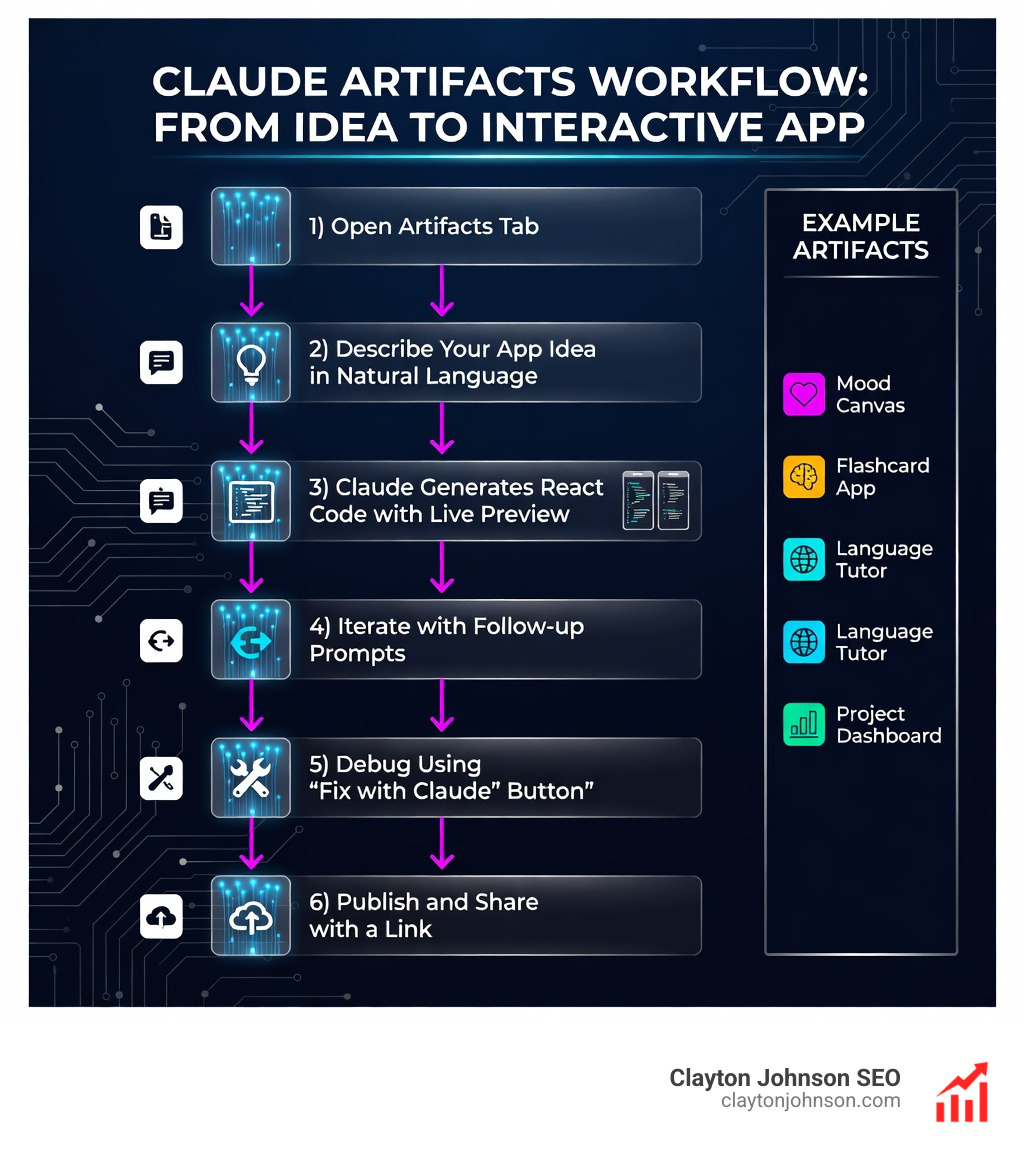
- Open the Artifacts tab in your Claude sidebar (available on Free, Pro, Max, Team, and Enterprise plans)
- Describe what you want to build in plain language—Claude will generate React components with live previews
- Iterate and publish by asking for changes, then click “Publish” to share your creation with a link
Over half a billion artifacts have been created by millions of users since launch. These range from custom dashboards and educational games to AI-powered chatbots and productivity tools. The feature works by generating self-contained code (typically React components with Tailwind CSS) in a dedicated window separate from your main chat, allowing you to see, edit, and interact with your creation in real-time.
Traditional app development requires API keys, deployment infrastructure, and technical expertise. Claude Artifacts removes these barriers entirely. You can build a flashcard app, a Pomodoro timer, a mood canvas, or a project dashboard simply by describing what you need. The conversation maintains context, so you can refine your app iteratively without losing previous work.
I’m Clayton Johnson, and I’ve built AI-augmented marketing systems and tool-driven workflows that help operators Create Claude Artifacts apps for rapid prototyping and process automation. This guide will walk you through the complete workflow—from basic creation to advanced features like AI-powered interactions and external service integrations.
Create Claude Artifacts apps word roundup:
What are Claude Artifacts and How Do They Work?
When we talk about how to Create Claude Artifacts apps, we aren’t just talking about a fancy way to display text. Claude Artifacts are self-contained, significant pieces of content that Claude generates during your conversation. While standard chat messages are great for quick answers, Artifacts are designed for material you want to edit, iterate on, and refer back to.
Technically, Artifacts are web applications that run in a strictly controlled browser sandbox. Most of the time, Claude uses React components styled with Tailwind CSS to build these apps. This means when you ask for a “marketing dashboard,” Claude doesn’t just describe it—it builds a functional interface you can actually click on.
Here is how standard chat compares to the Artifacts experience:
| Feature | Standard Chat | Claude Artifacts |
|---|---|---|
| Primary Output | Text, lists, short code blocks | Interactive apps, documents, full code files |
| Workspace | Inline conversation stream | Dedicated side panel |
| Interactivity | Static response | Clickable buttons, sliders, live updates |
| Iteration | Re-generating entire messages | Version control and targeted edits |
| Sharing | Copy-pasting text | Public URL with “Remix” capability |
If you are new to the ecosystem, our Anthropic Claude 101 guide covers the basics of the model’s architecture. For Artifacts, the magic happens because Claude can “see” the code it is writing in a live environment, allowing for a creative flow-state that feels less like coding and more like sculpting an idea.
Step-by-Step Guide to Create Claude Artifacts apps
Ready to build? Whether you’re in our home base of Minneapolis or working remotely, the process is accessible to anyone with a browser. Here is the step-by-step workflow to get your first app running.
1. Enable the Feature
First, ensure the capability is active. Navigate to Settings > Capabilities and toggle on “Artifacts.” If you want to build apps that can actually “think” on their own (more on that later), you should also enable “Create AI-powered artifacts” in the Feature Preview section of your profile settings.
2. Signal Your Intent
While you can simply ask Claude to build something, we recommend starting in the dedicated Artifacts tab in the sidebar. This signals to Claude that you aren’t just looking for information; you’re looking to build. Use our Claude Skill Pack to learn how to frame these initial requests for maximum accuracy.
3. Describe and Refine
Tell Claude exactly what you need. Instead of saying “Build a timer,” try: “Build a Pomodoro timer with a clean, minimalist UI using a forest green color palette. Include buttons for ‘Work’, ‘Short Break’, and ‘Long Break’.”
Best Prompts to Create Claude Artifacts apps
The quality of your app depends on the specificity of your prompt. We’ve found that the most successful “app creators” follow a “Context-Spec-Function” framework:
- Context: Who is this for? (e.g., “A marketing manager in Minnesota.”)
- Spec: What should it look like? (e.g., “Use a mood canvas style with vibrant visualizations.”)
- Function: What must it do? (e.g., “Calculate ROI based on user-entered ad spend and conversion rates.”)
Common Errors When You Create Claude Artifacts apps
Even AI makes mistakes. You might run into a “script error” or a component that doesn’t render correctly.
- The “Fix with Claude” Button: If an error occurs, look for the “Try fixing with Claude” button in the Artifact window. This automatically sends the error logs back to the model for a diagnosis.
- Iterative Debugging: If a feature isn’t working, describe the symptom in plain language: “The ‘Reset’ button doesn’t actually clear the data. Can you fix that?”
- Extend with Skills: To make your apps more robust, learn How to Extend Claude with Custom Agent Skills to give your Artifacts more “brainpower.”
Building AI-Powered Apps with window.claude.complete()
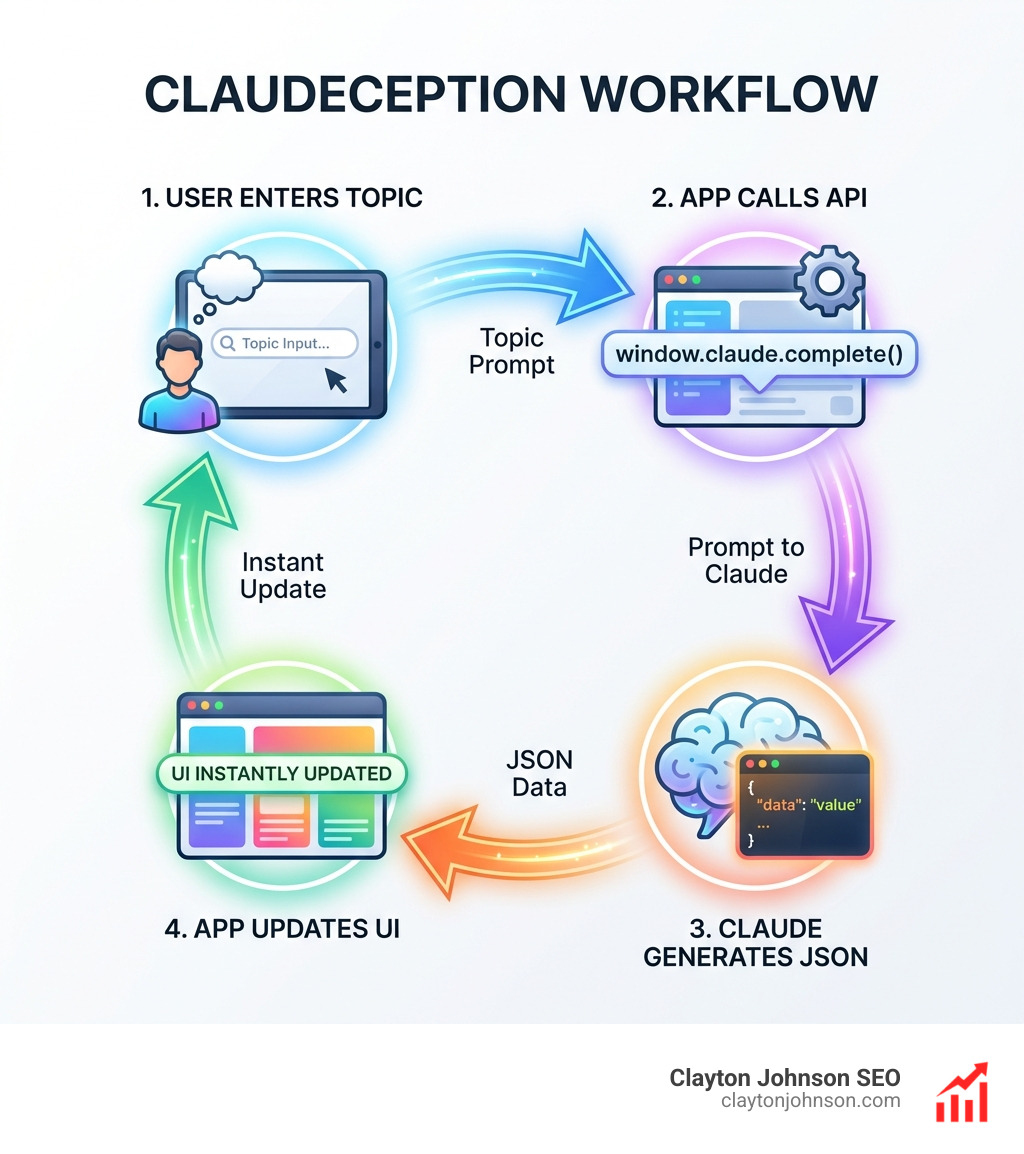
This is where things get “meta.” Anthropic recently introduced the ability to Build and share AI-powered apps with Claude. This allows the JavaScript code inside your Artifact to call Claude’s API directly.
We call this “Claudeception.”
Imagine building a flashcard app where, instead of you writing the cards, the app itself asks Claude to generate new cards based on a topic the user types in. This is made possible by the window.claude.complete() function.
How to implement AI-power:
- Enable the Preview: You must have “Create AI-powered artifacts” enabled in your settings.
- The Prompt: Ask Claude to build an app that “uses the internal completion API to generate content.”
- JSON Enforcement: To make this work reliably, the app needs to receive data in a structured format. We’ve found that you literally have to “yell” at Claude in the system instructions (e.g., “YOU MUST ONLY RESPOND IN VALID JSON”) to ensure the app doesn’t break.
For a deeper dive into how Claude structures its thoughts to handle these complex tasks, check out The Ultimate Claude Chain of Thought Tutorial.
Advanced Features: MCP Integration and Persistent Storage
For professional use cases—like those we handle at Clayton Johnson SEO—static apps aren’t enough. We need apps that connect to our real-world tools.
Model Context Protocol (MCP)
MCP is a game-changer. It allows your Artifacts to connect with external services. You can build an Artifact that reads your Asana tasks, checks your Google Calendar, or even sends a message to Slack.
This turns a simple “visualizer” into a legitimate workstation. For developers, we recommend The Complete Claude Skill Pack for Modern Developers to master these integrations.
Persistent Storage
Historically, if you refreshed your chat, your Artifact’s data was gone. Now, Claude supports Persistent Storage.
- Capacity: Up to 20MB of text-only data.
- Stateful Apps: This allows you to build journals, habit trackers, or even game leaderboards that remember your progress across sessions.
- Privacy: You can choose between “Personal” storage (only you see the data) or “Shared” storage (collaborators see the same data).
Sharing, Collaboration, and Version Control
Once you Create Claude Artifacts apps, you probably want to show them off.
Version Control
Every time you ask Claude to “make the font bigger” or “add a new tab,” it creates a new version of the Artifact. You can use the version selector (the slider icon) to jump back to an earlier build if you realize you liked the previous design better. This is essentially “Git for non-coders.”
Publishing and Remixing
Click the Publish button to generate a public URL.
- Viewers: Anyone with the link can see and interact with your app.
- Remixing: Other Claude users can click “Customize” to copy your code into their own chat and build upon it. This is how the community has created amazing tools like the language tutor.
If you decide your app is ready for “the big leagues,” you can copy the code and move it into a professional editor. This is where Claude Code comes in—Anthropic’s command-line tool for high-stakes engineering.
Frequently Asked Questions
Which plans support Artifacts?
Artifacts are available on all plans, including the Free tier. however, Pro, Max, Team, and Enterprise users enjoy higher usage limits. If you are building AI-powered apps (using window.claude.complete()), the “cost” of those prompts is billed to the user interacting with the app, not the creator.
Can I use Artifacts on mobile?
Yes! Artifacts are fully supported on the iOS and Android apps. While it’s easier to build them on a desktop, they are highly responsive and perform beautifully as “mini-apps” on your phone.
Is persistent storage available for all users?
Persistent storage is currently available for published artifacts. There is a 20MB text limit per artifact. It is important to remember that if you enter sensitive data into a “Shared” storage artifact, anyone with access to that artifact can potentially see it.
Conclusion
The ability to Create Claude Artifacts apps represents a massive shift in how we interact with technology. We are moving away from being “users” of software and becoming “creators” of custom tools. With over half a billion artifacts already in existence, the era of the “disposable app”—a tool built exactly for a specific 15-minute task—is here.
At Clayton Johnson SEO, we specialize in helping businesses leverage these AI-assisted workflows to drive growth and efficiency. Whether you’re in Minneapolis or anywhere else, these tools can revolutionize your operations.
Ready to scale your content and strategy using the latest AI technology? Explore our SEO Content Marketing services and let’s build something incredible together.