Supercharge Your IDE with These Claude Coding Extensions


Why Claude Coding Extensions Are Transforming Developer Workflows
Coding extensions Claude are reshaping how developers write, review, and refactor code by bringing Anthropic’s powerful AI models directly into your IDE. Whether you’re searching for the official Claude Code extension, exploring agentic coding tools, or comparing alternatives like Azad Coder, these extensions offer real-time diffs, autonomous task handling, and deep codebase awareness.
Quick Answer: Top Claude Coding Extensions
- Claude Code for VS Code – Official Anthropic extension with 2M+ installs, Sonnet 4.5 model, subagents, and checkpoints
- Claude Code Terminal – CLI-based interface for Unix-style composable workflows
- Claude Code for JetBrains – Native plugin for IntelliJ, PyCharm, and other JetBrains IDEs
- Azad Coder – Third-party extension optimized for GPT-5 and Claude Sonnet 4.5 with task budgeting
- Claude on Web/Mobile – Browser and iOS app for cloud-based coding sessions
Over 2 million developers already use Claude Code in VS Code to search million-line codebases instantly and turn hours-long workflows into a single command. The extension works alongside you by autonomously exploring your codebase, reading and writing code, and running terminal commands—all with your permission.
What makes these extensions powerful?
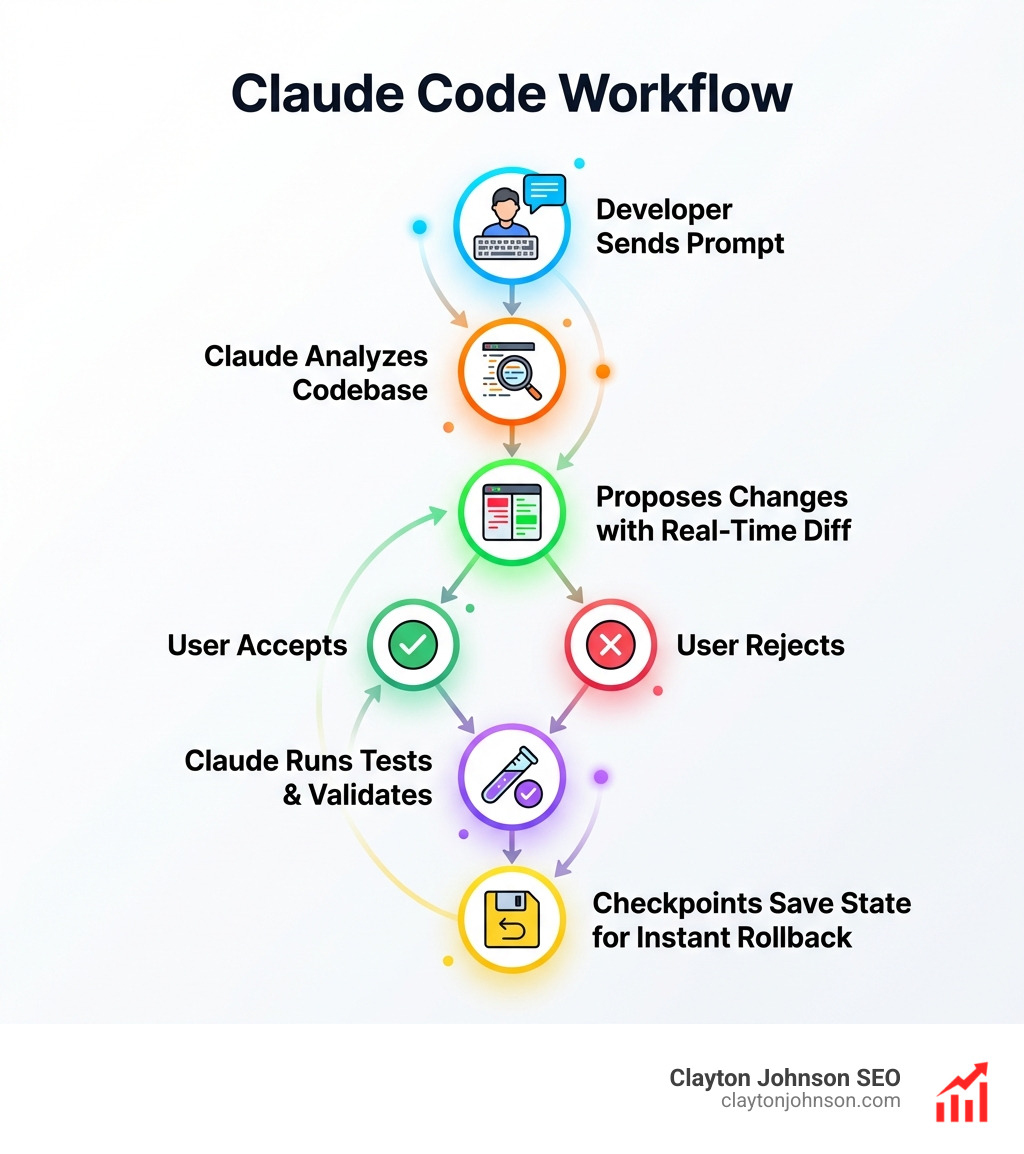
Claude Code doesn’t just autocomplete. It understands context across your entire project, proposes changes with real-time diffs, and handles complex refactoring tasks through advanced agentic features like subagents (parallel AI workers), checkpoints (instant rollback points), and hooks (automated scripts triggered by events).
The official VS Code extension integrates with your current file and text selection, proposing changes directly in the editor. It supports the Model Context Protocol (MCP) for connecting to external tools like Jira, Slack, and Google Drive. You can configure permission modes, enable extended thinking for complex logic, and customize behavior through detailed settings.
Platform flexibility matters.
You’re not locked into one environment. Claude Code runs in your terminal, VS Code, JetBrains IDEs, as a desktop app, in your browser, and even as a Chrome extension for debugging live web apps. Each interface is optimized for different workflows—terminal for scripting and CI/CD, VS Code for general development, JetBrains for specialized language support.
I’m Clayton Johnson, and I’ve spent years building AI-assisted marketing and development workflows that turn fragmented efforts into coherent systems. Coding extensions Claude represent exactly this kind of leverage—tools that compound your productivity by handling the tedious work while you focus on architecture and strategy.
Easy Coding extensions Claude word list:
What is Claude Code and the Official VS Code Extension?

Claude Code is Anthropic’s agentic coding assistant designed to live where developers spend their most productive hours. Unlike traditional chat interfaces, Claude Code is deeply integrated into the local environment. It doesn’t just suggest code; it acts as a collaborator that can explore million-line codebases, read files, execute terminal commands, and perform complex refactoring with minimal supervision.
At its heart, the official Claude Code for VS Code extension brings the raw power of the Claude 3.5 Sonnet and 4.5 models directly into your editor. It provides a richer, graphical experience compared to the command-line version, allowing you to see Claude’s proposed changes in real-time through a dedicated sidebar panel. This sidebar offers inline diffs, which are essential for maintaining the-best-ai-for-coding-and-debugging workflows because you can precisely see what is being added or removed before hitting “Accept.”
Why Developers Choose Coding extensions Claude
The adoption numbers speak for themselves: the official Anthropic extension for Coding extensions Claude has already surpassed 2 million installs. Developers are flocking to this tool because it bridges the gap between a “chatbot” and a “junior engineer.”
Key reasons for its popularity include:
- Verified Security: Being a native VS Code extension from a verified publisher (Anthropic) gives enterprise teams the confidence to use it on proprietary codebases.
- Context Awareness: It doesn’t just look at the open tab; it indexes your entire workspace to understand project-wide dependencies.
- Graphical Sidebar: You can manage multiple coding sessions, view diffs, and control permissions through a user-friendly UI.
- Seamless Integration: It works with your existing text selections and file structures, making it feel like a natural part of the VS Code ecosystem.
Core AI Capabilities and Models
The engine behind these extensions is Claude Sonnet 4.5, which is currently the default model for Claude Code. This model is specifically tuned for high-reasoning tasks, such as mastering-the-claude-ai-code-generator-for-faster-development by identifying architectural patterns rather than just syntax.
To access these capabilities, users generally need a Claude Pro, Team, or Enterprise subscription. However, for those who prefer a more granular approach, the Anthropic Console allows for a pay-as-you-go model using API credits. This flexibility ensures that whether you’re a solo founder in Minneapolis or part of a large engineering team, you can scale your AI usage to match your project’s needs.
Advanced Agentic Features of Coding extensions Claude
One of the most exciting aspects of Coding extensions Claude is the shift from “assisted coding” to “agentic coding.” This means Claude can take a high-level goal—like “refactor the auth module to use JWT”—and break it down into a series of autonomous steps.
The Claude Agent SDK allows developers to build custom agents that leverage these core capabilities. This is particularly useful for teams looking at how-to-extend-claude-with-custom-agent-skills to match their specific internal standards or proprietary frameworks.
Autonomous Task Handling and User Control
While Claude is powerful, we know that developers need to stay in the driver’s seat. Anthropic has implemented several mechanisms to ensure confidence and control:
- Checkpoints: Claude automatically saves the state of your code before making changes. If a refactor goes sideways, you can use the
/rewindcommand or hitEsctwice to instantly restore your codebase and conversation state. - Permission Modes: You can set Claude to “Plan” mode (where it only describes what it will do), “Accept Edits” (where it asks before every change), or even “Bypass Permissions” for trusted, repetitive tasks (though we recommend extreme caution here!).
- Subagents: For complex tasks, Claude can spawn subagents to handle isolated execution contexts. For example, a main agent could build a frontend component while a subagent researches the necessary API endpoints in the background.
These features make up the-complete-claude-skill-pack-for-modern-developers, allowing for a workflow where the AI handles the “how” while the human handles the “what.”
Model Context Protocol (MCP) and External Tools
The Model Context Protocol (MCP) is a game-changer for Coding extensions Claude. It allows the AI to connect to external services and retrieve data or perform actions outside of the local file system.
Imagine Claude being able to:
- Query your Jira backlog to understand a bug report.
- Post a summary of its changes to a Slack channel.
- Pull documentation from Google Drive to ensure a new feature follows company guidelines.
For those looking to set up these advanced integrations manually, we recommend checking out resources like the openclaw-manual-setup guide to understand the underlying architecture of these open-standard connections.
Top Claude Coding Extensions and Platform Integrations
While VS Code is the most popular environment, the ecosystem for Coding extensions Claude extends across nearly every major development platform.
- Terminal CLI: For the purists, the Claude Code CLI offers a Unix-style experience. You can pipe logs directly into Claude (
tail -f app.log | claude) or use it to automate CI/CD pipelines. - JetBrains IDEs: The Claude Code plugin for JetBrains brings interactive diff viewing and selection context sharing to IntelliJ, PyCharm, and WebStorm.
- Chrome Extension: Currently in beta, this allows Claude to interact with live web applications, making it an invaluable tool for frontend debugging and UI testing.
As we look at why-every-developer-needs-ai-tools-for-programming-in-2025, it’s clear that the ability to use the same AI context across different interfaces is a massive productivity multiplier.
Azad Coder: The Specialized Alternative
For developers who want a slightly different flavor of AI assistance, Azad Coder is a standout third-party extension. While it supports Claude Sonnet 4.5, it is also optimized for GPT-5 capabilities.
Azad Coder focuses on:
- Task Budgeting: You can set limits on time, turns, or cost for autonomous tasks.
- Browser Automation: It integrates tools like Playwright to allow the AI to test the code it just wrote in a real browser.
- Task Segmentation: It excels at breaking down massive, multi-step migrations into manageable chunks.
Claude on Mobile and Web
Development doesn’t always happen at a desk. The claude.ai/code web interface allows you to work on repositories you don’t have locally by running sessions on cloud infrastructure. Combined with the Claude iOS app, you can kick off a long-running refactoring task on your laptop in Minneapolis and check the progress on your phone while grabbing a coffee.
How to Install and Customize Coding extensions Claude
Getting started with Coding extensions Claude is straightforward, but there are a few technical requirements to keep in mind.
- VS Code Requirements: You must be running VS Code version 1.98.0 or higher.
- Terminal Installation: On macOS or Linux, you can install the CLI version using a simple curl script:
curl -fsSL https://claude.ai/install.sh | bash. - Marketplace: Search for “Claude Code” (published by Anthropic) in the VS Code Extensions view (Ctrl+Shift+X).
Once installed, the real power comes from customization. We recommend creating a CLAUDE.md file in your project root. This file acts as a persistent memory for Claude, where you can define coding standards, architecture decisions, and preferred libraries. You can find more detailed setup instructions in the official documentation Claude Code for VS Code.
Understanding the-real-truth-about-coding-ai-growth means realizing that the best results come from an AI that is properly configured to your specific environment.
Customizing Your Workflow with Coding extensions Claude
Beyond the basics, you can fine-tune your experience using a variety of settings:
- Slash Commands: Use commands like
/reviewto trigger custom checklists or/modelto switch AI versions mid-session. - Extended Thinking: Enable this mode when you need Claude to “show its work” and reason through complex debugging logic before writing code.
- File Handling: You can configure Claude to respect your
.gitignorepatterns so it never accidentally reads or modifies sensitive configuration files. - Autosave: Enable
autosaveso Claude always has the latest version of your files before it begins an analysis.
Pricing and Subscription Models
While there are some free trials available, a professional workflow usually requires one of the following Claude subscription details:
- Pro Tier ($20/mo): Best for individual developers, offering high usage limits and access to the latest models.
- Team Plan ($30/user/mo): Adds administrative controls and higher usage tiers for small groups.
- Enterprise: Custom pricing for organizations requiring SSO, role-based access, and maximum security.
- API Pay-As-You-Go: Available via the Anthropic Console for those building custom integrations or using extensions like Azad Coder.
Comparing Claude Code vs. Azad Coder and Other AI Assistants
When choosing between Coding extensions Claude, it helps to see how the top contenders stack up.
| Feature | Claude Code (Official) | Azad Coder | Cursor (Forked IDE) |
|---|---|---|---|
| Primary Model | Claude 3.5/4.5 Sonnet | GPT-5 & Claude | Claude/GPT-4o |
| Interface | Native Extension/CLI | VS Code Extension | Entire Custom IDE |
| Agentic Depth | Very High (Subagents/Hooks) | High (Task Budgeting) | High (Composer) |
| Setup Speed | 2 Minutes | 5 Minutes | High (Requires Migration) |
| Cost | Subscription or API | Credits/Subscription | Subscription |
| Best For | Anthropic Purists/CLI Fans | Multi-Model Users | All-in-one AI Experience |
For a deeper dive into these comparisons, check out the Claude Code VS Code Extension: Setup & Integration Guide.
Frequently Asked Questions about Claude Coding Tools
How do I install Claude Code in my terminal?
You can use the official install script for macOS and Linux: curl -fsSL https://claude.ai/install.sh | bash. For Windows, you can use WinGet or download the executable directly from the Anthropic documentation.
What are the system requirements for the VS Code extension?
You need VS Code version 1.98.0 or higher. You will also need an active Claude Pro, Team, or Enterprise subscription, or an Anthropic Console account with API credits.
Can I use Claude Code with third-party providers like Bedrock?
Yes, Claude Code supports enterprise setups using third-party providers like AWS Bedrock or Google Vertex AI. This usually requires setting specific environment variables or using the disableLoginPrompt setting for custom authentication.
Conclusion
At Clayton Johnson SEO, we believe that the future of digital growth lies in the intersection of strategic positioning and AI-assisted workflows. Coding extensions Claude are more than just a convenience; they are a fundamental shift in how we build and maintain the digital systems that power our businesses.
By automating the “grunt work” of coding—refactoring, linting, and boilerplate generation—these tools allow developers to reclaim their time for higher-level strategy and creative problem-solving. Whether you are a founder building your first MVP or a marketing leader looking to optimize your technical stack, integrating Claude into your development process is a strategic move that pays dividends in speed and quality.
Ready to scale your digital presence with smarter systems? More info about SEO content marketing services is just a click away. Let’s build something great together.