How Claude handles data science better than your spreadsheet

Why Claude for Data Science Represents a Structural Shift in Analytical Work
Claude for data science transforms how technical professionals approach their most time-consuming tasks: code generation, debugging, research synthesis, and pipeline automation. Instead of treating AI as a glorified autocomplete tool, data scientists now use Claude as an execution partner—handling boilerplate work, generating production-ready code, and reducing research time by 80% while maintaining full control over methodology and validation.
How Claude for Data Science Works:
- Code Generation & Optimization: Claude writes pandas-efficient EDA scripts, refactors nested loops into list comprehensions, and generates unit tests with edge-case coverage
- Research Acceleration: Summarizes academic papers, extracts methodological patterns, and generates structured research notes with source citations
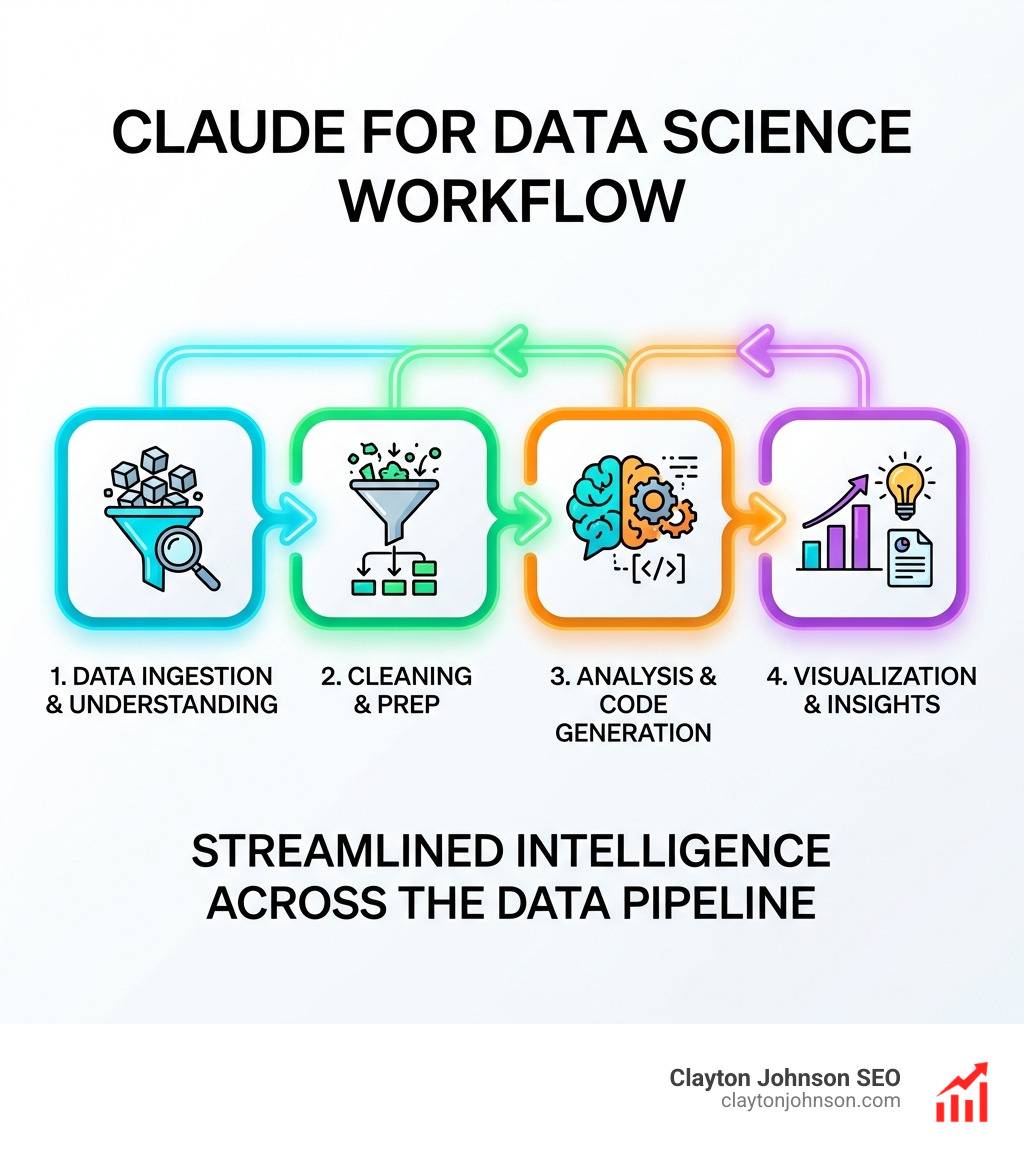
- Pipeline Automation: Builds end-to-end data workflows via Claude Code CLI—from ingestion to visualization—using plain-language instructions
- Context Management: Maintains 200,000-token context windows (1M for enterprise Sonnet), enabling analysis of entire codebases and multi-document research synthesis
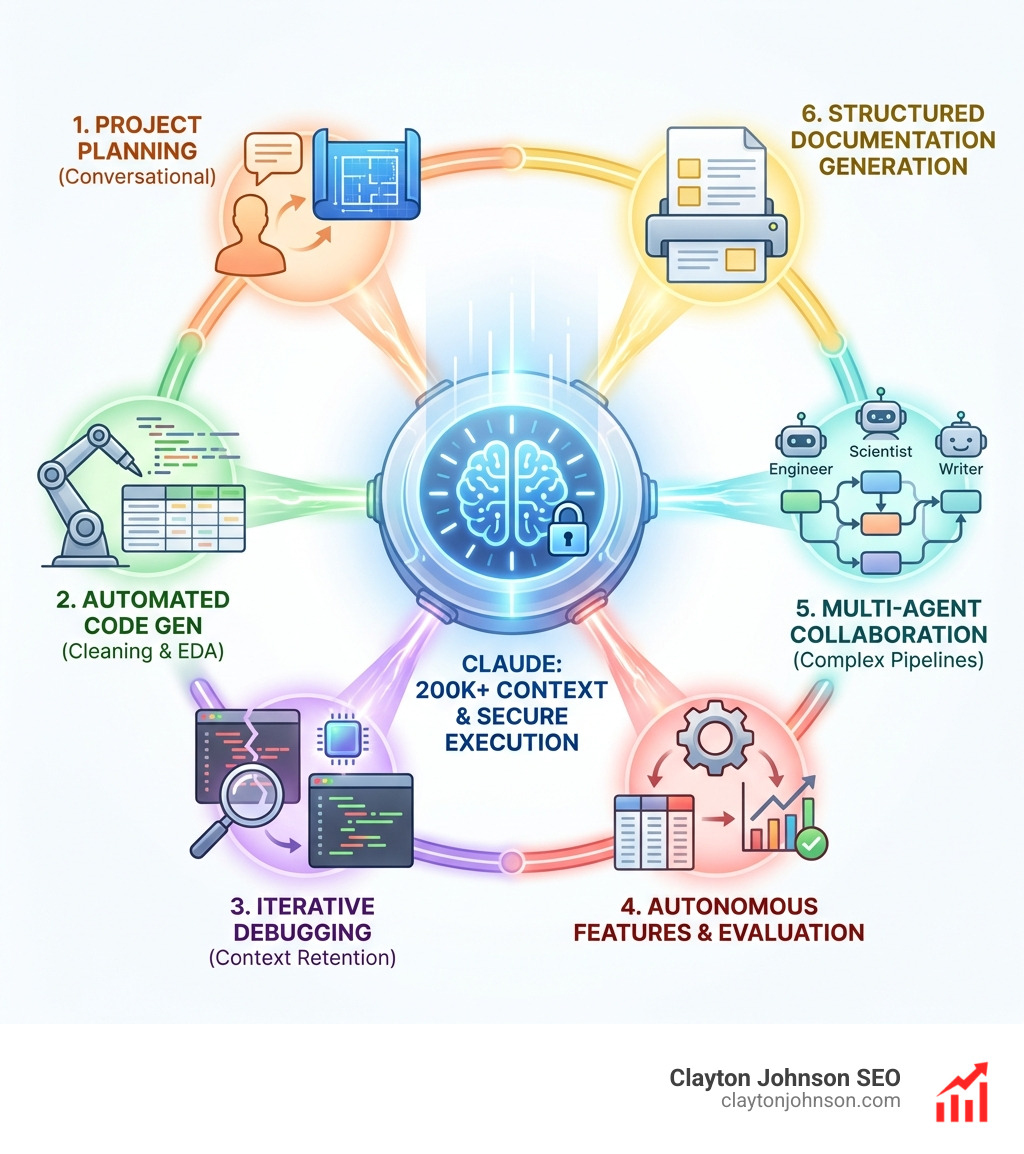
- Multi-Agent Orchestration: Coordinates specialized agents (data engineer, ML scientist, technical writer) for complex project workflows
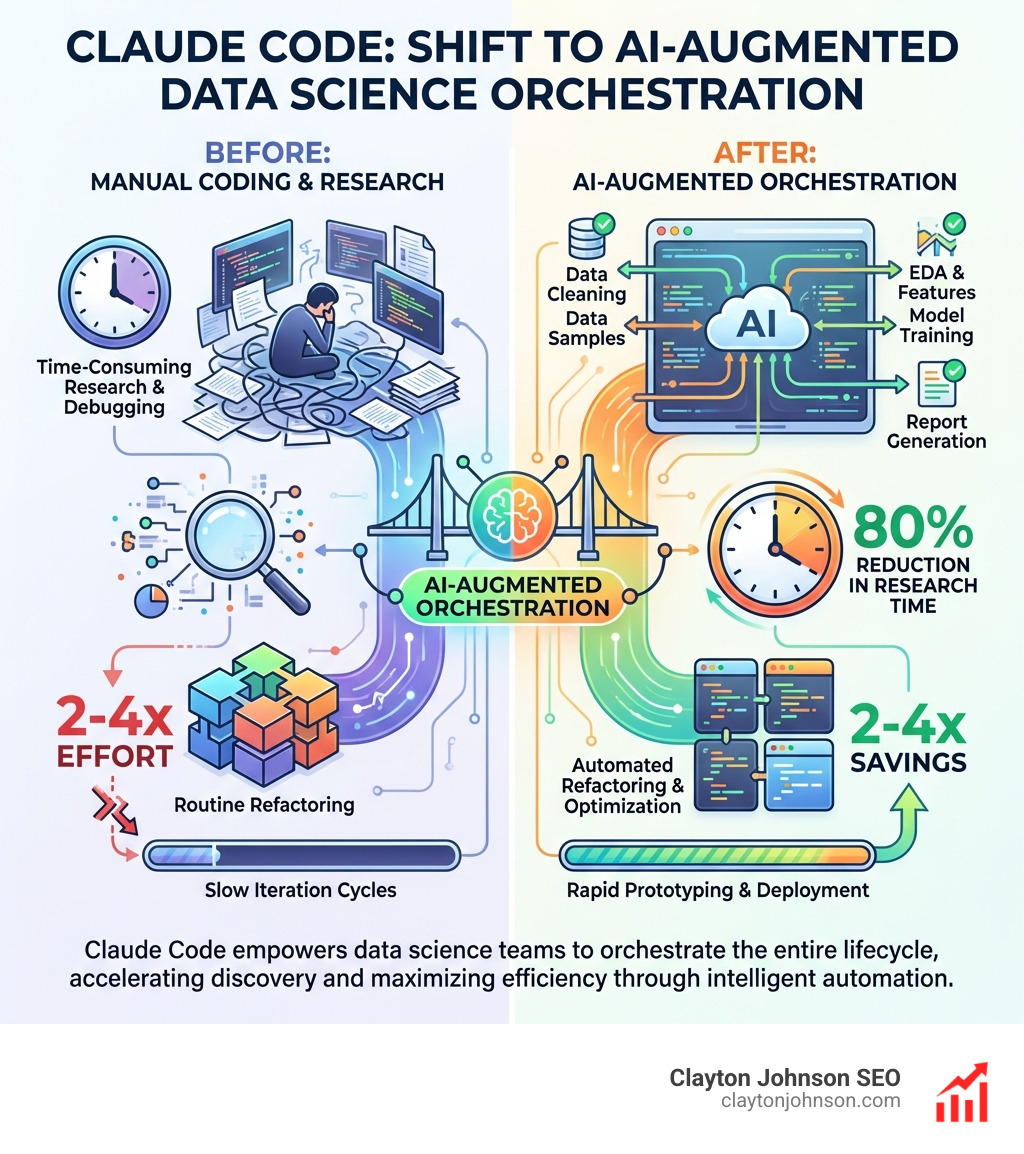
The practical impact is measurable: infrastructure debugging drops from 15 minutes to 5, research tasks shrink from an hour to 10-20 minutes, and 70% of complex features like Vim mode are written autonomously. Data science teams report 2-4x time savings on refactoring and successfully build 5,000-line TypeScript visualization apps despite minimal frontend experience.
I’m Clayton Johnson, and I’ve spent the past decade building AI-augmented marketing systems and strategic frameworks for technical founders. Using Claude for data science has fundamentally changed how I architect content workflows, competitive analysis pipelines, and strategic decision-support tooling—reducing execution drag while maintaining analytical rigor.
Claude for data science basics:
What is Claude and How It Empowers Data Professionals
When we talk about Claude, we aren’t just talking about another chatbot. Developed by Anthropic, Claude is a large language model (LLM) designed with a “safety-first” architecture known as Constitutional AI. For those of us in the data world, this means the model is trained to be helpful, honest, and harmless, but more importantly, it is exceptionally good at following complex instructions without the “hallucination” headaches we often see elsewhere.
In the Minneapolis tech scene and beyond, data professionals are moving away from simple prompt-and-response workflows. We are positioning Claude for data science as a sophisticated automated assistant that understands the nuance of data infrastructure. Whether you are accessing it via Claude.ai or integrating the Anthropic API into your custom pipelines, the model functions as a high-level collaborator.
What sets Claude apart is its massive context window. While other models might “forget” the beginning of a long script, Claude can ingest up to 200,000 tokens (and up to 1,000,000 in enterprise versions). This allows us to upload entire libraries of documentation, dozens of CSV files, or a thousand lines of Python and ask for a comprehensive analysis without losing the thread.
Claude for data science vs. ChatGPT: A Technical Comparison
The “Battle of the Bots” is a hot topic, but for data science, the nuances matter. While ChatGPT (specifically GPT-4o) is an incredible generalist and a verbose “teacher,” Claude for data science often feels like a senior engineer who just wants to get the job done efficiently.
In our testing, Claude consistently outperforms in generating production-ready code. For example, when asked to optimize a data processing script, ChatGPT might provide a robust but standard solution. Claude, however, frequently refactors nested loops into elegant list comprehensions and utilizes pandas-specific optimizations that reduce execution time.
| Feature | Claude 3.5 Sonnet | ChatGPT (GPT-4o) |
|---|---|---|
| Context Window | 200k – 1M tokens | 128k tokens |
| Code Style | Optimized, Pythonic, Minimalist | Robust, Verbose, Explanatory |
| Data Analysis | Integrated JavaScript/Python Sandboxes | Advanced Data Analysis (Python) |
| Hallucination Rate | Low (High adherence to facts) | Moderate (Occasional library “invention”) |
| File Handling | Multi-file multi-agent context | RAG-based (can miss details) |
One of the biggest wins for Claude is winning the coding war is its ability to avoid “ghost” libraries. We’ve seen ChatGPT hallucinate non-existent parameters for niche ML libraries, whereas Claude tends to stick to the actual documentation provided in its context.
Leveraging Claude for data science in Python and SQL
For the daily grind of a data scientist, Claude AI is more than just a chatbot. It excels at boilerplate reduction. If you’ve ever spent an hour writing the same data validation checks for a new dataset, you know the pain.
In Python, we use Claude to generate comprehensive test suites using pytest. It doesn’t just write the “happy path”; it identifies edge cases—like null values in a primary key or unexpected string formats in a date column—that we might have missed.
When it comes to SQL, Claude is a lifesaver for debugging complex Common Table Expressions (CTEs). You can paste a 200-line query with five joins, and Claude will pinpoint the logic error in your LEFT JOIN or suggest a more efficient window function. We also love the Claude for Sheets integration, which allows us to bring AI power directly into Google Sheets for quick sentiment analysis or data cleaning across thousands of rows.
Why Claude for data science excels at complex ML research
Machine learning is as much about research as it is about coding. Claude helps your coding workflow by acting as a research librarian.
Instead of spending an hour on Google and Stack Overflow trying to understand a new time-series forecasting method, we can feed Claude three academic PDFs. In 15 minutes, it can:
- Summarize the core methodology.
- Highlight the statistical justifications used by the authors.
- Provide a Python implementation of the proposed algorithm.
This represents an 80% reduction in research time. For researchers, Claude’s ability to extract citations and map the relationship between different studies is unmatched. It allows us to move from “reading” to “implementing” almost instantly.
Practical Applications: From Project Planning to Production Code
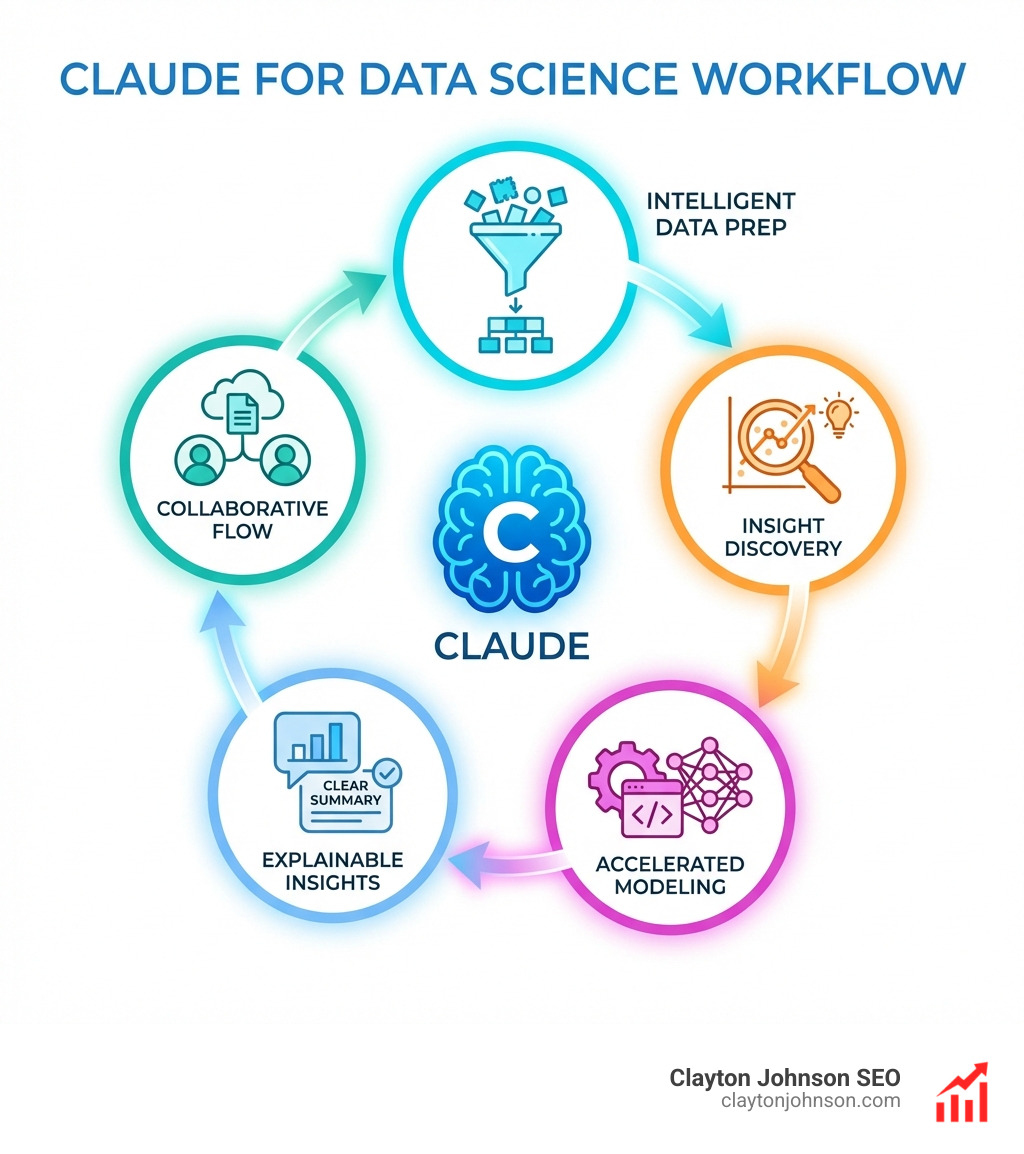
In a real-world data science project, the workflow is never linear. It’s a messy cycle of cleaning, exploring, and failing. Claude for data science acts as the project orchestrator.
We start by using Claude for faster development during the planning phase. We describe the business problem, and Claude helps us define the data schema, choose the right evaluation metrics (like F1-score for imbalanced classes), and outline the project structure.
Once the data arrives, we use Claude for:
- Data Cleaning: Automatically identifying outliers and suggesting imputation strategies based on the data distribution.
- Exploratory Data Analysis (EDA): Generating
matplotliborseaborncode for distribution plots and correlation heatmaps. - Feature Engineering: Suggesting new features based on domain knowledge (e.g., extracting “is_weekend” from a timestamp).
- Model Evaluation: Writing the code to perform cross-validation and generate confusion matrices.
The Claude Code overview highlights how this transcends simple snippets. It’s about managing the entire lifecycle of the data, ensuring that the final report isn’t just a bunch of numbers, but a narrative backed by code.
Maximizing Efficiency with Claude Code and Multi-Agent Systems
The real “magic” happens when we move into the terminal. Claude Code is Anthropic’s terminal-based assistant that can actually do the work. It reads your files, runs commands, and even fixes its own bugs.
Internal teams at Anthropic use Claude Code to achieve staggering efficiencies. For instance, infrastructure debugging that used to take 15 minutes now takes 5. Even more impressive, 70% of the code for complex features can be written autonomously by Claude.
We can even set up multi-agent systems. Imagine a workflow where:
- Agent A (The Data Engineer) cleans the raw CSVs.
- Agent B (The ML Scientist) runs three different models and compares accuracy.
- Agent C (The Technical Writer) takes the results and generates a
final_report.md.
This isn’t science fiction. By using Claude coding extensions, we can automate pull requests and refactor entire codebases 2-4x faster than manual work.
Best Practices for Integrating Claude into Your Data Workflow
To get the most out of Claude for data science, you need a structured approach. We follow the “Demandflow” philosophy: Clarity leads to structure, which leads to leverage.
- Use a CLAUDE.md File: This is a “cheat sheet” for the AI. Include your project’s coding standards, preferred libraries, and data schemas. This ensures Claude doesn’t suggest
TensorFlowwhen your whole team usesPyTorch. - Master Context Management: Don’t just dump 50 files into a chat. Use the
@filenamesyntax in Claude Code to reference only what’s relevant. This keeps the token limits from becoming an issue and keeps the AI focused. - Leverage Chain of Thought: Use the Claude Chain of Thought tutorial to encourage the model to “think” before it codes. Asking Claude to “explain your plan before writing any code” prevents logic errors.
- Iterative Refinement: Treat the first output as a draft. Use Claude to review its own code for security vulnerabilities or performance bottlenecks.
- Security Protocols: Always follow Claude security documentation. Never give an AI access to production databases without a human-in-the-loop, and use environment variables for API keys.
By adopting this skill pack for modern developers, you turn a chatbot into a robust piece of growth infrastructure.
Frequently Asked Questions about Claude for Data Science
How does Claude handle large datasets compared to other models?
Claude’s massive context window is its primary advantage. While other models might require you to use RAG (Retrieval-Augmented Generation) which can sometimes miss the “middle” of a document, Claude can hold the entire dataset in its active memory. For files up to 30MB in the chat or 500MB via the Files API, Claude provides superior Sonnet capabilities for holistic analysis. If your data is larger, we recommend “chunking” the data or using Claude to write a script that processes the data locally.
Can Claude Code access my local databases or private files?
Claude Code can read files you explicitly grant it access to in your local directory. It can also interact with external tools like Jira, Slack, or databases through the Model Context Protocol (MCP). However, it does not have “god mode” access to your computer. You maintain full control over security and permissions. It runs in your terminal, meaning it only sees what you let it see.
What are the primary limitations of using Claude for data analysis?
While powerful, Claude for data science has limitations. The in-chat Python/JavaScript runtime is a “sandbox,” meaning it doesn’t have internet access and has memory limits (usually around 2GB). It can struggle with highly interactive visualizations (like complex D3.js dashboards) and requires human verification for high-stakes mathematical precision. It is an accelerator, not a replacement for your brain.
Conclusion
At Clayton Johnson SEO, we believe that the future belongs to those who build structured growth architecture. Claude for data science is a foundational tool in that architecture. It allows us to move past the “tactics” of coding and focus on the “strategy” of data.
By integrating Claude into your workflow, you aren’t just saving time; you are creating leverage. You are moving from being a person who “writes code” to a person who “architects systems.” This shift leads to the compounding growth that Demandflow.ai was built to facilitate.
If you’re ready to stop guessing and start building AI-augmented workflows that actually move the needle, we’re here to help. Whether you need a complete SEO content strategy or a custom AI execution system, let’s build something that scales.
Work With Me to transform your data into a growth engine.