Why the Terminal Version of Claude Changes Everything
Why choose Claude coding? Claude Code transforms AI from a passive chat interface into an active development partner that reads your codebase, edits files directly, runs commands, and maintains full project context—eliminating the tedious copy-paste loop that plagued earlier AI coding workflows.
Key reasons to choose Claude Code:
- Persistent context – Your project files become Claude’s memory, no manual uploads
- Agentic execution – It doesn’t just suggest code, it writes files and runs tests
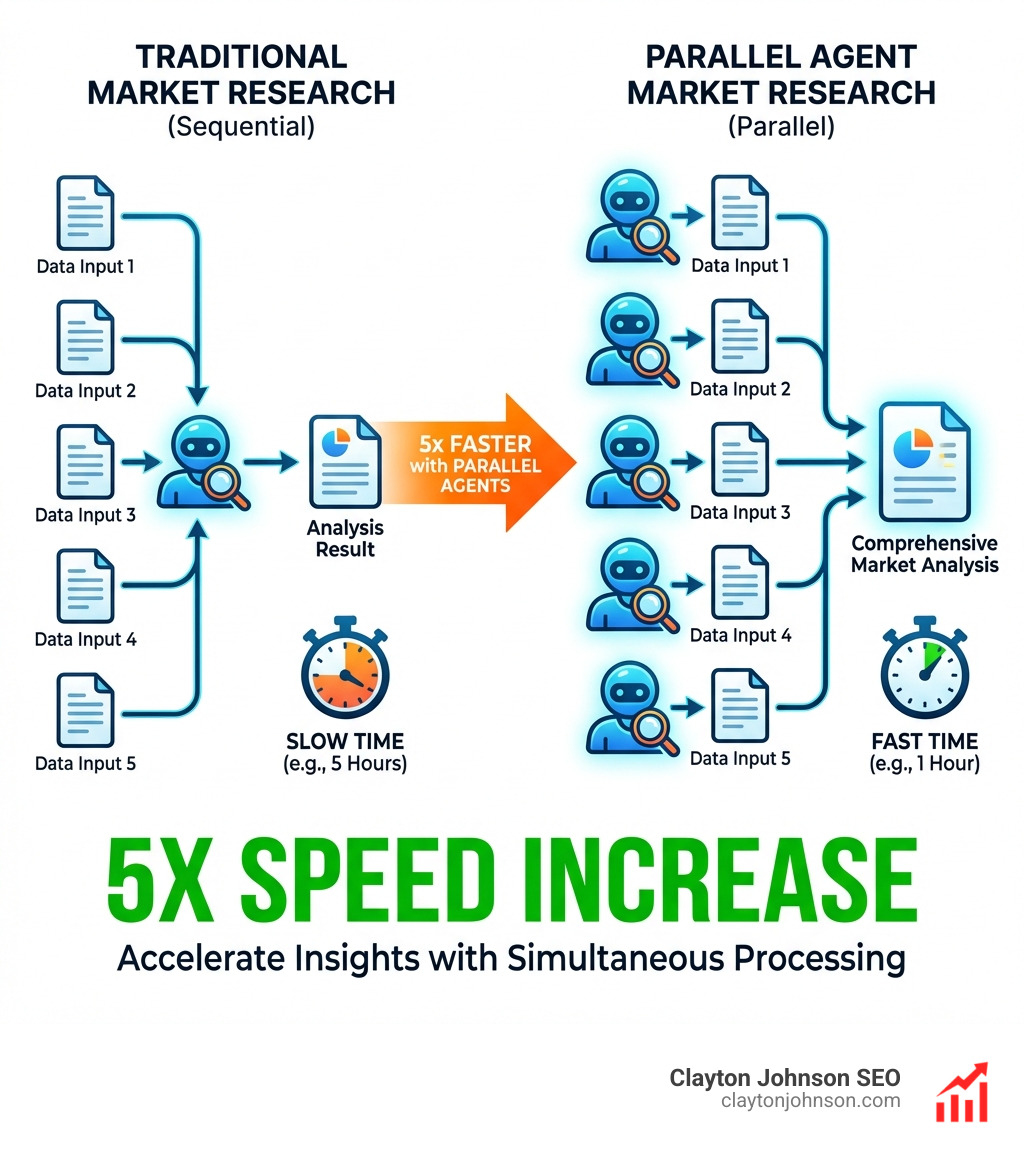
- Parallel processing – Multiple agents work simultaneously, 5x faster than sequential tasks
- Data ownership – Everything stays local in markdown files you control
- Automation layer – Slash commands, hooks, and skills turn one-time tasks into reusable systems
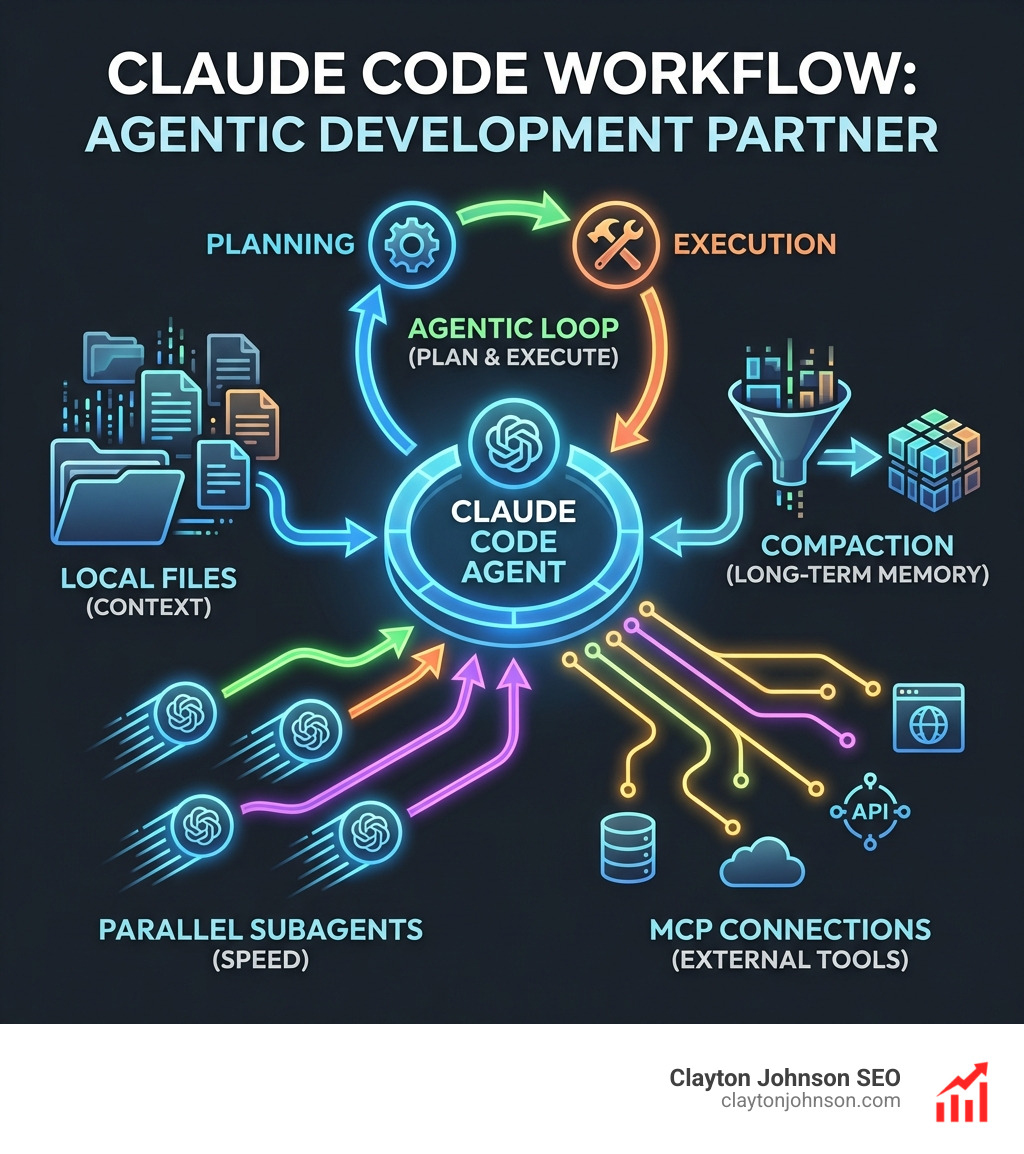
The breakthrough isn’t just the model—it’s the agentic harness around it. While browser-based Claude forgets your conversation after a few thousand words, Claude Code uses “compaction” to take notes, clear its memory, and review progress from those notes. It’s like the protagonist from Memento checking his tattoos, except instead of revenge, you get a functioning codebase.
This matters because context window limitations killed most practical AI workflows. You’d paste code, get a response, hit the token limit, lose everything, and start over. Claude Code solves this through local file awareness and a sophisticated set of tools—Skills for task-specific knowledge, subagents for parallel work, and the Model Context Protocol for external integrations.
The result? Developers report building proof-of-concepts in an hour that previously took teams a year. Non-technical founders use it for competitive research, invoice cleanup, and market analysis. It’s not replacing programmers—it’s refactoring the profession, as Andrej Karpathy noted.
I’m Clayton Johnson, and I’ve spent years building SEO and growth systems that depend on structured workflows and AI-assisted automation. Understanding why choose Claude coding over browser alternatives fundamentally shifts how you approach both development and knowledge work—it’s the difference between having an advisor and having an engineer.
Why choose Claude coding definitions:
Beyond the Browser: Why Choose Claude Coding for Real Work
If you’ve ever tried to build a complex feature using a standard chatbot, you know the “Tab Dance.” You copy code from VS Code, paste it into the browser, get a suggestion, copy it back, realize it broke a different file you forgot to mention, and repeat until your brain melts.
The Claude Code Overview reveals a better way. By running Claude directly in your terminal, the AI gains “eyes” on your entire project. It doesn’t just see the snippet you provide; it sees the file structure, the Git history, and the dependencies. This is why it’s more than just a chatbot; it’s a Claude AI coding 101 lesson in efficiency.
When we talk about “real work,” we mean tasks that span multiple files. Claude Code can search your entire directory, find every instance of a deprecated function, and refactor them all in one go. Because it has terminal access, it can run your build commands, see the errors, and fix them before you even realize there was a bug.
Why choose Claude coding for context management?
One of the most significant hurdles in AI development is the “memory fade.” Large Language Models (LLMs) have a context window—a limit on how much information they can hold in active memory. In a browser chat, once you hit that limit, the AI starts “forgetting” the beginning of the conversation.
Claude Code solves this using a “compaction” mechanism. Think of it like the movie Memento. When the context window fills up, Claude takes detailed notes on what has happened so far, clears the “active” memory, and then reads its own notes to maintain continuity.
This leads to incredible token efficiency. Instead of re-sending your entire codebase with every prompt, Claude only pulls in what it needs. If you want to dive deeper into how Claude structures its thoughts to solve these complex problems, check out the ultimate Claude chain of thought tutorial.
The power of local file awareness
When you use Claude Code, your data stays where it belongs: on your computer. You aren’t uploading your proprietary IP to a cloud-based project folder that might be subject to vendor lock-in.
Everything Claude Code does is based on the markdown files and source code already in your folder. This means you have a “persistent memory” that exists outside of a specific chat session. If you decide to try a different tool later, like Codex, you can point it at the same markdown files Claude was using. There’s nothing to port because everything is just text.
For those looking to move fast, mastering the Claude AI code generator involves setting up your local environment so Claude can navigate your files like a seasoned senior engineer.
The Agentic Harness: Skills, Hooks, and Parallel Power
The real magic happens when Claude stops acting like a single person and starts acting like a team. Through the use of “subagents,” Claude Code can split a massive task into smaller chunks and process them in parallel.
According to recent statistics, Claude Code’s parallel agents enable simultaneous processing, making tasks 5x faster than traditional sequential methods. While you’re grabbing a coffee, one agent might be writing the backend logic while another is generating the unit tests and a third is updating the documentation.
This is made possible by Agent Skills. Skills are essentially specialized instruction sets that the AI “loads” when it needs to perform a specific task, like building a React component or optimizing a SQL query. You can even learn how to extend Claude with custom agent skills to fit your specific business logic.
Why choose Claude coding for automation?
Automation is about more than just scripts; it’s about building systems that compound. Claude Code introduces slash commands and hooks that allow you to create repeatable workflows.
- /init: Sets up your project standards and gives Claude the “lay of the land.”
- /review: Triggers a security and style audit of your recent changes.
- Custom Hooks: You can set up a hook that automatically runs a linter or a test suite every time Claude finishes an edit.
By using the complete Claude skill pack, we can turn common, boring tasks into one-command automations.
Integrating with the Model Context Protocol (MCP)
We are particularly excited about the Model Context Protocol (MCP) introduction. MCP is an open standard that allows Claude to connect to external data sources without you having to write custom API integrations for every tool.
Imagine giving Claude access to your Google Drive, your Jira tickets, and your Slack logs all at once. Through MCP, Claude can pull a design requirement from a PDF in your Drive, check the current status in Jira, and then write the code to implement the feature. This level of tool-calling is what separates a “chatbot” from an “agent.” To see this in action, look into the Claude skill pack for modern integrations.
Non-Technical Superpowers: It’s Not Just for Engineers
A common misconception is that “Claude Code” is only for people who write C++ or Python. In reality, it is a “Claude Local” agent that can handle almost any file-based task.
| Feature | Claude.ai (Browser) | Claude Code (Terminal) |
|---|---|---|
| File Access | Manual upload (limited) | Full local directory access |
| Execution | Suggestions only | Can run scripts and commands |
| Context | Resets per chat | Persistent via local files |
| Speed | Sequential | Parallel (5x faster) |
| Security | Cloud-based | Local-first |
For founders and marketers, why choose Claude coding becomes clear when you look at competitive analysis. You can point Claude at a folder containing 15 competitor websites (saved as PDFs or markdown) and ask it to generate a feature comparison matrix. While a human might take hours to flip through those files, Claude does it in minutes.
Researchers are also flocking to the tool. The Claude Code for researchers guide highlights how it can manage massive literature reviews by “reading” hundreds of papers stored locally and synthesizing the findings. It’s time to stop guessing and start prompting and let the agent do the heavy lifting.
Building systems that compound
When you work in the browser, your “tribal knowledge”—the specific way your company likes things done—is lost the moment you close the tab. With Claude Code, you can store those preferences in a CLAUDE.md file in your root directory.
This file acts as a permanent instruction manual. Every time you launch Claude, it reads that file and knows exactly what your brand voice is, what your SEO requirements are, and how you prefer to structure your reports. This is the essence of the complete guide to how Claude helps your workflow.
Practical use cases for founders
We’ve seen founders use Claude Code for:
- Lead Generation: Scraping local directories or analyzing LinkedIn exports.
- Invoice Organization: Running a script to sort 500 messy PDF invoices into categorized folders for tax season.
- Market Research: Comparing pricing models across a dozen competitors like ElevenLabs to find a gap in the market.
Getting Started: From Installation to First Commit
Ready to jump in? Don’t let the word “terminal” scare you. If you can type a text message, you can use Claude Code.
First, you’ll need Node.js. Head over to Nodejs.org and download the recommended version. Once that’s installed, you’ll open your terminal (Command+Space on Mac, then type “Terminal”) and run the native installer command provided by Anthropic.
For a step-by-step walkthrough, our Anthropic Claude 101 guide covers the basics for those who are new to the command line.
Security, risks, and mitigation
Giving an AI access to your files does come with risks. Claude is powerful, but it’s still an LLM. It can hallucinate, and in some cases, it can be “sycophantic”—meaning it might agree with a bad idea just because you suggested it.
How to stay safe:
- Backups: Always run Claude Code in a directory managed by Git so you can “undo” any changes.
- Permission Prompts: Claude will ask for permission before deleting files or running potentially dangerous commands. Read those prompts.
- Start Small: Don’t give it access to your entire “Documents” folder. Create a dedicated project folder instead.
Following Claude Code Best Practices ensures you get the benefits of automation without the headache of accidental data loss.
Frequently Asked Questions about Claude Coding
Is Claude Code better than Cursor or GitHub Copilot?
While Cursor and Copilot are excellent autocomplete tools, they often hide the “thinking” process. Claude Code is a “terminal-first” agent, meaning you see its entire plan before it executes. This “visible thinking” allows you to interrupt and correct the AI mid-process. Furthermore, according to the TBench Leaderboard, Claude consistently outperforms other models in complex “terminal” tasks that require multi-step reasoning.
Do I need to be a developer to use Claude Code?
No. While it was built for developers, its ability to manipulate files makes it a general-purpose productivity tool. If you run into installation trouble, we recommend the Warp terminal, which uses AI to explain and fix terminal errors automatically, making the setup process much friendlier for non-technical users.
What are the subscription requirements for Claude Code?
To use Claude Code effectively, you generally need a Claude Pro subscription ($20/month) or an Anthropic Console account with API credits. The Claude subscription details page provides the most up-to-date information on pricing tiers. For high-volume users, the pay-as-you-go API model is often the most cost-effective.
Conclusion
The shift from “Chatbot AI” to “Agentic AI” is the most significant change in productivity since the invention of the search engine. Why choose Claude coding? Because it stops being a toy and starts being a tool. It respects your data ownership, handles your context with grace, and works at a parallel speed that humans simply cannot match.
At Clayton Johnson SEO, we specialize in building these types of AI-assisted workflows to help founders and marketing leaders scale their growth without scaling their headcount. Whether you’re looking for a deep dive into SEO strategy or need help implementing SEO Content Marketing Services, we’re here to help you navigate the agentic revolution.
The terminal is waiting. It’s time to stop copy-pasting and start building.