Battle of the Bots: Why Claude is Winning the Coding War


Why Developers Are Choosing Claude Over GPT for Serious Code
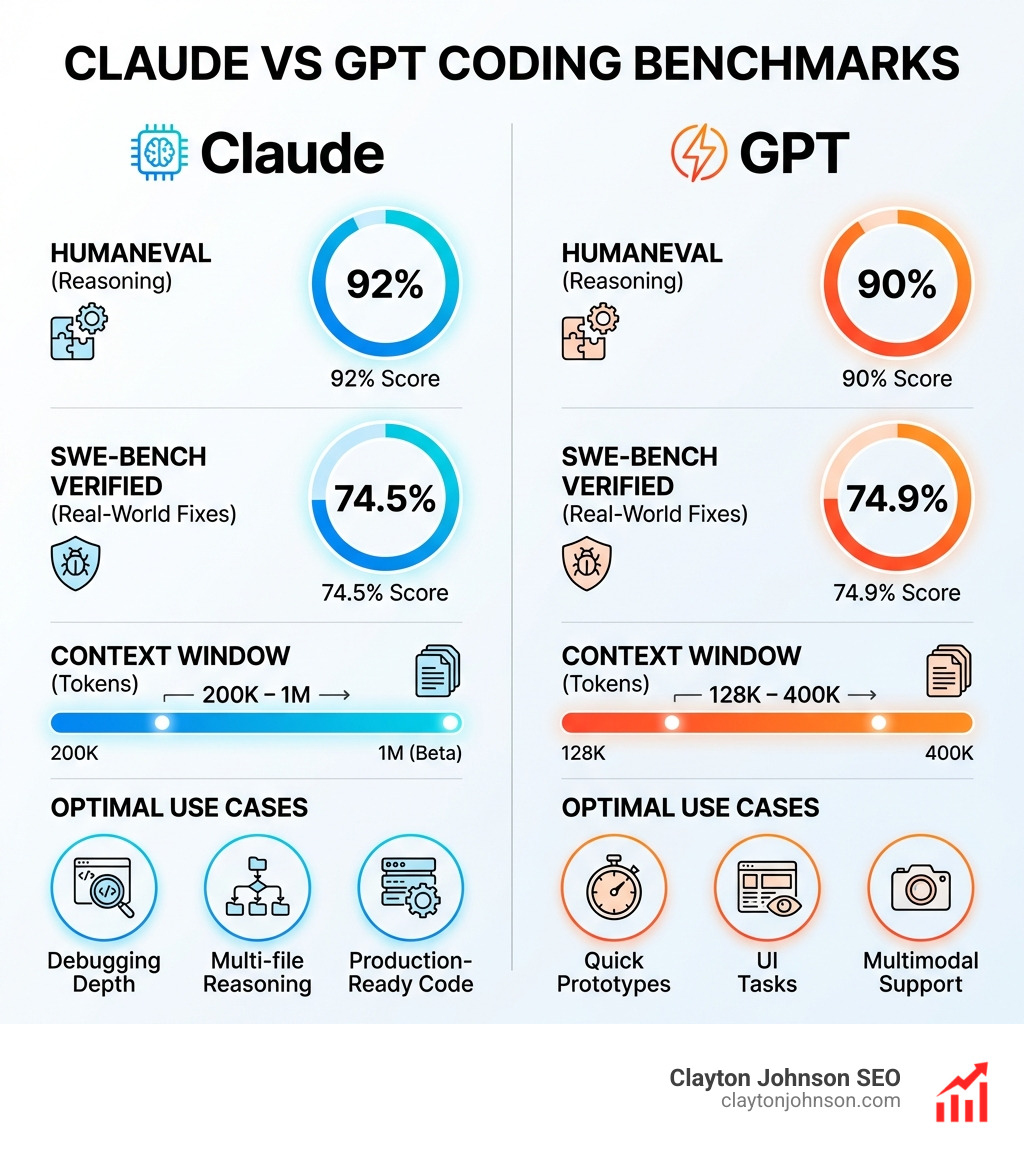
Claude vs GPT coding is no longer an abstract debate—it’s shaping how engineers ship production-ready software in 2025. If you’re evaluating which AI assistant to integrate into your workflow, here’s what the data shows:
| Metric | Claude (Sonnet 4.0 / Opus 4.1) | GPT (GPT-5 / o3) |
|---|---|---|
| SWE-bench Verified | 72.5–72.7% | 72.1–74.9% |
| HumanEval | ~92% | ~90% |
| Context Window | 200K tokens (1M beta) | 128K–400K tokens |
| Best For | Multi-file reasoning, debugging depth, production-ready code | Quick prototypes, UI tasks, multimodal support |
| Pricing (Input/Output) | $3/$15 per MTok | $1.25/$10 per MTok |
The short version: Claude delivers more consistent logic, stronger debugging, and better multi-file reasoning. GPT excels at speed, versatility, and integrations. Most experienced developers use both strategically.
The AI coding assistant landscape has split into two philosophies. Claude acts like a senior engineer—methodical, thorough, and great at explaining why code works or breaks. GPT behaves more like a fast prototyping tool—snappy, adaptable, and excellent for boilerplate or UI-heavy tasks.
But the benchmarks tell a more nuanced story. Claude 3.5 Sonnet scores 92% on HumanEval (algorithmic reasoning), while GPT-4o hits 90%. On SWE-bench Verified—a test of real-world bug fixing—GPT-5 edges ahead at 74.9% versus Claude Opus 4.1’s 74.5%. Yet developers consistently report that Claude produces more polished, production-ready code with fewer hallucinations.
Context windows matter too. Claude supports 200K tokens (with 1M in beta for Sonnet 4), letting you feed entire codebases into a single prompt. GPT-5 offers up to 400K tokens, but Claude’s Constitutional AI training makes it more reliable when reasoning across dependencies.
The real shift? Developers are no longer picking sides. One engineer shipped 44 pull requests with 98 commits across 1,088 files in five days by orchestrating Claude Opus 4.6 and GPT-5.3 Codex together. Claude handled creative development and refactoring. Codex tackled code review and quick fixes at 3x lower token cost.
This isn’t a winner-takes-all race. It’s about knowing when to use each tool—and how to combine them for maximum leverage.
I’m Clayton Johnson, and I’ve spent years building AI-assisted workflows for marketing and growth systems. My work on Claude vs GPT coding comes from hands-on testing across real projects, comparing how these models handle everything from API builds to multi-file refactors. This guide breaks down the strategic choices that separate fast code from good code.
Find more about Claude vs GPT coding:
The Ultimate Showdown: Claude vs GPT coding for Developers
When we look at the landscape of AI-assisted development in Minneapolis and beyond, we see two titans clashing. But they aren’t just “smarter” versions of a search engine. They represent two fundamentally different ways of building software.
Anthropic’s Claude is built on Constitutional AI. This isn’t just a fancy marketing term; it’s a training method that gives Claude a “set of principles” to follow. For us developers, this translates to a model that is less likely to give us a “lazy” answer or a dangerous shortcut. Claude feels like a senior developer who sits next to you, triple-checks the logic, and explains the “why” behind every function.
On the other side, we have the GPT ecosystem, specifically OpenAI’s Codex. GPT is trained using Reinforcement Learning from Human Feedback (RLHF), which makes it incredibly conversational and versatile. If you need a quick React component or a Python script to scrape a website, GPT is often faster. It’s the “scripting intern” that can churn out boilerplate at lightning speed.
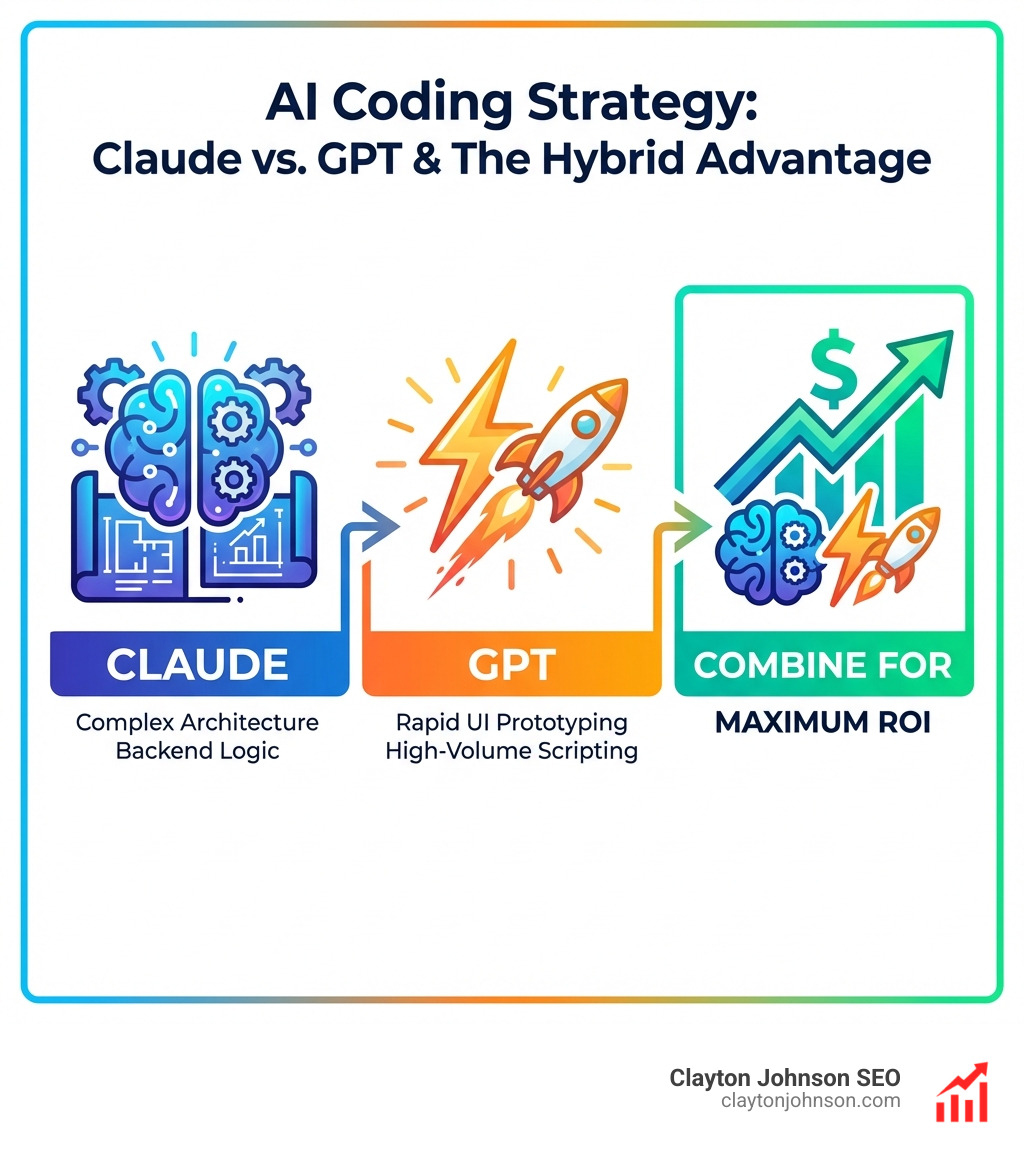
- Claude Opus 4.1: Best for sustained reasoning, deep architecture analysis, and long-context debugging.
- GPT-5 / Codex: Best for rapid prototyping, UI/UX variations, and high-volume, low-cost tasks.
To truly understand which one to use, we have to look at their specific tools. Claude Code brings the power of Opus directly into your terminal. It understands your project structure and can make coordinated edits across dozens of files. Meanwhile, OpenAI Codex powers much of the automation we see in IDEs today, excelling at following literal instructions and executing tests.
Architectural Differences in Claude vs GPT coding
The divide between these two tools is architectural. Claude is often described as local-guided. When you use Claude Code, it works within your local environment, understanding the nuance of your specific file system. It’s designed for deep reasoning—asking it to refactor a messy legacy system often results in a more neat, documented solution.
GPT, particularly through its Codex implementations, leans toward a cloud-autonomous philosophy. It is designed to be an agent that can open PRs, run commands, and operate somewhat independently in a cloud-based sandbox. While Claude wins on reasoning depth, GPT often wins on prompt interpretation—it’s very good at “knowing what you mean” even if your prompt is a bit sloppy.
For those of us in the trenches, the choice often comes down to the complexity of the task. As we’ve explored in our guide on why every developer needs AI tools for programming in 2025, the goal isn’t just to write code faster, but to write code that doesn’t break on Sunday afternoon.
Frontend vs. Backend: Claude vs GPT coding Strengths
In our experience, Claude vs GPT coding performance varies wildly depending on which side of the stack you’re working on.
Frontend (The GPT Edge):
GPT-5 and its variants are the kings of the UI. If you need a “modern, responsive landing page with a glassmorphism effect using Tailwind CSS,” GPT usually nails the visual design on the first try. It’s excellent at generating React components, handling CSS-in-JS, and managing state in simple Next.js apps.
Backend (The Claude Edge):
When the logic gets “gnarly”—think complex async flows, recursive file parsers, or database migrations—Claude takes the lead. Claude’s ability to maintain a consistent state across multiple files makes it superior for backend refactoring. It won’t just give you a snippet; it will show you how that snippet affects your API routes and your data models.
We’ve found that mastering the Claude AI code generator for faster development requires leaning into its ability to handle long-form logic. If you give Claude a 500-line controller, it’s much more likely than GPT to find that one sporadic async bug hiding in a useEffect hook.
Performance Benchmarks: HumanEval and SWE-Bench Results
Numbers don’t lie, but they do require context. To settle the Claude vs GPT coding debate, we look at two main benchmarks: HumanEval (solving isolated algorithmic problems) and SWE-bench (resolving real GitHub issues in large repositories).
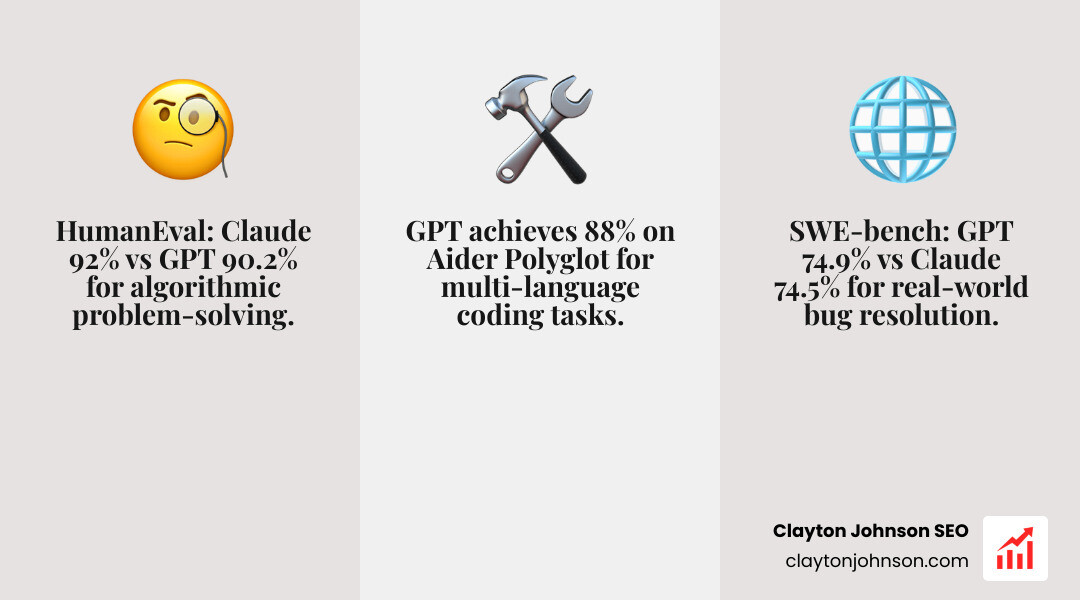
As shown in the Correctness Comparison of ChatGPT-4, Gemini, Claude, the gap is closing. Claude 3.5 Sonnet currently leads in algorithmic reasoning (HumanEval), which means it’s better at “thinking” through a new problem from scratch. However, GPT-5 holds a slight edge in “agentic” capabilities—the ability to use tools, steer a file system, and fix a bug autonomously.
What does this mean for you? If you are building something entirely new (greenfield development), Claude is your best friend. If you are maintaining a massive existing system and need an AI to hunt down a specific bug, GPT’s agentic strengths are hard to beat.
Debugging and Root-Cause Analysis
This is where the “Claude is a senior dev” analogy really shines. In our tests, Claude is significantly better at root-cause analysis. Instead of just suggesting a try-catch block to hide an error, Claude will often trace the logic back to a faulty state initialization three files away.
GPT is great for “quick fixes.” If you have a syntax error or a common React warning, GPT will give you the solution in seconds. But it can also be a “double-edged sword.” We’ve seen GPT (and even Claude) confidently hallucinate database schemas that don’t exist if they aren’t given enough context.
To minimize these headaches, we recommend using the best AI for coding and debugging by providing the model with full stack traces and snippets of related files. Claude’s larger context window makes this much easier.
Handling Large Codebases: Context Windows and Multi-File Projects
One of the biggest problems in Claude vs GPT coding is the “memory” of the AI. If the AI forgets what’s in your auth.ts file while it’s writing your dashboard.tsx file, you’re going to have a bad time.
Claude currently leads the “Context War.” With a 200K token window (and 1M tokens in beta), you can literally upload your entire codebase. This allows for:
- Dependency Tracking: Claude understands how a change in your database schema ripples through your entire API.
- Multi-file Refactoring: You can ask Claude to “rename this user property to ‘customer’ across the entire project,” and it will actually find every instance.
GPT-5 has expanded to 400K tokens, which is plenty for most projects, but developers often report that GPT “loses the thread” more easily than Claude when the context gets crowded. For a deeper look at this in action, check out this real-world coding comparison video, which shows a developer shipping 44 PRs by leveraging these massive windows.
Cost Considerations and Pricing Models
Let’s talk about the “token budget.” If you’re a solo founder in Minneapolis or part of a growing team, the cost of these models adds up.
- Claude Sonnet 4.0: $3 per million input tokens / $15 per million output tokens.
- GPT-5 / Codex: $1.25 per million input tokens / $10 per million output tokens.
GPT is significantly cheaper. If you are running high-volume, repetitive tasks—like generating unit tests for 100 different functions—Codex is the more cost-effective choice. However, Claude’s “performance per dollar” might be higher for complex tasks because it often gets the answer right on the first try, whereas GPT might require three or four follow-up prompts to fix logic errors.
Frequently Asked Questions about AI Coding
Which AI model is superior for debugging complex legacy systems?
For legacy systems, Claude Opus is our top pick. Legacy code is often “gnarly,” poorly documented, and filled with hidden dependencies. Claude’s methodical reasoning and ability to digest massive amounts of context allow it to perform superior root-cause analysis. It doesn’t just look at the line that crashed; it looks at the logic flow that led there. While GPT-5 Codex is faster, it can sometimes suggest “band-aid” fixes that don’t address the underlying architectural debt.
How do context window sizes impact multi-file development?
The context window is essentially the AI’s “short-term memory.” In Claude vs GPT coding, Claude’s 200K+ window allows it to “see” your entire repository at once. This is crucial for multi-file development because it ensures the AI remains aware of dependencies. If your User type changes in one file, a large context window ensures the AI knows to update the Profile component in another. Small windows lead to “hallucinated” variables and broken imports.
Can developers effectively leverage a hybrid Claude and GPT workflow?
Absolutely. In fact, we recommend it. The most productive “AI conductors” use a multi-agent strategy:
- Planning: Use Claude Opus to analyze the codebase and create a step-by-step implementation plan.
- Scaffolding: Use GPT-5 to quickly churn out the boilerplate and UI components based on that plan.
- Refinement: Use Claude to review the generated code for logic errors and security vulnerabilities.
- Validation: Use GPT’s faster, cheaper API to generate and run unit tests.
This hybrid approach maximizes quality while keeping your token budget under control. Using Git worktrees can further boost this productivity by allowing different AI models to work on different branches simultaneously.
Conclusion
The “Battle of the Bots” isn’t about finding a single winner; it’s about building the ultimate developer toolkit. Claude vs GPT coding has shown us that while Claude excels as a senior-level reasoning partner, GPT remains a powerhouse for speed and versatility.
At Clayton Johnson SEO, we believe that the future of growth—whether you’re building a SaaS in Minneapolis or a global platform—lies in these AI-assisted workflows. Choosing the right model is a strategic decision that impacts your velocity, your code quality, and ultimately, your bottom line.
If you’re ready to integrate these advanced AI strategies into your business, we can help. From technical SEO to building content systems that leverage the latest in LLM technology, we provide the frameworks you need to scale.
Explore our SEO Content Marketing Services to see how we can help you execute with measurable results.