Stop Typing and Start Prompting with Claude AI Tools

Why Claude AI Code Completion Changes Everything About Development
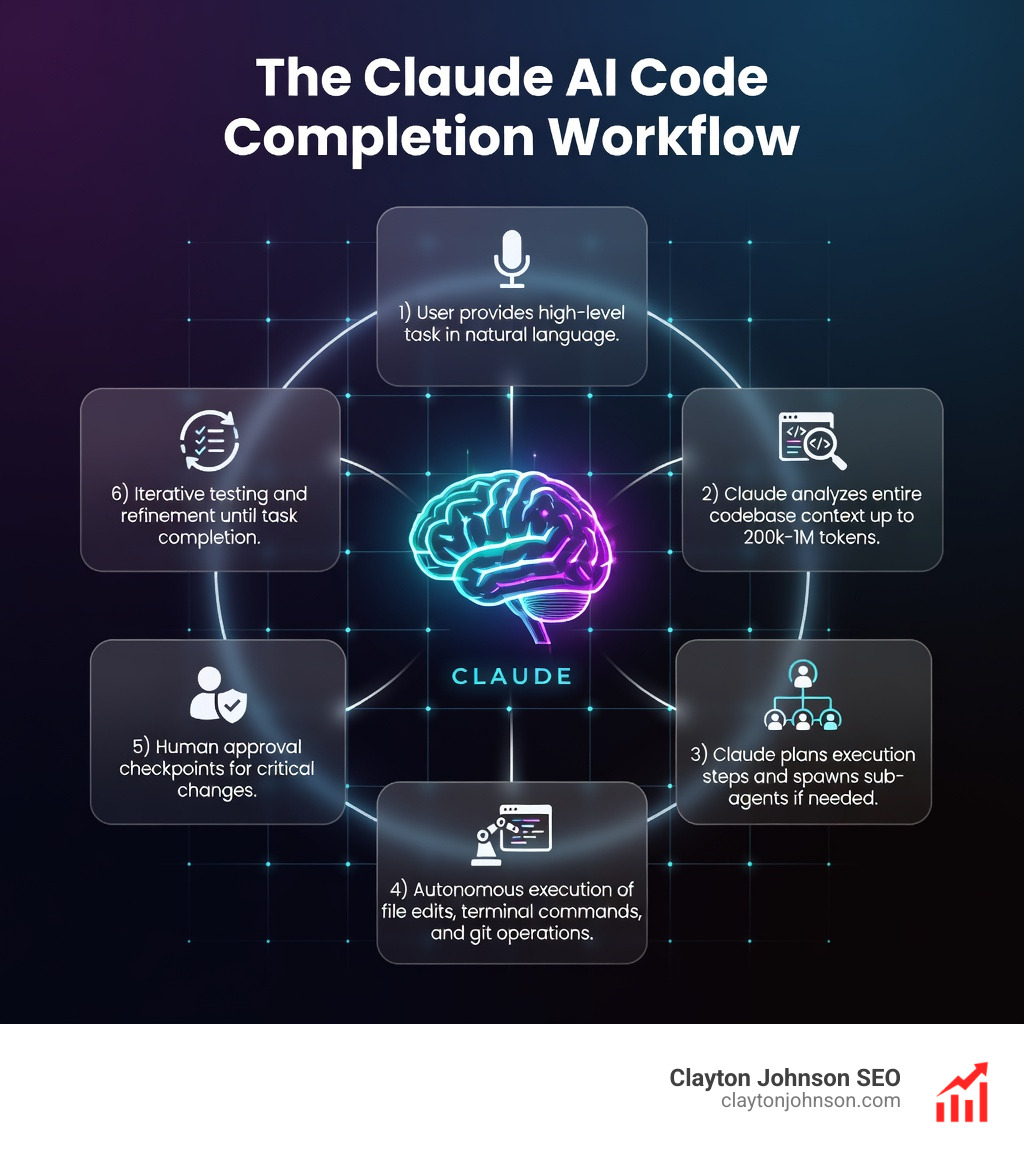
Claude AI code completion isn’t just autocomplete on steroids. It’s an agentic coding assistant that reads your entire codebase, edits files across your project, runs terminal commands, and even coordinates multiple sub-agents to tackle complex tasks in parallel.
Quick Answer: What Claude AI Code Completion Does
| Capability | What It Means |
|---|---|
| Autonomous File Editing | Reads and modifies multiple files across your codebase without constant prompting |
| Terminal Command Execution | Runs build scripts, tests, git operations, and deployment commands |
| Context Awareness | Handles up to 200,000 tokens (~500 pages) or 1M tokens in latest models |
| Multi-Agent Orchestration | Spawns sub-agents to work on frontend/backend tasks simultaneously |
| Platform Flexibility | Works in terminal, VS Code, JetBrains IDEs, browser, desktop app, and CI/CD pipelines |
The shift is fundamental. Traditional code completion tools suggest the next few lines. Claude Code can refactor an 18,000-line React component—something no other AI agent has successfully done. Teams report 5x productivity gains by treating it as an orchestrator rather than a pair programmer.
Here’s the reality: 90% of traditional programming skills are becoming commoditized while the remaining 10% becomes worth 1000x more. Claude AI code completion sits at that inflection point, handling the repetitive work so you can focus on architecture, strategy, and the problems that actually require human judgment.
I’m Clayton Johnson, and I’ve spent years building AI-assisted workflows for marketing and development teams at scale. Understanding how Claude AI code completion integrates into real production environments—not just demos—is critical for anyone building modern software systems.
What is Claude Code and How Does it Redefine Development?
For years, “code completion” meant a dropdown menu suggesting the next variable name or closing a bracket. We were essentially teaching the computer to finish our sentences. Claude Code flips this script. It doesn’t just finish your sentence; it writes the chapter, runs the spellchecker, and publishes the book.
The core difference lies in autonomy. While traditional tools are reactive, Claude Code is proactive. It is an agentic tool that lives in your terminal and IDE, capable of reading your entire file structure, understanding the relationships between components, and executing shell commands to verify its own work.
As Kent Beck, a pioneer in software engineering with over 50 years of experience, recently noted, we are at an inflection point where 90% of traditional programming skills are becoming commoditized. This doesn’t mean developers are obsolete; it means the 10% of our work—the architectural decisions, the strategic intent, and the “vibe” of the product—is now worth 1000x more because we can move 10x faster.
| Feature | Traditional Autocomplete | Claude Agentic Coding |
|---|---|---|
| Scope | Single file or function | Entire codebase awareness |
| Action | Text suggestion | File editing & command execution |
| Verification | Requires human to run tests | Runs tests and fixes failures autonomously |
| Git | No integration | Creates branches, commits, and PRs |
| Context | Limited to few hundred lines | Up to 1 million tokens (Sonnet 4.5) |
Mastering Claude AI Code Completion Across Every Platform
One of the most impressive aspects of Claude Code is its “Unix philosophy” approach. It is designed to be a composable tool that works wherever you do. Whether you are a terminal purist or a VS Code enthusiast, the experience remains consistent.
You can explore the official Claude Code Overview to see the breadth of its reach. At its heart, it is a CLI (Command Line Interface) tool, but it extends into every corner of the modern developer’s stack. By Mastering the Claude AI Code Generator for Faster Development, we can move from simple chat-based interactions to a fully integrated agentic workflow.
Setting Up Your Environment for Claude AI Code Completion
Getting started is surprisingly fast. For most developers, a five-minute setup is all it takes to have a junior engineer living in your terminal.
- macOS / Linux / WSL: Use the simple curl script:
curl -fsSL https://claude.ai/install.sh | bash - Windows (PowerShell):
irm https://claude.ai/install.ps1 | iex - Homebrew:
brew install --cask claude-code
Once installed, you simply navigate to your project directory and type claude. You’ll need an active Claude subscription or Anthropic Console account to authenticate. While there is a free tier, professional developers usually opt for the Pro or Max tiers to handle the heavy lifting required for large-scale codebases.
Integrating Claude AI Code Completion into Professional IDEs
While the terminal is powerful, many of us live in our IDEs. Anthropic has released a Claude Code VS Code extension that brings these agentic capabilities directly into your sidebar.
This integration allows for a “human-in-the-loop” experience. You can watch Claude propose changes in real-time, view inline diffs, and approve or reject edits with a single click. For those using the JetBrains suite (IntelliJ, PyCharm, WebStorm), there is a dedicated plugin that offers similar interactive diff viewing and selection context sharing.
The Power of Agentic Coding: Sub-Agents and Autonomous Execution
The real magic happens when you stop asking Claude to “write a function” and start asking it to “build a feature.” This is where agentic coding takes over.
Claude Code can break a high-level goal into a series of sub-tasks. If you ask it to build a new dashboard, it might:
- Analyze the existing data models.
- Spawn a sub-agent to generate the backend API endpoints.
- Simultaneously spawn another sub-agent to build the React frontend components.
- Run the local development server to check for errors.
- Fix any linting or TypeScript errors it finds.
This autonomous execution is Why Every Developer Needs AI Tools for Programming. It removes the “babysitting” required by older AI tools. Instead of copy-pasting code back and forth, you are orchestrating a team.
Advanced Workflows: MCP, CLAUDE.md, and Large Codebases
As we move toward more complex projects, we need ways to give Claude more context without overwhelming the model. This is handled through two primary methods: the Model Context Protocol (MCP) and the CLAUDE.md file.
The Model Context Protocol (MCP) is an open standard that allows Claude to connect to external data sources. Imagine Claude being able to read your Jira tickets to understand a bug report, or checking a Google Drive folder for the latest design specifications before it starts coding. By learning How to Extend Claude with Custom Agent Skills, you can build a custom ecosystem where your AI agent has the same access to information as a human employee.
Optimizing Claude AI Code Completion for Large Codebases
One of the biggest hurdles for AI has always been the “memory” limit. If a project is too big, the AI loses the plot. Claude 3.5 and the upcoming Claude 4 models solve this with massive context windows—up to 200,000 tokens as standard, and up to 1 million tokens via API.
This is how Claude managed the legendary feat of refactoring an 18,000-line React component. It doesn’t just look at the snippet; it understands the shared state, the prop drilling, and the architectural patterns used throughout the entire file. When looking for The Best AI for Coding and Debugging, the ability to maintain “state” across a massive project is the deciding factor.
Best Practices for Team Workflows and Automation
To get the most out of claude ai code completion, we recommend a few “pro” configurations:
- The CLAUDE.md File: Place this in your project root. It should contain your coding standards, preferred libraries (e.g., “We use Tailwind, not CSS modules”), and review checklists. Claude reads this at the start of every session.
- Custom Slash Commands: You can create “Skills” or slash commands for repeatable tasks, like
/refactor-uior/check-security. - Shell Hooks: Set up hooks to automatically run your linter or test suite after Claude finishes an edit.
- CI/CD Integration: Use Claude within GitHub Actions to automatically review PRs or triage incoming issues.
Check out The Complete Claude Skill Pack for Modern Developers for a deep dive into these automation techniques.
Claude Code vs. The Competition: Cursor, Copilot, and Beyond
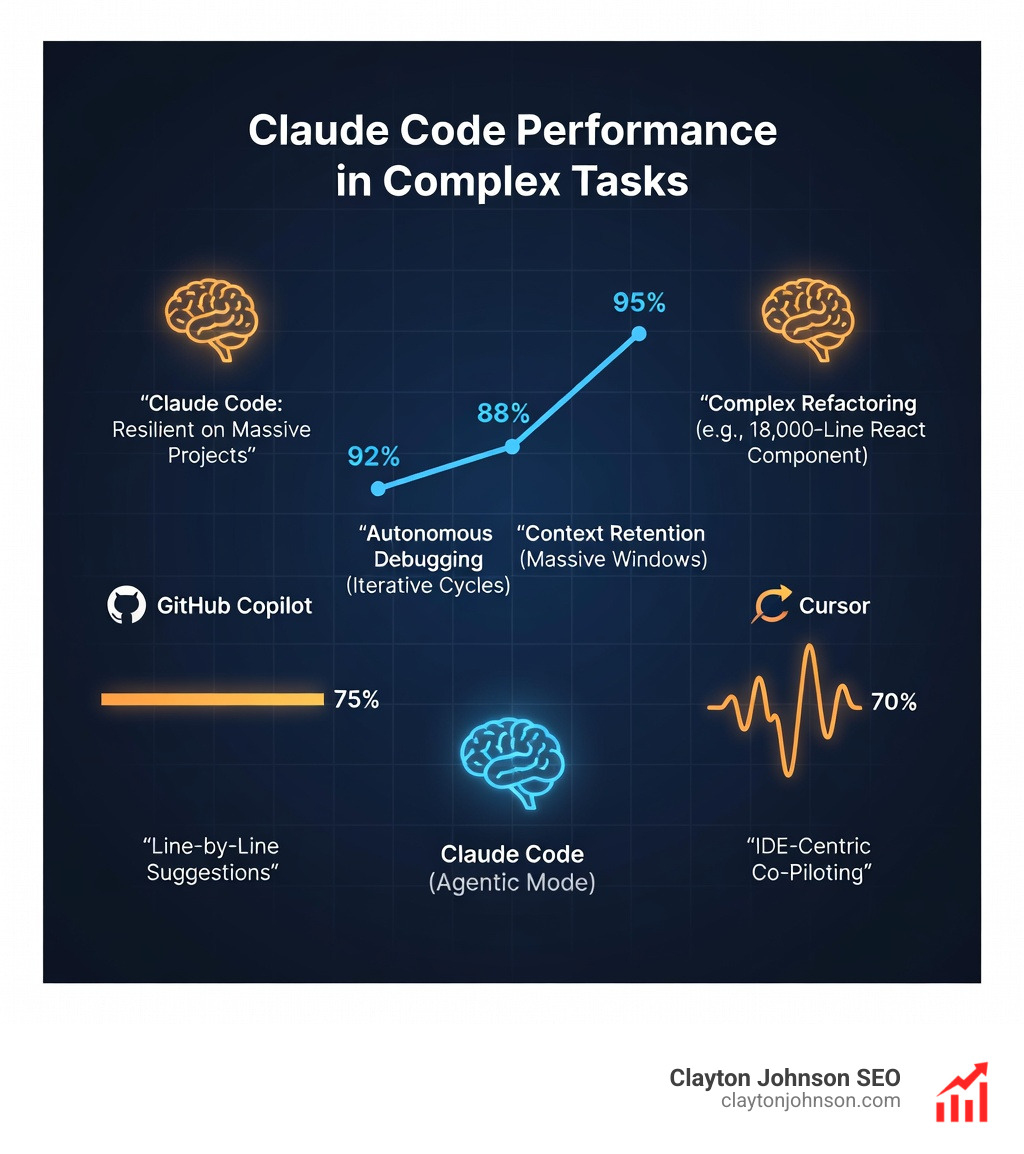
The market is crowded, but Claude Code has carved out a unique niche. While GitHub Copilot is excellent for line-by-line suggestions and Cursor provides a fantastic wrapper for AI-first IDE development, Claude Code feels more like a dedicated software engineer in your terminal.
The main advantage of Claude Code over Cursor is its stability on massive tasks. Many developers report that while Cursor is great for “co-piloting,” it often gets stuck or requires constant manual intervention on complex refactors. Claude, especially in its agentic mode, tends to be more resilient, often solving its own errors through iterative testing cycles.
The Real Truth About Coding AI Growth is that the best tool is often the one that stays out of your way. Claude’s ability to run via CLI means you can pipe logs directly into it: tail -f app.log | claude -p 'Alert me if you see any anomalies'—a level of automation that traditional IDE-bound tools struggle to match.
Frequently Asked Questions about Claude AI Code Completion
What are the pricing tiers for Claude Code?
Claude Code is available across several tiers:
- Free: Basic access to Claude models on the web and mobile.
- Pro ($20/month): Includes Claude Code, higher usage limits, and priority access to new models like Sonnet 4.5.
- Max (from $100/month): Designed for power users, offering 5–20x more usage than Pro. This is recommended for developers working in large codebases daily.
- API / Console: You can also pay-as-you-go via the Anthropic Console for custom agent builds.
How does Claude Code handle security and privacy?
Security is a major concern when giving an AI access to your codebase. Claude Code primarily executes its reasoning in the cloud, but its actions (file edits, terminal commands) happen in your local environment. It respects your .gitignore files by default and always prompts for permission before executing “dangerous” commands or making major file changes unless you explicitly set it to a bypass mode. You can review the full Anthropic Privacy Policy for details on data handling.
Can Claude Code be used for non-engineering tasks?
Absolutely. Because it lives in the terminal and has access to your file system, it’s a powerful general-purpose agent. We’ve seen users use it to:
- Automate documentation updates.
- Translate entire folders of strings for localization.
- Monitor server logs and send Slack alerts for specific errors.
- Orchestrate complex file migrations that have nothing to do with code.
Conclusion
The era of manual, line-by-line coding is fading. By embracing claude ai code completion, you aren’t just getting faster; you’re changing your role from a “writer of code” to an “architect of systems.”
At Clayton Johnson SEO, we focus on these high-leverage, AI-assisted workflows to help founders and marketing leaders scale their operations without the traditional engineering bottlenecks. Whether you’re looking to diagnose growth problems or execute a complex SEO strategy, the tools you use define your ceiling.
Ready to take your development and growth strategy to the next level? Explore More info about SEO services and see how we can help you build a more efficient, AI-powered future. Stop typing, start prompting, and let’s get to work.