Claude AI JavaScript Code Tips for Developers Who Hate Debugging

Why Debugging JavaScript Is Faster With Claude AI
Claude AI JavaScript code tips can cut your debugging time dramatically — here’s a quick breakdown of the most impactful ones:
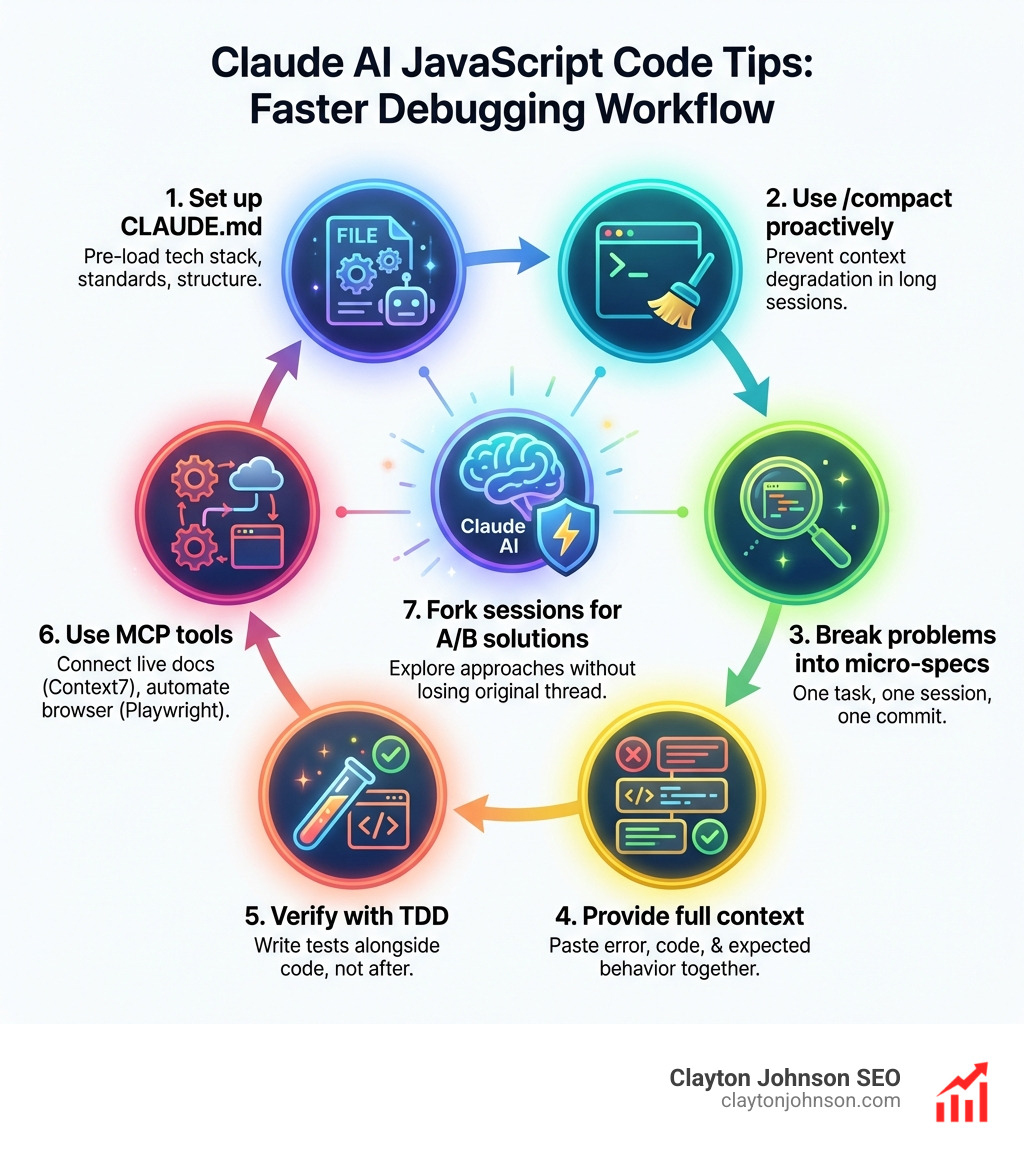
Top Claude AI JavaScript Code Tips at a Glance:
- Set up CLAUDE.md — Give Claude your tech stack, coding standards, and project structure upfront so it never needs re-explaining
- Use /compact proactively — Prevent context degradation during long JS sessions before it slows Claude down
- Break problems into micro-specs — One task per session, one commit per milestone; never ask Claude to solve everything at once
- Provide full context — Paste your actual error, the relevant code, and your expected behavior together
- Verify with TDD — Ask Claude to write tests alongside code, not after
- Use MCP tools — Connect context7 for live docs and Playwright for browser automation directly inside Claude Code
- Fork sessions for A/B solutions — Clone a conversation to explore two different JS approaches without losing your original thread
Every JavaScript developer has hit that wall — you install a package, nothing works, and hours disappear. Whether it’s Clerk middleware breaking your Next.js auth flow or a physics library like MatterJS failing silently on setup, the frustration is real. Claude Code changes that equation by acting as a context-aware coding partner, not just a snippet generator. And unlike simpler AI tools, it can navigate massive codebases — one developer reported it was the only AI agent to successfully update an 18,000-line React component without getting stuck.
I’m Clayton Johnson, an SEO strategist and systems builder who integrates AI-assisted workflows into scalable growth operations — and applying Claude AI JavaScript code tips is one of the highest-leverage moves I’ve seen for developer productivity. Let’s break down exactly how to use Claude Code to write cleaner JS, debug faster, and stop wasting hours on setup errors.
Claude AI JavaScript code tips vocabulary:
Setting Up Claude Code for JavaScript Success
Getting started with Claude Code isn’t just about running a command; it’s about creating an environment where the AI understands your specific flavor of JavaScript. We’ve all seen AI hallucinate outdated syntax or suggest libraries that don’t fit our stack. Proper setup prevents this.
First, ensure your Node.js environment is ready. Claude Code is a terminal-based CLI tool that thrives on direct access to your file system. You can install it globally using npm:
npm install -g @anthropic-ai/claude-code
Once installed, we recommend running /init in your project root. This creates the foundational configuration Claude needs to be effective. However, the real magic for JavaScript developers lies in the Claude Code Best Practices regarding context exclusion.

In large JavaScript projects, your node_modules folder is a black hole of tokens. If Claude tries to index every dependency, you’ll hit context limits before you’ve even written a single line of code. Use a .claudeignore file to exclude node_modules, build artifacts like dist or .next, and large log files. This keeps Claude focused on your source code, which is where the actual logic lives.
To speed things up, we suggest setting up terminal aliases in your .zshrc or .bashrc. An alias like alias c='claude' might seem small, but when you’re in a flow, it makes jumping into an AI-assisted session seamless.
Optimizing CLAUDE.md for Claude AI JavaScript Code Tips
Think of CLAUDE.md as your project’s constitution. It is a Markdown file located in your root directory that Claude reads at the start of every session. Without it, you’ll find yourself repeating, “We use TypeScript, not vanilla JS,” or “We prefer functional components over classes,” every single time you open the terminal.
According to the CLAUDE.md documentation, this file should be concise but comprehensive. For a JavaScript developer, your CLAUDE.md should include:
- Tech Stack: Specify if you’re using React, Next.js, Vue, or Node.js.
- Coding Standards: Mention your linting rules (e.g., “Always use semicolons,” “Prefer arrow functions”).
- Architectural Patterns: Explain your folder structure (e.g., “Components go in /src/components, hooks in /src/hooks”).
- Build Commands: Provide the exact commands for testing (
npm test) and building (npm run build).
By providing this persistent context, you ensure that every piece of code Claude generates fits perfectly into your existing codebase. It’s the difference between a generic snippet and a production-ready feature.
Advanced Claude AI JavaScript Code Tips for Context Management
Context is the lifeblood of AI coding. If the context gets “stale” or too bloated, Claude starts losing the thread, leading to those annoying “dizzy” moments where it repeats errors. We like to say that AI context is like milk — it’s best served fresh and condensed!
One of the most powerful Claude AI JavaScript code tips is to proactively use the /compact command. As your session grows, Claude’s memory fills up with every terminal output and file read. /compact summarizes the conversation so far, keeping the essential context while throwing away the “noise.” This is vital for complex JS debugging sessions where you might have dozens of failed test runs in the history.
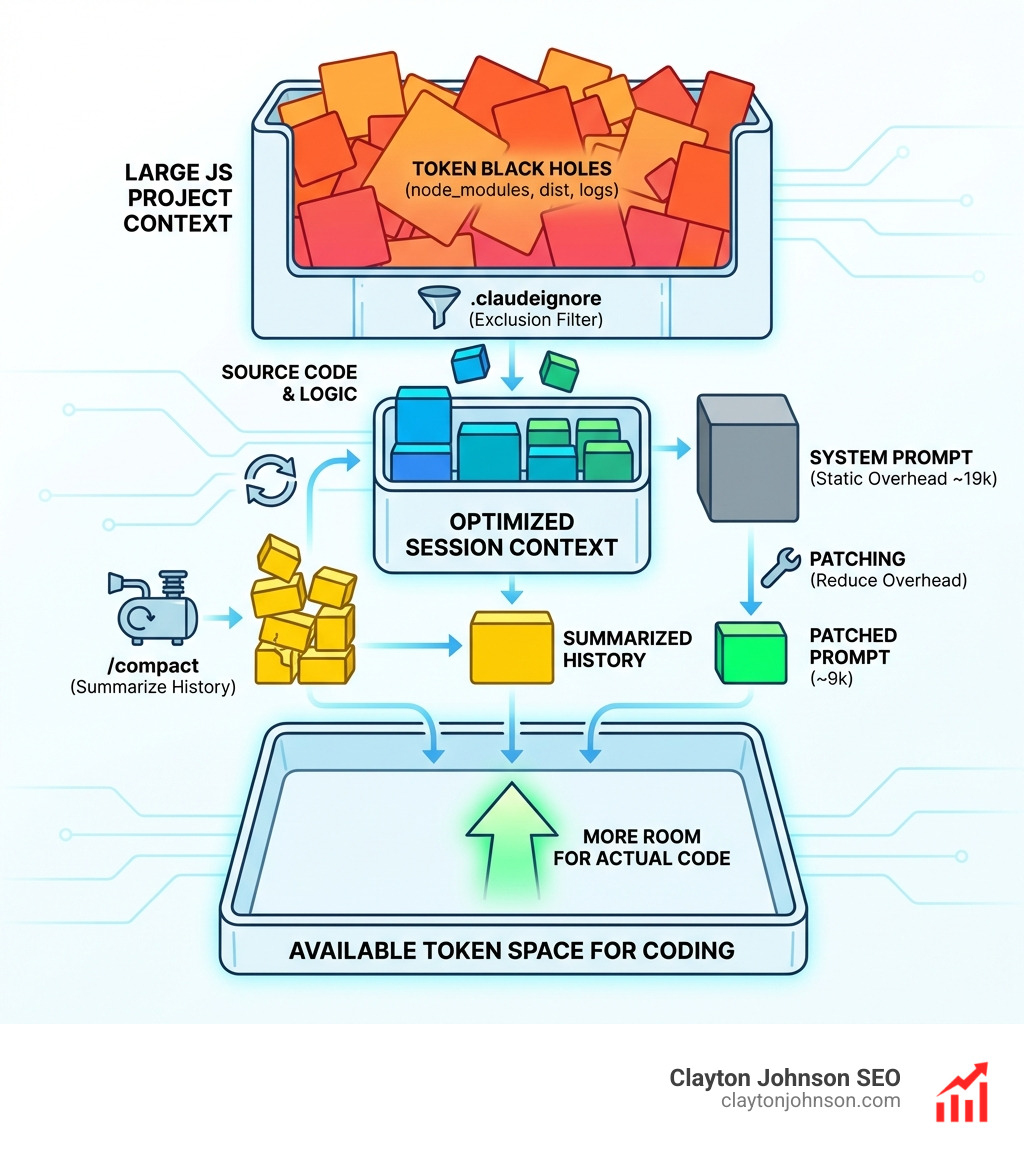
If you’re a power user, you might even consider system prompt patching. Research shows that patching Claude Code’s minified JavaScript bundle can reduce the static system prompt overhead from 19k tokens to around 9k. This saves you money and leaves more room for your actual code. You can find more on this in our guide on how to stop wasting tokens and start coding like a Claude pro.
Preventing Token Waste in Large JS Codebases
When working in massive monorepos or complex React apps, you need to be strategic. If a conversation becomes too long and Claude starts getting confused, don’t just keep pushing. Instead, use session hydration or conversation forking.
- Conversation Forking: Use a “half-clone” script to duplicate the later half of a conversation. This reduces token usage while preserving your most recent work.
- Absolute Paths: Always use
realpathto provide Claude with absolute paths in monorepos. This prevents the AI from getting lost in nested directory structures. - Context7 Integration: Use the
context7MCP tool to fetch up-to-date, version-specific documentation. This is a lifesaver when you’re using a brand-new version of a library that Claude’s training data might not fully cover.
Understanding how Claude handles loops without getting dizzy is key here. By limiting the scope of each session, you prevent the infinite loop of “fix one thing, break another.”
Essential Slash Commands and MCP Tools for JS Developers
Claude Code is more than just a chat interface; it’s a toolbelt. Knowing which tool to pull out — and when — is what separates a junior AI user from a senior AI-augmented engineer.
| Feature | Best For | Token Efficiency |
|---|---|---|
| Slash Commands | User-triggered actions (e.g., /clear, /search) |
High (Manual) |
| Skills | AI-triggered capabilities (e.g., custom scripts) | Medium (Auto-loaded) |
| Plugins | Extended functionality (e.g., GitHub integration) | Variable |
Essential commands for JS developers include:
/resume: Rehydrates a prior conversation, including branch details./clear: Wipes the current session history to start a fresh feature./read: Explicitly tells Claude to look at specific files across your project.
Leveraging MCP Tools for Claude AI JavaScript Code Tips
The Model Context Protocol (MCP) is a game-changer. It allows Claude to “step out” of the terminal and interact with the world. For JavaScript developers, two MCP tools are non-negotiable:
- Playwright MCP for browser automation: This allows Claude to open a browser, navigate your frontend, and see what’s actually happening on the screen. No more copy-pasting screenshots of CSS bugs!
- Chrome DevTools Integration: This goes a step further, giving Claude access to the console and network tab. If an API call is failing with a 403, Claude can inspect the headers and suggest a fix.
For a deeper dive, check out the complete Claude skill pack for modern developers. These tools enable live debugging and library research that would otherwise take hours of manual tab-switching.
The Micro-Spec Agentic Flow for JavaScript Projects
One of the biggest mistakes developers make is asking Claude to “Build a whole dashboard.” This is a recipe for spaghetti code. Instead, we advocate for the “Micro-Spec Agentic Flow.” This approach is inspired by eXtreme Programming (XP) and focuses on tiny, iterative “baby steps.”
The workflow looks like this:
- Create a Micro-Spec: Write a short Markdown card (we call it
SPEC.md) describing a single task that takes no more than one hour to complete. - Iterative Development: Let Claude work on that one card.
- Commit often: Every time a card is finished and the tests pass, commit it. Your Git history becomes your backlog.
This method reduces uncertainty and ensures that if something goes wrong, you only have to backtrack a few minutes, not a few hours. For more on this, see our guide on mastering AI coding workflows on GitHub.
Verifying Claude AI JavaScript Code Tips with TDD
Test-Driven Development (TDD) is the ultimate safety net when using AI. We always tell Claude: “Write the Jest tests for this utility function first, then write the implementation.”
By following the write-test cycle, you force the AI to prove its logic. If the tests fail, Claude can autonomously run git bisect or use terminal output to debug itself. This is particularly effective for complex logic like data transformations or auth middleware. We’ve found that Claude is the best AI for coding and debugging specifically because it excels at this iterative self-correction.
Secure and Scalable JavaScript Workflows
Safety is paramount when giving an AI agent permission to run commands on your machine. While the --dangerously-skip-permissions flag is tempting for speed, it’s the digital equivalent of leaving your front door unlocked.
We recommend using Docker containers for risky experiments. By running Claude Code inside a container, you isolate it from your host system. If Claude accidentally runs a destructive command (which has happened to some users!), it only affects the container, not your entire home directory.

You can also supercharge your IDE with these Claude coding extensions while keeping the core logic in the terminal. This “hybrid” approach gives you the best of both worlds: the visual power of VS Code and the agentic power of the Claude CLI.
Handling Massive React Components and Monorepos
Can Claude handle an 18,000-line React component? Surprisingly, yes. While humans struggle to hold that much state in their heads, Claude’s 200k token context window (available in Opus 4.5) allows it to map out dependencies and shared state across massive files.
When dealing with such scale, we use:
- Git Worktrees: This allows you to work on multiple feature branches in parallel without constantly switching contexts.
- Dependency Mapping: Ask Claude to generate a Mermaid diagram of your component relationships before refactoring.
- Phased Refactoring: Don’t refactor the whole file at once. Use Claude to extract small, reusable hooks one by one.
Choosing scalable coding frameworks for AI assistance ensures that as your project grows, your AI partner doesn’t become a bottleneck.
Frequently Asked Questions about Claude AI JavaScript Code Tips
How do I fix MatterJS or Clerk middleware errors with Claude?
The most common reason these packages fail is version mismatch or missing peer dependencies. Use the context7 MCP tool to fetch the latest documentation for the specific version you are using. Then, provide Claude with the exact error log from your terminal. Usually, the fix involves a specific configuration tweak in your middleware.ts or a missing canvas initialization in MatterJS.
Can Claude Code handle React components over 10,000 lines?
Yes, Claude Code is uniquely capable of navigating massive files. Unlike other AI tools that only see small “snippets” of code, Claude can read the entire file into its context. To make this efficient, use the /read command on the specific large file and ask Claude to “map the state logic” before suggesting any changes.
What is the difference between /compact and /clear in JS sessions?
/compact is like a “save point” — it summarizes the history to save tokens but keeps the essential context alive so you can continue the current task. /clear is a “hard reset” — it wipes everything, which is best when you’re moving from one feature (like auth) to a completely different one (like UI styling).
Conclusion
Mastering Claude AI JavaScript code tips isn’t just about learning new commands; it’s about shifting your mindset. It’s about moving from “vibe coding” to structured, architected growth. At Demandflow.ai, we believe that clarity and structure are the foundations of compounding leverage.
By setting up a robust CLAUDE.md, utilizing MCP tools for live debugging, and following a micro-spec workflow, you transform Claude from a simple chatbot into a high-performance engineering partner. This is the core of our approach at Clayton Johnson SEO — building structured growth architecture that scales.
If you’re ready to stop fighting your debugger and start building at 10x speed, we can help. Explore our SEO content marketing services to see how we apply these same principles of structured strategy and AI-enhanced execution to help companies achieve measurable, compounding growth.
Clarity leads to structure, and structure leads to leverage. Let’s start building.