The Ultimate Claude Chain of Thought Tutorial


Why Chain of Thought Prompting Claude Changes How You Solve Complex Problems
Chain of thought prompting claude unlocks step-by-step reasoning that dramatically improves accuracy on complex tasks. Here’s how to implement it:
Three Core CoT Methods:
- Basic CoT – Add “Think step-by-step” to your prompt
- Guided CoT – Provide numbered instructions for Claude to follow
- Structured CoT – Use
When to Use CoT:
- Complex math problems
- Multi-step analysis
- Decisions with many variables
- Debugging code or logic
When to Skip CoT:
- Simple retrieval tasks
- Basic text edits
- Low-latency operations
Chain of thought prompting transforms Claude from a pattern-matching tool into a reasoning engine. When you ask Claude to “think step-by-step,” you’re not just adding words—you’re triggering a fundamentally different processing mode that breaks down complex problems into manageable pieces.
The technique emerged from research by Wei et al. (2022) showing that large language models develop emergent reasoning abilities when prompted to show their work. Claude’s implementation goes further with extended thinking mode, which allocates a token budget specifically for internal reasoning, then presents clean final answers.
But here’s what most guides miss: CoT isn’t always better. It increases token usage, adds latency, and can actually harm performance on simple tasks. The key is knowing when Claude needs to think and when it should just answer.
I’m Clayton Johnson, and I’ve built AI-assisted workflows for marketing and operations teams that rely heavily on chain of thought prompting claude to handle everything from competitive analysis to strategic planning frameworks. The difference between mediocre AI output and genuinely useful reasoning almost always comes down to how you structure the thinking process.
What is Chain of Thought Prompting Claude?
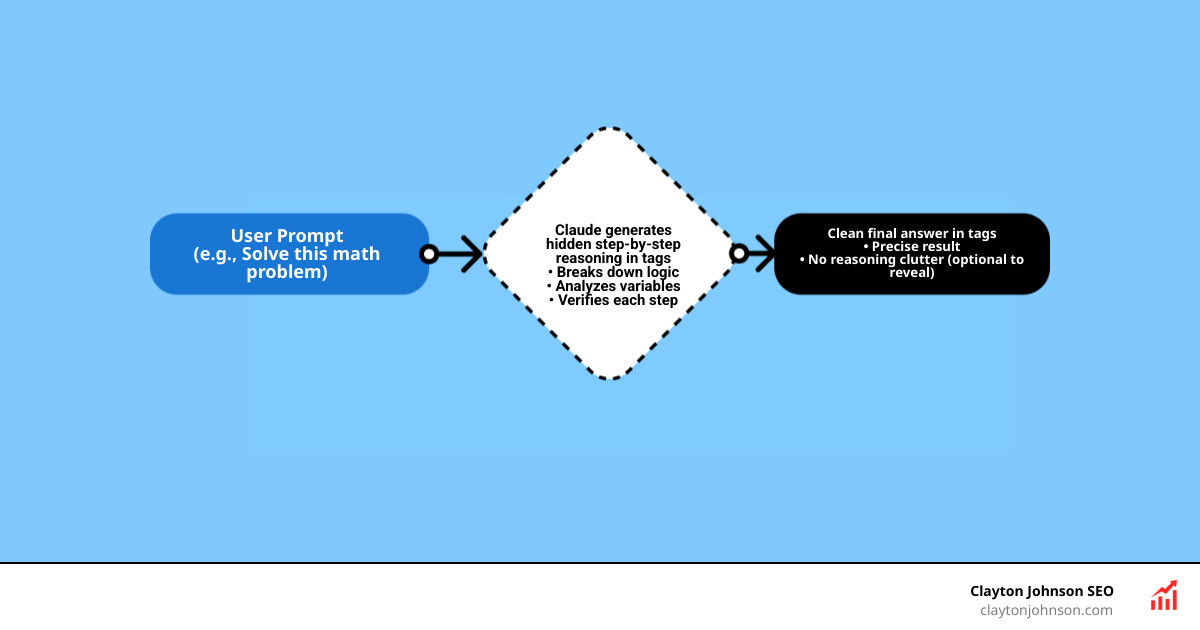
At its core, chain of thought prompting claude is a technique that encourages the model to generate intermediate reasoning steps before arriving at a final answer. Instead of jumping straight from question to conclusion, Claude “talks to itself” to work through the logic.
This isn’t just a neat trick; it’s backed by foundational AI research. Wei et al. (2022) first introduced the concept, demonstrating that providing a few examples of reasoning (few-shot CoT) allows models to solve problems they previously failed. Later, Kojima et al. (2022) discovered “Zero-shot CoT,” proving that simply adding the phrase “Let’s think step by step” could trigger this same emergent ability.
For those of us building modern developer skill sets, understanding CoT is the difference between a chatbot that hallucinates and a reasoning agent that solves.
Why Let Claude Think?
Giving Claude “mental breathing room” leads to several observable benefits:
- Error Reduction: In complex math and logic, Claude often makes “calculation errors” if it tries to answer instantly. By writing out the steps, it catches its own mistakes.
- Coherence: For long-form analysis or writing, thinking first ensures the final output follows a logical structure rather than drifting off-topic.
- Debugging: If Claude gives you a wrong answer, seeing the “thought process” allows you to pinpoint exactly where the logic failed, making it easier to refine your prompt.
- Emergent Intelligence: Statistics show that providing even one CoT example can achieve perfect results on tasks like summing odd numbers, where standard prompting often fails.
When to Avoid Chain of Thought Prompting Claude
More isn’t always better. We should avoid forcing Claude to think when:
- Latency Matters: Thinking takes time. If you need a sub-second response for a simple chatbot, skip CoT.
- Token Usage is High: Every word Claude “thinks” costs tokens. For simple tasks, this is literal money down the drain.
- Simple Retrieval: If you’re asking “What is the capital of France?”, Claude doesn’t need to ponder the geopolitical history of Europe. It just needs to say “Paris.”
- Basic Edits: For tasks like “Fix the spelling in this paragraph,” reasoning steps often add unnecessary fluff without improving the result.
Implementing Chain of Thought Prompting Claude: Three Core Methods
To get the most out of Claude, we use three distinct levels of CoT complexity. Choosing the right one depends on how much control you need over the reasoning process.

When you extend Claude with custom agent skills, you’ll find yourself reaching for these methods constantly.
[TABLE] comparing Basic, Guided, and Structured CoT
| Method | Complexity | Best For | Key Instruction |
|---|---|---|---|
| Basic CoT | Low | Quick logic, arithmetic | “Think step-by-step.” |
| Guided CoT | Medium | Multi-step workflows | “First analyze X, then evaluate Y.” |
| Structured CoT | High | API use, Clean UI | Use |
Basic Chain of Thought
This is the “Zero-shot” approach. You don’t give examples; you just give a command. By appending “Let’s think step by step” or “Show your work” to your prompt, you trigger Claude’s internal logic.
Example: “I have 10 apples. I give 2 to a neighbor and 2 to a repairman. I buy 5 more and eat 1. How many do I have? Let’s think step by step.”
Without CoT, models sometimes hallucinate the math. With it, Claude will list the subtractions and additions sequentially, consistently hitting the correct answer (10).
Guided Chain of Thought
In guided CoT, we provide the “skeleton” of the thought process. This is vital for complex business analysis. Instead of letting Claude wander, we tell it exactly which factors to consider.
Example: “Analyze this market entry strategy. First, identify the top 3 competitors. Second, evaluate our pricing against theirs. Third, list potential regulatory hurdles. Show your reasoning for each step.”
Structured Chain of Thought
This is the gold standard for developers and power users. We use XML tags to create a “scratchpad.” Zhang et al. (2022) noted that automating these demonstrations (Auto-CoT) reduces manual effort, but for most of us, manual XML tags are the most reliable way to separate thoughts from the final answer.
The Syntax:
This allows you to programmatically extract only the
Claude’s Extended Thinking Mode: Under the Hood
With the release of Claude 3.7 Sonnet, Anthropic introduced a native “Extended Thinking” mode. This isn’t just a prompt trick; it’s a fundamental architectural shift.

When this mode is enabled, Claude uses serial reasoning. It doesn’t just predict the next token; it engages in a test-time compute process where it can ponder a problem for seconds—or even minutes—before speaking. According to Anthropic’s visible extended thinking research, this allows Claude to adjust its mental effort based on the difficulty of the task.
Performance Benchmarks and Statistics
The data behind chain of thought prompting claude is staggering:
- Math Mastery: On the 2024 AIME math exam, Claude’s accuracy increases logarithmically with more thinking tokens.
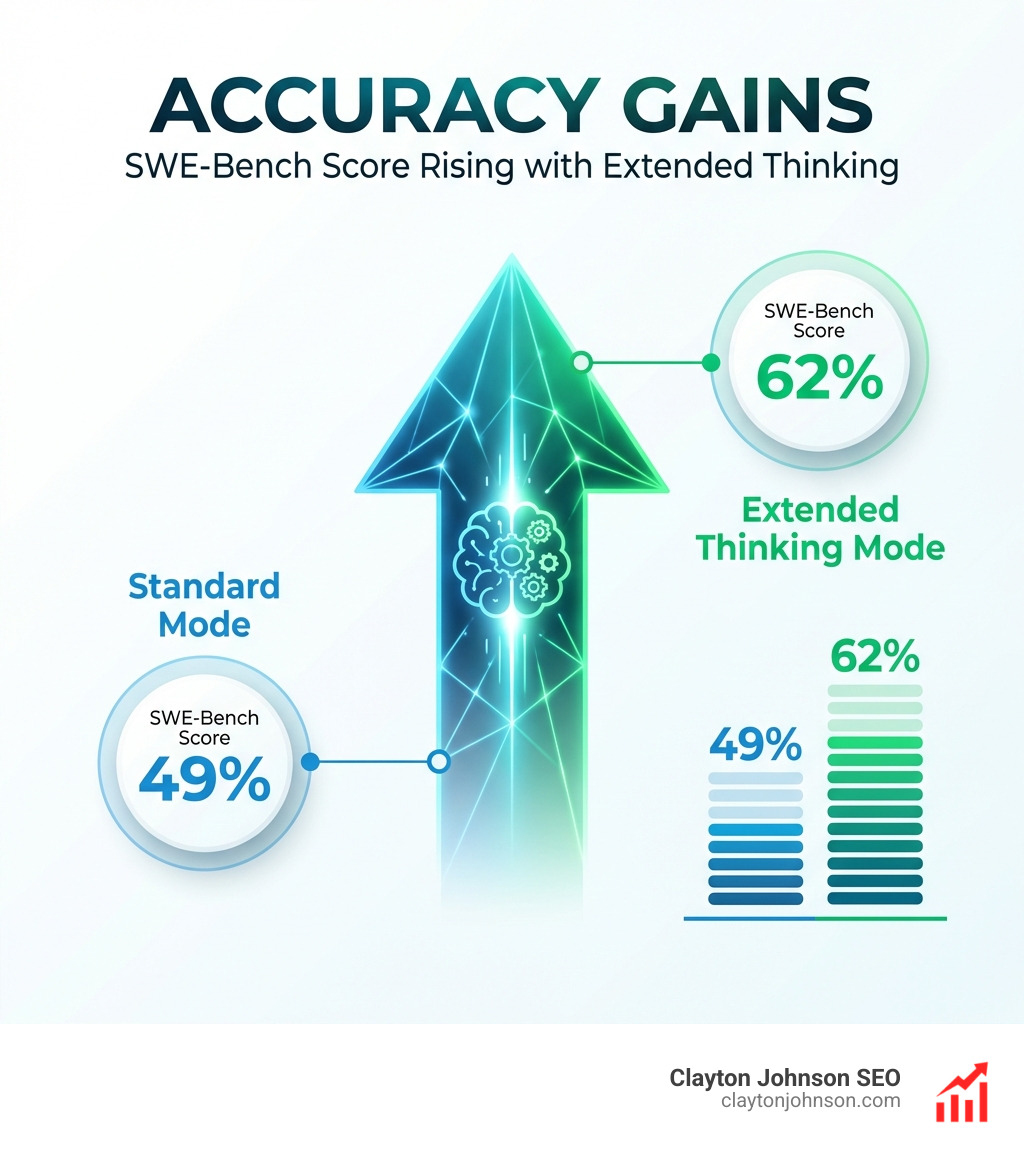
- Coding Jumps: On SWE-Bench (a rigorous software engineering benchmark), Claude 3.7’s score jumped from ~49% to over 62% simply by enabling extended thinking.
- Agentic Behavior: In TAU-Bench simulations, Claude achieved an 81.2% success rate compared to ~73.5% without extended reasoning.
- Reduced Refusals: Extended thinking reduces unnecessary “I can’t help with that” refusals by 45%, as the model can reason through safety guidelines more accurately.
Managing the Thinking Budget
When using the API, you can set a thinking_budget_tokens. This is a cap on how much “inner monologue” Claude can generate.
- Minimum Budget: Usually 1,024 tokens.
- Max Budget: Can go up to tens of thousands depending on the model.
- Cost Management: You are billed for thinking tokens. If you’re doing an OpenClaw manual setup, start with a lower budget (2,000–4,000 tokens) and increase it only if Claude is getting cut off mid-thought.
Advanced Strategies for Chain of Thought Prompting Claude
To truly master chain of thought prompting claude, you need to combine it with other prompt engineering heavyweights.
- Role-Play: Tell Claude, “You are a Senior Security Architect. Think through the vulnerabilities in this code.” The “persona” changes the flavor of the reasoning.
- Multi-Shot Prompting: Provide 2-3 examples of a problem followed by the correct step-by-step reasoning. This “teaches” Claude the specific logic style you want.
- Prompt Decomposition: If a task is too big for one chain, break it into a series of prompts. This is the secret to faster development with Claude.
Prompt Chaining vs. CoT
While CoT is one long “thought” before an answer, Prompt Chaining is a sequence of separate interactions.
- CoT: One prompt → Claude thinks → Claude answers.
- Chaining: Prompt 1 (Research) → Claude Output → Prompt 2 (Analyze Research) → Claude Output.
Chaining is better for massive tasks because it provides “checkpoints.” If Claude messes up the research phase, you can fix it before it starts the analysis phase. Using XML tags to pass data between these chains ensures high traceability.
Long-Context Reasoning
Claude’s massive 200K token context window is a superpower, but it can lead to “lost in the middle” syndrome. To fix this:
- Query Placement: Place your instructions after the long document.
- Quote Extraction: Ask Claude to “First, find and quote the 5 most relevant passages, then reason through the answer.”
- XML Organization: Wrap different documents in
Anthropic’s guidance suggests that structured navigation of big inputs can improve accuracy by up to 30%.
Frequently Asked Questions about Claude Reasoning
Does Chain of Thought increase API costs?
Yes. Every token generated in the thinking process—whether hidden or visible—is billed at the model’s output rate. For high-volume applications, use CoT only for the most difficult 20% of your tasks.
Can I hide Claude’s thinking from the final user?
Absolutely. When using Structured CoT with XML tags, you can use a simple regex or string split in your code to remove everything between the
Which Claude models support extended thinking?
Currently, Claude 3.7 Sonnet is the flagship model for native “Extended Thinking.” However, you can use the “manual” CoT methods (Basic, Guided, and Structured) on any version, including Claude 3.5 Sonnet and Claude 3 Opus.
Conclusion
Mastering chain of thought prompting claude is the single most effective way to level up your AI workflows. By understanding when to let Claude ponder and when to demand speed, you can build systems that are both efficient and incredibly accurate.
At Clayton Johnson SEO, we specialize in building these AI-assisted workflows to help founders and marketing leaders execute growth strategies with precision. Whether you’re looking to master your SEO content marketing strategy or automate complex competitive analysis, the “step-by-step” approach is your competitive advantage.
Stop treating Claude like a search engine and start treating it like a partner. Give it the space to think, and it will give you the results you need.