Why AI Code Generator Python Tools Are Changing Development Speed
An ai code generator python tool can help you write functions, classes, APIs, and data scripts in seconds instead of minutes or hours. Here’s how to get started:
Top AI Python Code Generators (2024):
| Tool | Best For | Key Feature | Cost |
|---|---|---|---|
| Overchat AI | Speed and simplicity | GPT-4 with 1M token context | Free |
| Workik AI | Team collaboration | Workspaces with permissions | Freemium |
| Salesforce CodeGen | Open-source projects | 16B parameter model, outperforms Codex | Free |
| OpenAI Codex | Enterprise integration | IDE, CLI, and SDK interfaces | Paid API |
Quick Start Steps:
- Describe your code need in plain English
- Add context (requirements.txt, schemas, API specs)
- Generate code in 20-30 seconds
- Test and customize for production
The shift is dramatic. Research shows AI can generate a working component in roughly 20 seconds and write a simple app in 30 seconds, compared to at least 10 minutes for an experienced developer. That’s not hype-that’s the new baseline for Python development.
These tools handle everything from Django APIs and FastAPI endpoints to Pandas ETL scripts and pytest test generation. They follow PEP 8 standards, include type hints and docstrings, and can even refactor legacy code into modern, maintainable patterns.
But speed isn’t the only story. The best ai code generator python tools understand context. You can feed them your repository structure, database schemas, or API blueprints to get project-specific output. They explain unfamiliar libraries, automate documentation, and help teams collaborate through isolated workspaces.
I’m Clayton Johnson, and I’ve built AI-assisted marketing and growth systems for multiple companies across industries. Throughout my work with ai code generator python tools, I’ve learned which ones actually deliver on productivity gains and which ones add friction to your workflow.
Understanding the AI Code Generator Python Workflow
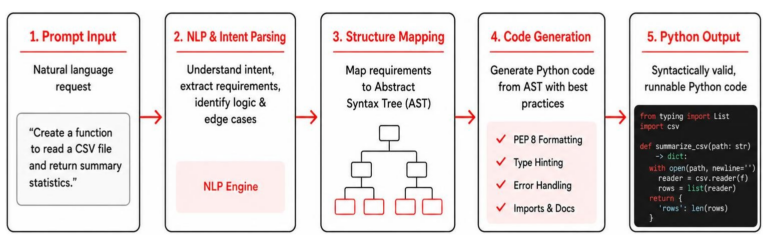
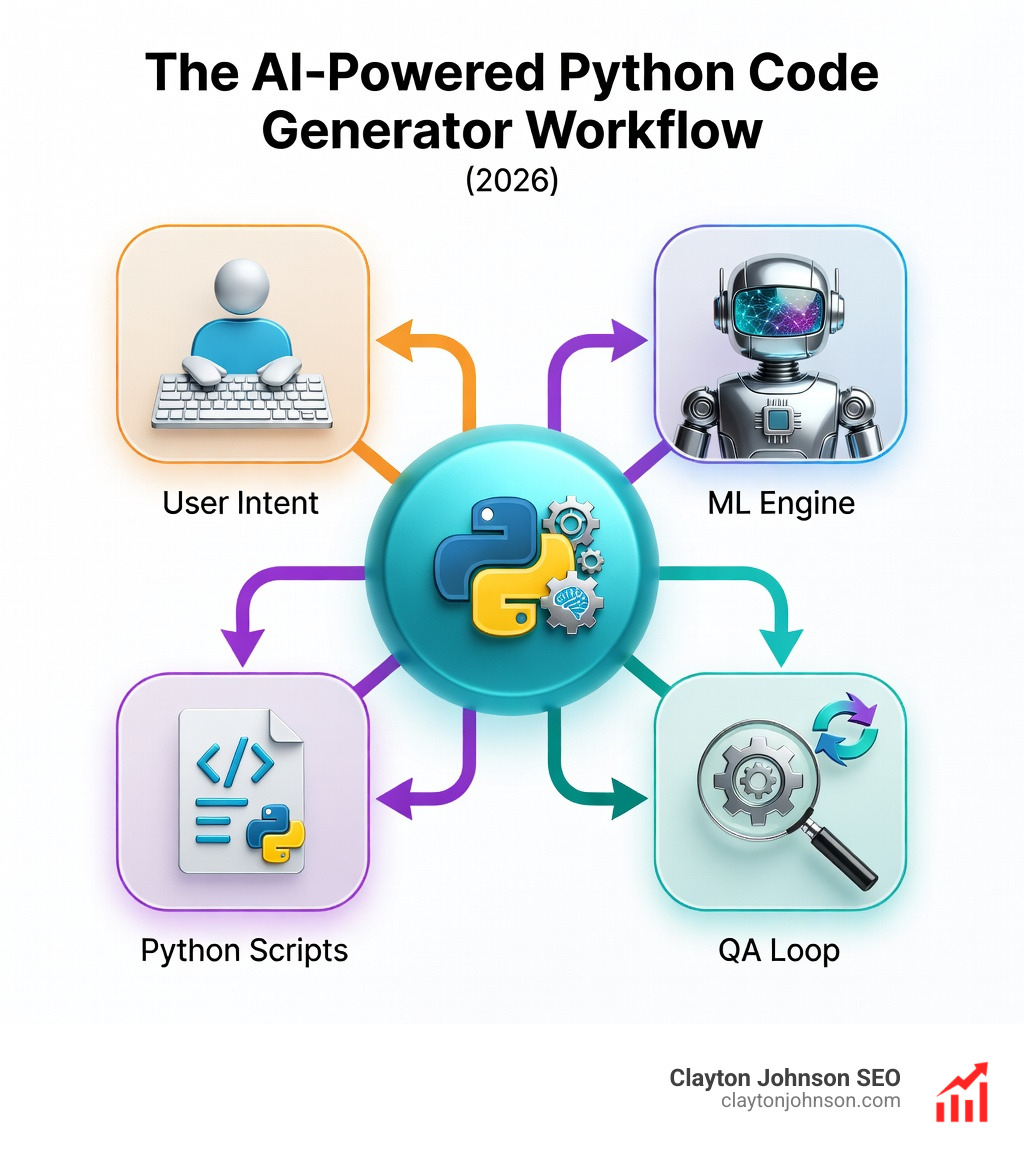
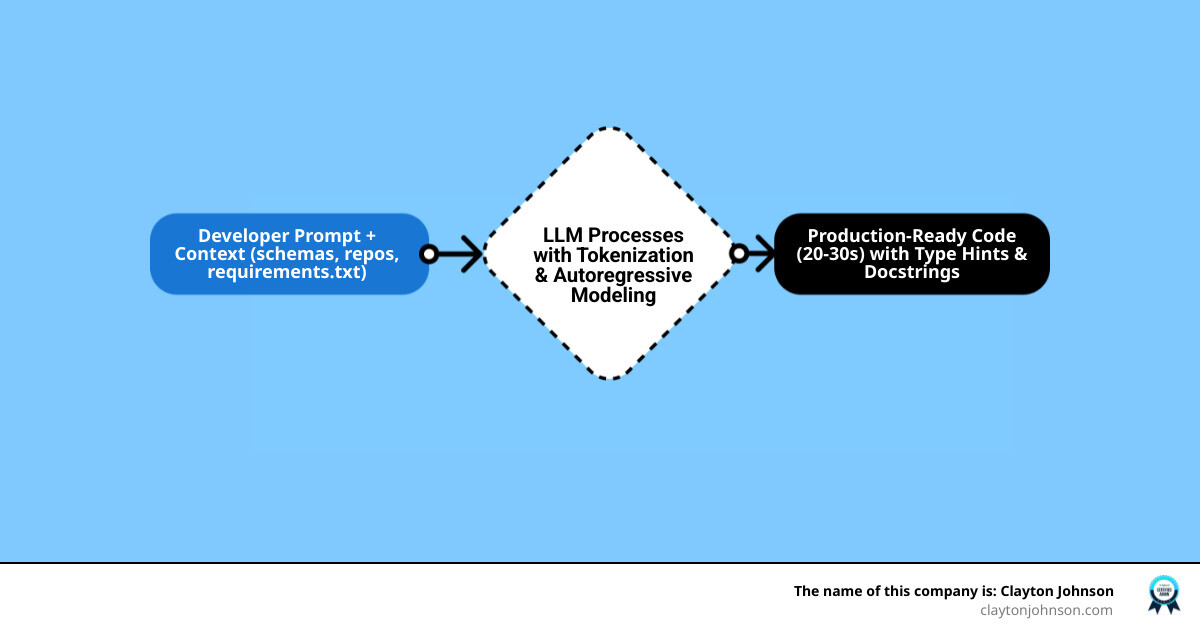
To get the most out of an ai code generator python, we first need to pull back the curtain on how these digital assistants actually think. It isn’t magic—though it feels like it when a complex script appears in under a minute—it’s a sophisticated process of program synthesis.
When we use an AI code generator, we are engaging with a Large Language Model (LLM) that has been specifically trained on billions of lines of public code. The workflow typically begins with a developer prompt. This prompt is the “north star” for the AI. However, a prompt alone is often not enough for complex enterprise applications. This is where “context windows” come into play.
Modern tools like Overchat AI feature context windows as large as 1M tokens. Think of a token as a small chunk of text; 1M tokens is roughly equivalent to several thick novels. This massive window allows us to feed the AI our entire codebase, ensuring the generated Python code follows our specific architectural patterns and naming conventions.
For those looking to integrate these capabilities directly into their software, the OpenAI Codex Documentation provides a roadmap for using APIs to power these interactions.
How an AI Code Generator Python Works
At its core, an ai code generator python uses autoregressive modeling. This means it predicts the next “token” in a sequence based on all the tokens that came before it. In the context of Python, the model understands that after def my_function():, the next logical step is an indented block of code, likely starting with a docstring or a variable initialization.
The industry measures the effectiveness of these models using the HumanEval benchmark. This is a set of programming problems used to test how well an AI can synthesize functional code. Interestingly, Salesforce’s CodeGen (specifically the 16B parameter version) has been shown to outperform OpenAI’s original Codex on these benchmarks. You can explore the technical foundations of this in the Salesforce CodeGen Research.
The Importance of Context and Code Examples
We’ve all been there: you ask an AI for a script, and it gives you something that works but looks nothing like the rest of your project. To fix this, we must provide context. The best ai code generator python workflows involve:
- Repository Schemas: Letting the AI know how your data is structured.
- API Blueprints: Sharing your endpoint definitions so the AI generates compatible code.
- requirements.txt: Showing the AI which library versions you are using (e.g., preventing it from using outdated Pandas syntax).
- Folder Structures: Helping the AI understand where utility functions live.
By using “few-shot prompting”—providing two or three examples of how you want the code to look—you can drastically improve the accuracy and style of the output.
Top AI Python Code Generators for 2024
The landscape of AI coding tools is crowded, but a few heavy hitters stand out for Python developers this year. We’ve tested several, and the “best” tool usually depends on whether you’re working solo, in a team, or on an open-source research project.
| Feature | Workik AI | Overchat AI | Salesforce CodeGen |
|---|---|---|---|
| Core Model | Multi-LLM | GPT-4 | CodeGen-16B-Mono |
| Context Window | Project-based | 1M Tokens | 2048 Tokens |
| Best For | ETL & API Teams | Rapid Prototyping | Open-Source Research |
| Collaboration | High (Workspaces) | Low (Chat-based) | Technical/Programmatic |
For a deep dive into the underlying architecture of open-source models, the Hugging Face Transformers CodeGen documentation is an essential resource for developers who want to host their own generators.
Comparing Workik AI, Overchat, and Salesforce CodeGen
Workik AI is a powerhouse for specialized Python workflows. We find it particularly useful for generating Django or Flask APIs because it allows us to set up “pipelines.” These pipelines can automate repetitive tasks like generating unit tests or documentation every time code is pushed. It’s built for the developer who needs the AI to understand their specific database schemas and API specs.
Overchat AI is the “speed demon” of the group. Powered by GPT-4, it’s designed for simplicity. If you need a working React component or a Python script to scrape a website, Overchat can usually deliver it in 20 seconds. Its 1M token context window is its secret weapon, allowing it to “read” massive files without losing the thread of the conversation.
Salesforce CodeGen takes a different approach. It was developed using a “conversational paradigm” for program synthesis. Instead of just one-shot generation, it’s designed to handle a multi-turn conversation where the developer and AI work together to refine a solution. The 16B parameter model is a favorite in the research community for its high performance on Python-specific tasks.
Free AI Python Generators and Their Limitations
If you’re just starting out, there are several free options like ZZZ Code AI or the basic tiers of Overchat. However, “free” usually comes with strings attached:
- Credit Systems: Many tools give you a set number of “credits” per month. Once you’re out, you’re back to manual coding.
- Rate Limits: You might find the AI taking longer to respond during peak hours.
- Privacy Concerns: Free tools often use your prompts to train their models. If you’re working on proprietary logic for a client in Minneapolis, check the privacy policy before pasting sensitive code.
Accelerating Python Tasks: From ETL to API Development
The true value of an ai code generator python isn’t just in writing “Hello World.” It’s in the heavy lifting of modern data and web engineering.
Choosing the Right AI Code Generator Python for Your Team
When we work with teams at Clayton Johnson, we emphasize that an AI tool is only as good as its integration into the team’s workflow. For a professional setting, you need:
- Team Workspaces: Shared areas where everyone can access the same context and prompts.
- Permission Management: Ensuring that only authorized developers can run or edit specific AI-generated modules.
- CI/CD Integration: Using SDKs (like the one provided by Codegen) to run automated checks or refactors during the build process.
If you are a business owner in the Twin Cities looking to scale your technical presence, we often recommend looking into how these tools can be paired with professional SEO services Minneapolis to ensure your technical infrastructure supports your growth goals.
Real-World Use Cases: ETL, APIs, and CLI Tools
- FastAPI Endpoints: AI can scaffold an entire CRUD (Create, Read, Update, Delete) API in seconds. It handles the boilerplate of Pydantic models and async definitions so you can focus on the business logic.
- Pandas ETL: Need to transform a messy CSV into a clean SQL table? Describe the source and target formats, and the AI will generate a Pandas script with logging, validation, and error handling included.
- Typer CLI Tools: Scaffolding command-line interfaces used to be a chore. Now, you can simply say, “Create a CLI tool that takes a directory path and zips all PDF files,” and get a production-ready script.
- Automated Documentation: AI is brilliant at reading your code and generating Docstrings that follow Google or NumPy standards.
Debugging and Optimizing with an AI Code Generator Python
Let’s be honest: we spend more time debugging code than writing it. An ai code generator python is essentially a “super-powered rubber duck.” You can paste a confusing error message or a “spaghetti code” function, and the AI will often spot the logic flaw or the missing null-pointer check in seconds.
Reliability and Testing Practices for AI Code
We must address the elephant in the room: AI can hallucinate. It might suggest a library that doesn’t exist or use a method that was deprecated in Python 3.10.
Best Practices for AI Reliability:
- Human-in-the-Loop: Never deploy AI code without a human review.
- Pytest Generation: Always ask the AI to “generate unit tests for this function, covering edge cases like empty inputs and invalid data types.”
- Syntax Validation: Use tools like Flake8 or Black to ensure the generated code meets your project’s linting standards.
Refactoring Legacy Code for Modern Standards
Many Minneapolis businesses have legacy Python 2 scripts or early Python 3 code that feels “clunky.” You can drop this code into an AI generator and ask it to:
- “Refactor this to use modern PEP 8 standards.”
- “Add type hints for better IDE support.”
- “Convert these script-style functions into a clean, class-based design.”
This not only makes the code more maintainable but also helps onboard new developers who might struggle with unstructured legacy logic.
Best Practices for Integrating AI into Your Python Environment
To truly 10x your speed, you shouldn’t just copy-paste from a web browser. The goal is to bring the ai code generator python into your development environment.
Security and Privacy in AI-Assisted Coding
Security is paramount. When using AI, we follow a strict protocol:
- Sanitize Prompts: Never include API keys, JWT secrets, or sensitive customer data in your prompts.
- Client-Side Processing: Some tools offer client-side processing for sensitive tasks like data conversion, ensuring your data never leaves your machine.
- Licensing Compliance: Be aware that AI-generated code might occasionally mirror its training data. Use a tool that provides “copy-left” or licensing alerts if the generated code closely matches a known public repository.
Frequently Asked Questions about AI Python Coding
How reliable is AI-generated Python code?
In most cases, it is very reliable for standard tasks (data manipulation, API scaffolding, math). However, for niche libraries or complex logic, it can produce errors. We recommend a “test-first” approach where you generate unit tests alongside the code.
Do I need to provide my entire codebase as context?
No, but providing “relevant” context helps. For example, if you’re writing a new database model, providing your existing models.py and requirements.txt will ensure the AI uses the correct syntax and library versions.
Which AI tool is best for Python data science?
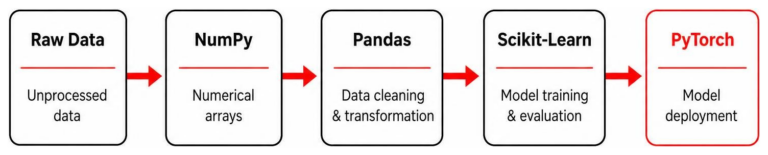
Workik AI and Overchat AI are excellent due to their strong support for Pandas, NumPy, and Scikit-Learn. They can explain complex data changes and even suggest more efficient ways to handle large DataFrames.
Conclusion
The era of manual boilerplate is ending. By integrating an ai code generator python into your workflow, you aren’t just coding faster; you’re coding smarter. You’re offloading the repetitive, error-prone parts of development to a machine that never sleeps, freeing up your brain to solve the big, creative problems.
At Clayton Johnson, we believe that strategic growth—whether in SEO or software development—comes from using the best tools available to amplify human talent. If you’re ready to optimize your growth strategy with SEO services Minneapolis, we’re here to help you steer the intersection of AI, technology, and marketing.
Whether you’re building a FastAPI microservice in a North Loop coffee shop or managing a global ETL pipeline from a home office in Minnetonka, these AI tools are your new secret weapon. Start small, test everything, and watch your productivity soar.