How to Build a Claude Coding Pack That Actually Works


Why Claude Skill Packs Are Changing How We Work with AI
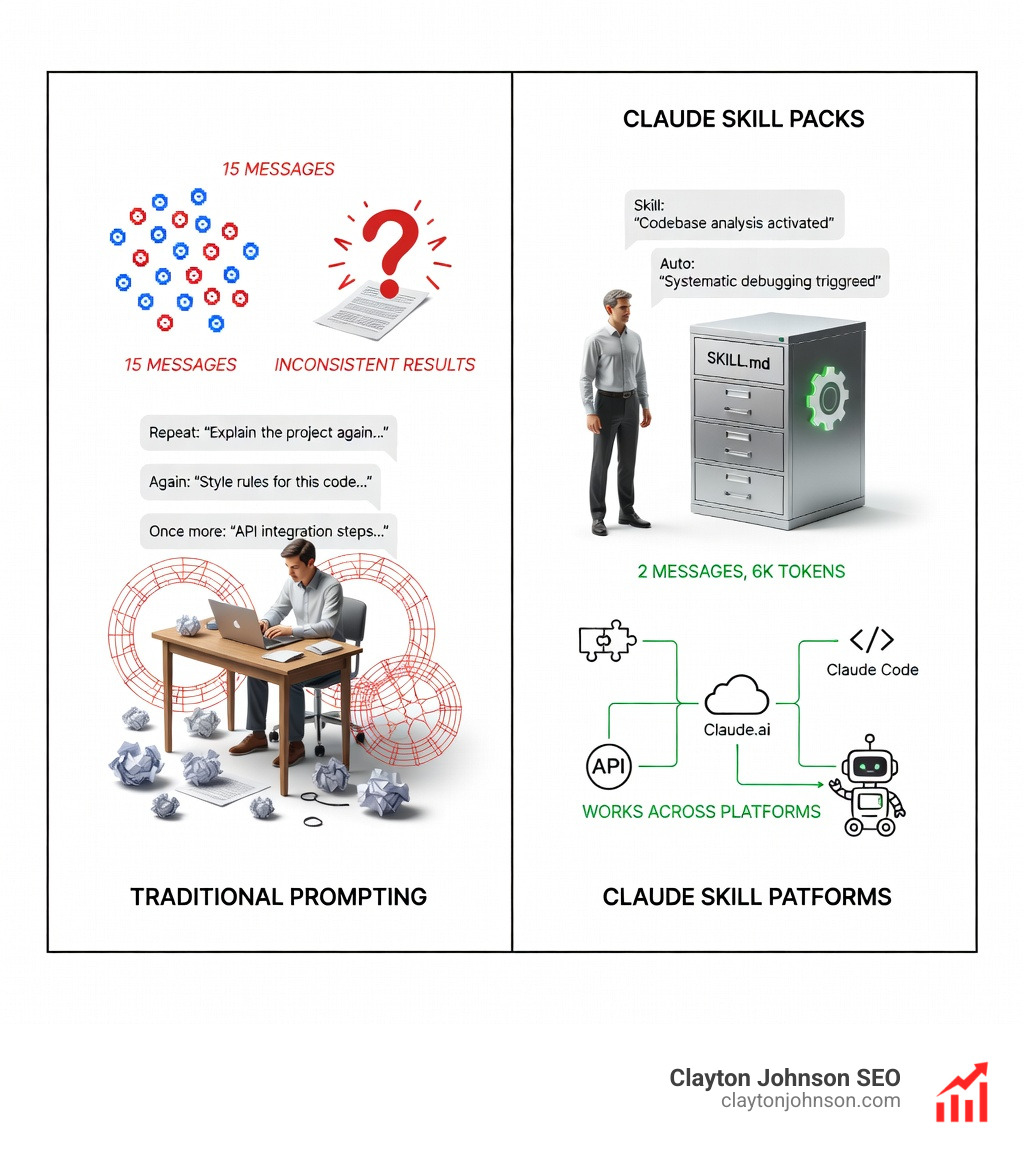
A Claude skill pack is a reusable folder containing instructions, scripts, and resources that teach Claude to perform specialized tasks autonomously—without you repeating the same context in every conversation.
Quick answer for searchers:
| What | Why | How |
|---|---|---|
| Claude skill packs extend Claude with domain-specific expertise packaged as filesystem folders | Traditional prompting requires repeating instructions every conversation; skills load context once and work across all sessions | Create a SKILL.md file with YAML frontmatter, add scripts/references, upload to Claude.ai or deploy via API |
Here’s what makes skills different from regular prompting:
- Progressive disclosure: Claude loads only what it needs (metadata → instructions → resources) to avoid context bloat
- Autonomous invocation: Claude detects when a skill is relevant and uses it automatically
- Composability: Multiple skills work together without conflicts
- Portability: Build once, use across Claude.ai, Claude Code, and API
Instead of pasting your company’s style guide or debugging process into every chat, you package it once as a skill. Claude references it whenever relevant—like an onboarding manual for your AI assistant.
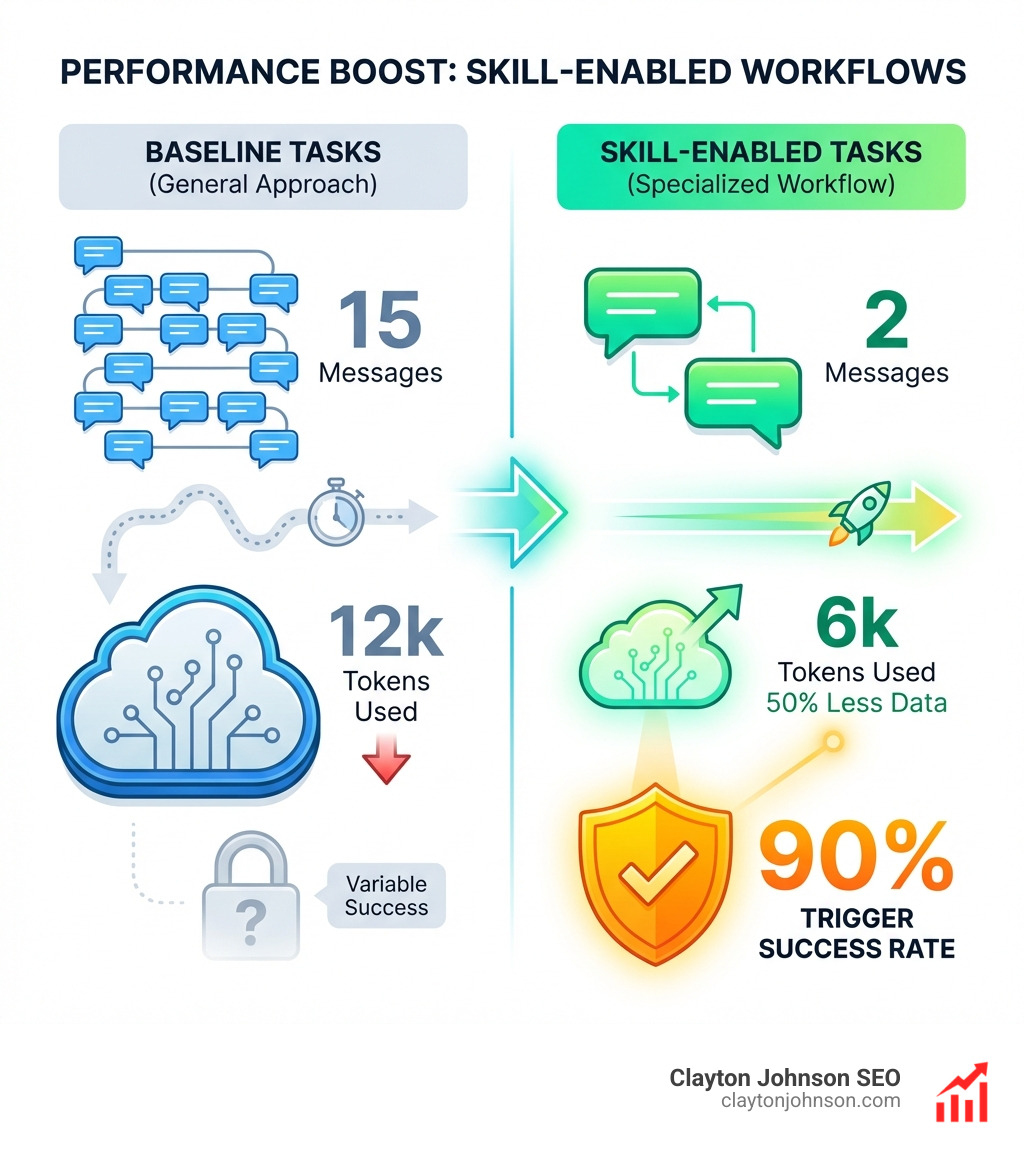
The community has already built 30+ skill packs for platforms like Supabase, Vercel, and Sentry. One developer reduced daily repetitive tasks from 2 hours to 20 minutes using custom skills for codebase analysis and systematic debugging.
But most guides skip the practical details: how to structure the YAML frontmatter so Claude actually triggers your skill, why your carefully written instructions get ignored, and how to deploy skills across teams without manual uploads.
I’m Clayton Johnson, and I’ve spent years building AI-assisted workflows and content systems that turn fragmented efforts into repeatable processes—the same philosophy behind effective Claude skill packs. This guide walks through the complete architecture, from file structure to deployment, so you can build skills that Claude consistently uses.
Claude skill pack vocab explained:
Understanding the Claude Skill Pack Architecture
To build a Claude skill pack that actually fires when you need it, we have to understand the philosophy of “progressive disclosure.” Unlike a standard prompt that dumps 10,000 words into the context window immediately, a Skill is designed to be lean.
Claude doesn’t load everything at once. It scans the “metadata” of your available skills first. If it sees a match for your current task, it then pulls in the instructions. This allows Claude to have access to hundreds of specialized workflows without slowing down or hitting context limits.
Learn more about Skills → Claude Skills Library
This architecture also allows for deep MCP (Model Context Protocol) integration. While an MCP server provides the “tools” (like the ability to read a database), a Skill provides the “recipe” (the specific workflow for how to analyze that database data). This combination transforms Claude from a general-purpose chatbot into a specialized agent that can autonomously invoke the right tools at the right time.
For a deeper dive into why this matters for development teams, check out our guide on the-complete-claude-skill-pack-for-modern-developers.
The Three-Level Loading System
The efficiency of a Claude skill pack comes down to its three-level loading system:
- Level 1: Metadata (Always Loaded): This is the YAML frontmatter in your
SKILL.mdfile. It costs roughly 100 tokens per skill. Claude uses this to decide if the skill is relevant to your request. - Level 2: Instructions (Loaded on Trigger): Once Claude identifies a match, it loads the full text of the
SKILL.mdfile. This usually stays under 5,000 tokens to keep the conversation fast. - Level 3: Resources and Code (Loaded via Bash): If the skill needs to run a Python script or read a massive 50MB documentation file, it does so using bash execution. This means you have “effectively unlimited” resource access without paying for those tokens unless they are specifically needed.
Pre-built vs. Custom Skills
Anthropic provides several “Pre-built Agent Skills” that are available by default on Claude.ai and the API. These include:
- PDF Processing: Extracting text and tables or merging documents.
- Excel Automation: Creating spreadsheets with complex formulas and generating reports with charts.
- PowerPoint Generation: Building full presentations from scratch.
- Word Formatting: Professional document creation and editing.
While these are great, the true power lies in Custom Skills. These allow you to encode your organization’s specific brand guidelines, coding standards, or complex multi-step deployment workflows into a portable package.
How to Build a Custom Claude Skill Pack
Building a Claude skill pack is simpler than it sounds. At its core, it is just a folder containing a file named SKILL.md. This file tells Claude what the skill does and how to execute it.
To get started, we recommend using the skill-creator skill (available in the official directory). It provides an interactive walkthrough to help you generate the folder structure and instructions without manual formatting errors.
If you want to build it manually, you need to follow a strict structure. For more technical details on this process, see how-to-extend-claude-with-custom-agent-skills.
Required File Structure and YAML Frontmatter
A standard Claude skill pack should follow this directory layout:
my-skill-folder/SKILL.md(The core instructions and metadata)scripts/(Optional: Python or Bash scripts for Level 3 execution)references/(Optional: Deep documentation, schemas, or templates)assets/(Optional: Images or static files)
The most important part is the YAML frontmatter at the very top of SKILL.md. It must contain:
- name: A kebab-case name (max 64 characters).
- description: A clear explanation of what the skill does and when to use it. This is limited to 1,024 characters and is the primary way Claude decides to trigger the skill.
Best Practices for Effective Skill Descriptions
If your skill isn’t triggering, 90% of the time the issue is in the description. To fix this:
- Be Specific: Instead of “helps with coding,” use “enforces TDD (Test Driven Development) standards for React TypeScript projects.”
- Include Trigger Phrases: Explicitly mention keywords that users are likely to use.
- Use Progressive Disclosure: Don’t put everything in the
SKILL.md. Put the “how-to” in the main file and the “deep data” in thereferences/folder. - Error Handling: Tell Claude what to do if a script fails or if the user provides the wrong input.
For more examples, the Agent Skills Cookbook is an excellent resource for templates.
Deploying Skills Across Claude Products
One of the best features of a Claude skill pack is portability. You can build a skill once and use it across the entire Claude ecosystem:
- Claude.ai: Upload a ZIP file of your skill folder in Settings.
- Claude Code: Place the skill folder in your project’s
.claude/skills/directory. - Claude API/SDK: Programmatically load skills via the
/v1/skillsendpoint.
Extend Claude with skills – Claude Code Docs
Enabling and Installing a Claude skill pack
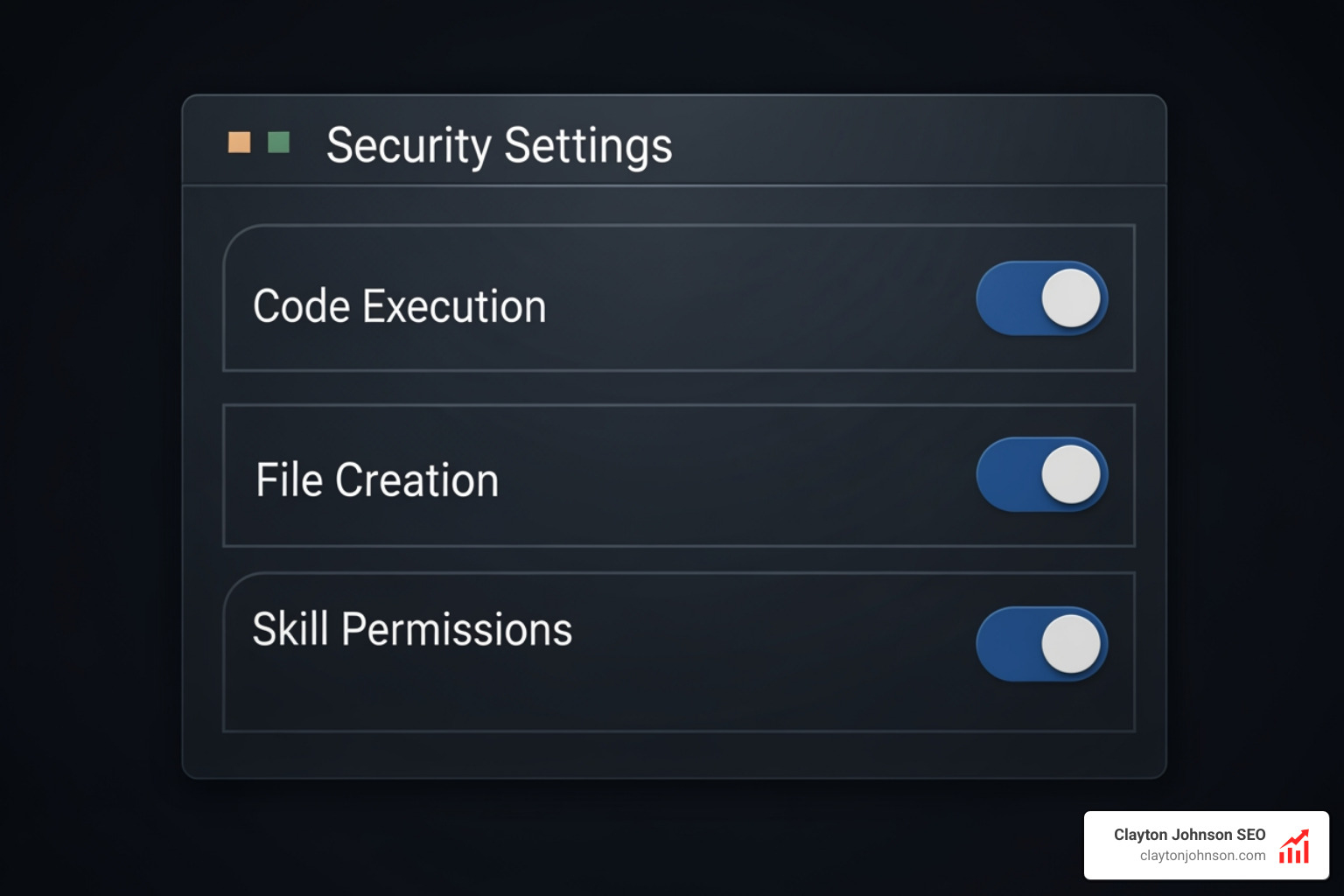
To use skills on Claude.ai, you must first enable “Code execution and file creation” in your Settings > Capabilities. Once enabled:
- Steer to the Skills section.
- Toggle on any Anthropic-provided skills you want.
- Click “Upload” to add your custom ZIP files.
For Team and Enterprise plans, organization owners can provision skills organization-wide. This means you can push a “Brand Voice” skill or a “Security Audit” skill to every member of your team instantly. These skills appear with a team indicator and receive automatic updates when the admin replaces the file.
Using Skills via API and SDK
For developers building their own applications, Agent Skills can be added to Messages API requests. This gives you programmatic control over versioning and management.
In the Claude Agent SDK, you must explicitly configure setting_sources=['user', 'project'] and include ‘Skill’ in your allowed_tools list. This ensures Claude knows where to look for the SKILL.md files on your local filesystem.
Top Community-Recommended Claude skill pack Examples
The community has been busy building some incredible tools. I spent a week testing 30+ skills and hooks, and these are the standouts:
- Superpowers: This is a must-have for developers. It adds slash commands for brainstorming, systematic debugging, and execution planning.
- Skill Seekers: A meta-skill that helps you generate new skills by pointing Claude at a documentation URL.
- Flagship+ Packs: Industry-specific packs for Supabase, Vercel, and Sentry. Each pack contains roughly 30 individual skills covering everything from database operations to CI/CD deployments.
To learn more about how these accelerate the dev cycle, read mastering-the-claude-ai-code-generator-for-faster-development.
Real-World Use Cases for Developers
How are people actually using these?
- TDD Enforcement: A skill that refuses to write production code until a failing test is written.
- Documentation Generation: Pointing a skill at a messy codebase to generate a clean, interactive HTML tree and statistics.
- Systematic Debugging: Using a skill at 2 AM to perform root-cause analysis on a production bug rather than just “guessing” at a fix.
- Knowledge Graphs: Using the “Mix” skill to convert 50+ API PDFs into a queryable knowledge wiki.
Security Considerations and Limitations
When you install a Claude skill pack, you are essentially giving Claude a new set of instructions and, occasionally, the ability to run code.
Security Essentials:
- Sandboxing: Claude runs skills in a secure container environment. However, you should still audit any skill from an untrusted source.
- Prompt Injection: Malicious skills could try to manipulate Claude into exfiltrating data. Only use skills from reputable repositories (like the “awesome-claude-skills” lists on GitHub).
- Network Access: Depending on your settings, skills may have limited or no network access. This is a feature, not a bug, designed to prevent data leaks.
Limitations to Keep in Mind:
- Cross-Surface Sync: Custom skills you upload to Claude.ai do not automatically sync to Claude Code or the API. You must manage them separately.
- Plan Requirements: Skills are available for Free, Pro, Max, Team, and Enterprise users, but “Code Execution” must be toggled on for them to function.
Frequently Asked Questions about Claude Skills
How do I trigger a Claude skill pack?
Claude uses autonomous discovery. You don’t usually need to “turn on” a skill during a chat. If your request matches the description in the skill’s YAML frontmatter, Claude will load it automatically. You can also be explicit: “Use the Supabase skill to check my edge function logs.”
Can I share my Claude skill pack with my team?
Yes. If you are on a Team or Enterprise plan, your admin can upload a skill to the organization settings. This makes the skill available to everyone in the company. For individual users, you can share the ZIP file or host the folder on GitHub for others to download.
What is the difference between a skill and a prompt?
A prompt is a one-off set of instructions. A Claude skill pack is a reusable, filesystem-based resource. Skills are more efficient because they use the three-level loading system (progressive disclosure), meaning they don’t eat up your context window until they are actually needed. They can also include executable scripts, which prompts cannot.
Conclusion
Building a Claude skill pack is the most effective way to turn Claude from a generic AI into a specialized member of your team. By packaging your domain expertise into a reusable format, you eliminate the “context tax” of repeating yourself and ensure that Claude always follows your preferred workflows.
At Clayton Johnson SEO, we focus on building these kinds of AI-assisted workflows to help founders and marketing leaders execute strategy with measurable results. Whether you’re looking for SEO strategy or content systems that actually scale, our goal is to help you diagnose growth problems and fix them with precision.
If you’re ready to stop prompting and start building, explore our More info about SEO content marketing services to see how we can help you integrate these advanced AI workflows into your business growth strategy.