Claude Code Modularization Tips for Cleaner Projects


Why Claude Code Modularization Tips Matter for Production Workflows
Claude code modularization tips help you break large, complex codebases into clean, manageable modules without introducing bugs or losing code fidelity. Here is a quick overview of the most effective approaches:
Top Claude Code Modularization Tips at a Glance:
- Limit CLAUDE.md to 150 lines – Keep instructions tight to reduce token waste and directive loss
- Use .claude/rules/ for path-specific rules – Apply targeted instructions only where they are needed
- Avoid LLM rewriting during refactoring – Use AST-based extraction to preserve 100% code fidelity
- Create custom slash commands – Automate repetitive modularization workflows in .claude/commands/
- Structure Agent Skills with SKILL.md – Package reusable expertise into portable folder-based modules
- Use Plan mode for reviews, AcceptEdits for active coding – Match permission modes to the task at hand
- Validate with git diff and automated tests – Confirm zero unintended rewrites after every extraction
Here is the core problem developers run into: when Claude Code refactors a large file, it tends to rewrite the code rather than simply move it. That means renamed variables, reformatted comments, and subtle logic shifts that take hours to verify. For a 2,500-line utils.js with battle-tested logic, that verification overhead is unacceptable in production environments.
The good news is that with the right setup, you can guide Claude Code to modularize deterministically — preserving every line, every comment, every edge case — while also reducing token consumption by up to 50-80%.
I’m Clayton Johnson, an SEO strategist and systems architect who applies structured, AI-augmented workflows to complex technical and marketing problems — including finding the right Claude code modularization tips that actually hold up at scale. In the sections below, I’ll walk you through the full framework, from memory hierarchy setup to agent orchestration and fidelity validation.
Glossary for Claude code modularization tips:
The Core of Claude Code Modularization Tips

At the heart of any successful refactoring project is the transition from “AI generation” to “deterministic extraction.” When we talk about Claude code modularization tips, we are advocating for a shift in how we interact with the tool. Instead of asking Claude to “Rewrite this file into three modules,” we should guide it to act as an orchestrator for Abstract Syntax Tree (AST) parsing and literal string extraction.
Deterministic modularization ensures that the code moved from A.js to B.js is identical to the source. By using AST parsing to identify logical boundaries (like export statements or class definitions), we can perform “cut and paste” operations that maintain the functional integrity of the application. This is a significant upgrade from the standard LLM behavior of regenerating code from scratch, which often results in “hallucinations”—subtle logic errors that the AI thinks are improvements but actually break production builds.
| Feature | LLM Rewriting (Risky) | Deterministic AST Extraction (Safe) |
|---|---|---|
| Code Fidelity | Variable; often changes formatting | 100% Identical to source |
| Comments | May be stripped or altered | Preserved exactly |
| Logic | Risk of subtle “hallucinations” | Zero logic change |
| Speed | Slower (requires full generation) | Instant (string slicing) |
| Verification | High (manual line-by-line diff) | Low (verification of imports only) |
For more on how to integrate these workflows, check out our guide on the Claude AI programming assistant.
Why Modularization Matters for Production
In a production environment, context is expensive. Every line of code Claude reads contributes to the token count. Power users have found that by modularizing their codebases, they can achieve 50-80% token savings. This isn’t just about saving money; it’s about staying within the context window limits of the model.
When a file is 2,000 lines long, Claude has to “hold” all that information in its working memory to make a single change. By splitting that file into five 400-line modules, you allow Claude to focus exclusively on the relevant logic. This reduces “contextual noise” by 40%, leading to sharper, more accurate edits. Adopting Claude Code best practices ensures that your production safety remains high while your development velocity increases.
The Problem with LLM Rewriting
The biggest hurdle in AI-assisted refactoring is the “rewrite itch.” LLMs love to tidy things up. While a human developer might just want to move a function to a new file, Claude might decide to rename a variable for clarity or update a loop to a more modern syntax.
In a legacy codebase, these “improvements” are dangerous. They introduce non-determinism—the same prompt might yield different results on different days. Furthermore, the verification overhead becomes a bottleneck; if you spend two hours auditing a git diff because Claude changed 50 lines of formatting, you’ve lost the productivity gain the AI provided. This is why we recommend tools that extract code without rewriting, treating the AI as the hands that move the blocks, rather than the brain that reimagines them.
Structuring the Memory Hierarchy for Modular Success
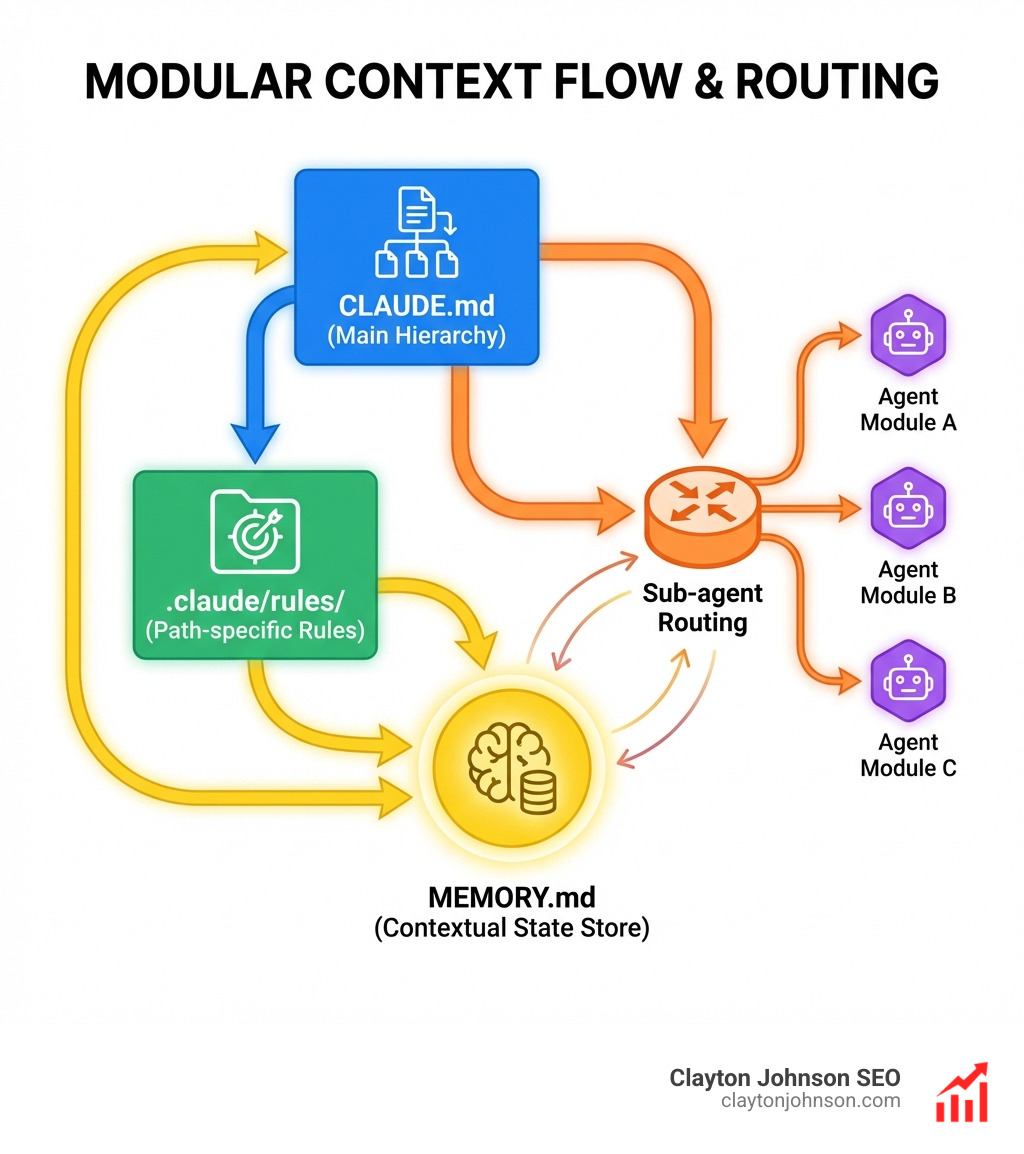
To get the most out of Claude code modularization tips, you must understand the hierarchy of how Claude “remembers” your project. Claude doesn’t just read your files; it consumes a layered system of instructions that define its behavior.
We structure this hierarchy to prevent “instruction dilution.” If you put every rule into a single CLAUDE.md file, the high-priority instructions get lost in the noise. Instead, we use a modular approach:
- User-level rules (
~/.claude/CLAUDE.md): Global preferences for all your projects. - Project-level rules (
./CLAUDE.md): Core architecture and standards for this specific repo. - Modular rules (
.claude/rules/*.md): Path-specific instructions that only load when relevant. - Auto-memory (
MEMORY.md): A record of session-specific learnings.
This structure is essential for scalable coding frameworks for AI assistance, as it ensures Claude only sees the rules it needs for the file it is currently editing.
Optimizing CLAUDE.md and Project Rules
The most common mistake is a bloated CLAUDE.md. Research shows that files over 200 lines cause a 30% loss in directive adherence. We recommend a strict 150-line limit. Use bullet points rather than dense paragraphs, and focus on defining critical paths and prohibitions (what Claude must not do).
For domain-specific logic, use path-specific rules in .claude/rules/. By using YAML frontmatter to target specific file patterns (e.g., paths: ["src/api/**/*.ts"]), you ensure that API-specific validation rules don’t clutter the context when Claude is working on a React component. Teams using this modular approach report a 35% reduction in corrections needed on the agent’s output.
Automating Workflows with Claude Code Modularization Tips
Efficiency comes from automation. Instead of typing out long instructions for every refactor, we use custom slash commands. By placing Markdown files in .claude/commands/, you can create reusable specialists.
For example, a /modularize command can be configured with an XML-structured instruction set that tells Claude exactly how to extract code, update imports, and run a linting hook. This turns a complex 10-step manual process into a single command. You can also create a /review command that runs a specific checklist against your newly created modules to ensure they meet your project’s architectural standards.
Advanced Agent Orchestration and Custom Skills
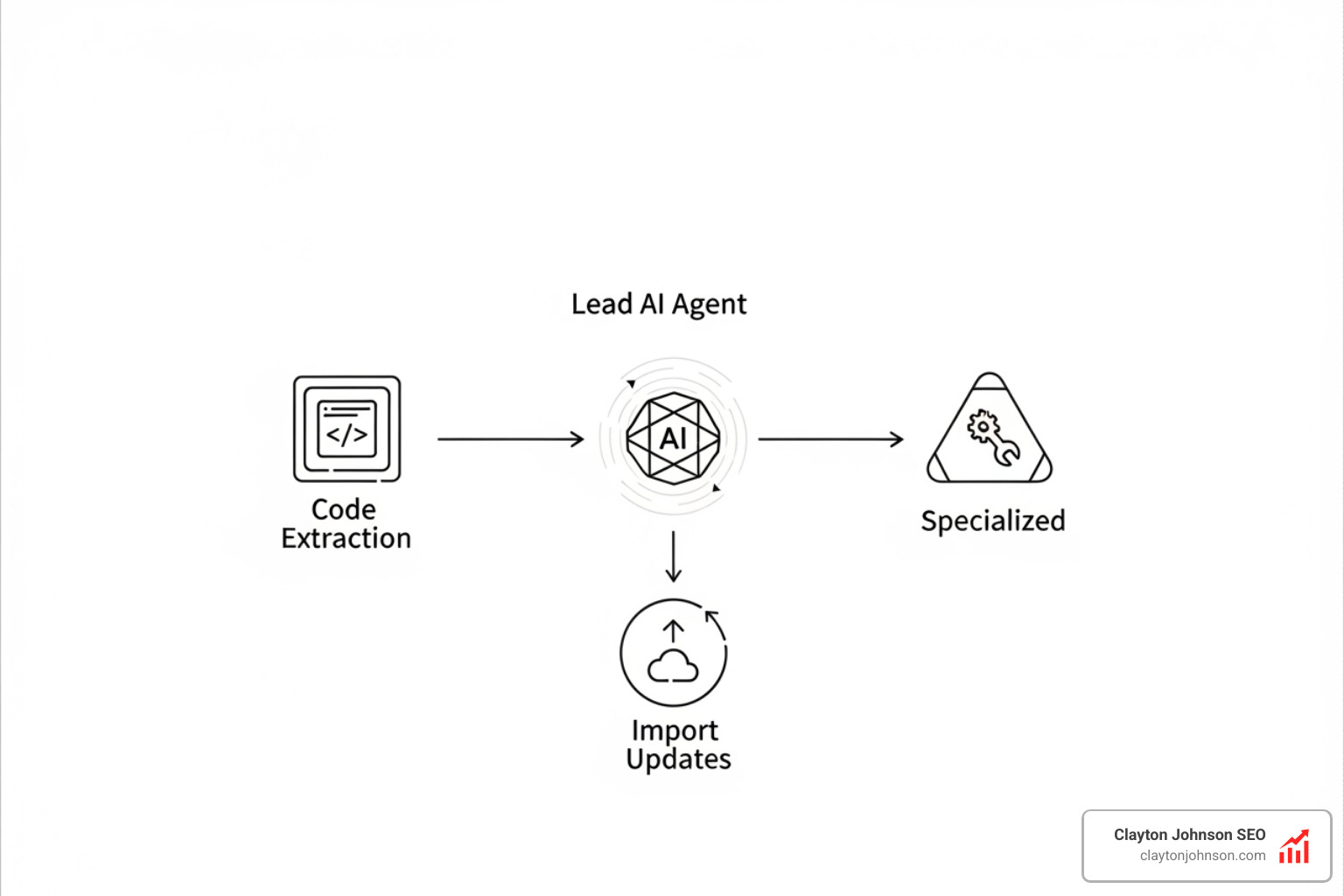
When modularizing a massive project, one Claude instance isn’t enough. We use agent teams and sub-agents to handle different parts of the task simultaneously. This “divide and conquer” strategy is one of the most powerful Claude code modularization tips for enterprise-scale repos.
You can spawn a lead agent to coordinate the work, while sub-agents handle specialized tasks like:
- Sub-agent A: Extracting utility functions from a monolith.
- Sub-agent B: Updating all import statements across the codebase.
- Sub-agent C: Generating unit tests for the new modules.
Because sub-agents work in isolated contexts, they don’t pollute the main session with unnecessary tokens. This keeps the orchestrator focused on the big picture. Learn more about these mechanics in our guide on Claude Code Agents and sub-agents.
Scaling Expertise using Claude Code Modularization Tips
To maintain consistency across a large team, we package expertise into Agent Skills. This shifts the paradigm from simple prompt engineering to file-system-based expertise. A skill folder typically contains:
SKILL.md: The core instructions for the specialized task.reference.md: Documentation and API signatures the agent needs.examples.md: 3 to 5 high-quality code examples.
Projects that include these examples see a 40% reduction in correction requests. This “Skill Pack” can be shared across the team via git, ensuring that everyone’s Claude instance follows the same modularization logic. For a deep dive, see the complete Claude skill pack for modern developers.
Leveraging MCP and Permission Modes
The Model Context Protocol (MCP) allows Claude to reach outside the codebase. During modularization, you might use an MCP server to query a Jira ticket for requirements or update a documentation page in Google Drive.
Equally important are Permission Modes. When you are in the middle of a refactor, you don’t want to be interrupted by a dozen “Are you sure?” prompts.
- Plan Mode: Best for initial analysis and read-only reviews.
- AcceptEdits Mode: Best for the heavy lifting of moving code.
- BypassPermissions: Only for trusted, local environments where speed is the priority.
Matching the mode to the task can lead to productivity boosts of up to 40%.
Measuring Fidelity and Avoiding Refactoring Pitfalls
How do you know if your modularization was successful? You measure it. The goal is “Zero-Rewrite Extraction.” After a refactor, your git diff should show lines being removed from one file and added to another with zero modifications to the internal logic.
We use a combination of AST validation and automated tests to confirm functional equivalence. If the AST of the extracted function matches the source, and the unit tests still pass, you have successfully modularized without introducing regression bugs. This process reduces contextual noise by 40%, making the codebase easier for both humans and AI to understand. It is also wise to keep an eye on Anthropic usage monitoring to ensure your large-scale refactors don’t hit rate limits unexpectedly.
Real-World Use Cases: Utils and React Components
One of the most common Claude code modularization tips involves splitting a bloated utils.js. Imagine a 2,500-line file containing everything from date formatting to complex math logic. We guide Claude to:
- Identify logical groups (e.g.,
stringUtils,dateUtils). - Extract these groups into separate files using deterministic string slicing.
- Automatically update all imports in the
src/directory.
The same applies to React. Extracting sub-components from a 1,500-line Dashboard.jsx into a components/ folder follows the same “extract-and-import” pattern. This ensures that your legacy refactoring remains safe and your production app remains stable.
Common Pitfalls and Hallucination Prevention
The road to modularization is paved with good intentions—and common pitfalls. Instruction dilution occurs when you give Claude too many conflicting rules. Circular dependencies can happen if you split files without a clear architectural plan.
To avoid these, we recommend:
- Manual verification: Always audit the git diff for unexpected rewrites.
- Audit logging: Use Claude to summarize exactly what it changed in a session.
- Proactive Prohibitions: Explicitly tell Claude, “Do not change variable names or formatting during extraction.”
Teams that follow these structured steps report up to 40% faster delivery times and a significantly lower bug rate.
Frequently Asked Questions about Claude Code Modularization Tips
How does the memory hierarchy improve refactoring accuracy?
The memory hierarchy (User > Project > Modular > Auto-memory) ensures that Claude always has the most relevant “high-priority” instructions at the top of its context. By using modular rules, you prevent Claude from being distracted by irrelevant guidelines, which directly improves its ability to perform precise, accurate refactors. This optimization reduces token consumption and prevents the model from getting “confused” by too many global rules.
What are the best practices for Agent Skills folder structure?
A professional Agent Skill should be organized as a portable directory. The standard structure includes a SKILL.md for core logic, a scripts/ folder for any deterministic automation (like AST parsers), and a templates/ folder for standardized output. Including a reference.md with your specific library versions or API keys helps Claude avoid making assumptions about your tech stack.
How can I automate code fidelity validation?
The best way is to use non-LLM verification hooks. You can set up a git hook or an npm script that runs an AST comparison between the old file and the new modules. If the logic trees don’t match, the build should fail. Additionally, always run your existing unit test suite immediately after a refactor to ensure functional equivalence.
Conclusion
At Clayton Johnson SEO, we believe that clarity leads to structure, and structure leads to leverage. Claude code modularization tips are more than just a way to clean up your files; they are a core part of a structured growth architecture. By treating your AI interactions with the same rigor you apply to your software architecture, you create a compounding growth environment where development becomes faster, safer, and more scalable.
If you are a founder or marketing leader looking to build a high-leverage growth engine, explore our SEO content marketing services to see how we combine actionable strategic frameworks with AI-augmented workflows.