Why You Need to Integrate AI Into Your Workflows Right Now
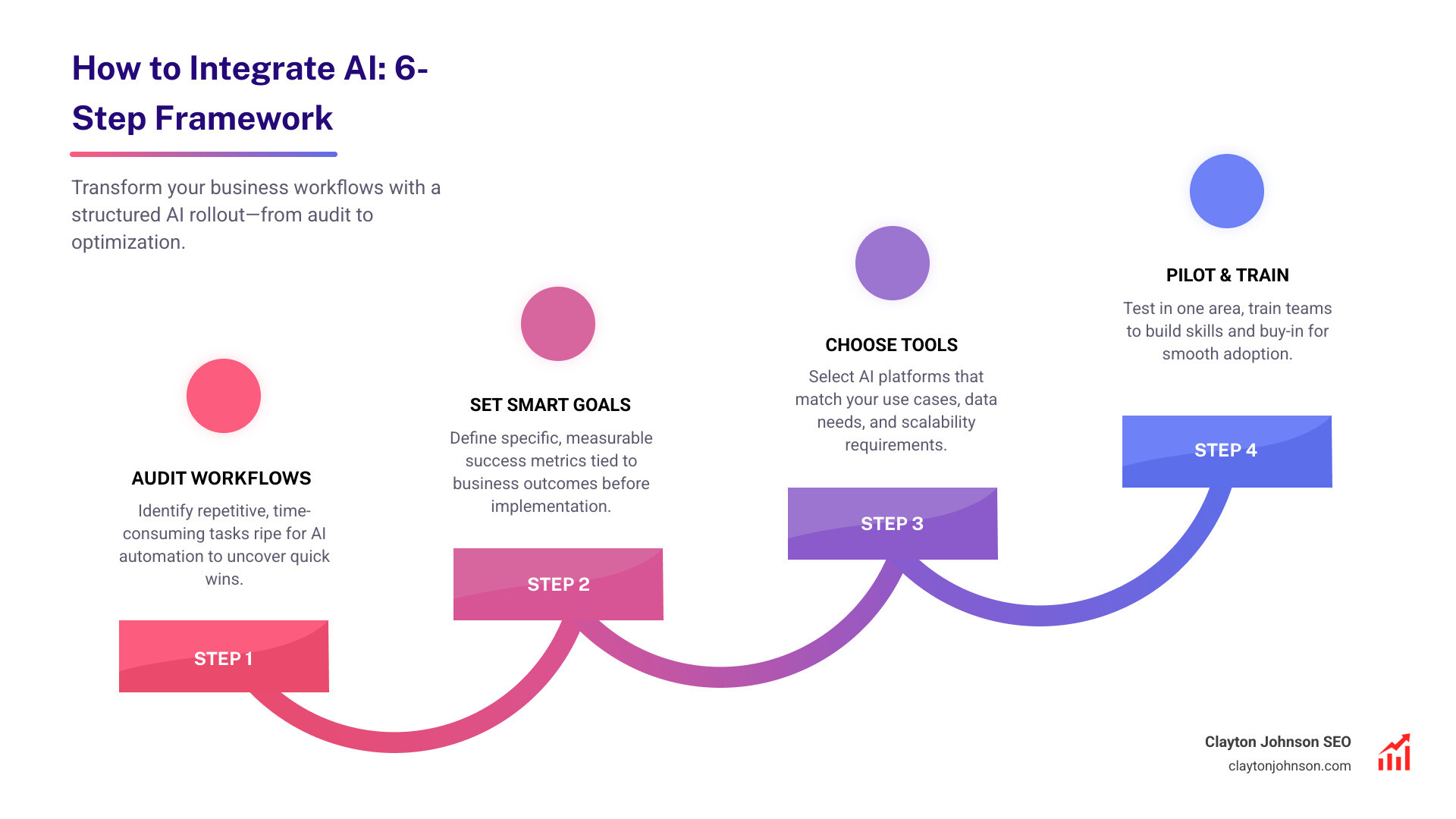
How to integrate AI into your business comes down to six core steps:
- Audit your workflows — identify repetitive, time-consuming tasks
- Set SMART goals — define what success looks like before you start
- Choose the right tools — match AI platforms to your specific use cases
- Start with a pilot project — test in one area before scaling
- Train your team — close the skills gap and build internal buy-in
- Monitor and optimize — track KPIs and refine continuously
Most founders and marketing leaders already know AI matters. What stops them is not interest — it is knowing where to actually begin.
The numbers make the urgency clear. Organizations using AI in their workflows report up to a 30% boost in operational efficiency and a 25% drop in manual errors. Companies that integrate AI effectively can boost productivity by as much as 40%. And yet, over 80% of AI projects fail — usually because there was no clear plan, no defined goals, and no structured rollout.
The gap is not access to AI tools. It is knowing how to deploy them systematically.
This guide is built for founders and marketing leaders who are done treating AI as a side experiment. It gives you a structured framework to move from fragmented, tactical AI use to a system that compounds over time.
I’m Clayton Johnson, an SEO strategist and growth operator who has built AI-augmented marketing workflows for founder-led businesses, and I’ve written this guide on how to integrate AI specifically for operators who want leverage — not hacks. The frameworks here come from real deployments, not theory.
How to integrate AI vocabulary:
Understanding AI Integration and Its Business Impact
When we talk about AI integration, we aren’t just talking about opening a browser tab and asking a chatbot to write a funny email. True integration means embedding machine-driven intelligence directly into your existing systems, applications, and daily habits. It transforms static software into adaptive systems that learn and improve over time.

The business impact is no longer theoretical. According to McKinsey research on AI efficiency and decision-making, 50% of organizations piloting AI projects reported measurable improvements in efficiency and decision-making within just six months. This isn’t just about speed; it’s about the quality of the work being produced.
Key benefits of a successful rollout include:
- Operational Efficiency: Automating the “boring stuff” so your team can focus on high-level strategy. IBM research on operational efficiency and manual error reduction shows that organizations using AI in their workflows have seen a 30% boost in efficiency.
- Error Reduction: AI doesn’t get tired at 4:00 PM on a Friday. It maintains consistent accuracy in data entry and monitoring, leading to a 25% drop in manual errors.
- Scalability: AI allows you to handle 10x the volume without 10x the headcount. Whether it’s processing support tickets or analyzing SEO data, AI provides the infrastructure to grow.
- Predictive Analytics: Instead of just looking at what happened last month, you can use AI to forecast trends and make proactive business decisions.
In a competitive market like Minneapolis, staying ahead means moving from “AI-curious” to “AI-integrated.”
How to Integrate AI: A Step-by-Step Strategic Framework
Successful AI adoption isn’t a “plug-and-play” event; it’s a process of redesigning how work gets done. We recommend a structured 7-step guideline to ensure your investment actually generates a return.
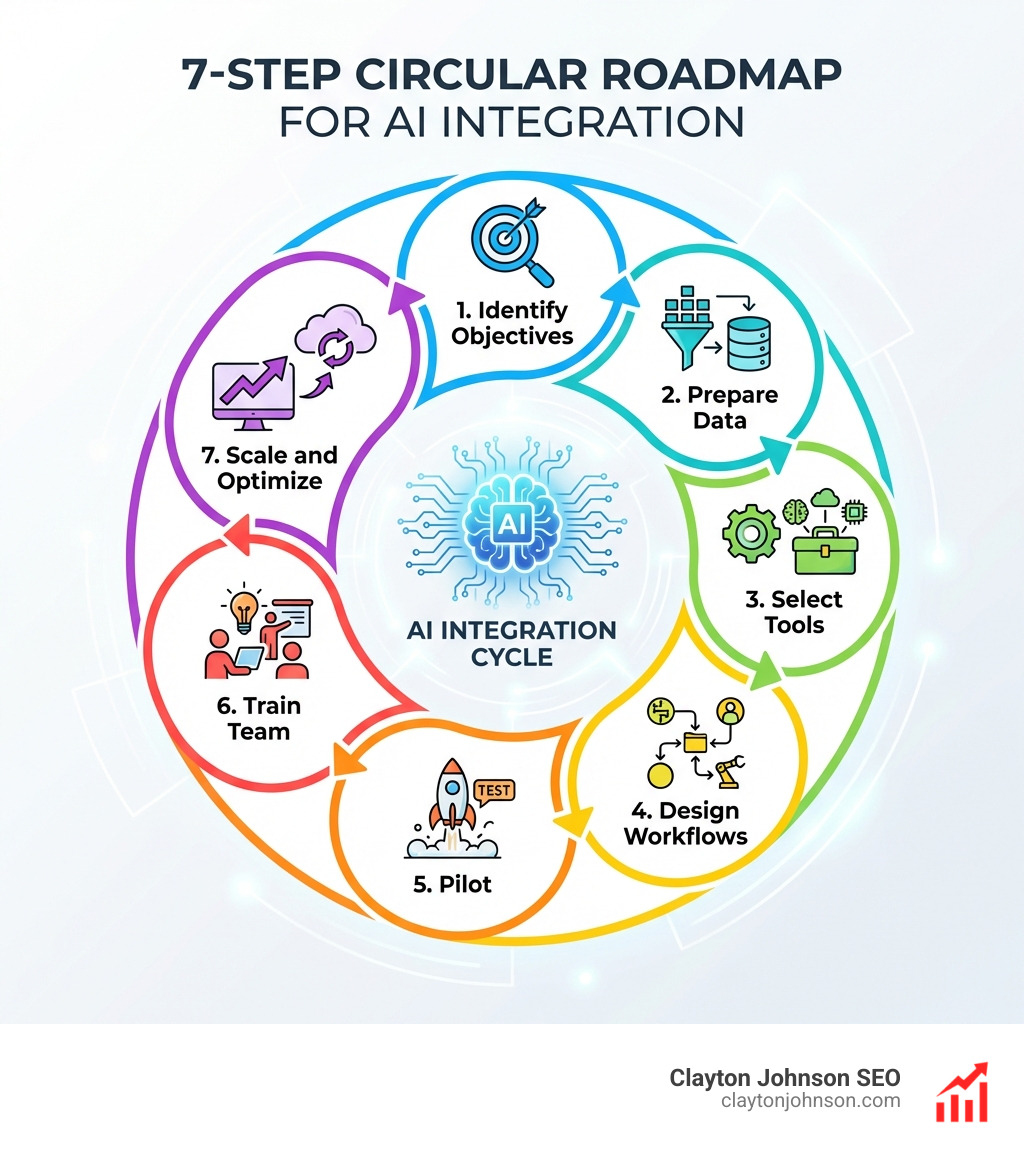
- Define Objectives: Start with SMART goals. Don’t just say “we want to use AI.” Say “we want to reduce customer service response time by 30%.”
- Assemble Cross-Functional Teams: Integration isn’t just an IT problem. You need voices from marketing, sales, and operations to ensure the tools solve real-world problems.
- Redesign Workflows: Don’t just layer AI on top of a broken process. Rethink the workflow to maximize speed while keeping humans in the loop for tasks requiring emotional intelligence.
- Choose the Right Stack: Decide between off-the-shelf tools or custom API solutions. More info about AI tools can help you navigate this selection process.
- Launch a Pilot: Test your hypothesis in a controlled environment.
- Train and Manage Change: Address the skills gap early. Over 60% of organizations report an AI skills gap, so ongoing education is vital.
- Scale and Optimize: Once the pilot proves successful, roll it out across the department and monitor performance.
How to integrate AI through pilot projects and MVPs
The biggest mistake we see is trying to do everything at once. Instead, start with an MVP (Minimum Viable Product). We categorize tasks into two buckets:
- Discovery Tasks: Low-risk, high-value activities like drafting social media posts or summarizing internal meetings. These are perfect for early wins.
- Trust Tasks: Mission-critical operations like financial forecasting or customer-facing medical advice. These require rigorous validation and human oversight.
MIT Technology Review insights on industry leaders suggest that starting small allows you to test the waters without risking major disruptions. Use iterative testing and feedback loops to refine the model’s accuracy before it ever touches a customer.
How to integrate AI tools into existing software ecosystems
Your AI shouldn’t live on an island. It needs to talk to the tools you already use.
- Communication: Integrate AI assistants into Slack to automate channel summaries or triage internal requests.
- Content: Use AI plugins within Google Docs to assist with research and first drafts.
- Automation: Platforms like Zapier workflow automation and Microsoft Power Automate act as the “glue,” connecting your CRM, email, and project management tools to AI models without writing a single line of code.
Identifying High-Value Use Cases and Workflows
To get the best ROI, you must identify where the bottlenecks are. Is your sales team spending four hours a day on manual follow-ups? Is your marketing team stuck in a cycle of repetitive keyword research?
One of the most important technical decisions you’ll make is where the “brain” of your AI lives.
| Feature | On-Device AI | Cloud-Based AI |
|---|---|---|
| Latency | Ultra-low (instant) | Higher (depends on internet) |
| Privacy | High (data stays on device) | Variable (data sent to servers) |
| Processing Power | Limited by hardware | Virtually unlimited |
| Best Use Case | Real-time translation, local security | Complex data analysis, LLMs |
For those looking to keep data local, Microsoft Foundry on Windows for local AI offers a robust path for developers to integrate AI directly into Windows apps. Conversely, for heavy lifting like content generation and complex marketing workflows, tools like ChatGPT for marketing workflows provide the scale needed to transform your output.
Selecting the Right Tools and Managing Data Governance
Choosing a tool because it’s “trending” is a recipe for failure. Your selection criteria should be based on your specific business gaps. Whether you are using OpenAI for developers to build a custom app or a modular platform like Eden AI for modular solutions to access multiple models, you must prioritize data quality.

Organizations lose an average of $12.9 million annually due to poor data quality. Before you integrate, you must:
- Clean and Label: Ensure your data is accurate and structured.
- Establish Governance: Implement Security and compliance best practices to protect sensitive information.
- Ensure Compliance: Adhere to GDPR and other privacy regulations to mitigate legal risks.
- Mitigate Bias: Regularly audit your AI outputs to ensure they are fair and ethical.
Overcoming Implementation Challenges and Measuring Success
The hardest part of how to integrate AI isn’t the technology—it’s the people. Change management is essential. If your team thinks AI is there to replace them, they will resist it. If they see it as a “Copilot” that removes the drudgery from their day, they will embrace it.
To track if your integration is working, use tools like Wrike for tracking workflow efficiency to monitor these key metrics:
- Response Time: How much faster are we completing tasks?
- Accuracy: Has the error rate decreased?
- Cost Efficiency: Are we saving money on manual labor?
- User Engagement: Is the AI actually being used by the team?
Implementing Continuous improvement loops ensures that your AI systems evolve as your business grows. Companies that actively monitor and refine their AI systems see up to 20% higher ROI than those that don’t.
Frequently Asked Questions about AI Integration
What are the biggest challenges in AI integration?
The most common hurdles include the AI skills gap, poor data quality, and a lack of clear business objectives. Many companies also struggle with “hallucinations” (where AI makes things up) and integrating new tools with legacy software.
How do I choose between building a custom model or using an API?
For most businesses, using an API (like OpenAI) is the fastest and most cost-effective route. You get state-of-the-art performance without the massive overhead of training a model from scratch. Building a custom model is usually only necessary for highly specialized, proprietary tasks where data privacy is the absolute priority.
How can I ensure my AI features comply with data privacy laws?
Start by anonymizing user data before it ever hits the AI model. Ensure your vendors are GDPR and HIPAA compliant, and always provide transparency to your users about how their data is being used by AI.
Conclusion
How to integrate AI is not a one-time project; it is a fundamental shift in how your business operates. At Clayton Johnson, we believe that most companies don’t lack the tools—they lack the structured growth architecture to make those tools effective.
By following this framework, you move away from random acts of marketing and toward a growth operating system that leverages AI for compounding results. Whether we are building SEO strategy or AI-enhanced execution systems, our goal is to provide the clarity and structure needed for long-term leverage.
If you are ready to stop experimenting and start scaling, explore More info about AI tools or reach out to see how Demandflow.ai can build the infrastructure your business needs to thrive.