Claude AI Coding 101: More Than Just a Chatbot

Why Claude Code Is Changing How Developers Work
What is Claude coding? Claude Code is an agentic AI coding tool that runs in your terminal, reads your entire codebase, edits files directly, and executes commands autonomously—going far beyond simple code suggestions or chat-based assistance.
Quick Answer for Busy Developers:
- What it is: A terminal-based AI agent powered by Claude 3.7 Sonnet that understands your full project context
- How it’s different: Direct file access, autonomous execution, and persistent project memory via CLAUDE.md files
- Key capabilities: Complex debugging, test-driven development, git workflow automation, and parallel agent teams
- Who it’s for: Both technical developers and non-technical users building systems or workflows
- Cost: Claude Pro ($20/month) for ~10-40 prompts per 5 hours; Claude Max 5x ($100/month) for ~50-200 prompts
If you’ve been frustrated with copy-pasting code from chatbots or losing context mid-project, Claude Code solves those problems by living directly in your development environment.
One developer described their first experience: “After a couple of days of vibe coding frustration, I finally gave Claude Code a go” on their toddler’s flashcard app. The tool traced data flow, identified issues, and provided a structured to-do list—all without the manual back-and-forth of traditional AI chat interfaces.
The fundamental shift: Claude Code doesn’t just answer coding questions. It acts as an autonomous agent that can work for extended periods, manage its own context, and integrate directly with your tools and workflows. This represents a move from AI-assisted coding to AI-augmented development systems.
I’m Clayton Johnson, and I’ve spent years building AI-assisted marketing workflows and scalable systems at the intersection of technical SEO and automation. Understanding what is Claude coding matters because it signals how AI agents will transform not just development, but knowledge work across disciplines—from content systems to competitive research.
What is Claude coding word roundup:
What is Claude coding?
When we ask, “What is Claude coding?” we are referring to Claude Code, a specialized agentic tool developed by Anthropic. Unlike the standard Claude chatbot you might use in a browser, Claude Code is a terminal-based interface designed to live where developers work. It doesn’t just suggest snippets; it has deep codebase awareness, meaning it can read your files, understand your project structure, and make edits autonomously.
This tool provides direct model access to Claude 3.7 Sonnet, which is currently regarded as the best AI model family for coding. In fact, Claude 3.7 Sonnet is the most popular model on Cursor, a popular AI-integrated IDE. By moving the AI into the terminal, Anthropic has created a workflow where the agent can run tests, check logs, and even fix bugs it discovers during the process.
For a deeper look into how these tools are evolving, check out The Real Truth About Coding AI Growth. You can also explore the Claude Code Official Overview to see the technical specifications.
What is Claude coding vs. the web app?
The difference between Claude Code and the standard web app is like the difference between a consultant who gives advice and a partner who actually sits down and does the work with you.
- Local File Access: The web app requires you to manually upload files or copy-paste code. Claude Code has direct access to your local files.
- Terminal CLI: It operates as a Command Line Interface (CLI). This allows it to run shell commands, execute scripts, and interact with your development environment directly.
- Agentic Execution: In the web app, Claude is reactive. In the terminal, Claude is proactive. You can give it a high-level goal—like “Fix the broken checkout flow for expired cards”—and it will search the codebase, write a failing test, modify the payment logic, and verify the fix.
- Context Management: While web chats often “forget” details as the conversation gets long, Claude Code uses sophisticated context management to keep track of your entire project’s architecture.
If you prefer a middle ground, the Claude Desktop Download offers some local file integration, but the CLI remains the power user’s choice for true automation.
What is Claude coding for non-technical users?
You might think a terminal-based tool is only for software engineers, but we’ve seen non-technical founders use it to build incredible systems. Because it uses natural language, anyone who can describe a process can use it.
For example, we use Claude Code for competitive research. You can point Claude at a folder of markdown files containing competitor data and ask it to “Analyze these four competitors in parallel and generate a comparison table.” Because it supports parallel agents, it can research multiple topics simultaneously, saving hours of manual work.
Non-technical users benefit from:
- Data Portability: Everything is stored in markdown files on your machine. You own your data.
- System Building: Instead of asking one-off questions, you are building a reusable system.
- Parallel Processing: Running multiple tasks at once without the AI getting “confused” by mixed contexts.
To start building your own AI systems, see our guide on Mastering the Claude AI Code Generator for Faster Development.
Key Features and Strengths of Claude Code
The real “magic” of Claude Code lies in its ability to maintain project memory.
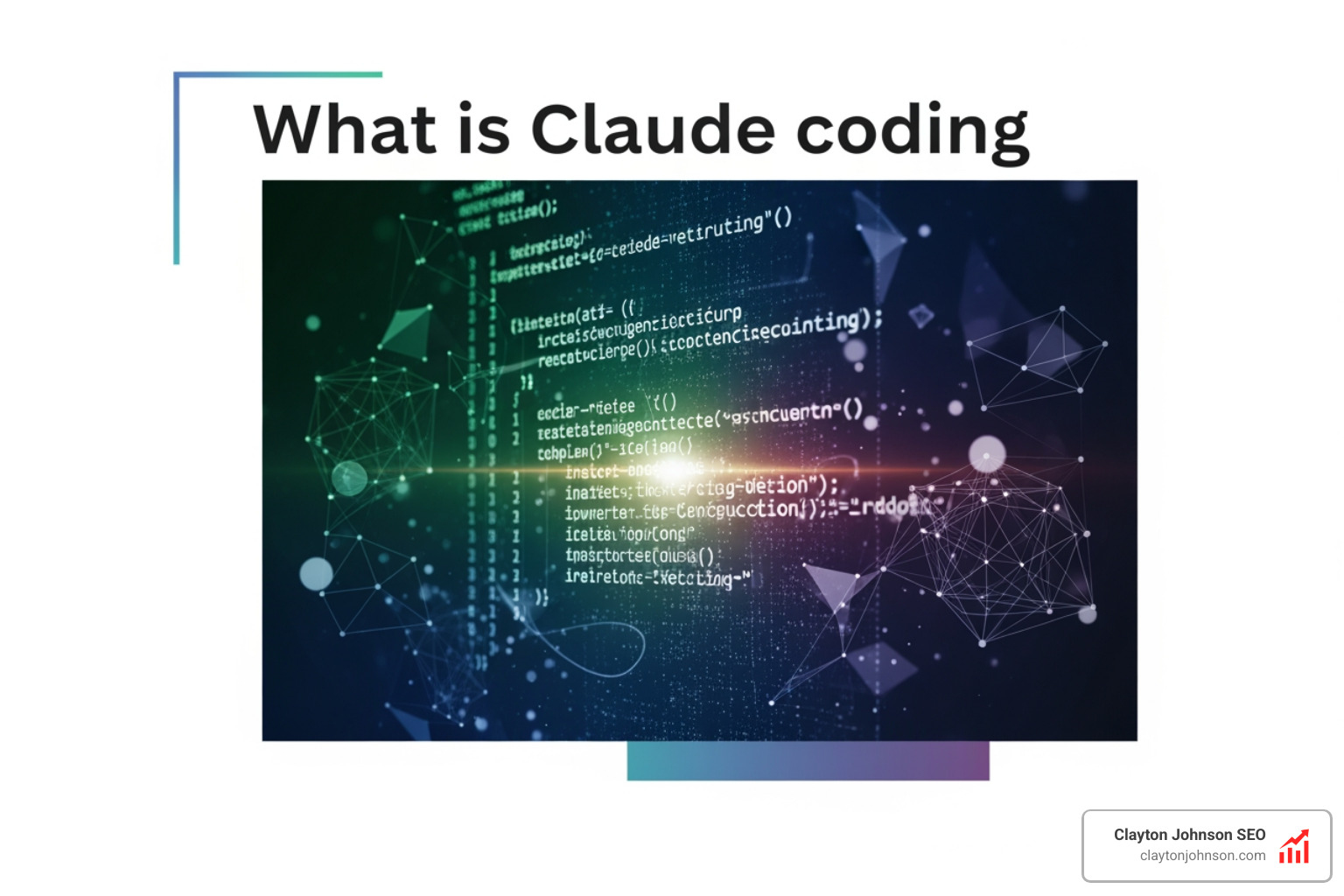
CLAUDE.md: The Project Memory
When you first start a project, you run the /init command. This creates a CLAUDE.md file in your project root. This file acts as the “brain” for the AI. It stores:
- Project Architecture: How the different parts of your code fit together.
- Coding Standards: Your preferred naming conventions and libraries.
- Review Checklists: What the AI should check before finishing a task.
This persistent memory ensures that every time you start a new session, Claude knows exactly where you left off. It’s one of the reasons it’s considered The Best AI for Coding and Debugging.
Complex Debugging and TDD
Claude Code excels at Test-Driven Development (TDD). We’ve seen it fix complicated scraper bugs for just $1.22 in API costs. It doesn’t just guess what’s wrong; it writes a test to prove the bug exists, then iterates until the test passes. This methodical approach is much more reliable than “vibe coding” where you hope the AI gets it right on the first try.
For a full list of what you can do, check out The Complete Claude Skill Pack for Modern Developers.
Structured Problem Solving and Git Workflows
One of the most powerful aspects of what is Claude coding is its integration with Git. It doesn’t just write code; it manages the version control process.
- TASKS.md: You can create a file called TASKS.md to list project stages. Claude will check these off as it completes them.
- Git Worktrees: Advanced users can use Git worktrees to run multiple Claude Code agents in parallel on different branches.
- Automated Commits: After completing a task, you can simply say “commit my changes,” and Claude will write a descriptive commit message based on what it actually did.
Following Claude Code Best Practices means starting with exploration prompts. Instead of saying “Write this feature,” start with “Explore how the data flows in this module.” This helps the AI avoid making “twitchy” or incorrect assumptions.
How to Set Up and Use Claude Code
Setting up Claude Code is straightforward if you have a basic comfort level with your computer’s terminal.
Prerequisites
- Node.js 18+: You must have Node.js installed on your machine. You can Download Node.js from the official site.
- Anthropic Account: You need an active Claude subscription or an Anthropic Console account.
- OS Requirements: It runs natively on macOS and Linux. Windows users will need to install WSL2 to use it effectively.
Installation and Project Initialization
To install, open your terminal and run:
npm install -g @anthropic-ai/claude-code
Once installed, steer to your project folder and simply type claude. The first time you run it, you’ll need to authenticate.
The most important step is running the /init command. This scans your directory and creates that vital CLAUDE.md file. As we mentioned in Why Every Developer Needs AI Tools for Programming in 2025, this initialization is what separates an assistant from a true agent.
For more detailed setup steps, the Claude Code Documentation is your best friend.
Advanced Techniques: MCP, Skills, and Sub-Agents
Once you’ve mastered the basics, you can open up the true power of Claude through the Model Context Protocol (MCP).

Model Context Protocol (MCP)
MCP is an open standard that allows Claude Code to connect to external data sources. Instead of just looking at your local files, you can give Claude access to:
- Google Drive: To read project briefs or documentation.
- Jira: To pull in tickets and update their status.
- Slack: To alert the team when a build fails or a task is completed.
Custom Slash Commands and Skills
You can create your own “Skills”—bundles of instructions and tools that the AI loads as needed. We often create custom slash commands for repetitive tasks. For example, a command like /security-scan could trigger a specific set of prompts that audit your code for vulnerabilities.
Learn more about this in our guide on How to Extend Claude with Custom Agent Skills.
Context Management and Long-Running Tasks
How does Claude handle tasks that take an hour or more? It uses a technique called compacting.
When the context window (the AI’s “short-term memory”) starts to get full, Claude summarizes everything it has done so far into a set of notes, clears the session, and reloads those notes to continue. This allows it to work autonomously for long periods.
This capability is reflected in METR benchmarks, which track how long AI can work on professional-level tasks with 50% reliability. These numbers have been increasing exponentially over the past few months. You can read more about Measuring AI Task Completion here.
Pricing and Limitations
While Claude Code is powerful, it’s important to understand the costs. It is not “free” even with a subscription, as it consumes tokens at a high rate due to its agentic nature.
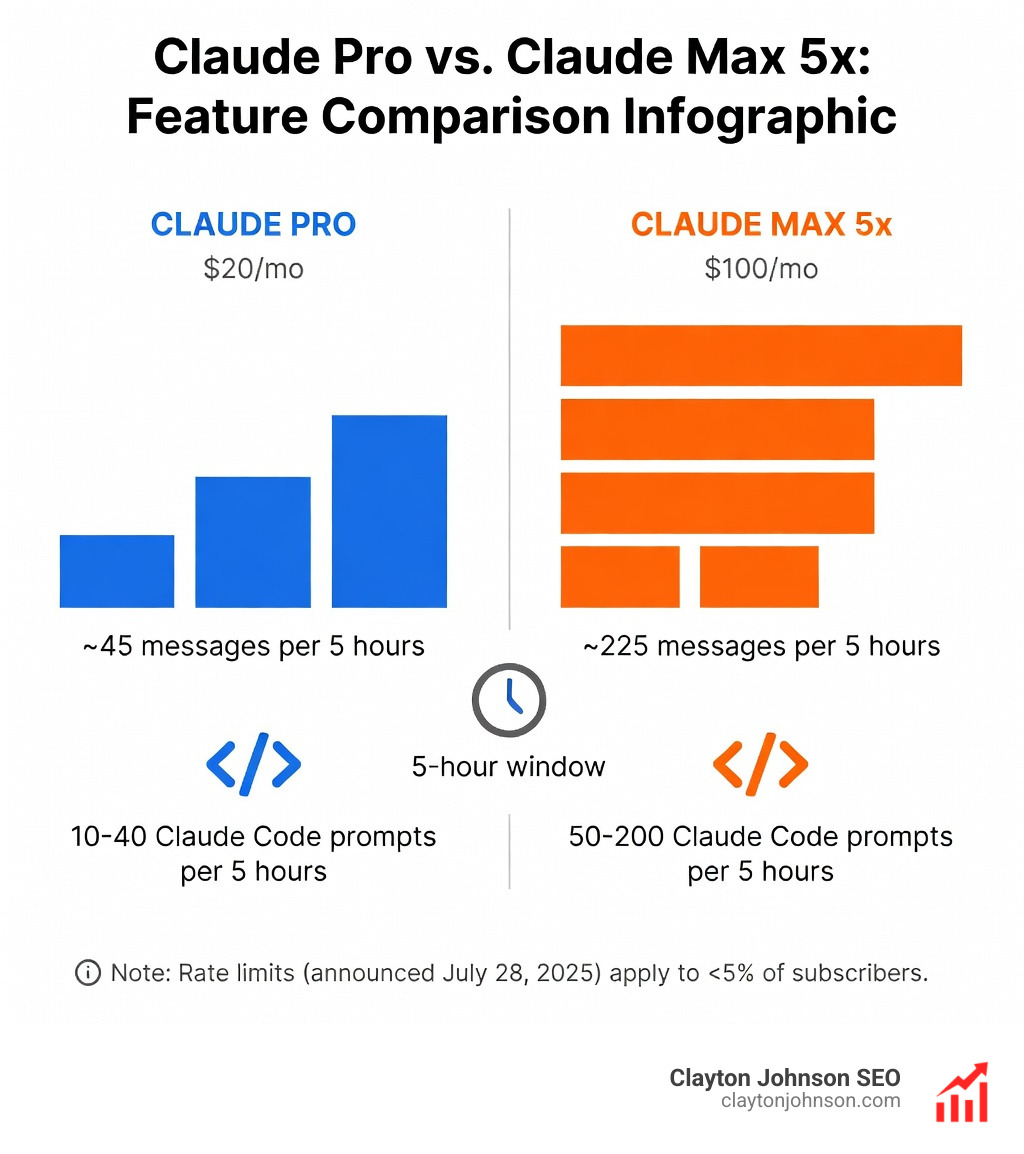
Understanding Costs and Usage Limits
- Initialization Cost: Running
/initfor the first time usually costs around $0.20 in API credits because it has to read and summarize your entire codebase. - Task Costs: A complicated bug fix might cost between $1.00 and $5.00 depending on the number of files touched.
- Usage Limits: Anthropic recently announced new rate limits (July 28, 2025) that affect about 5% of users. For most of us, the standard Claude Subscription Plans are sufficient.
| Plan | Price | Best For |
|---|---|---|
| Claude Pro | $20/month | “Vibe” coders and light technical use |
| Claude Max 5x | $100/month | Heavy technical use and professional developers |
Current Limitations
- Terminal Learning Curve: If you’ve never used a terminal, there is a bit of a hurdle to overcome.
- Context Window Limits: Even with compacting, very large projects can still hit limits after 15-20 minutes of intense coding.
- Cost Visibility: It’s easy to burn through $10 completing a task if you aren’t monitoring your usage.
Conclusion
At Clayton Johnson SEO, we believe that the future of growth and strategy is inextricably linked to AI-assisted workflows. Understanding what is Claude coding is the first step toward building more efficient content systems and marketing operations. By moving the AI from a simple chat box into your terminal, you gain a partner that can execute, test, and maintain your projects with a level of precision that was impossible just a year ago.
Whether you are a developer looking to automate tedious Git commits or a founder building a competitive research system, Claude Code offers a glimpse into a future where “writing code” is just one small part of a much larger, AI-augmented development lifecycle.
Next Steps for Adopting Claude Code:
- Install Node.js and run the install command for Claude Code.
- Start small: Use it to refactor a single component or write a unit test.
- Create your CLAUDE.md: Run
/initto give the AI its project memory. - Explore MCP: Connect your external tools to bring your data into the terminal.
Frequently Asked Questions
What is Claude Code?
Claude Code is an agentic coding tool by Anthropic that lives in your terminal. It can read your codebase, edit files, run commands, and manage Git workflows autonomously using the Claude 3.7 Sonnet model.
How do I install Claude Code?
Ensure you have Node.js 18+ installed, then run npm install -g @anthropic-ai/claude-code in your terminal. Authenticate with your Anthropic account to begin.
What is CLAUDE.md?
CLAUDE.md is a project-specific memory file generated by the /init command. It stores architecture notes, coding standards, and context, allowing Claude to remain consistent across different coding sessions.
For more information on how we integrate AI into our SEO content marketing services, reach out to our team in Minneapolis.