Why Throughput Benchmarks Are the Secret to AI Scaling


Why Throughput Benchmarks Are the Secret to Scaling AI in Production
What LLM throughput benchmarks measure is simple: how fast a model generates tokens under real load — and whether that speed holds up when multiple users hit it at once.
Here’s a quick breakdown:
| Metric | What It Measures | Why It Matters |
|---|---|---|
| Tokens per Second (TPS) | Output tokens generated per second | Core speed signal for production readiness |
| Time to First Token (TTFT) | Delay before first token appears | Determines if chat feels responsive |
| Inter-Token Latency (ITL) | Time between each generated token | Affects streaming smoothness |
| Requests per Second (RPS) | Concurrent requests handled | Signals scalability under load |
| End-to-End Latency (E2E) | Total time from request to final token | Critical for non-streaming use cases |
Most teams evaluate LLMs using quality benchmarks — tests like MMLU or GSM8K that measure reasoning and knowledge. Those matter. But they tell you nothing about whether your model can handle 50 simultaneous users without collapsing under the load.
That gap is exactly where throughput benchmarks live.
A model that scores brilliantly on a leaderboard can still fail in production if it delivers tokens too slowly, saturates your GPU at modest concurrency, or drives your cost-per-token into unprofitable territory. The research is clear: 30 tokens per second is the minimum threshold for a chat application to feel responsive to users. Fall below that, and the experience degrades fast.
I’m Clayton Johnson, an SEO strategist and growth systems architect who works at the intersection of AI infrastructure and scalable marketing — and understanding what LLM throughput benchmarks actually measure has become foundational to helping founders make smarter, cost-efficient AI deployment decisions. If you’re scaling an AI-powered product, this guide gives you the framework to benchmark what actually matters.
What LLM throughput benchmarks word list:
Quality vs. Performance: What LLM Throughput Benchmarks Reveal
When we look at the AI landscape, we often see models ranked by their “intelligence.” These rankings come from quality benchmarks like MMLU (Massive Multitask Language Understanding), which tests knowledge across 57 subjects, or GSM8K, which focuses on grade-school math word problems. While these are great for a subjective comparison of AI models, they don’t tell the whole story for an engineer or founder trying to scale a product.
Quality benchmarks measure what the model knows. Performance benchmarks measure how it runs. You can find an extensive Hugging Face collection of LLM leaderboards that rank models by accuracy, but in a production environment, a smart model that takes 10 seconds to say “Hello” is effectively useless.
Why What LLM Throughput Benchmarks Matter for Production
In professional AI deployment, throughput is the engine of profitability. If your inference setup is inefficient, your cost-per-token sky-rockets. We’ve seen that systems like Llama-3.1-8B on NVIDIA A10G GPUs can achieve 98 tokens per second, but those numbers shift dramatically based on how many requests you’re handling at once.
High throughput allows you to serve more users on the same expensive hardware. Without understanding these metrics, you’re flying blind on your margins. You have to balance the trade-offs: do you want the lowest possible latency for a single user, or the highest possible throughput for a thousand users? Usually, you can’t have both at the same time.
The Difference Between Static Leaderboards and Real-World Load
Static leaderboards often suffer from “data contamination,” where the benchmark questions accidentally end up in the model’s training data. This makes the model look smarter than it is. Furthermore, static tests don’t account for dynamic traffic patterns.
The Chatbot Arena leaderboard is a step forward because it uses human preference, but it still doesn’t tell you how the model will behave when your server is at 90% utilization. Real-world load involves varying prompt lengths, system prompts, and retrieval-augmented generation (RAG) contexts that static leaderboards simply don’t simulate.
The Anatomy of Inference: Latency, Throughput, and RPS
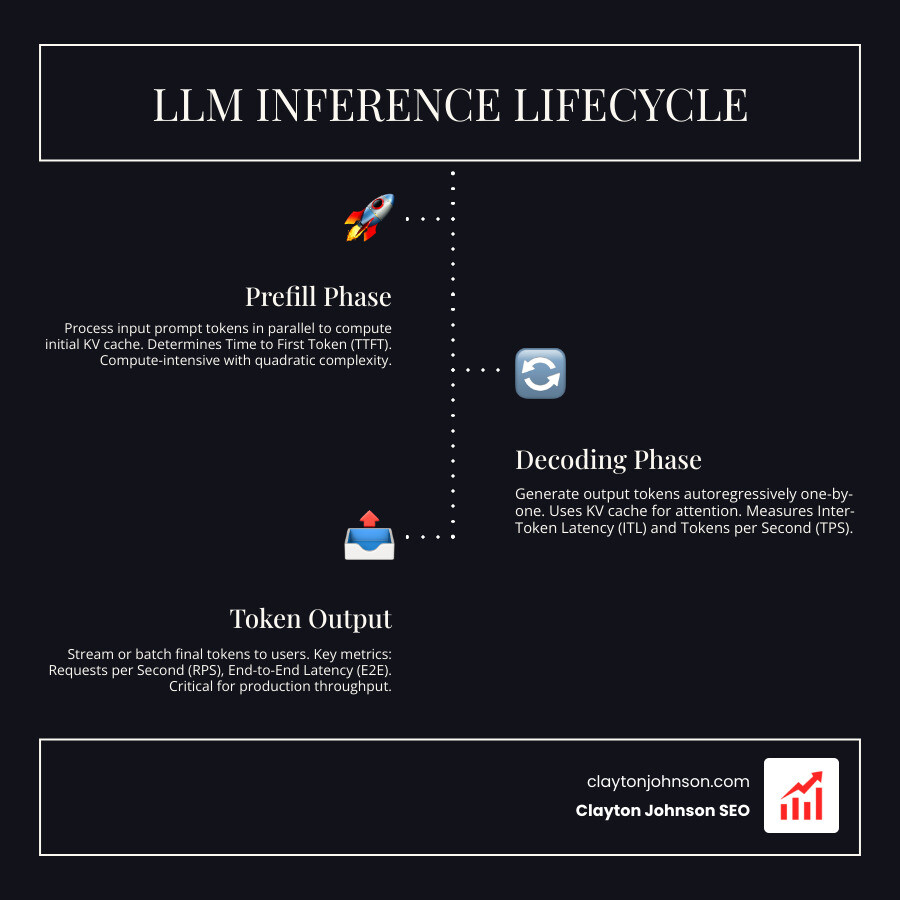
To understand what LLM throughput benchmarks are telling us, we have to look under the hood of how an LLM actually generates text. The process is split into two distinct phases:
- The Prefill Phase: This is where the model processes your input prompt. It builds the key-value (KV) cache, which acts as the model’s short-term memory for that specific conversation. This phase is compute-heavy.
- The Decoding Phase: This is where the model generates text, one token at a time. This phase is memory-bound, meaning the speed is limited by how fast the GPU can move data, not just how fast it can calculate.
Key Metrics for Measuring What LLM Throughput Benchmarks
When we analyze performance, we focus on a few “north star” metrics:
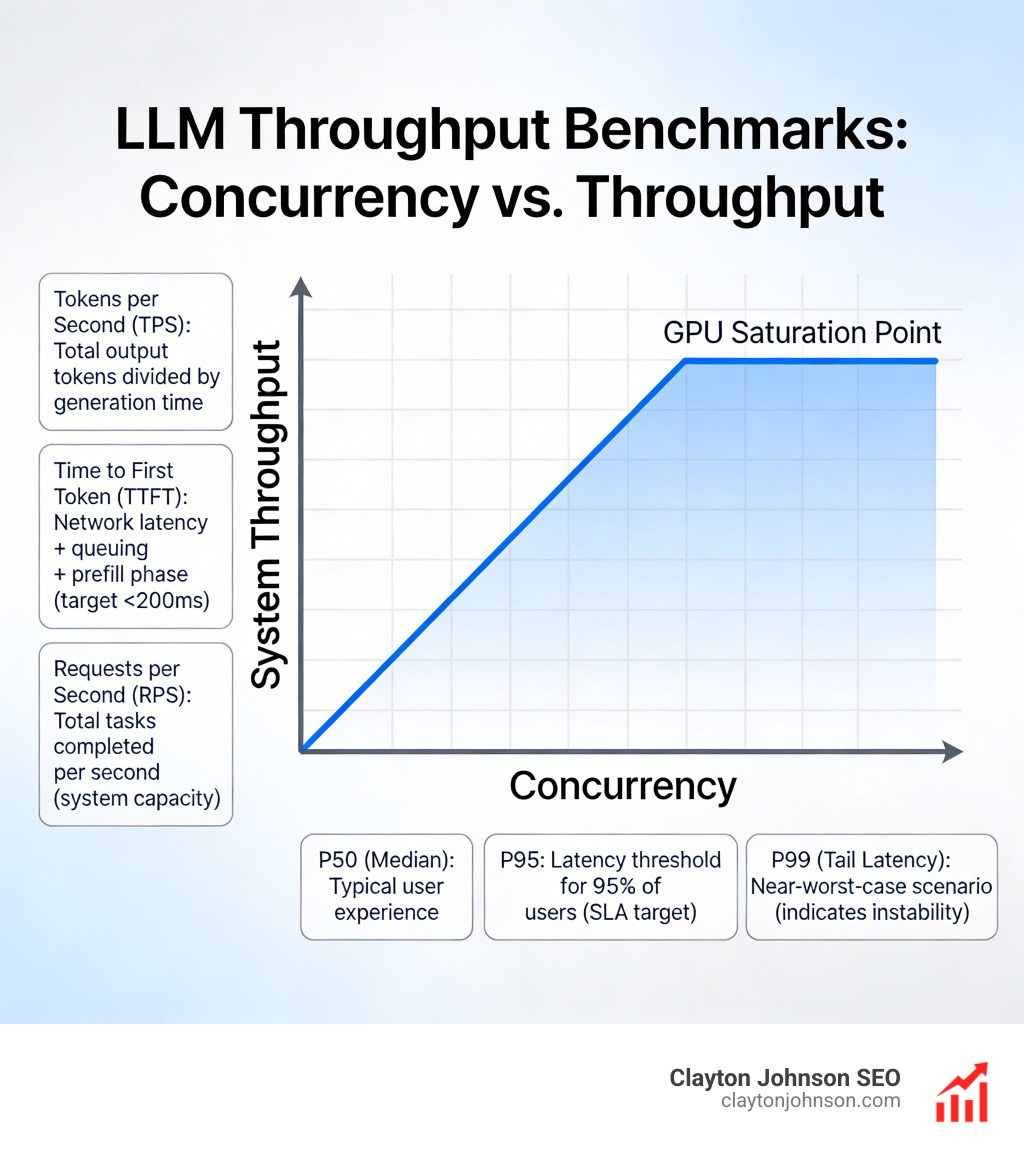
- Tokens per Second (TPS): The total number of output tokens divided by the time it took to generate them. Tools like NVIDIA GenAI-Perf and LLMPerf calculate this slightly differently. GenAI-Perf looks at the time between the first request and the last response, while others might include the entire benchmark duration.
- Time to First Token (TTFT): This is the “snappiness” factor. It includes network latency, queuing time, and the prefill phase. For a responsive API experience, you want this to be under 200ms.
- Requests per Second (RPS): This tells you how many total tasks your system can finish in a second. It’s the ultimate measure of “goodput” or system capacity.
Understanding Percentiles in Performance Data
Averages are dangerous in benchmarking. If 99 users get a response in 1 second and 1 user waits 60 seconds, your “average” looks okay, but that one user is having a terrible experience. This is why we use percentiles:
- P50 (Median): What the “typical” user experiences.
- P95: The latency threshold that 95% of your users stay under. This is usually your SLA (Service Level Agreement) target.
- P99: The “tail latency.” This represents the near-worst-case scenario. If your P99 is significantly higher than your P50, your system is likely unstable or saturating its resources.
Tools like LLMPerf are excellent for uncovering these tail latencies by simulating multiple concurrent users.
Tools and Methodologies for Measuring LLM Performance
You can’t manage what you don’t measure. For founders, assessing LLM scalability for enterprise requires a standardized toolkit. Here are the industry standards:
- NVIDIA GenAI-Perf: The gold standard for benchmarking on NVIDIA hardware, providing deep insights into Triton Inference Server performance.
- LLMPerf: A Ray-based tool that focuses on provider-level benchmarks (comparing Groq vs. Together.ai vs. AWS).
- vLLM & SGLang: These are actually inference engines, but they come with high-performance vLLM benchmarking scripts that allow you to test optimizations like PagedAttention.
- Locust & K6: General load-testing tools that are great for seeing how your entire API stack handles thousands of concurrent connections.
How to Interpret What LLM Throughput Benchmarks for Scaling
When you run these tools, you’ll notice that as you increase concurrency (the number of active requests), your system TPS increases until the GPU is fully saturated. However, your per-user TPS usually goes down.
This happens because the GPU is “batching” requests to be more efficient. Finding the “sweet spot” where you maximize total throughput without making the individual user wait too long is the key to SGLang performance profiling and scaling.
Reproducibility and Benchmarking Best Practices
A benchmark is only useful if it’s reproducible. To get meaningful results, we recommend:
- Standardized Prompts: Use the same input/output lengths (e.g., 512 input / 512 output).
- Greedy Decoding: Set temperature to 0. This removes the randomness of the model so you can focus purely on hardware speed.
- Ignore EOS: In some tests, it’s better to force the model to generate a fixed number of tokens so you aren’t measuring the model’s “creativity” but its raw processing power.
- Cold Start Mitigation: Always run a “warm-up” round. The first request to a model often takes longer because it has to load weights into memory.
Optimizing for the Real World: Balancing Cost and Speed
Every use case has a different performance profile. A chatbot needs low latency, while a summarization tool needs high throughput for long documents.
| Use Case | Input Length (ISL) | Output Length (OSL) | Priority Metric |
|---|---|---|---|
| Chatbot | Short (100) | Medium (256) | TTFT & ITL |
| Summarization | Long (2000+) | Short (150) | Throughput (TPS) |
| Reasoning (o1 style) | Short (100) | Very Long (10,000) | ITL & Cost |
| RAG | Very Long (4000+) | Medium (512) | TTFT & KV Cache Speed |
To optimize these, many teams turn to inference platforms for low latency that offer quantization. Quantization (like INT4 or FP8) shrinks the model weights, allowing them to fit into smaller, cheaper GPUs while often doubling the throughput speed.
Hardware Influence on Throughput Results
The hardware you choose is the single biggest factor in what LLM throughput benchmarks will show.
- NVIDIA H100: The current king of throughput, especially for large models like Llama-3 70B, thanks to its high memory bandwidth.
- NVIDIA A10G: A great middle-ground for smaller 8B models, often used in cost-sensitive production environments.
- NVLink: This is the high-speed interconnect between GPUs. If you are running a model across multiple GPUs, NVLink is essential to prevent a massive drop in throughput.
Streaming vs. Non-Streaming Performance
Streaming is a “UX hack” that makes models feel faster. Instead of waiting 5 seconds for the whole paragraph, the user sees the first word in 200ms.
Human visual reaction time averages around 200 milliseconds, so if your TTFT is below that, the AI feels instantaneous. In contrast, “perceived throughput” is how fast the text flows once it starts. If it’s faster than the average human reading speed (about 300 words per minute), the user is happy.
Frequently Asked Questions about LLM Benchmarking
What is a good throughput for a chat application?
A good target is 30 tokens per second per user. Since 4 tokens is roughly 3 words, 30 TPS equals about 1,350 words per minute. This is significantly faster than most people read, which creates a “premium” feel. For the background system, you want to see a total system throughput that scales with your user base without letting the per-user speed drop below this 30 TPS floor.
How does input length affect TTFT?
Input length has a “quadratic” impact on the prefill phase. Because of the way the attention mechanism works, doubling your input prompt doesn’t just double the processing time—it can increase it much more. This is why long-context RAG applications often have much higher TTFT (sometimes several seconds) compared to simple chat prompts.
Why do different tools show different TPS results?
It usually comes down to “overhead.” Some tools, like LLMPerf, include the time it takes to establish a network connection and the overhead of the benchmarking script itself. In single-request scenarios, this overhead can account for up to 33% of the measured time. Other tools like GenAI-Perf focus purely on the server-side processing time. Always check the methodology before comparing numbers between two different reports.
Conclusion
At Demandflow.ai, we believe that clarity leads to structure, and structure leads to compounding growth. Understanding what LLM throughput benchmarks are and how they impact your bottom line is part of building that “growth architecture.”
Whether you are optimizing for the snappiest chat experience or trying to process millions of documents for a RAG system, your choice of model, hardware, and inference engine must be backed by data. Don’t just trust a leaderboard; run your own benchmarks using your specific prompts and expected concurrency.
If you’re looking to build a high-performance AI strategy that actually scales without breaking the bank, explore our AI models directory and see how we integrate structured SEO and AI-augmented workflows to drive measurable growth.