Why Technical SEO Site Migration Can Make or Break Your Organic Growth
A technical SEO site migration is one of the highest-risk events your website will ever go through. Done right, it preserves your rankings, traffic, and authority. Done wrong, it can wipe out months — or years — of SEO progress overnight.
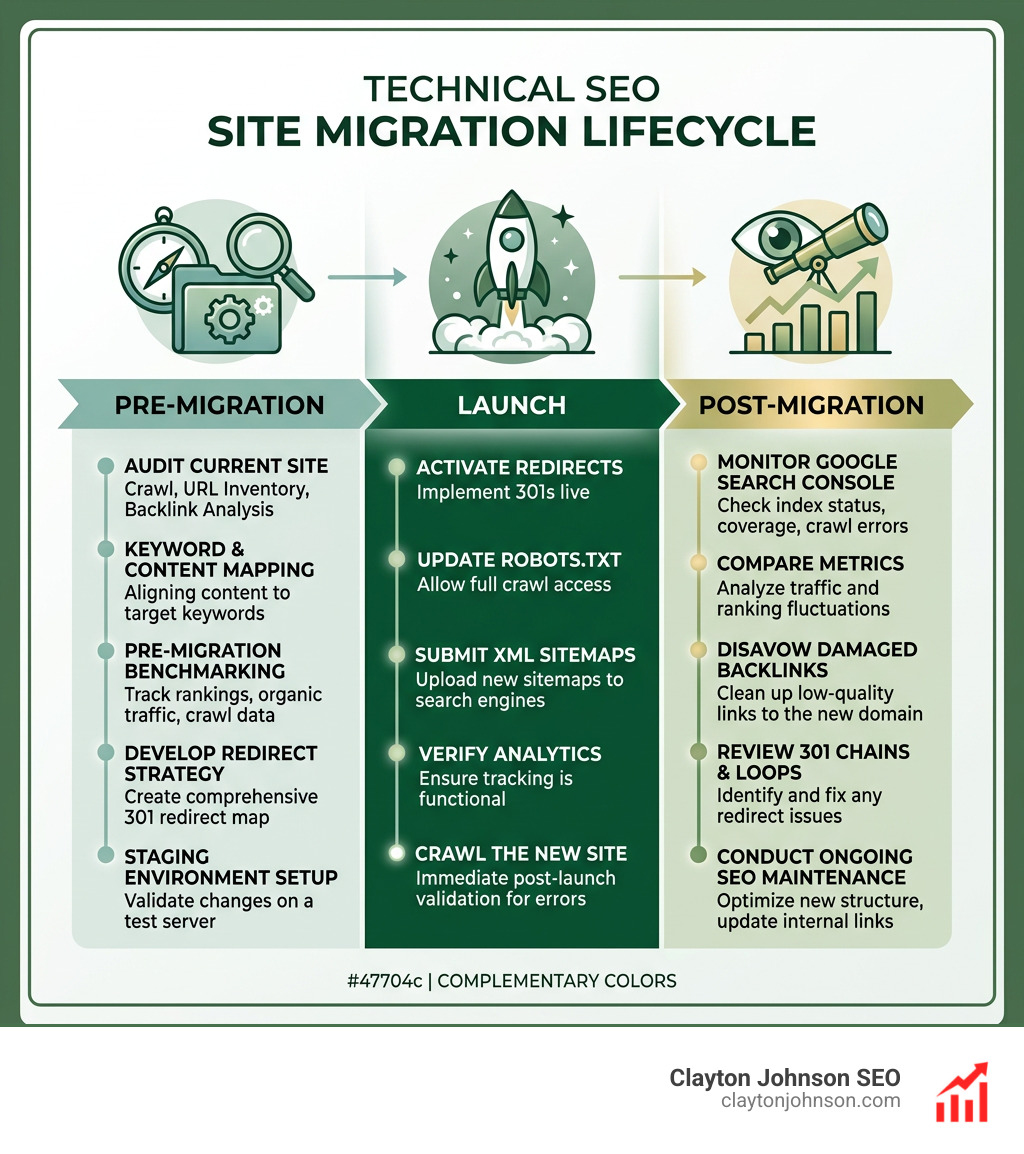
Here is what a successful technical SEO site migration requires:
- Benchmark everything before you touch a single URL (traffic, rankings, backlinks, crawl data)
- Crawl your entire site to build a complete URL inventory
- Map every old URL to a new destination using 301 redirects — no chains, no homepage dumps
- Validate on a staging environment before going live
- Launch during low-traffic hours with a developer on standby
- Submit updated sitemaps to Google Search Console immediately after launch
- Monitor daily for at least 4–6 weeks post-launch for crawl errors, indexation drops, and traffic anomalies
The stakes are real. Poorly executed migrations can cause 20–60% organic traffic loss that may take months to recover — if it recovers at all. Even well-planned migrations typically cause a temporary 10–20% dip in the first week, simply because search engines need time to re-crawl and re-index your new site structure.
What makes migrations especially dangerous is that most of the damage happens before launch — in the planning gaps no one caught.
I’m Clayton Johnson, an SEO strategist with nearly two decades of experience guiding companies through every type of technical SEO site migration, from CMS switches and domain rebrands to full URL restructures. In the sections below, I’ll walk you through the exact framework I use to protect SEO equity and minimize traffic loss at every stage of the process.
Explore more about technical seo site migration:
- Dental SEO Strategies
- SEO Marketing Strategy
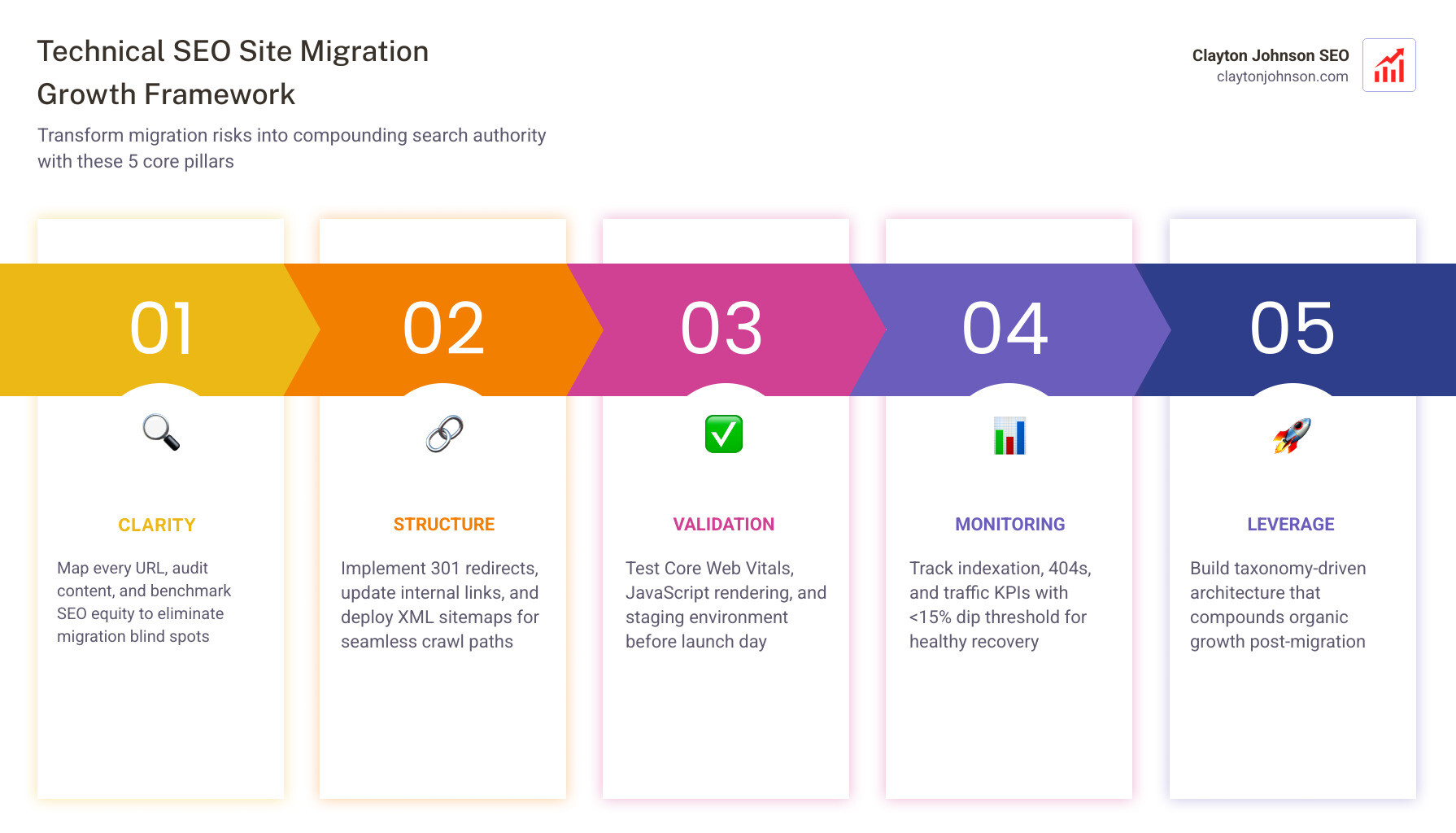
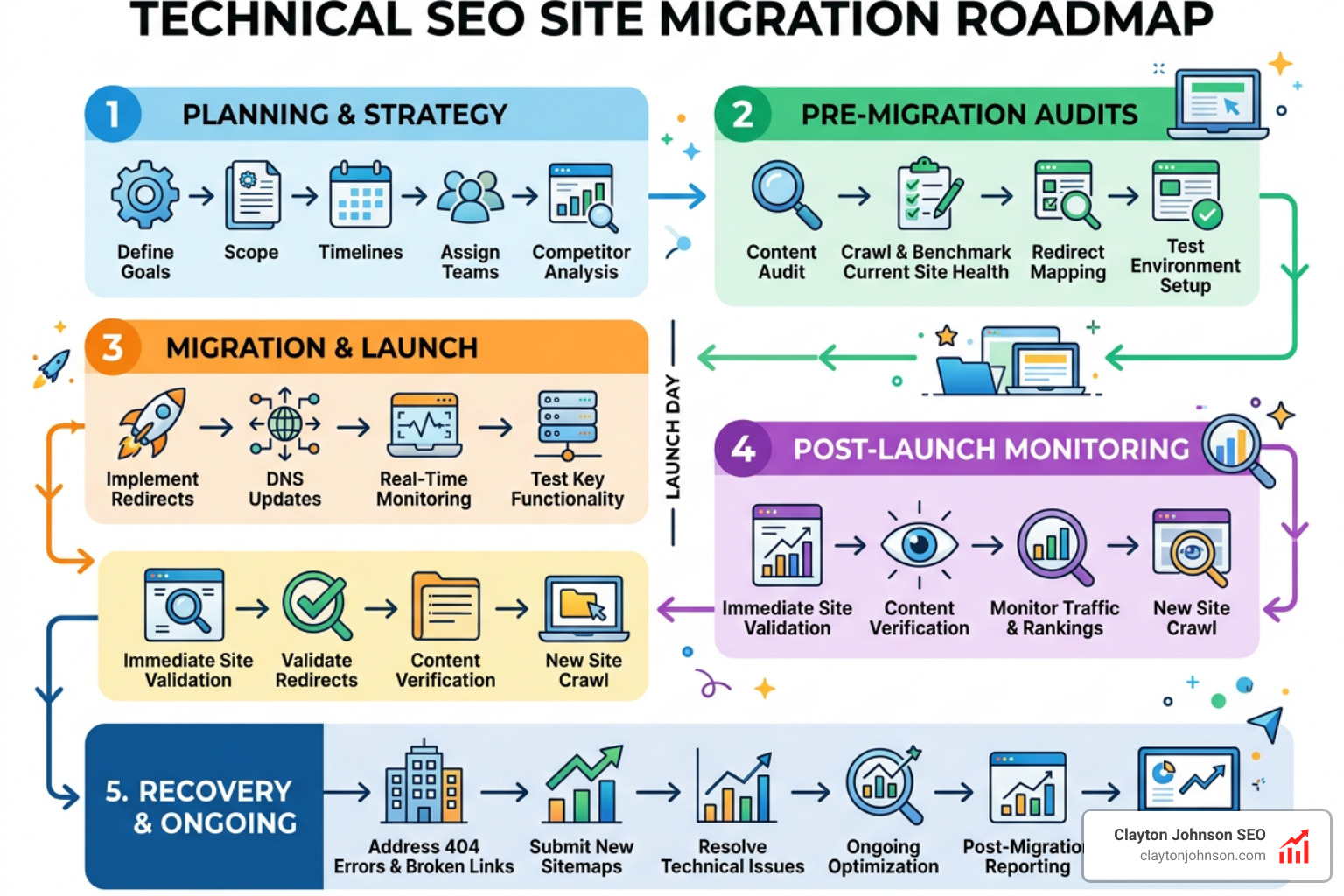
The Strategic Framework for a Technical SEO Site Migration
When we talk about a technical SEO site migration, we aren’t just talking about moving files from one folder to another. We are talking about a fundamental shift in how search engines perceive your brand’s digital footprint. Whether you are changing your domain name, switching from a legacy CMS to a modern headless setup, or consolidating multiple subdomains into a single subdirectory, the goal remains the same: preserve your hard-earned SEO equity.
Think of it like moving into a new house. If you don’t tell the post office your new address, your mail ends up in a dead-letter office. In the digital world, your “mail” is your organic traffic, and the “post office” is Google.
Common Migration Types
- Domain Changes: Moving from
oldbrand.comtonewbrand.com. This is the highest risk because it requires a total transfer of authority. - CMS Switches: Moving from WordPress to Shopify or a custom JavaScript framework.
- Protocol Shifts: Switching from HTTP to HTTPS (though most have done this by now, it still requires proper 301 or 308 redirects).
- Site Consolidation: Merging two or more websites into one to build a massive “authority” site.
- URL Restructure: Changing the path logic, such as moving
/blog/article-nameto/resources/article-name.
Common Migration Pitfalls to Avoid
- The “Homepage Dump”: Redirecting all old URLs to the new homepage. This is a disaster. Google treats these as “Soft 404s,” and you will lose almost all your internal page rankings.
- Redirect Chains: Linking URL A to B, then B to C. Research shows that redirect chains can cause authority losses of up to 10% for every extra jump.
- Forgetting the “Noindex”: Keeping the staging site’s
noindextags active on the live production site after launch. This is the #1 cause of “ghost town” traffic drops. - Ignoring Metadata: Failing to carry over title tags, meta descriptions, and alt text.
If you are feeling overwhelmed, you aren’t alone. Many enterprise companies seek out SEO services specifically to manage the high-stakes technical hurdles of a migration.
Pre-Migration: Benchmarking and URL Inventory
We cannot fix what we haven’t measured. Before a single line of code is moved, we must create a “state of the union” for your current website. This involves two critical steps: data gathering and risk assessment.
1. The Master URL Inventory
You need a list of every single URL that Google knows about. Don’t just rely on a single crawl. To get the full picture, we combine data from:
- A Full Site Crawl: Use tools like Screaming Frog or Sitebulb to find every internal link.
- Google Search Console: Export the “Pages” report to see which URLs are actually getting clicks and impressions.
- Backlink Data: Use Semrush to identify pages that have external authority pointing to them.
- XML Sitemaps: Ensure you aren’t missing legacy pages that might not be linked in the current navigation.
2. Performance Benchmarking
Record your current organic traffic, conversion rates, and keyword rankings. We recommend a 12-month look-back period to account for seasonality. This data serves as your “recovery target.” If you know you usually get 50,000 visitors in a specific month, and you drop to 10,000 post-migration, you have a clear KPI for troubleshooting.
Understanding HTTP Status Codes is vital here. You need to know which pages are currently 200 (OK), which are 404 (Not Found), and which are already redirected. For large-scale operations, we often recommend setting up your SEO audit automation process to catch errors in real-time before they become systemic failures.
Mapping Redirects and Preserving AI Search Visibility in a Technical SEO Site Migration
The redirect map is the most important document in your technical SEO site migration. It is a spreadsheet that connects every “Old URL” to a “New URL.”
The 301 Redirect Rule
Always use 301 redirects for permanent moves. A 301 tells search engines, “This page has moved forever; please pass the ranking power to the new address.” Avoid 302 redirects, which are temporary and do not transfer SEO equity. According to Google’s official documentation, a proper 301 redirect passes approximately 90-99% of ranking power.
The AI Search Factor
In the modern era, we aren’t just optimizing for standard blue links. We are optimizing for AI Overviews (SGE) and SearchGPT. AI engines rely heavily on structured data and schema markup to understand the relationship between entities.
- Preserve Schema: If your old site had Product, FAQ, or Organization schema, ensure it is perfectly replicated on the new site.
- AI Citations: AI search engines cite content based on trust signals. If your site structure becomes fragmented, you risk losing your spot in AI summaries. Aim to preserve 95% of AI citations within 60 days post-migration.
Learning how to audit SEO with AI can help you simulate how these new engines will “read” your new site structure before you flip the switch.
Staging Environment Validation and Technical QA
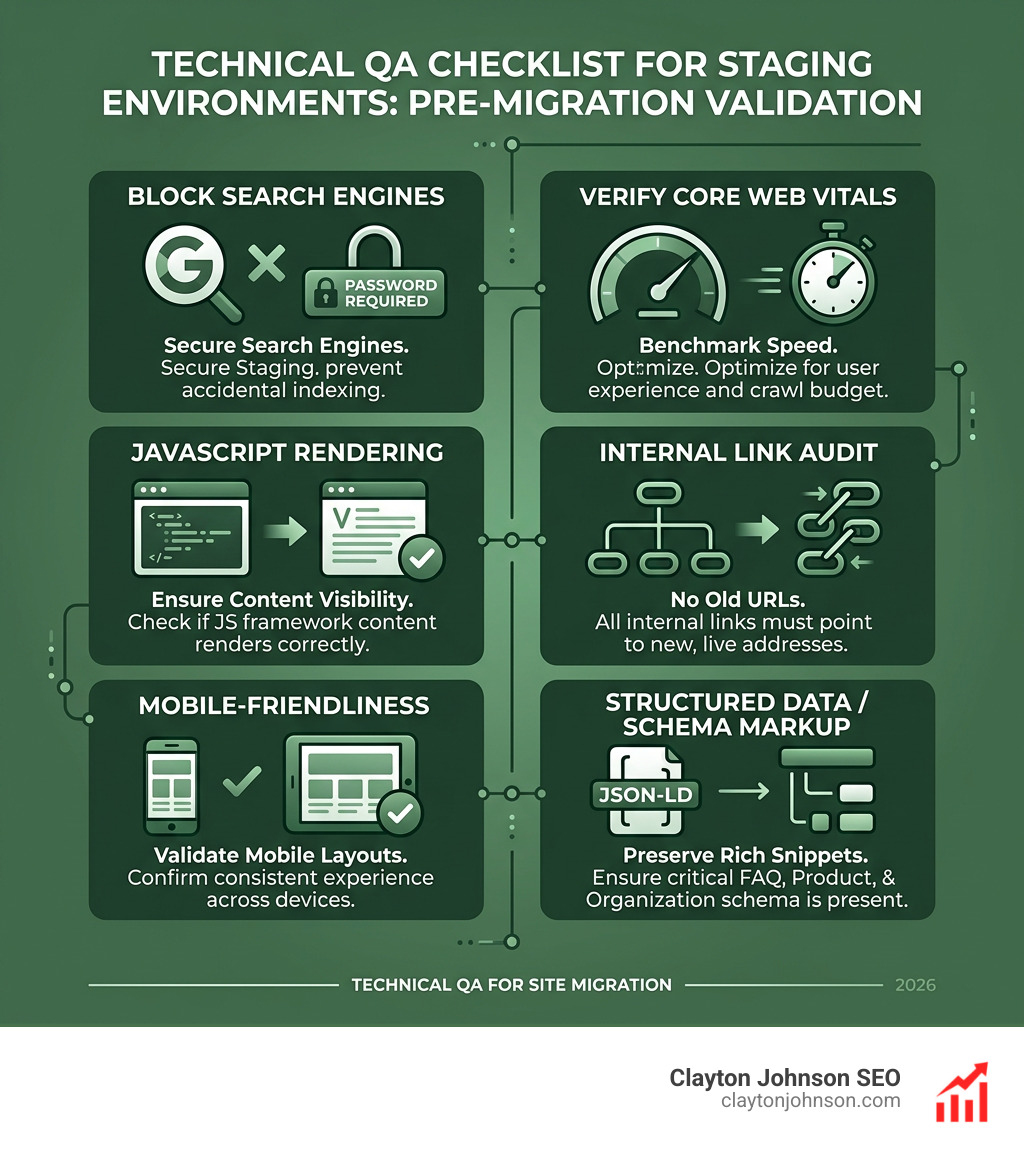
A staging environment is a private copy of your new website where we can break things without the public (or Google) seeing. It is our laboratory for a technical SEO site migration.
Critical Staging Tasks:
- Block Search Engines: Use a password or a
noindextag. Do NOT rely solely onrobots.txtdisallow rules, as Google might still index the URLs if they are linked elsewhere. - Verify Core Web Vitals: Use PageSpeed Insights to benchmark the new site’s speed. If the new site is slower than the old one, fix it now. Slower pages mean a smaller crawl budget, which delays indexation.
- JavaScript Rendering: If your new site uses a framework like React or Vue, you must ensure Google can actually see the content. We often suggest tools like prerender.io for JS-heavy sites. Check our guide on how to perform a JavaScript SEO audit and fix rendering issues for a deeper dive.
- Internal Link Audit: Ensure all links on the new site point to “New URLs,” not the old ones or (worse) the staging domain.
Launch Day Execution and Post-Migration Recovery Systems
Launch day is “Go Time.” It’s the moment all your planning meets reality. We typically recommend launching on a Tuesday or Wednesday morning between 2:00 AM and 4:00 AM. Why? Because if something breaks, your dev team is awake, and your traffic is at its lowest point.
Launch Day: Executing the Technical SEO Site Migration
When you are ready to pull the trigger, follow this sequence:
- Lower DNS TTL: A few days before, lower your Time-To-Live (TTL) settings so DNS changes propagate faster.
- Remove Staging Blocks: Remove the password protection and the
noindextags. - Enable Redirects: Push your .htaccess or server-level redirect rules live.
- The “Change of Address” Tool: If you are changing domains, use the Official Google Change of Address Tool. This tells Google explicitly that the move is intentional.
- Submit Sitemaps: Upload your new XML sitemap to Google Search Console. Pro tip: Keep your old sitemap active for 30 days to help Google find and follow the redirects faster.
- Fetch and Render: Use the URL Inspection tool to verify that Google can successfully crawl your most important pages.
For enterprise-level sites, having a B2B SEO audit framework ensures that your lead generation forms and high-value conversion paths are functioning perfectly in the new environment.
Monitoring KPIs and Troubleshooting Traffic Drops
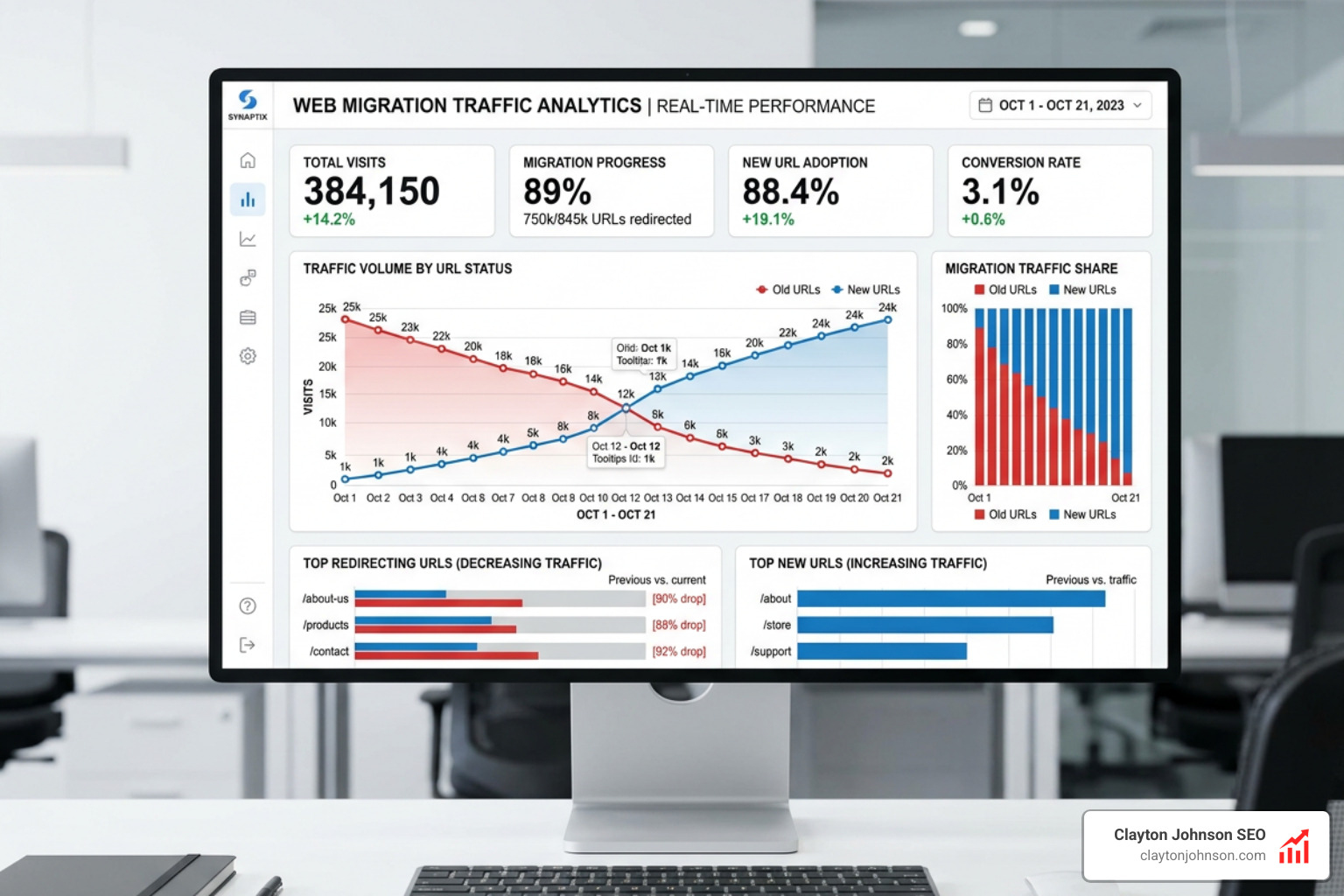
The first 14 days are the most volatile. You will see “Page with redirect” errors in GSC—this is normal. What you are looking for are “anomalies.”
What to Monitor:
- Indexation Progress: Is the number of indexed pages on the new site rising while the old site’s count falls?
- 404 Errors: Check GSC daily for “Not Found” errors. These are usually missed redirects.
- Traffic by Source: Is organic traffic dropping significantly more than direct traffic? If so, you may have a ranking issue.
- Internal Linking: Use a tool like LinkWhisper or Matrixify to bulk update any links that are still hitting redirects. Direct links (Status 200) are always better for UX and crawl budget.
| KPI | Healthy Threshold | Warning Sign |
|---|---|---|
| Organic Traffic | 10-15% dip (Week 1) | >30% drop (Week 2) |
| Indexed Pages | 80% moved (Month 1) | <50% moved (Month 1) |
| 404 Errors | <1% of total URLs | >5% of total URLs |
| AI Citations | 90% retained | >20% loss |
If you notice a sustained drop, revisit your internal linking. We have a comprehensive guide on building the best internal link structure to help you pass authority effectively throughout your new architecture. You can also learn from industry leaders by studying how they approach winning at technical SEO the Aleyda Solis way.
Conclusion: Building Durable Search Systems
A technical SEO site migration is not just a hurdle to clear; it is an opportunity to rebuild your site on a foundation of clarity and structure. By following a rigorous framework, you transform a risky project into a compounding growth engine.
At Clayton Johnson SEO, we don’t believe in chasing temporary tactics. We focus on building durable systems—taxonomy-driven content ecosystems, strategic internal linking, and AI-augmented workflows that turn fragmented efforts into coherent search authority. Whether you are a founder or an operator, the goal is to move from the chaos of a “botched migration” to the leverage of a high-performance search system.
Ready to take your strategy to the next level? Explore AI-augmented marketing systems and see how we can help you turn your next migration into a launchpad for long-term growth.