AI Coding Tools Are Reshaping How Software Gets Built
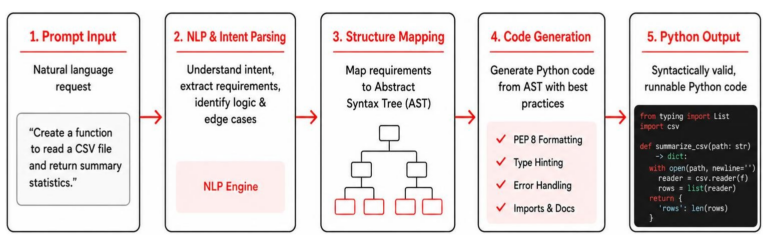
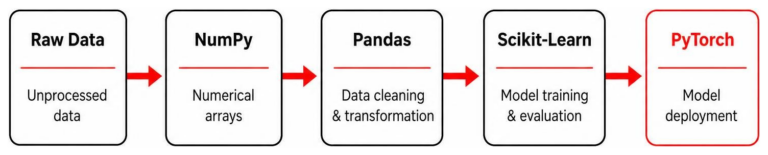
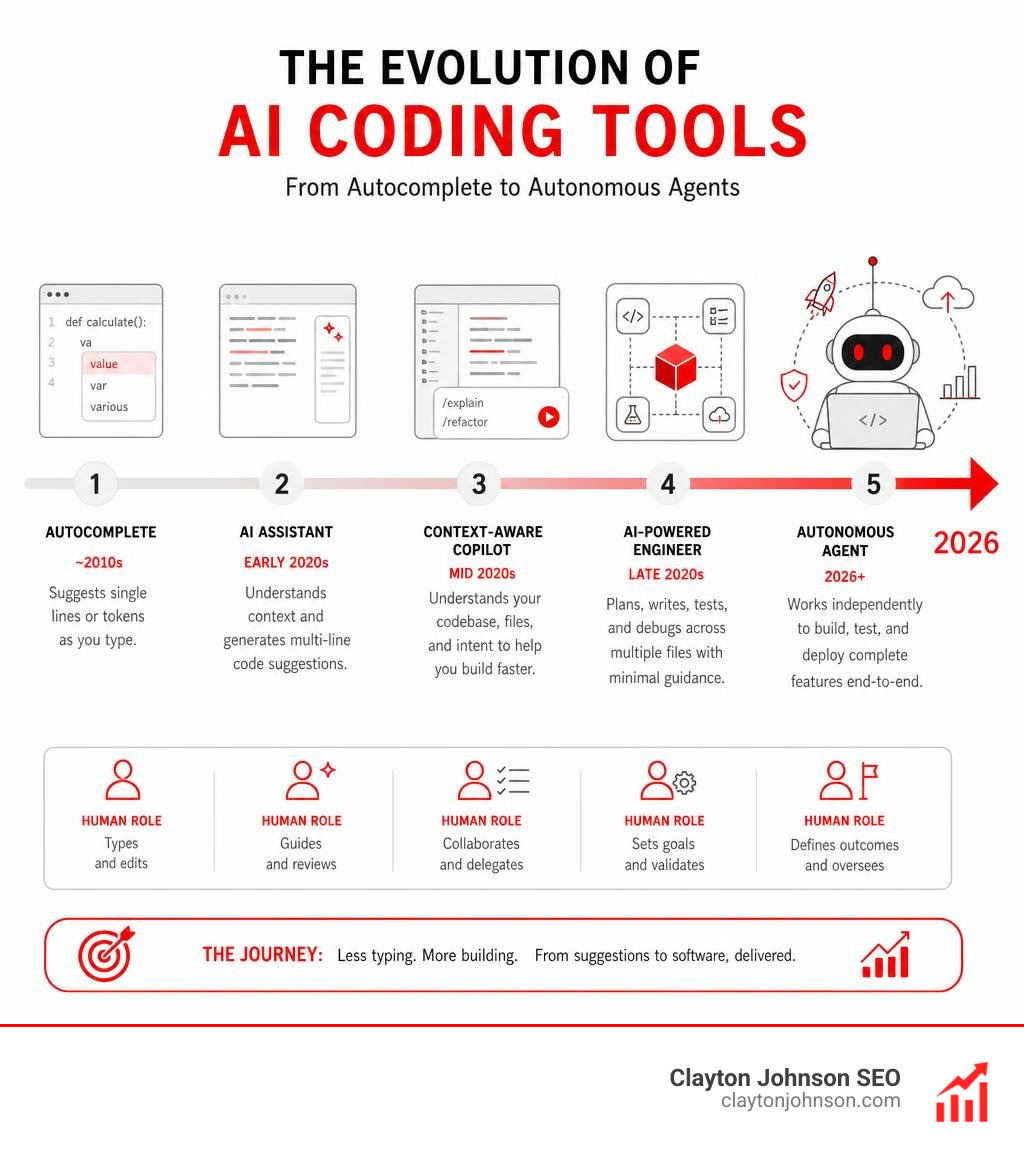
AI coding tools have moved well beyond simple autocomplete. In 2026, they range from lightweight browser plugins to fully autonomous agents that can write, test, and deploy code on their own — with almost no human input.
The pace of change is striking. AI adoption among software developers hit 90% in 2025. Today, developers integrate AI into roughly 60% of their daily work. Over half of the Fortune 500 now rely on these tools to ship software faster.
Here is a quick look at the top AI coding tools and what each one does best:
| Tool | Best For | Starting Price |
|---|---|---|
| Cursor | Agentic workflows, complex codebases | $16/mo |
| GitHub Copilot | GitHub-native teams, beginners | Free / $10/mo |
| Claude Code | Large codebase understanding, terminal use | $17/mo |
| Replit | Beginners, rapid prototyping | Free tier |
| Augment Code | Multi-repo enterprise codebases | Contact sales |
| Tabnine Enterprise | Air-gapped, regulated industries | $39/user/mo |
| Amazon Q Developer | AWS-native teams | Free tier |
| Windsurf | Collaborative team coding | Free tier |
| OpenAI Codex | Multi-agent background automation | ChatGPT plan |
| v0 by Vercel | UI generation, fast prototyping | Free tier |
But choosing the right tool is not simple. The options are genuinely different from each other — in how they work, what they cost, and who they are built for.
Some tools live inside your existing editor as a plugin. Others replace your editor entirely. Some understand your whole codebase. Others only see the file you have open. Some are safe for regulated industries. Others raise serious data privacy questions.
This guide cuts through the noise and helps you compare your real options — clearly and honestly.
I’m Clayton Johnson, an SEO strategist and digital marketing specialist who has spent over a decade tracking how technology tools reshape business workflows, including AI coding tools and their growing role in developer productivity and enterprise software delivery. I’ll walk you through everything you need to make a confident, informed decision.
AI Coding Assistants vs. AI-Powered IDEs: Key Differences
To make sense of the modern development ecosystem, we must first understand the fundamental split in the market: standard AI coding assistants versus dedicated, AI-first Integrated Development Environments (IDEs).
While both leverage large language models (LLMs) to write software, they interact with your code in completely different ways. For a complete look at how generative models are transforming software development, check out the ultimate guide to generative ai coding tools.
Traditional Extensions and Inline Autocomplete
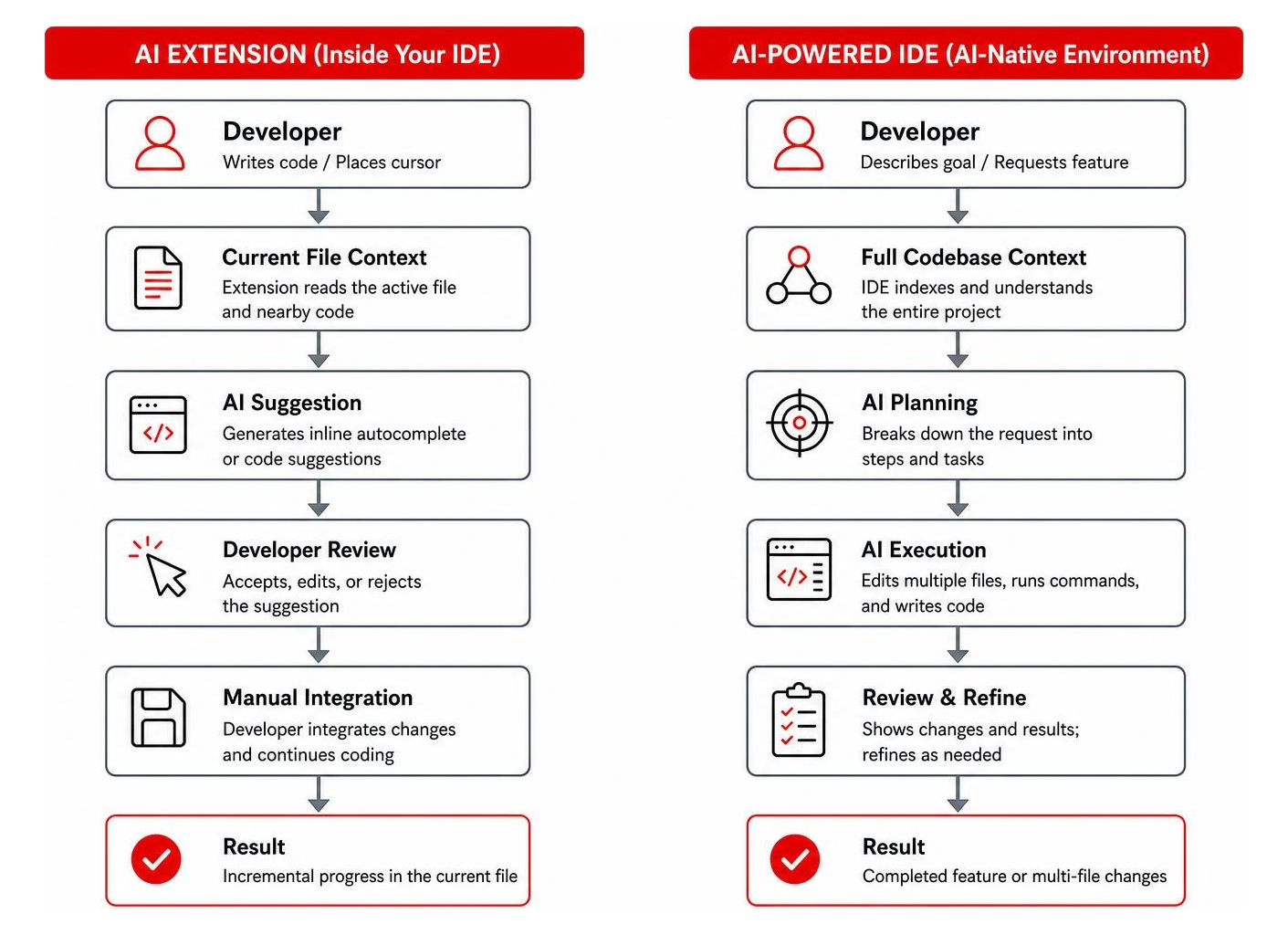
Traditional AI assistants operate as plugins or extensions inside your existing editor, such as VS Code or JetBrains.
These extensions, like GitHub Copilot · Your AI pair programmer · GitHub, primarily focus on inline autocomplete. They look at your active file, analyze your cursor position, and suggest the next few lines of code.
Because they sit inside a standard editor, they are lightweight and easy to install. However, they are often limited to passive assistance; they wait for you to type before offering suggestions. For a deeper dive into how these extensions serve as tireless assistants, see our guide on how ai code assistants your new pair programmer doesnt need coffee breaks.
Next-Gen AI-Powered IDEs and Agentic Workflows
Next-generation AI-powered IDEs, such as Cursor: AI coding agent and Windsurf, do not just sit inside your editor—they are the editor. Built on top of VS Code open-source foundations, these tools have deep, systemic access to your workspace.
Instead of waiting for your input, they can run autonomous terminal commands, manage parallel files, and execute complex agentic workflows. For example, an AI agent can be tasked with building an entire interactive dashboard. It can explore multiple files, run searches, execute tests, and deploy the finished product to a staging environment in under 15 minutes.
This agentic capability is why Cursor has seen organic adoption rocket to over 80% in top startup accelerators like Y Combinator, and why enterprise giants like NVIDIA have deployed it to 40,000 engineers to drive massive productivity gains. To learn more about selecting the right environment for debugging and development, read about the best ai for coding and debugging.
Evaluating the Best AI coding tools for Different Developer Profiles
A tool that works beautifully for a beginner building their first mobile app can easily fall apart when handed to a senior engineer refactoring a legacy microservice architecture. Matching the tool to your technical profile and project scale is essential.

Best ai coding tools for Beginners and Rapid Prototyping
If you are a beginner or a developer focused on rapid prototyping, you want tools that minimize environment setup and let you focus on your ideas.
Replit, v0 by Vercel, and Bolt are outstanding for this use case. Replit provides an entire cloud-based development environment that asks clarifying questions before writing code, preventing beginners from getting overwhelmed by a pile of files.
Meanwhile, v0 by Vercel is unmatched for visual prototyping. You can describe a user interface in plain language, and v0 will instantly generate polished React components that you can export.
For those looking to explore without financial commitment, we have curated a list of the top ai coding tools free options to get you started. To explore why having a dedicated collection of these tools is a game-changer, check out why every developer needs a coding ai pack.
Advanced ai coding tools for Complex, Multi-Repository Codebases
For senior developers managing complex, multi-repository systems, lightweight autocomplete tools are simply not enough. These environments require deep semantic dependency analysis and massive context handling.
Augment Code is designed specifically for this challenge. Its Context Engine can process over 400,000 files through semantic dependency analysis, allowing it to trace payment flows or authentication tokens across entirely different services and repositories. This specialized focus helped Augment Code achieve an impressive 70.6% SWE-bench score, far outpacing the 54% competitor average.
Similarly, Sourcegraph Cody excels at searching and indexing massive codebases, making it a favorite for enterprise teams. For those who want to run models locally or customize open-source alternatives, our best open source ai coding tools guide offers an in-depth framework.
To understand why this shift to advanced programming systems is happening so rapidly, read our breakdown of why every developer needs ai tools for programming in 2025.
Key Features to Evaluate When Choosing an AI Coding Tool
When comparing ai coding tools for your team, look past the marketing hype and evaluate these critical features:
| Feature | What to Look For | Why It Matters |
|---|---|---|
| Context Depth | Large token windows (e.g., 1M+ tokens) | Allows the AI to read your entire codebase, not just a single file. |
| Multi-File Editing | Simultaneous edits across files | Essential for refactoring and system-wide changes. |
| Agentic Workflows | Autonomous execution and testing | Let the AI write, run tests, and fix bugs without manual copy-pasting. |
| Model Flexibility | Ability to switch between LLMs | Use the best model (e.g., Claude, GPT-4o, Gemini) for each specific task. |
| CLI & Terminal Integration | Natural language terminal control | Run build commands, install packages, and manage Git states directly. |
Context Depth and Codebase Indexing
An AI model is only as smart as the context you give it. Standard models often suffer from a short memory, forgetting what was written in another file.
Tools like Claude Code by Anthropic | AI Coding Agent, Terminal, IDE address this with massive 1-million token context windows. This allows the AI to map out and hold entire repositories in its active memory.
By indexing your codebase in the background, these tools can automatically pull in relevant helper functions and data structures from other folders, saving you from manual copy-pasting. For a comprehensive introduction to Anthropic’s capabilities, read our claude ai coding 101 more than just a chatbot guide.
Agentic Workflows and Terminal Integration
The most exciting evolution in AI coding is the shift toward terminal-first, agentic execution.
With tools like Codex in ChatGPT | AI Coding Agents for Software Engineering | OpenAI, the AI does not just suggest code; it acts as a background agent. It can run commands, install dependencies, execute test suites, and read error logs to self-correct its bugs before showing you the final pull request.
To master these advanced workflows and speed up your development cycle, check out our guide on mastering the claude ai code generator for faster development.
Enterprise Security, Compliance, and Total Cost of Ownership
For enterprises, security and compliance are just as important as code generation speed. Introducing AI tools into a corporate environment without strict guardrails can expose proprietary IP and create severe legal risks.

Security and Compliance Frameworks in Regulated Industries
With over 60% of enterprises requiring formal AI governance by 2026, security certifications like SOC 2 Type II and ISO 42001 are non-negotiable.
Regulated industries such as finance and healthcare cannot risk their proprietary code being used to train public models. This is where Tabnine Enterprise stands out. Tabnine offers a zero-code-retention policy and supports complete air-gapped or virtual private cloud (VPC) deployments.
This ensures that all code processing happens within your secure network perimeter, fully isolated from external servers. To explore why securing an AI code generator is a critical step for your business right now, read why you need an ai code generator right now.
Pricing Models and Total Cost of Ownership (TCO)
When calculating the total cost of ownership for these tools, look out for hidden platform costs.
For example, while a GitHub Copilot Business seat costs $19 per user per month, it requires an underlying GitHub subscription (ranging from $4 to $21 per user per month), bringing the true cost to between $23 and $60 per user per month.
Similarly, advanced agentic workflows can quickly consume high volumes of tokens, requiring teams to buy extra cloud credits. For a complete look at how to budget for these tools, see our guide on why every developer needs a coding ai pack.
Limitations, Pitfalls, and the Productivity Paradox of AI Coding
While ai coding tools are incredibly powerful, they are not a silver bullet. In fact, relying on them blindly can sometimes slow your team down.
The Productivity Paradox and Code Quality Concerns
Rigorous testing has revealed a surprising “productivity paradox”: experienced developers using AI tools can actually be 19% slower to complete complex tasks, even though they perceive themselves as being 20% faster.
Furthermore, 67% of developers agree that AI often produces code that looks correct but isn’t reliable. Unchecked AI adoption is associated with a 9% increase in bugs and a massive 154% increase in pull request size, which has caused code review times to jump by 40%.
Only 52% of developers report a positive impact on their actual day-to-day productivity. To learn how to navigate these challenges and protect your code quality, read our guide on how to enhance your coding skills in the age of ai and discover the real truth about coding ai growth.
Managing Context Windows and Bug-Fixing Loops
A common pitfall is the “bug-fixing loop,” where an AI assistant gets stuck in an infinite loop of suggesting the same three broken solutions.
This usually happens when the tool runs out of context or fails to understand the broader system architecture. To prevent this, developers must design modular, clean architectures and prompt the AI in small, testable steps rather than asking it to generate massive code blocks all at once.
For tips on using specialized models to break out of these loops, check out our resource on the claude ai programming assistant.
Frequently Asked Questions about AI Coding Tools
Which AI coding tools support air-gapped deployment for maximum security?
Tabnine Enterprise and self-hosted models like CodeT5 or Qwen3-Coder (deployed locally via Ollama) are the leading choices for air-gapped environments. These tools allow teams to run code generation entirely on-premises or within a private VPC, ensuring no data ever leaves the corporate network.
How do multi-repository AI coding tools handle microservice architectures?
Advanced tools like Augment Code use deep semantic dependency analysis to index your entire workspace. Instead of looking at files in isolation, they map how services interact with each other, allowing the AI to trace api calls, detect breaking changes across services, and refactor multi-repo projects safely.
What is the true cost of ownership for GitHub Copilot in an enterprise?
The true cost of ownership includes the base Copilot fee ($19/user/month for Business or $39/user/month for Enterprise) plus the required underlying GitHub seat license ($4 to $21/user/month). You should also factor in the extra code review time (which can increase by 40%) and potential CI/CD pipeline costs from larger, more frequent pull requests.
Conclusion
The era of manual boilerplate coding is winding down. Whether you choose an inline extension like GitHub Copilot or an autonomous agentic environment like Cursor, the right ai coding tools can dramatically accelerate your software development lifecycle.
However, success requires a careful balance of developer training, robust code review policies, and strict enterprise security governance.
At Clayton Johnson, we help companies navigate complex technological shifts and reach their target audiences through strategic content and SEO services. If you want to dive deeper into our technical guides and resource libraries, explore our comprehensive hub on artificial intelligence/ai-coding.
Ready to equip your engineering team with the future of software development? Visit our dedicated AI Coding Pillar Page to access our latest tool evaluations, implementation roadmaps, and strategic development guides.