The Best AI Coding Assistants in 2026: A Developer’s Guide to What Actually Works
The best AI coding assistants available right now, ranked for most developers:
| Tool | Best For | Starting Price |
|---|---|---|
| GitHub Copilot | Everyday inline coding, teams | $10/mo |
| Cursor | Agentic multi-file editing | $20/mo |
| Augment Code | Enterprise monorepos | Custom |
| Tabnine | Privacy-first, self-hosted | $12/mo |
| Amazon Q Developer | AWS workloads | Free tier |
| Multi | Solo devs, BYOK flexibility | Free |
| Aider | CLI power users | Free |
Something strange is happening in software development right now.
85% of developers now use AI tools regularly, according to JetBrains’ 2025 State of Developer Ecosystem report. Yet trust in AI accuracy has dropped to just 29%, per Stack Overflow’s 2025 Developer Survey. Developers are using these tools more than ever — and trusting them less than ever.
That tension is exactly why picking the right tool matters so much.
The market has also exploded in size. An analysis of VS Code extensions found over 1,085 AI coding assistants, with more than 90% released in just the last two years. Cursor surpassed $2 billion in annualized revenue by March 2026. GitHub Copilot now has 4.7 million paid subscribers. This is no longer a niche experiment — it is the new normal for how software gets written.
But faster code output does not automatically mean better software. Qodo raised $70 million in March 2026 on exactly that thesis. And research shows developers spend roughly 25% of their time reviewing and fixing AI-generated suggestions — time that often gets left out of the productivity math.
I’m Clayton Johnson, an SEO strategist and digital marketing specialist who has spent years researching AI tools and their practical impact on technical and business workflows, including evaluating the best AI coding assistants for real-world use cases. In this guide, I break down what actually works — across team sizes, tech stacks, and budgets — so you can make a clear, confident decision.
AI Coding Assistants vs. AI Coding Agents: Key Technical Differences
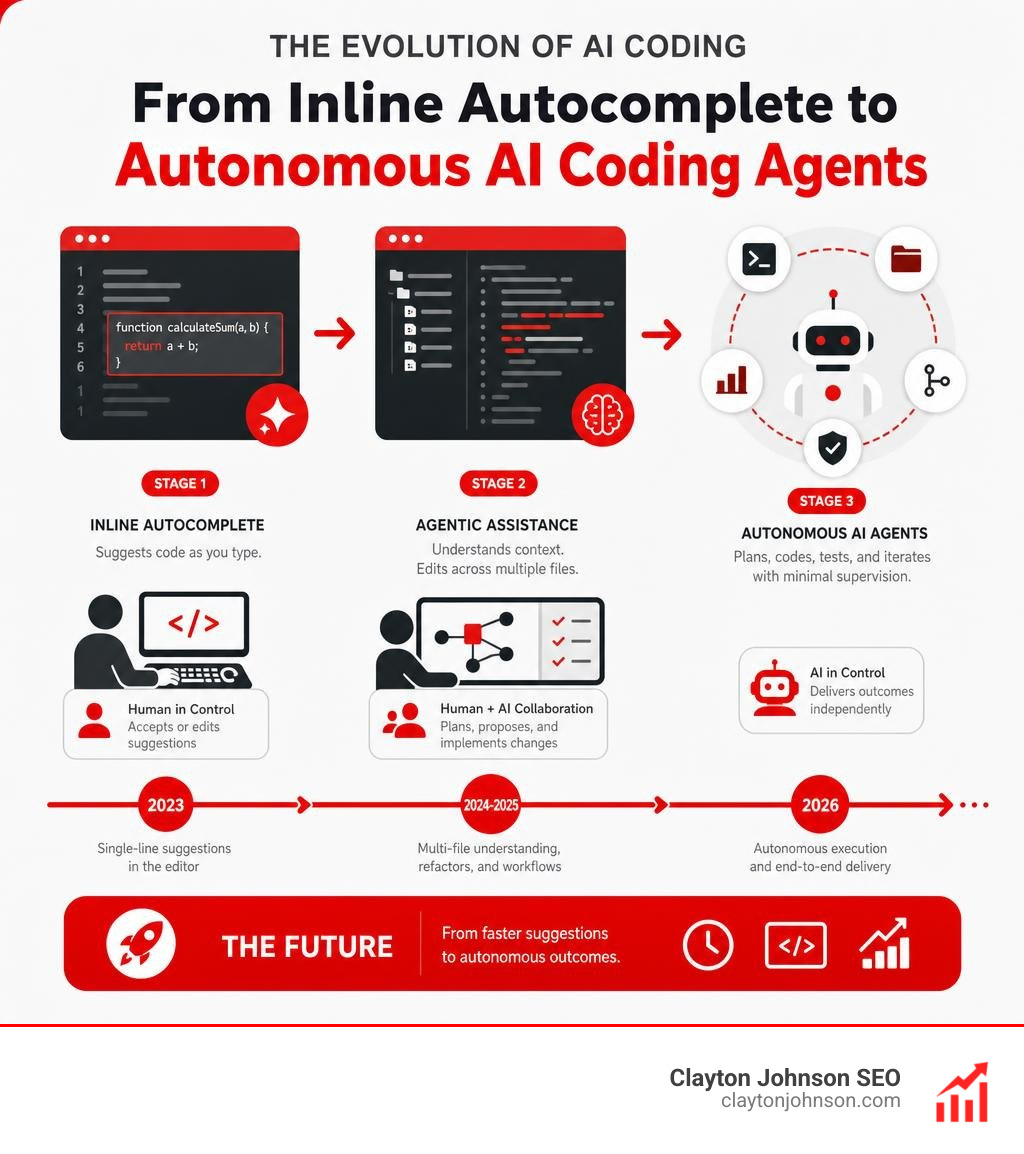
Before we dive into individual tool evaluations, we need to clarify a massive shift that occurred across the software engineering space between 2024 and 2026: the split between traditional AI coding assistants and autonomous AI coding agents.
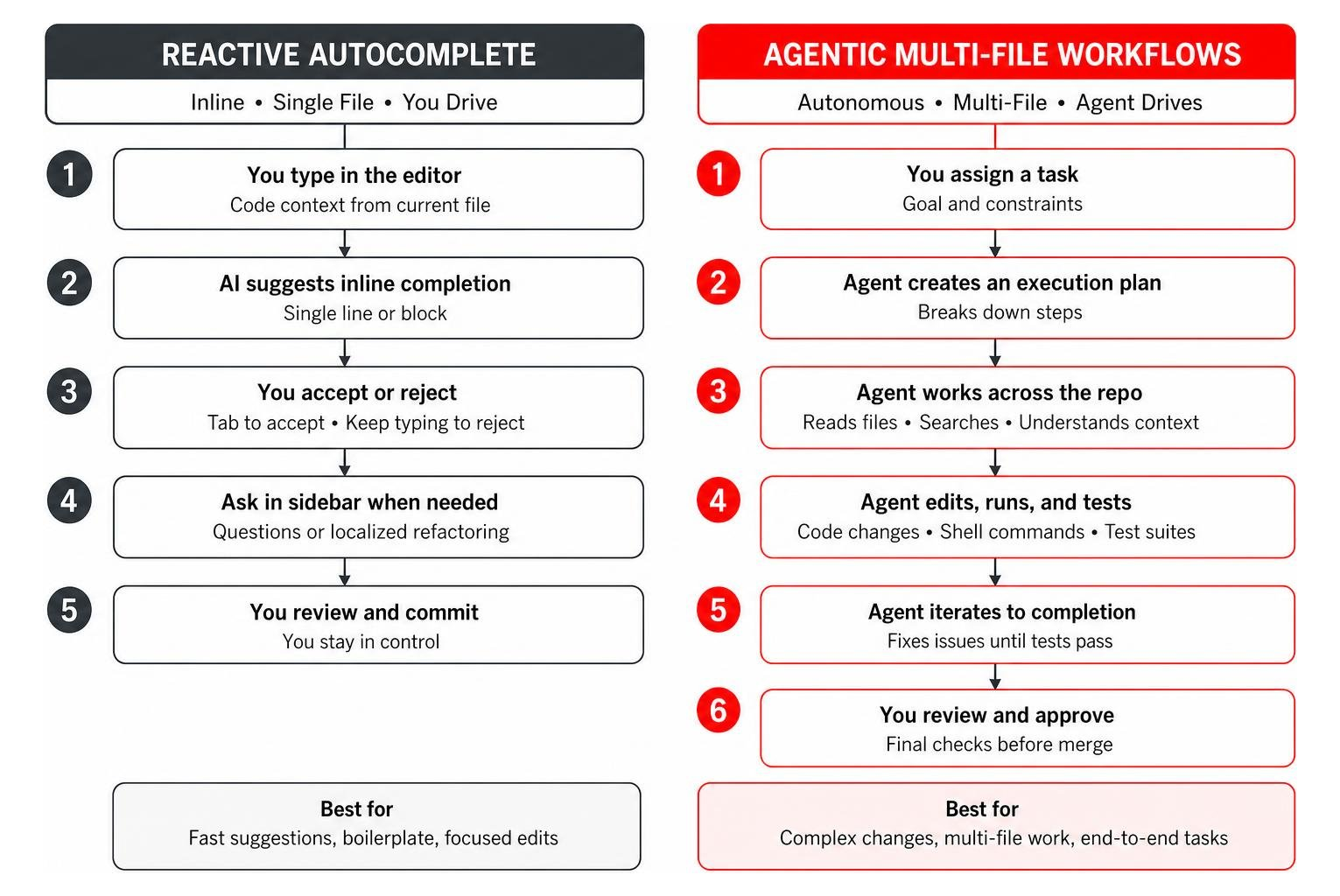
Classic AI coding assistants operate reactively. As you type in your editor, the assistant reads surrounding lines of code, open editor tabs, and recent file changes to serve single-line or block-level inline autocompletions. You press Tab to accept or Keep Typing to reject. When you hit a roadblock, you open a sidebar panel to ask questions or request localized refactoring. This approach keeps you strictly in the driver’s seat, accelerating boilerplate creation while maintaining tight human control.
By contrast, modern AI coding agents (such as Claude Code, Cursor’s agent mode, or the Auggie CLI) operate proactively and autonomously. When assigned a task, an agent creates an execution plan, searches repository indexes, reads across dozens of connected files, edits code across multiple directories, runs shell commands in the terminal, executes test suites, and iterates on failures until tests pass.
To prevent autonomous agents from wrecking active code workspaces, leading tools use advanced developer safety features:
- Shadow Git Checkpoints: Agents create background git snapshots before modifying files, allowing instant single-click rollbacks of individual file changes without erasing conversation memory.
- Isolated Worktree Execution: Agents execute terminal commands and run build processes inside isolated git worktrees, preventing untested agent logic from corrupting your active branch.
- Granular Permission Rules: Developers set auto-approval limits for passive file reads while requiring manual review for database migrations, network calls, or destructive bash scripts.
Understanding this distinction helps explain why engineering teams frequently deploy both modes simultaneously. Inline autocomplete handles rapid flow-state coding, while agentic workflows handle multi-file refactoring and feature scaffolding. For a deeper breakdown of how generative models handle software tasks, explore The Ultimate Guide to Generative AI Coding Tools and our deep dive into the Claude AI Programming Assistant.
Comparative Analysis of the Best AI Coding Assistants

To help you navigate the noisy marketplace, we evaluated the best AI coding assistants across latency, context window quality, privacy compliance, repository understanding, and total cost of ownership.
| Tool | Primary Strengths | Supported IDEs / Platforms | Model Flexibility | Private / Self-Hosted Support | Enterprise Pricing Model |
|---|---|---|---|---|---|
| GitHub Copilot | Ubiquitous IDE integration, non-intrusive flow | VS Code, JetBrains, Visual Studio, Neovim | Multi-model (Claude 3.5 Sonnet, GPT-4o, Gemini 1.5 Pro) | No (Cloud business privacy policies) | $19/user/month (Business), Credit-based PR review options |
| Cursor | Native agentic multi-file editing, cloud agents | Custom VS Code fork | OpenAI, Anthropic, Gemini, Custom models | No | $20/user/month (Pro), Enterprise custom tiers |
| Augment Code | Deep monorepo context, architectural reasoning | VS Code, JetBrains | Proprietary Context Engine + Frontier LLMs | Hybrid Enterprise Cloud | Custom enterprise contracts |
| Tabnine | Zero data retention, air-gapped security | VS Code, JetBrains, Eclipse, Android Studio | Local LLMs, Custom fine-tuned models | Yes (Fully self-hosted / air-gapped) | $12/user/month (Pro), Custom Enterprise |
| Amazon Q Developer | AWS ecosystem integration, IAM policy generation | VS Code, JetBrains, AWS Management Console | Amazon Bedrock models | Cloud-based AWS security boundaries | Free individual tier, $19/user/month (Pro) |
| Multi | Bring Your Own Key (BYOK), shadow git reverts | VS Code, JetBrains, Cursor, Windsurf | 27 providers / 100+ models | Yes (Local key storage, direct provider calls) | Free client software (Pay provider API directly) |
| Aider | CLI-first multi-file refactoring, git integration | Terminal / Command Line | Any LLM API (Claude, DeepSeek, OpenAI) | Yes (via local Ollama / vLLM endpoints) | Free open-source tool |
For additional evaluation frameworks, review our AI Coding Software Guide 2026 and see why AI Code Assistants Your New Pair Programmer Doesnt Need Coffee Breaks.
GitHub Copilot and Cursor: Best AI Coding Assistants for Daily Flow
For everyday feature development and individual flow-state coding, the battle for developer mindshare comes down to GitHub Copilot · Your AI pair programmer · GitHub and Cursor: AI coding agent .
GitHub Copilot remains the undisputed market leader, powering code completion for over 4.7 million subscribers. Copilot excels at unobtrusive inline completion. As you write functions or docstrings, light gray ghost text appears seamlessly ahead of your cursor. Accepting suggestions takes a simple hit of the Tab key, keeping developers inside their psychological flow state without constant context switching.
Copilot has evolved beyond single-model limitations by giving developers model choice. Subscribers can switch between Anthropic’s Claude 3.5 Sonnet, OpenAI’s GPT-4o, and Google’s Gemini 1.5 Pro directly inside the chat interface. For large enterprise teams already using GitHub Enterprise, Copilot delivers low adoption friction, strict IP indemnity, and code duplication suppression filters that block suggestions matching public repositories over 65 lexemes (~150 characters).
Cursor, on the other hand, approaches software creation as an agentic experience. Built as a custom fork of Visual Studio Code, Cursor re-architects the editor interface around AI interactions. Features like Composer (Cmd+I) allow developers to describe structural changes across multiple files simultaneously. Cursor explores workspace contexts, drafts edits in parallel, runs build scripts, and highlights diffs directly inside your code files.
While GitHub Copilot costs $10/month for individual developers ($19/user/month for Business), Cursor Pro runs $20/month. For developers working primarily on single-file updates and rapid boilerplate creation, Copilot offers exceptional value. For developers performing continuous multi-file refactoring or scaffolding complete application stacks, Cursor’s agentic workflow often justifies its higher price point.
Free and BYOK Options: Best AI Coding Assistants for Solo Developers
If you are a solo developer, open-source maintainer, boot camper, or university student, paying $20 per month per tool adds up quickly. Fortunately, free and Bring-Your-Own-Key (BYOK) options have matured dramatically.
Leading the BYOK revolution is Multi – Free AI Coding Agent for VS Code & JetBrains IDEs . Multi is a completely free, native AI coding extension that integrates directly into VS Code, JetBrains IDEs, Cursor, and Windsurf. Instead of forcing you into a proprietary monthly subscription with arbitrary markup, Multi connects directly to over 27 model providers (including Anthropic, OpenAI, OpenRouter, AWS Bedrock, Google Vertex AI, Groq, and DeepSeek) using your personal API keys.
Multi solves major developer pain points through native control features:
- Shadow Git Checkpoints: Revert experimental AI edits step-by-step without losing chat context.
- Worktree Isolation: Run background agent tasks on isolated git worktrees so active workspace code remains untouched.
- Custom Model Profiles: Switch between lightweight, high-speed models for inline autocompletion and heavy reasoning models like Claude 3.5 Sonnet for multi-file architecture tasks with keyboard shortcuts.
For students and verified open-source contributors, GitHub Copilot offers free individual access. Meanwhile, Amazon Q Developer provides a generous free tier for individual developers that includes inline code completions and AWS infrastructure generation. Browse our detailed breakdown of AI Coding Tools Free for additional cost-saving alternatives.
Enterprise Powerhouses: Monorepos, Legacy Code, and Self-Hosted Security
When evaluating tools for enterprise organizations managing legacy monoliths, distributed microservice architectures, or strict data regulatory requirements, standard inline autocomplete extensions fall short. Large engineering organizations need deep codebase indexing, cross-service context mapping, and strict privacy guarantees.
Augment Code has established itself as an enterprise leader for large codebases. While standard tools struggle when repository sizes exceed local context windows, Augment utilizes a specialized Context Engine that indexes massive monorepos (450,000+ files) in near real-time. On benchmarks like SWE-bench Pro, Augment’s Auggie CLI scored 51.80% on multi-file issue resolution. When debugging complex cross-service issues—such as tracking a distributed JWT authentication failure across multiple microservices—Augment maps dependencies in minutes, preventing hours of manual trace parsing.
For organizations operating in regulated banking, defense, or healthcare sectors, sending proprietary source code to public cloud APIs is strictly prohibited. Tabnine Enterprise addresses this challenge by providing fully self-hosted and air-gapped deployments. Tabnine runs on private cloud infrastructure or on-premise hardware using local open-weight models (such as Qwen2.5-Coder) fine-tuned on your organization’s private codebase. Tabnine guarantees zero data retention and zero public model training on your intellectual property.
To explore open-source model deployment options in greater detail, see our Best Open Source AI Coding Tools Guide.
Stack-Specific Performance: Clojure, AWS, and Functional Workflows
Not all programming languages receive equal performance from general-purpose AI models. Language popularity directly influences training data density, creating noticeable quality variations across functional paradigms, infrastructure-as-code, and web frameworks.
For functional programming languages like Clojure, standard inline autocompletions can feel intrusive or produce syntactically invalid balance expressions due to Clojure’s dense parenthetical structure. Developer feedback across functional communities highlights that pairing side-panel chat or agentic editors (like Cursor or Aidermacs) with Claude 3.5 Sonnet yields the highest accuracy for Clojure development. Instead of relying on raw autocomplete, functional programmers achieve superior results using one-shot prompting—providing a complete, hand-written feature slice (including spec definitions, pure functions, unit tests, and integration tests) and asking the AI agent to follow that exact structural blueprint for adjacent namespaces.
For engineering teams heavily invested in Amazon Web Services, Amazon Q Developer offers stack-specific performance. Amazon Q understands IAM policy definitions, CloudFormation templates, AWS CDK constructs, and AWS SDK usage patterns better than general models. It allows developers to generate secure, least-privilege infrastructure code directly inside VS Code or JetBrains, cutting down context switches to AWS documentation.
To maximize your workflow efficiency when using advanced LLMs, consult The Complete Guide to How Claude Helps Your Coding Workflow.
Real-World Productivity Impact, Hallucinations, and Measuring ROI

Marketing claims surrounding AI developer tools often promise 50% to 90% time savings. However, real-world productivity math requires accounting for the review, verification, and debugging time created by hallucinated code logic.
Empirical testing reveals that while AI assistants accelerate initial boilerplate generation by roughly 40% and overall code authoring by 15%, developers spend approximately 25% of their working hours reviewing, refactoring, and fixing AI-generated suggestions. This operational gap explains why overall developer trust in AI code accuracy dropped to 29% in recent industry surveys, with senior engineers (10+ years of experience) expressing the highest rates of skepticism (~20% explicit distrust).
To calculate real return on investment (ROI) from AI tool adoption, engineering leaders must look beyond raw code output speed and track holistic software delivery metrics, such as DORA (DevOps Research and Assessment) indicators:
- Change Failure Rate (CFR): Measures the percentage of production deployments that result in downstream failures. If AI code velocity increases but CFR spikes, developer time savings are completely wiped out by emergency hotfixes.
- Mean Time to Restore (MTTR): Measures how quickly engineering teams recover from production incidents. High-context AI tools accelerate debugging by identifying root causes across complex call stacks.
- Cycle Time: Measures the total time elapsed from initial code commit to production deployment. Effective AI adoption shortens code review delays without increasing defect rates.
- Defect-Leak Savings: Catching an architectural flaw or security vulnerability (such as an N+1 query pattern or SQL injection risk) during pull request creation saves an estimated 10:1 ratio in remediation costs compared to fixing the bug after deployment.
For enterprise teams deploying AI across 50 to 200 developers, direct seat license costs ($10 to $20 per user per month) represent a minor fraction of engineering overhead. The real ROI driver comes from reducing friction during onboarding, automating repetitive unit test authoring, and accelerating legacy refactoring passes.
Read more about why modern development teams are adopting automated code generation in Why You Need an AI Code Generator Right Now and explore The Best AI for Coding and Debugging.
Frequently Asked Questions About AI Coding Assistants
Which AI coding assistant has the lowest hallucination rate?
Across independent evaluation benchmarks and developer community surveys, Anthropic’s Claude 3.5 Sonnet (integrated via tools like Cursor, GitHub Copilot, or Aider) consistently achieves the lowest code hallucination rate for complex reasoning, multi-file refactoring, and functional logic. For massive monorepos, enterprise context engines like Augment Code achieve lower hallucination rates by providing localized semantic retrieval across repository dependencies before synthesizing code output.
How can engineering teams accurately measure the ROI of AI coding assistants?
Engineering teams should establish baseline software delivery metrics prior to deployment and track impact across DORA metrics over 90-day cycles. Key indicators include pull request cycle time, PR review turnaround speed, code churn rate, Change Failure Rate (CFR), and time spent writing unit tests. Measuring defect-leak savings—catching architectural violations in staging rather than production—provides an accurate monetary measurement of AI value.
Which AI coding assistant is best for self-hosted or air-gapped environments?
Tabnine Enterprise is the premier choice for strict air-gapped or self-hosted enterprise environments, offering complete local deployment, zero data retention, and custom model fine-tuning without external network communication. Alternatively, open-source CLI tools like Aider or Multi can be connected to locally hosted open-weight models (such as Qwen2.5-Coder or DeepSeek-Coder) running on internal hardware via Ollama or vLLM.
Conclusion
Choosing among the best AI coding assistants comes down to matching tools to your specific developer environment, team size, security posture, and budget:
- Everyday Individual & Team Flow: GitHub Copilot offers the lowest friction, strongest autocomplete flow, and best multi-model flexibility inside standard IDEs.
- Autonomous Multi-File Refactoring: Cursor provides an unrivaled agentic workspace experience for developers managing complex feature scaffolding.
- Free & BYOK Flexibility: Multi gives solo developers and power users full freedom to connect high-performing frontier models using direct API keys without monthly subscription markups.
- Enterprise Monorepos & Monoliths: Augment Code delivers deep cross-service context engines capable of navigating complex distributed codebases.
- Air-Gapped Security & Compliance: Tabnine Enterprise guarantees complete intellectual property protection through self-hosted local model execution.
The future of software development is not about replacing human software engineers with fully automated code generators. It is about empowering developers with context-aware AI assistants that eliminate mundane boilerplate work, accelerate routine refactoring, and free up creative energy for system architecture and user experience.
Discover how our strategic SEO and content frameworks help developer tool creators and software companies scale their audience by reviewing Why Every Developer Needs AI Tools for Programming in 2025. Ready to build authoritative content campaigns that capture search intent across the AI ecosystem? Explore our specialized Clayton Johnson SEO Services today.