AI Coding Software Is Changing How Developers Build — Here’s What to Know in 2026
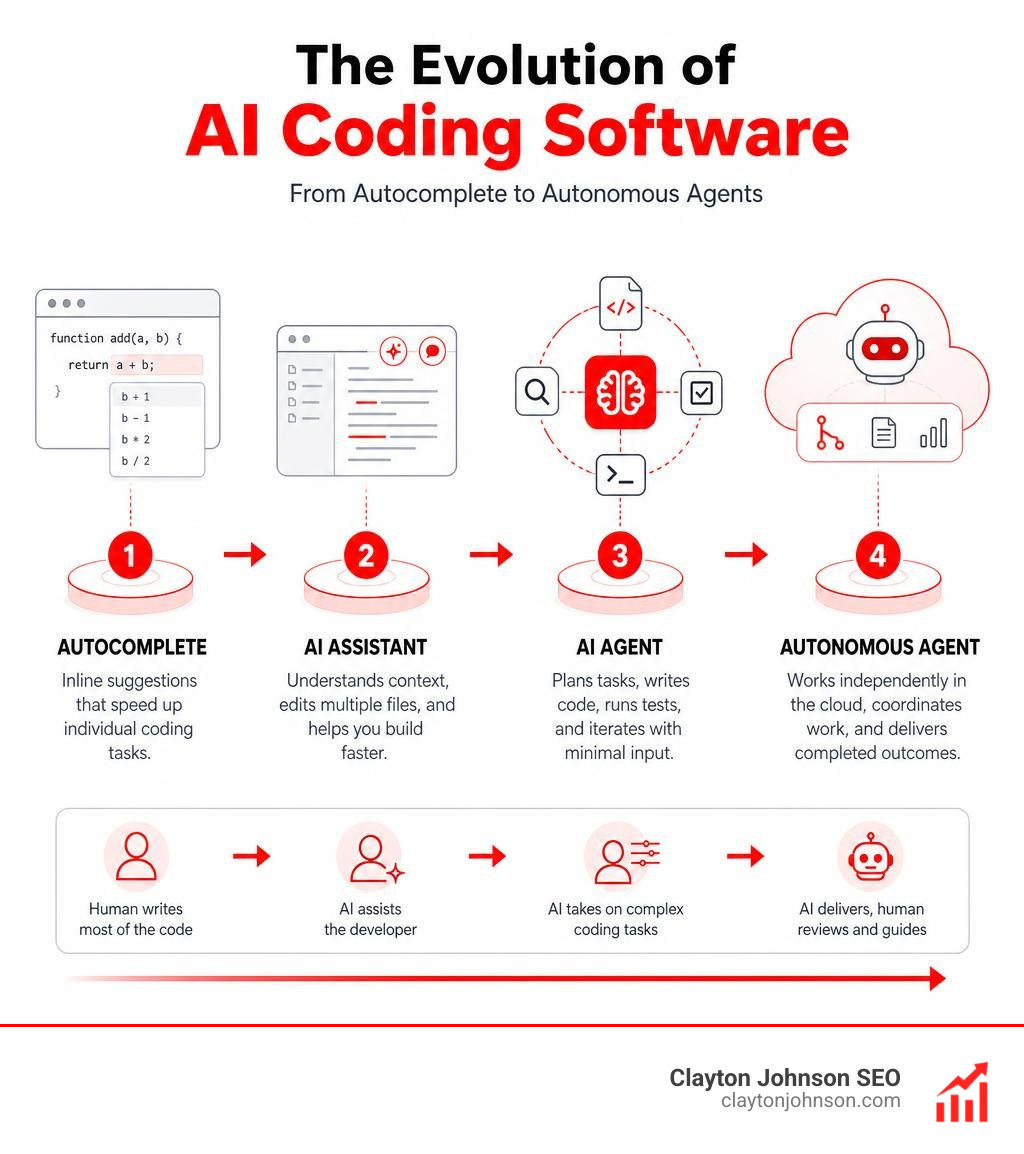
AI coding software has moved far beyond simple autocomplete. Today’s tools can plan features, write multi-file code, run tests, and submit pull requests — with minimal human input.
Here are the top AI coding tools worth knowing right now:
| Tool | Best For | Starting Price |
|---|---|---|
| Cursor | Agentic workflows, everyday shipping | $16/month |
| Claude Code | Deep reasoning, complex debugging | $17/month |
| GitHub Copilot | Pair programming, broad IDE support | $10/month |
| Codex (OpenAI) | Multi-agent, background automation | Included in ChatGPT |
| Replit | Beginners, browser-based building | Free tier available |
| OpenCode | Open-source, privacy-first teams | Free |
| Cline | Developer control, bring-your-own model | Free + API costs |
The numbers tell a clear story. Around 75% of engineers now use AI tools in their daily work. At Y Combinator-backed startups, adoption of tools like Cursor jumped from single digits to over 80% within a single batch. NVIDIA has deployed AI assistance to all 40,000 of its engineers.
But here is the catch: most organizations still see no measurable performance gains. The tool matters — but so does how you use it.
The shift happening right now is from passive assistants to autonomous agents that can work on their own cloud environments, run in parallel, and hand finished work back to developers for review. That is a fundamentally different way of building software.
I’m Clayton Johnson, an SEO strategist and digital marketing expert who has spent years tracking how AI coding software reshapes developer productivity, technical infrastructure, and business competitiveness. In this guide, I’ll cut through the marketing noise and show you exactly how these tools compare — so you can make a smart choice for your team or project.
Evaluating the Best AI Coding Software for Modern Engineering Teams

To find the right tool for your workflow, you need to look past the marketing hype and understand how these platforms perform in real-world scenarios. The ai coding software landscape has fragmented into highly specialized niches. Some tools excel at keeping you in “the flow” with lightning-fast inline completions, while others act as fully autonomous agents that can refactor an entire repository while you grab a coffee.
When evaluating these tools, we look at model flexibility, context depth, and how well the software integrates with existing developer environments. To dive deeper into the core technologies driving this space, check out The Ultimate Guide to Generative AI Coding Tools as well as our breakdown of The Best AI for Coding and Debugging.
The table below outlines the core practical differences between the three heaviest hitters in the industry:
| Feature | Cursor | Claude Code | GitHub Copilot |
|---|---|---|---|
| Primary Interface | Forked VS Code IDE | Terminal / Command Line | IDE Extension (VS Code, JetBrains, etc.) |
| Autonomy Level | High (Cloud-based parallel agents) | Extremely High (Runs commands, edits files) | Medium (Inline suggestions & chat) |
| Model Selection | Multi-model (OpenAI, Anthropic, Gemini) | Anthropic Claude models | Multi-model (via metered credits) |
| Context Strengths | Full-repo indexing & codebase search | 1M+ token window with agentic search | Probabilistic localized context |
Cursor: The Agentic IDE Standard
Cursor has quickly become the default AI-native IDE for modern development teams. By forking VS Code, the team behind Cursor created a seamless experience where the AI isn’t just an extension — it is the core engine of the editor.
With its advanced codebase indexing, Cursor builds a semantic map of your entire project. This means when you prompt its autonomous cloud agents, they can explore files, run searches, and execute parallel tasks on their own virtual environments. For example, during testing, a Cursor agent successfully built an interactive analytics dashboard in just over 14 minutes, exploring 12 different files and running multiple searches to wire up the backend logic. It is this level of hands-off execution that has driven its rapid adoption among top-tier startups. Learn more about its features directly from Cursor: AI coding agent.
Claude Code: The Terminal-First Reasoning Engine
If Cursor is the polished desktop experience, Anthropic’s Claude Code is the raw, terminal-first powerhouse. Operating directly from your command line, Claude Code is designed for deep reasoning, complex debugging, and massive architectural shifts.
Claude Code stands out because of its agentic capabilities. It can run terminal commands, execute tests, and even use “computer use” features to navigate local tools to solve a problem. It relies on a massive 1-million token context window, allowing you to feed it massive chunks of code without losing project context. It even features a charmingly nostalgic CLI interface (complete with Clippy-esque loading animations and whimsical status messages like “Flibertigibbeting…”) that wins over developers who prefer working outside of heavy graphical interfaces. Discover how to integrate it into your terminal via Claude Code by Anthropic | AI Coding Agent, Terminal, IDE.
GitHub Copilot: The Pragmatic Pair Programmer
GitHub Copilot remains the gold standard for inline code completion and low-friction pair programming. Instead of taking over your entire workflow, Copilot sits quietly in your favorite IDE, suggesting the next line of code or generating boilerplate functions on the fly.
One of Copilot’s strongest enterprise features is its built-in duplication filter, which blocks any suggestion containing more than 65 matching lexemes (around 150 characters) from public repositories. This provides a crucial layer of legal and intellectual property protection for enterprise teams. While it may not have the fully autonomous, multi-file agentic capabilities of Claude Code or Cursor by default, it is incredibly reliable and boasts the highest developer satisfaction rates for everyday coding. For more details on licensing, filters, and setup, visit GitHub Copilot · Your AI pair programmer · GitHub.
How AI Coding Agents Navigate Complex Codebases and Multi-File Projects
Building a single-file script is easy. The real test of any ai coding software is how it handles a complex, multi-service repository with hundreds of thousands of lines of code. This is where repository mapping and codebase indexing become critical.
Modern coding agents use background indexing to build semantic dependency graphs of your files. When you ask an agent to modify a database schema, it doesn’t just edit the schema file; it traces that schema’s imports across your API layers, updates your frontend types, and rewrites your test suites to match. To understand how these tools fit into modern engineering pipelines, explore our guide on Why Every Developer Needs AI Tools for Programming in 2025 and see how AI Code Assistants Your New Pair Programmer Doesnt Need Coffee Breaks.
Why Context Depth Matters in AI Coding Software
A massive context window is useless if the AI cannot accurately recall or reason about the information inside it. This is known as the “needle in a haystack” problem. If you dump a 500,000-line codebase into an agent, does it actually understand the relationship between a data transformation utility and a downstream machine learning pipeline?
This is why tools like Augment Code focus heavily on context engineering rather than just raw context capacity. Augment Code’s Context Engine processes over 400,000 files through deep semantic dependency analysis to ensure the AI always has the exact context it needs, achieving a 59% F-score on code review benchmarks. To scale your projects effectively, choosing the right framework is crucial. Read more on Scalable Coding Frameworks Choosing the Right Tech for AI Assistance.
Managing Token Efficiency and Cost at Scale
Running agentic workflows can get incredibly expensive. Every time an agent searches your codebase, runs a test, and retries a failing build, it consumes thousands of tokens. If your agents are running continuously in the background, your API costs can spiral out of control.
To combat this, platforms are shifting toward metered, usage-based pricing models. For instance, GitHub has introduced “GitHub AI Credits” (valued at $0.01 USD per credit) to meter heavy agentic and chat workflows while keeping standard inline completions unlimited. Understanding how to write efficient prompts is the best way to keep these costs down. Learn how to optimize your token usage with Stop Wasting Tokens and Start Coding Like a Claude Pro.
Enterprise Security, Compliance, and Workflow Integration

For enterprise engineering leaders, productivity gains mean nothing if they come at the cost of security or compliance. Deploying ai coding software across hundreds of developers requires strict controls over data retention, intellectual property protection, and network security.
To prevent sensitive proprietary code from being leaked or used to train public models, enterprises must enforce zero-data-retention policies and require SOC 2 Type II compliance. For a deep dive into managing these workflows securely, check out Mastering AI Coding Workflows on GitHub.
Choosing the Right AI Coding Software for Beginners vs. Experts
Your team’s technical expertise should dictate the tools you deploy.
- For Beginners: Browser-based environments like Replit act as an excellent launchpad. They remove the friction of setting up local compilers, database connections, or environmental variables, allowing new developers to build functional applications using plain-text prompts.
- For Experienced Developers: Experts require maximum control and customization. Tools like Cline or OpenCode allow senior engineers to bring their own API keys, run local open-weight models, and fine-tune the agent’s behavior directly within their existing command-line workflows.
To help your team level up their capabilities, read our guide on How to Enhance Your Coding Skills in the Age of AI.
Security, Privacy, and CI/CD Pipeline Integration
Integrating AI directly into your CI/CD pipelines allows you to automate routine security checks, perform back-compat testing, and run automated PR reviews before a single human developer looks at the code.
However, teams must establish clear guardrails. AI-generated code must go through the same rigorous automated linting, vulnerability scanning, and testing pipelines as human-written code. To learn how to automate this process without sacrificing quality, read about AI Code Review Tools Because Your Coworkers Are Tired of Your Typos.
Emerging Trends and New Tools to Watch in 2026
The software development lifecycle (SDLC) is rapidly evolving into an “Agentic SDLC,” where human developers act as systems architects and decision-makers, while parallel subagents handle the execution. To stay ahead of the curve, keep an eye on how these technologies are growing by reading The Real Truth About Coding AI Growth.
Here are some of the most exciting emerging tools and open-source projects making waves right now:
OpenCode: The Open-Source Privacy-First Agent
For teams that refuse to lock themselves into proprietary ecosystems, OpenCode has emerged as a massive force. With over 160,000 GitHub stars and 900 contributors, OpenCode is a privacy-first, open-source AI agent that runs in your terminal, IDE, or desktop. It allows you to connect over 75 different LLM providers or run completely local, offline models to ensure your code never leaves your local machine. For a complete list of open-source options, see our Best Open Source AI Coding Tools Guide.
Codex, Windsurf, and Verdent AI
OpenAI’s Codex has taken a major leap forward by integrating directly into ChatGPT, allowing developers to preserve Git states and use “Record & Replay” features to turn manual workflows into reusable automated skills. Explore this integration via Codex in ChatGPT | AI Coding Agents for Software Engineering | OpenAI.
Meanwhile, tools like Windsurf and Verdent AI are pushing the boundaries of parallel agent execution. Verdent AI, for example, uses a specialized methodology called SEAlign to train models to make better decisions at critical engineering points. This approach has boosted its performance on the SWE-bench Verified benchmark from a baseline of 2.8% to an impressive 21.8%, proving that behavioral alignment is just as important as raw model size. Learn more about their multi-agent platform at Verdent AI|Agentic Coding with Multiple Parallel Agents.
Frequently Asked Questions about AI Coding Tools
How do engineering leaders measure the real productivity impact of AI coding agents?
Measuring productivity by “lines of code written” is a recipe for disaster when using AI, as agents can easily bloat codebases with duplicate functions. Instead, engineering leaders should focus on business-oriented metrics like task completion speed, pull request cycle time, and deployment frequency. For example, enterprise case studies show that deploying GitHub Copilot can increase completed tasks by 25% on average, with some organizations reporting up to a 94% increase in overall developer throughput. To set up your team for success, explore Why Every Developer Needs a Coding AI Pack.
What are the most common mistakes teams make when adopting AI coding tools?
The biggest mistake is over-reliance without human oversight. Developers often accept AI suggestions blindly, leading to “hallucinated” bugs, broken downstream dependencies, and massive technical debt. Another common mistake is letting agents run wild across a codebase, resulting in duplicated files and messy architectures. To avoid these traps, teams must establish strict code review policies and master the art of refactoring. Learn how to clean up your codebase with How to Code Refactoring in 7 Easy to Follow Steps.
How do pricing models and token efficiency impact the real-world cost of using AI coding agents?
The true cost of using AI coding agents isn’t just the flat monthly subscription fee — it’s the cost-per-outcome. If an agent takes 20 retries (consuming millions of tokens) to solve a simple bug, it can end up costing far more than a developer doing it manually. Understanding token efficiency, setting strict credit budgets, and utilizing free tiers when prototyping are essential strategies for keeping costs under control. Discover free and low-cost options in our guide on AI Coding Tools Free.
Conclusion
Choosing the right ai coding software is no longer just about finding a tool that autocompletes your brackets. It is about strategically integrating autonomous agents into your team’s workflow to accelerate shipping times while maintaining strict security, privacy, and code quality standards.
At Clayton Johnson, we are an SEO agency that helps software, technology, and enterprise companies map and understand their target audiences through strategic content and SEO services. By aligning your technical content with what developers and engineering leaders are actually searching for, we help you build authority and drive real, measurable growth.
Ready to scale your engineering authority and reach your target audience? Learn more about AI Coding and let us help you map out your digital growth strategy.