Build Your First Basic AI Program in Python
You can build a basic AI program in Python without advanced math, a paid API, or a large language model. Start with one small goal, such as replying to customer questions, predicting a number from a spreadsheet, or choosing the next task from a short list.
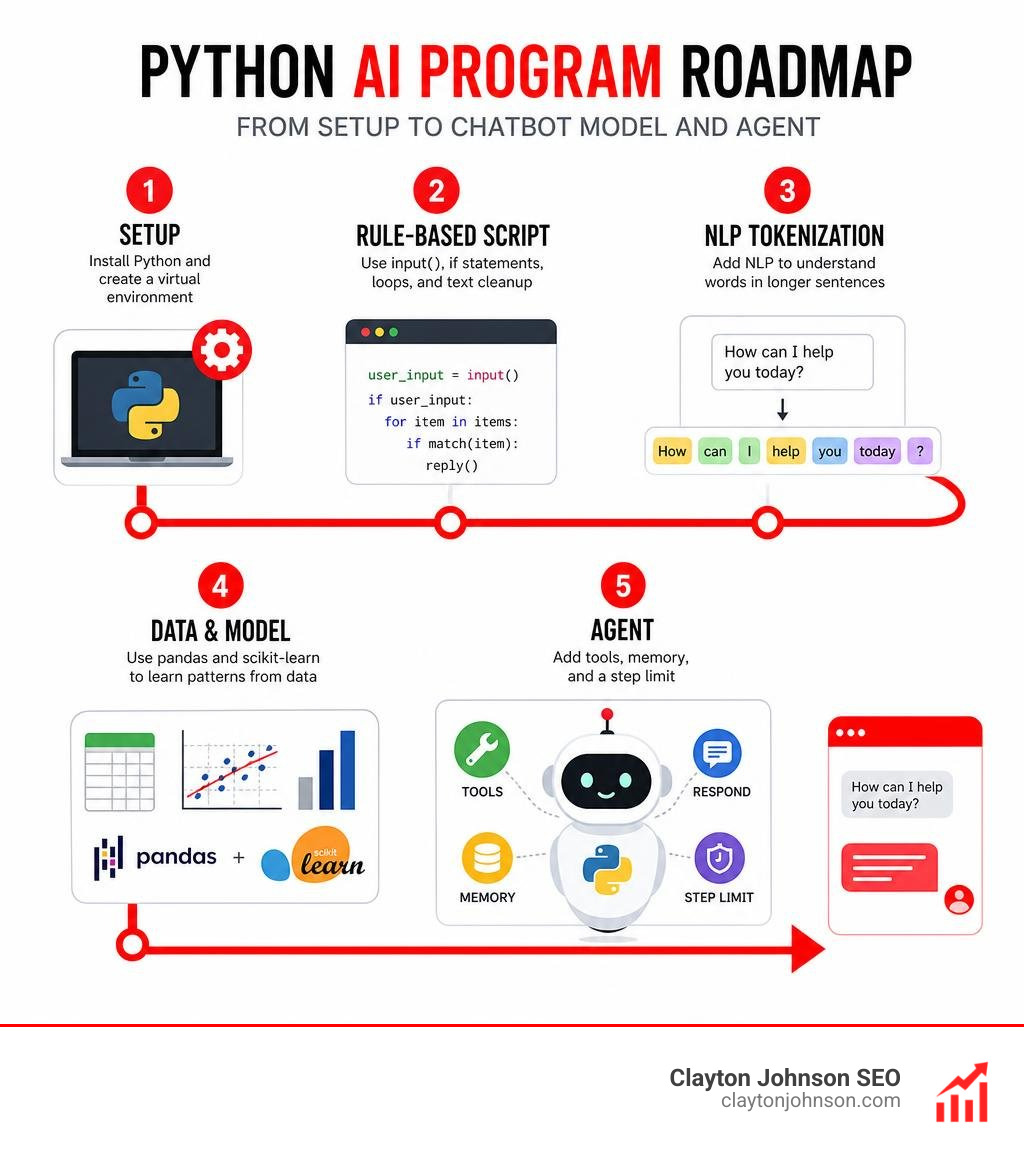
A practical beginner path is:
- Install Python and create a separate project environment with
venv. - Build a rule-based script using
input(),ifstatements, loops, and text cleanup. - Add NLP tokenization when the program needs to recognize words in longer sentences.
- Use pandas and scikit-learn when you have data and want the program to learn patterns.
- Add tools, memory, and a step limit to turn a script into a simple AI agent.
Python is a strong starting point because its readable syntax and libraries support everything from a no-dependency chatbot to predictive models and tool-using agents. For a small business owner, the useful question is not “How do I build the most advanced AI?” It is “What repeatable customer, content, or data task can a small program help me do better?”
I am Clayton Johnson, an SEO strategist and marketing-automation practitioner who works at the intersection of AI, data, search visibility, and practical business systems. In this guide, I will show how a basic AI program in Python can become a useful building block for automation, analysis, and customer-facing tools.
Terms related to basic ai program in python:
- artificial intelligence python code
- python programming artificial intelligence
- simple ai program in python
Prerequisites and Environment Setup for Python AI Development
Before writing intelligence logic, you need a comfortable workspace. Python is used by over 70% of data scientists and machine learning engineers because it reads almost like plain English. Developers working in artificial intelligence are experiencing strong demand, with a projected job growth rate of 25% between 2021 and 2031 and an average salary of $130,662 per year. Building a strong foundation begins with standard syntax: variables, lists, dictionaries, functions, and loops.
To accelerate your learning curve, explore our curated Python AI for beginners resource and review your roadmap to learning artificial intelligence.
Essential Python Libraries for AI
Python’s real strength lies in its specialized ecosystem. Instead of writing mathematical algorithms from scratch, you rely on mature, community-tested packages:
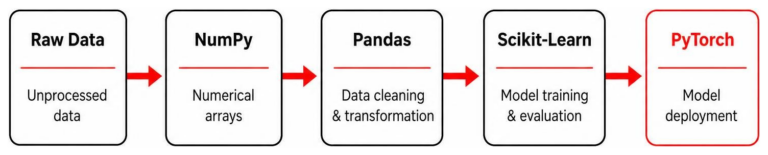
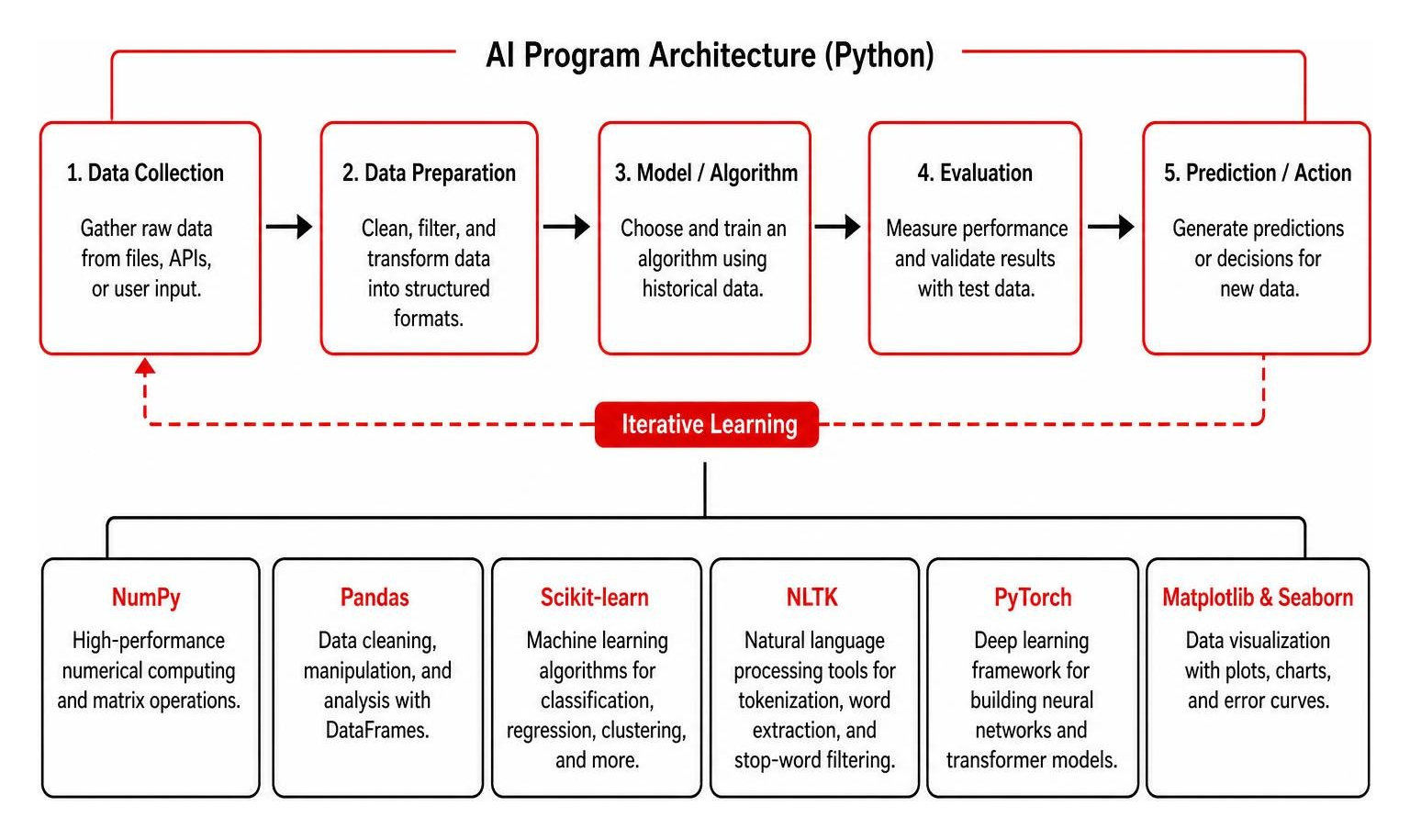
- NumPy: Handles high-performance numerical computing, matrix calculations, and multi-dimensional array operations.
- Pandas: Provides Series and DataFrame structures to clean, filter, and manipulate tabular datasets like CSVs or spreadsheets.
- Scikit-learn: The industry standard for classical machine learning, offering pre-built tools for linear regression, classification, clustering, and dataset splitting.
- NLTK (Natural Language Toolkit): Simplifies text processing tasks such as sentence tokenization, word extraction, and stop-word filtering.
- PyTorch: A flexible deep learning framework utilized for constructing multi-layer artificial neural networks and modern transformer models.
- Matplotlib and Seaborn: Convert raw prediction numbers into clear visual graphs, scatter plots, and error curves.
Understanding these tools helps clarify what is artificial intelligence in practice: a combination of organized data, structured algorithms, and iterative learning.
Setting Up Virtual Environments and Packages
When working on Python scripts, avoid installing all third-party libraries into your global operating system environment. Different projects require different package versions, and global installations often result in dependency conflicts.
Using Python’s built-in venv module creates a self-contained folder for your project dependencies:
- Open your system terminal or command prompt.
- Navigate to your desired project directory.
- Run the virtual environment creation command: python -m venv ai_env
- Activate your environment:
- On macOS and Linux: source ai_env/bin/activate
- On Windows: ai_env\Scripts\activate
- Install your foundational packages using the pip package manager: pip install numpy pandas scikit-learn nltk matplotlib
For data science workflows requiring interactive visual output, distributions like Anaconda bundled with Jupyter Notebooks provide an excellent alternative environment.
How to Build a Basic AI Program in Python from Scratch
Creating an artificial intelligence program does not require training massive neural networks from day one. You can build practical software using three distinct starting approaches: rule-based conversational systems, supervised predictive models, and autonomous decision loops. For quick reference templates across these methods, check out our cheat sheet to artificial intelligence Python code examples.
Key Architecture of a Basic AI Program in Python
Every AI script follows an architectural pipeline designed to process information and determine actions:
- Input Processing: Receiving unstructured text, numerical values, or real-time system metrics and standardizing them into usable data types.
- State Memory: Tracking conversation history, session variables, or past programmatic decisions in memory dictionaries.
- Decision Engine: Evaluating normalized data against statistical weights, pattern rules, or algorithmic models.
- Action and Output Generation: Executing external tools, displaying text responses, or formatting numerical predictions.
- Continuous Execution Loop: Coordinating the cycle so the software can continuously receive feedback until the task finishes.
Building a Rule-Based NLP Conversational Bot
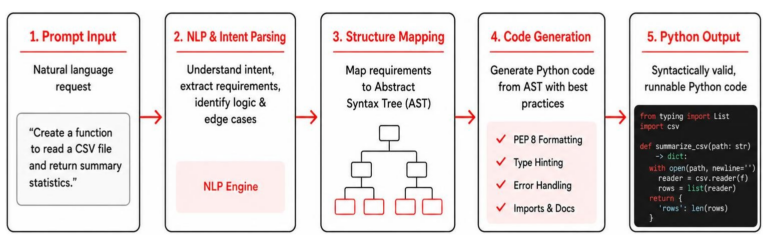
A chatbot is a program that simulates conversation by parsing user text and matching it against structured rules. You do not need machine learning to create a responsive conversational tool. By applying string methods like lower() to normalize input casing and using while loops with conditional checks, you can handle typical visitor questions smoothly.
To make the chatbot more flexible, integrate Natural Language Processing (NLP) tokenization using NLTK’s punkt tokenizer. Sentence tokenization breaks raw sentences into distinct word tokens, preventing errors caused by unexpected punctuation or complex phrasing. Adding dynamic replies with Python’s built-in random.choice() function makes the dialogue feel natural.
For a detailed step-by-step tutorial on constructing conversational workflows, read the guide on How to Build a Simple AI Chatbot with Python or review this beginner walkthrough to Write a Python Program to Implement a Simple Chatbot.
Training a Simple Scikit-Learn Predictive Model
When your goal shifts from conversation to prediction, supervised machine learning allows software to identify numerical trends from past data rather than relying on hardcoded rules.
Consider an everyday example: predicting residential property valuations based on square footage, bedroom count, and age. The workflow follows these steps:
- Data Preparation: Structure your historical observations into a Pandas DataFrame, designating independent input features as X and the dependent target label as y.
- Data Splitting: Use scikit-learn’s traintestsplit module to allocate 80% of your records for model training and reserve 20% as an unseen test dataset.
- Model Training: Instantiate the LinearRegression algorithm and train it by running the fit method on your training data.
- Output Evaluation: Generate predictions for your test data and evaluate statistical accuracy using Mean Squared Error (MSE).
- Result Visualization: Plot actual values against model predictions using Matplotlib to inspect accuracy trends visually.
This statistical foundation serves as a direct bridge to advanced data science, which we explore in depth within our guide to Python programming and artificial intelligence.
Creating a Decision-Loop AI Agent in Pure Python
An AI agent differs from a basic chatbot because it can evaluate its environment, use external tools, and iterate through a decision loop until it accomplishes a goal. You can build a fully functional agent in pure Python without third-party frameworks, paid API keys, or signups.
To construct a pure Python agent:
- Tool Setup: Write standard Python functions that execute distinct actions, such as a math calculation tool with safe evaluation or a dictionary lookup tool.
- The Brain: Implement a decision function that uses regular expressions and pattern matching to inspect the user’s objective, evaluate current memory, and choose the appropriate tool.
- Memory Store: Maintain a structured list or dictionary that stores previous tool outputs and intermediate notes.
- The Agentic Loop: Wrap the decision and execution steps inside a while loop with an enforced maximum step limit (e.g., 5 iterations) to prevent accidental infinite loops.
For deeper architectural examples, see Richel Attafuah’s tutorial on building an AI agent in pure Python, review O’Reilly’s blueprint on How to Build a General-Purpose AI Agent in 131 Lines of Python, and explore Eva Patel’s breakdown on how to Build an AI Agent from Scratch in Python.
Comparing AI Paradigms: Rule-Based vs Machine Learning
Choosing the right approach depends on your project goals, available data, and complexity requirements.
| AI Paradigm | Core Mechanism | Primary Advantages | Main Limitations | Ideal Real-World Use Cases |
|---|---|---|---|---|
| Rule-Based Systems | Hardcoded conditional statements (if-elif-else) and keyword matching | Deterministic, completely explainable, requires zero training data, zero API or computing cost | Cannot handle unprogrammed edge cases; scaling complex rule trees becomes difficult | Navigational website bots, customer FAQ routing, deterministic form validation |
| Statistical Machine Learning | Pattern discovery via mathematical optimization (e.g., scikit-learn Linear Regression) | Learns complex relationships from data; handles continuous numeric and categorical inputs | Requires structured historical data; vulnerable to overfitting and data anomalies | Real estate pricing, market trend forecasting, customer churn prediction, lead scoring |
| Autonomous AI Agents | Execution loops managing tools, memory state, and reasoning engines | Capable of multi-step problem solving, external tool use, and automated goal completion | Requires careful step limits, input sanitization, and fallback error handling | Automated research, system diagnostics, multi-step data transformation tasks |
Extending Basic AI Scripts into Real-World Applications
A terminal script is a great starting point, but turning your program into a practical business application requires adding accessible user interfaces and deployment pipelines.
You can accelerate your development process using modern tools. Discover how in our guides to Python code generation with AI made easy and The Complete Guide to Python Code Generation. Selecting the right assistant is equally important, so consult our analysis of the ultimate guide to generative AI coding tools, review top AI coding tools free options, and check The Complete Guide to Compare Best AI Coding Tools.
Common Pitfalls When Debugging a Basic AI Program in Python
As you build and expand your programs, watch out for these common implementation errors:
- Unhandled Input Variations: Failing to normalize strings with lower() or strip() leads to missed keyword matches.
- Data Type Inconsistencies: Passing lists or strings into mathematical functions expecting single floats results in TypeError crashes.
- Infinite Agent Loops: Forgetting to set a strict max_steps counter in while loops can trap your program in endless decision cycles.
- Overfitting Training Datasets: Evaluating a machine learning model only on the data it was trained on produces overly optimistic accuracy metrics that fail in production.
- Insecure String Execution: Using Python’s eval() function on untrusted user inputs without restricting built-in methods exposes your environment to security risks.
Transitioning to Web Apps and Live APIs
Moving a Python AI script out of the terminal and into production usually involves two main approaches:
- Lightweight Web Interfaces: Use libraries like Streamlit or Gradio to create clean browser interfaces with text fields, buttons, and visual charts in just a few lines of Python.
- Web Framework Endpoints: Wrap your model or agent inside a Flask or FastAPI application. This exposes REST API endpoints that allow external mobile apps, WordPress sites, or internal CRM platforms to query your Python AI logic securely.
Frequently Asked Questions About Python AI Programming
Can I build an AI program in Python without machine learning experience?
Yes. Many practical AI applications rely on deterministic decision logic, regular expression parsing, and natural language tokenization rather than complex machine learning algorithms. Rule-based systems provide a practical foundation for understanding program state, user interaction flow, and automation before stepping into statistical modeling.
Which Python libraries should beginners learn first for AI?
Beginners should start with NumPy and Pandas to build confidence in data handling. Once comfortable, adopt Scikit-learn for basic predictive modeling and NLTK for text processing. If you choose to explore deep learning and neural network design later on, PyTorch is the recommended next step.
What is the difference between a simple chatbot and an AI agent?
A simple chatbot matches incoming text against predefined rules or statistical models to output a direct conversational response. An AI agent uses a decision loop, maintains a record of past actions in memory, and autonomously selects and executes external tools (such as running calculations, querying databases, or making web requests) to solve multi-step problems.
Conclusion
Building your first AI programs in Python helps demystify artificial intelligence. Moving progressively—from rule-based conversational scripts and scikit-learn regression pipelines to pure Python decision agents—demonstrates that practical AI is built on clear logic, clean data handling, and structured control loops.
At Clayton Johnson SEO, we help companies turn search data and audience intent into scalable business growth. Developing a foundational understanding of Python AI equips you to automate data workflows, improve technical optimization, and build practical customer-facing tools. Continue expanding your technical capabilities by exploring our complete guide to mastering AI coding workflows.