You Can Build a Working AI Program in Python Today — Here’s How
Writing a simple AI program in Python is easier than most beginners think. You don’t need a computer science degree, an expensive API key, or a complex framework. With just a few lines of Python, you can build a working AI agent that thinks, acts, and responds to goals.
Here’s the fastest way to build a simple AI program in Python:
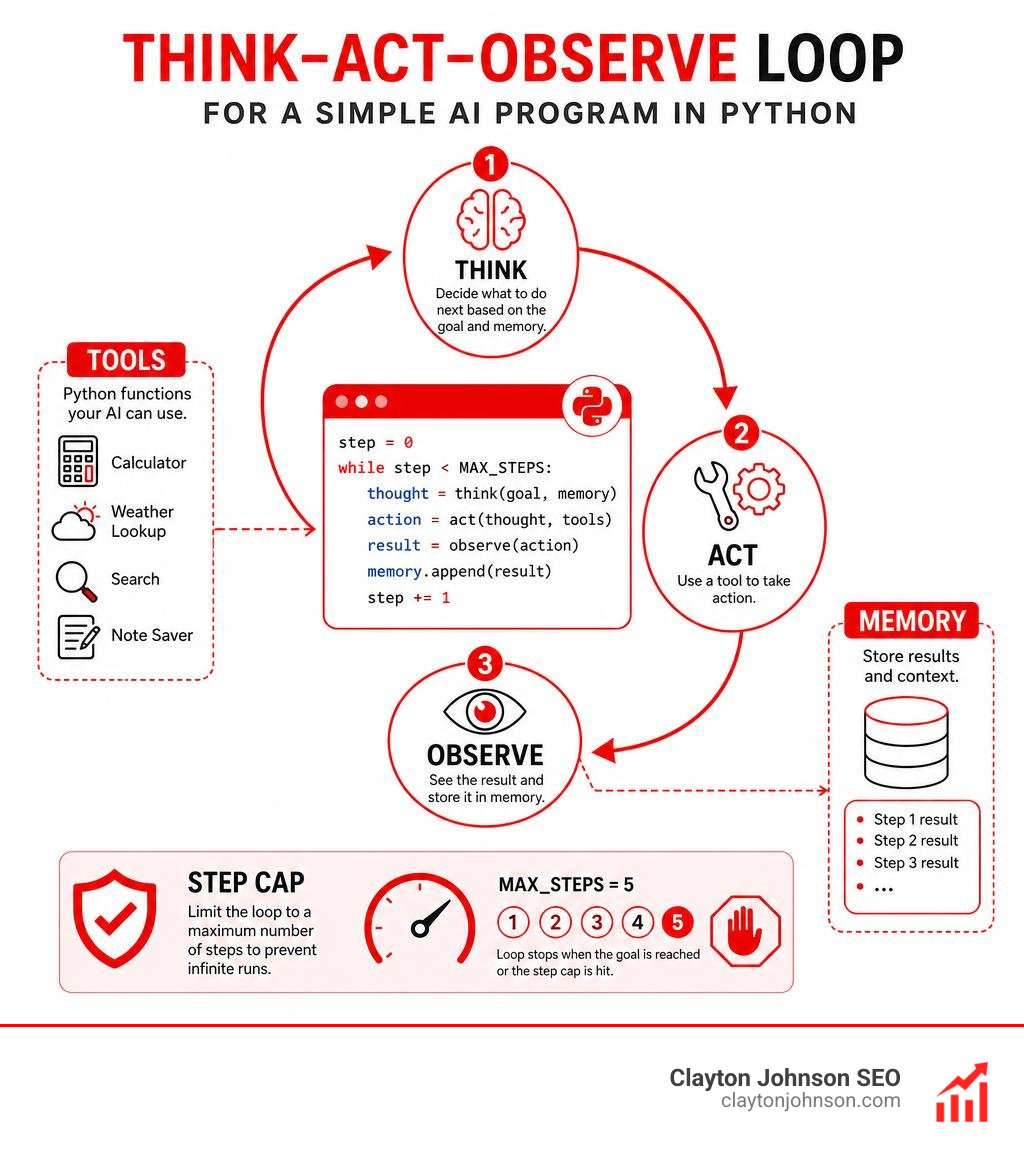
- Define your tools — write plain Python functions (like a calculator or weather lookup)
- Build a brain — use simple
if/elselogic to decide which tool to use - Add memory — store results in a Python list
- Create a loop — repeat the think-act-observe cycle until the task is done
- Set a safety cap — limit the loop to a max number of steps (e.g., 5) to prevent infinite runs
The entire structure can be built in pure Python — no API key, no signup, no cost.
Most people assume AI is locked behind advanced math or paid tools. It isn’t. The core of every AI agent — from a basic rule-based script to a production LLM system — follows the same simple loop: think, act, observe, repeat.
One developer described their first working agent like this: you watch its thought process print out step by step, and the moment it works, it genuinely feels magical.
That’s exactly what this guide will help you build.
I’m Clayton Johnson, an SEO strategist and digital marketing expert who works extensively at the intersection of AI systems, content architecture, and technical strategy — including hands-on work with simple AI programs in Python as part of building AI-assisted marketing automation tools. This guide gives you everything you need to go from zero to a working Python AI agent in about 15 minutes.
What is a Simple AI Program in Python?
To understand what we are building, we first need to define what an AI agent actually is. Strip away the marketing buzzwords, and an AI agent is simply a piece of software that can perceive its environment, make decisions, remember context from previous steps, and execute actions to achieve a specific goal.
Unlike a traditional, rigid script that follows a strict “If A, then B” path, an AI agent operates with a reasoning layer. This reasoning layer allows the program to evaluate unpredictable inputs, choose the best tool for the job, inspect the outcome, and decide what to do next.
When starting out, developers often face a choice: build a rule-based agent or an LLM-powered agent. A rule-based agent uses deterministic Python logic (like regular expressions and conditional statements) to parse user intent and route tasks. An LLM-powered agent, on the other hand, uses a Large Language Model API to handle complex, probabilistic language understanding.
We highly recommend starting with a rule-based skeleton. It allows you to build the structural engineering of an agent entirely for free, helping you master the underlying mechanics before you start paying for API tokens.
The demand for these skills is exploding. The global chatbot and conversational AI market is projected to reach $36.3 billion by 2032. Learning how to build these architectures from scratch is one of the most valuable moves you can make as a modern developer. If you want to understand how this fits into the broader landscape of modern development, check out The Ultimate Guide to Generative AI Coding Tools to see how professional teams leverage automated programming workflows.
The Core Components of a Simple AI Program in Python
Every AI agent, no matter how complex, relies on four foundational components working in a continuous cycle:
- The Brain: The decision-making center. It analyzes the user’s goal, looks at what has already been done, and decides which action to take next.
- The Tools: Specialized functions the agent can run to interact with the outside world (such as a calculator, a database query, or a web search).
- The Memory: A running log of the conversation history, actions taken, and observations gathered. Because language model APIs and rule-based loops are stateless, memory acts as the essential scratchpad passed along during each iteration.
- The Loop: The engine that drives the agent forward, coordinating the “Think-Act-Observe” process until the goal is achieved or a safety limit is hit.
By structuring your program this way, you keep your tools completely decoupled from your core decision loop. This modular design makes your code incredibly easy to maintain, test, and upgrade. For a deep dive into the philosophy of pure-Python agent architecture, read the excellent walkthrough on Build Your First AI Agent in Pure Python.
Step-by-Step: Building a Pure Python AI Agent from Scratch
Let’s roll up our sleeves and write a simple AI program in Python using only standard built-in libraries. We will create an autonomous assistant that can solve math equations and look up weather data using a local dictionary.
To make your development workflow even faster, you can use modern generation utilities. Check out our guide on Python Code Generation with AI Made Easy to learn how to generate boilerplates instantly.
Step 1: Defining Practical Tools for Your Simple AI Program in Python
Our agent needs to interact with the world, so we must provide it with tools. We will define two standard Python functions: a safe calculator and a mock weather database.
For our calculator tool, we want to solve basic math queries safely. Instead of using the dangerous eval() function which can run malicious code, we can write a function named calculate that accepts an operation string and two numeric values. It looks like this:
def calculate(operation, num1, num2):
if operation == "multiply": return num1 * num2
elif operation == "add": return num1 + num2
elif operation == "subtract": return num1 - num2
elif operation == "divide": return num1 / num2 if num2 != 0 else "Error: Division by zero"
return "Unknown operation"
Next, we will build a mock weather lookup tool. In a real-world app, this would query a live API, but a local dictionary works perfectly for testing:
def get_weather(city):
weather_database = {"accra": "hot and sunny, 31C", "london": "cool and rainy, 15C", "tokyo": "mild and clear, 22C"}
return weather_database.get(city.lower(), "weather data not found for this location")
These functions are completely independent. Our agent can call them whenever it needs to gather data. For more inspiration on building interactive, beginner-friendly conversational scripts, explore this guide on How to Build a Simple AI Chatbot with Python.
Step 2: Creating the Rule-Based Brain and Memory
Now we need to build the decision maker (the brain) and a way to store past steps (the memory).
Our memory will be a simple Python list called agent_memory = []. Every time our agent performs an action or makes an observation, we will append it to this list as a string.
Our rule-based brain will use basic text parsing and regular expressions to read the user’s goal, check what is currently stored in agent_memory, and decide on the next step.
For instance, if the user asks “What is 12 times 8, and what is the weather in Accra?”, our brain needs to look at the prompt and memory:
- If the word “times” or “multiply” is in the prompt, and we haven’t calculated the math yet (meaning “Math Result:” is not in our memory), the brain decides to call the
calculatetool with “multiply”, 12, and 8. - If the word “weather” is in the prompt, and we haven’t looked up the weather yet (meaning “Weather Result:” is not in our memory), the brain decides to call the
get_weathertool for “accra”. - Once both results are recorded in our memory list, the brain realizes it has all the answers and outputs a final summary.
This simple logic successfully mimics the reasoning of a much larger language model, completely free of charge!
Step 3: Implementing the Decision-Making Loop with Safety Caps
The magic happens when we tie the brain, tools, and memory together inside an execution loop. This loop runs a “Think-Act-Observe” cycle.
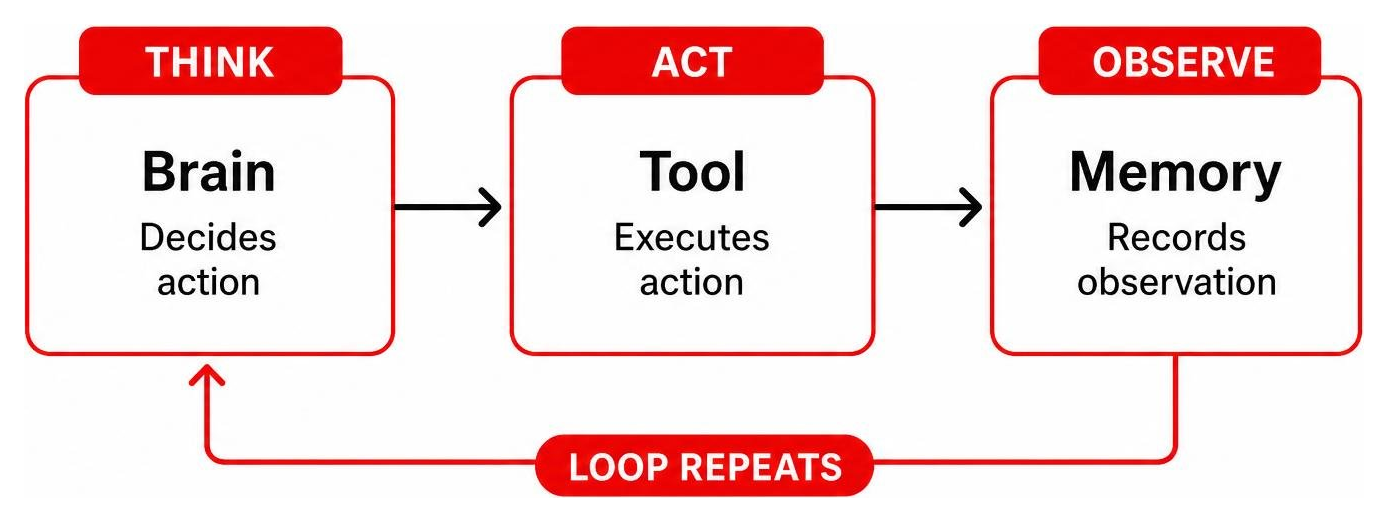
During each turn of the loop:
- Think: The program evaluates the user’s objective alongside the
agent_memorylist. - Act: If a tool call is required, the program prints the action (e.g., “Action: Calculating 12 times 8”) and executes the corresponding function.
- Observe: The output of the function is recorded back into
agent_memory(e.g., “Observation: Math Result is 96”).
Crucial Safety Tip: We must always include a step cap (max_steps = 5) inside our loop. If our logic contains a bug or receives a highly confusing prompt, a loop without a safety cap will run infinitely. In an LLM-powered agent, an infinite loop is a “footgun” that can run up hundreds of dollars in API bills in minutes. A simple counter like step_count += 1 acting as a break condition guarantees your program will exit safely.
When you run this script in your terminal, you will see the step-by-step reasoning print out in real-time, showcasing how the agent systematically solves each sub-goal.

Upgrading Your Agent: Swapping the Rule-Based Brain for an LLM
While a rule-based brain is fantastic for learning, it struggles with complex tasks, variations in human language, or unpredictable formatting. To make our agent general-purpose, we can swap out our if/else brain for a Large Language Model (LLM) API.
Instead of writing custom regular expressions, we describe our tools using a standard JSON schema and pass them to the LLM. The model reads the conversation history, decides which tool to call, and returns a JSON payload containing the tool name and arguments. Our Python loop parses this JSON, runs the function, appends the result to the message list, and sends it back to the model.
To avoid strict free-tier rate limits when testing, we recommend using the Groq Console (utilizing open-source models like Llama 3) or Anthropic’s SDK. For a brilliant example of a lightweight, production-ready coding agent built in just 131 lines of code, read the tutorial on How to Build a General-Purpose AI Agent in 131 Lines of Python. If you are looking for the absolute best developer environments to write and test these integrations, check out our curated guide on The Best AI for Coding and Debugging.
Here is a quick comparison of how these two approaches stack up:
| Feature | Rule-Based Brain | LLM-Powered Brain |
|---|---|---|
| Cost | 100% Free | Pay-per-token (or free developer tiers) |
| Setup Complexity | Very Low (Pure Python) | Medium (Requires APIs and SDKs) |
| Flexibility | Rigid (Only matches exact rules) | Extremely High (Understands context) |
| Execution Speed | Near-Instantaneous | Dependent on API latency |
| Risk of Infinite Loops | Low (Deterministic) | High (Requires strict step caps) |
Common Pitfalls and the Future of Python AI in 2026
As you begin building more advanced AI programs, keep an eye out for these common beginner traps:
- Unbounded History (Memory Bloat): If you continuously append every message and tool output to your memory list, your API request size will balloon. This increases latency and costs. Implement a rolling window memory or summarization step to keep your context clean.
- Malicious Inputs: If your agent has access to file systems or terminal tools, sanitize all inputs. A tool like a shell executor can accidentally modify or delete critical system files if the agent is tricked by a clever user prompt.
- Vague Tool Descriptions: LLMs rely on tool descriptions to know when to use them. Keep your descriptions sharp, specific, and clear.
Looking forward, the landscape of Python AI is undergoing a massive shift. With Python 3.14’s experimental support for a free-threaded build (removing the Global Interpreter Lock, or GIL), developers can run true multi-threaded parallel processing. This is a game-changer for AI workloads. Instead of running sequential steps, your agents will soon be able to run parallel reasoning, planning, and model inference pipelines concurrently within a single Python process.
Staying on top of these shifts is vital. Read our analysis on Why Every Developer Needs AI Tools for Programming in 2025 to see how these advancements are reshaping the industry.
Frequently Asked Questions about Python AI
Embarking on your first AI programming project can spark plenty of questions. Here are clear, practical answers to help you navigate the process.
How long does it take to build a simple AI agent from scratch?
You can build a basic, rule-based AI agent skeleton in about 15 to 30 minutes following this guide. If you want to integrate a real-world LLM API, set up environment variables, and build a clean research or automation assistant from scratch, it typically takes about 4.5 hours of focused coding and testing.
Do I need expensive API keys to learn AI programming in Python?
No, you do not need to spend any money. You can learn all the structural design patterns of AI agents using pure Python rule-based logic. When you are ready to upgrade to language models, you can use free developer tiers from providers like Groq, or run completely free local models on your own machine using open-source tools like Ollama.
How does Python 3.14 impact AI agent development?
Python 3.14’s experimental free-threaded mode removes the Global Interpreter Lock (GIL). This allows developers to build highly responsive, multi-agent systems that can perform complex planning, execute local tools, and communicate with external APIs in parallel across multiple CPU cores, drastically reducing execution latency.
Conclusion
Building a simple AI program in Python is the ultimate gateway to mastering modern software engineering. By breaking down complex agents into simple building blocks — a brain, tools, memory, and a safety-capped loop — you can create programs that interact dynamically with their environments.
At Clayton Johnson SEO, we help brands scale their digital presence by aligning cutting-edge technology with search intent. We specialize in mapping and understanding target audiences through strategic content architectures and search engine optimization. Whether you are building internal AI automation tools or optimizing your customer-facing platforms, we design customized content strategies that drive real business growth.
Ready to build more advanced AI workflows? Explore Clayton Johnson’s AI Coding Pillar Page for deep-dive tutorials, industry-leading tools, and practical guides designed for modern developers.