Why AI Implementation for Small Business Is No Longer Optional
AI implementation for small business has shifted from an experimental luxury to a practical necessity — and the numbers back that up.
Here is a quick overview of how to implement AI in your small business:
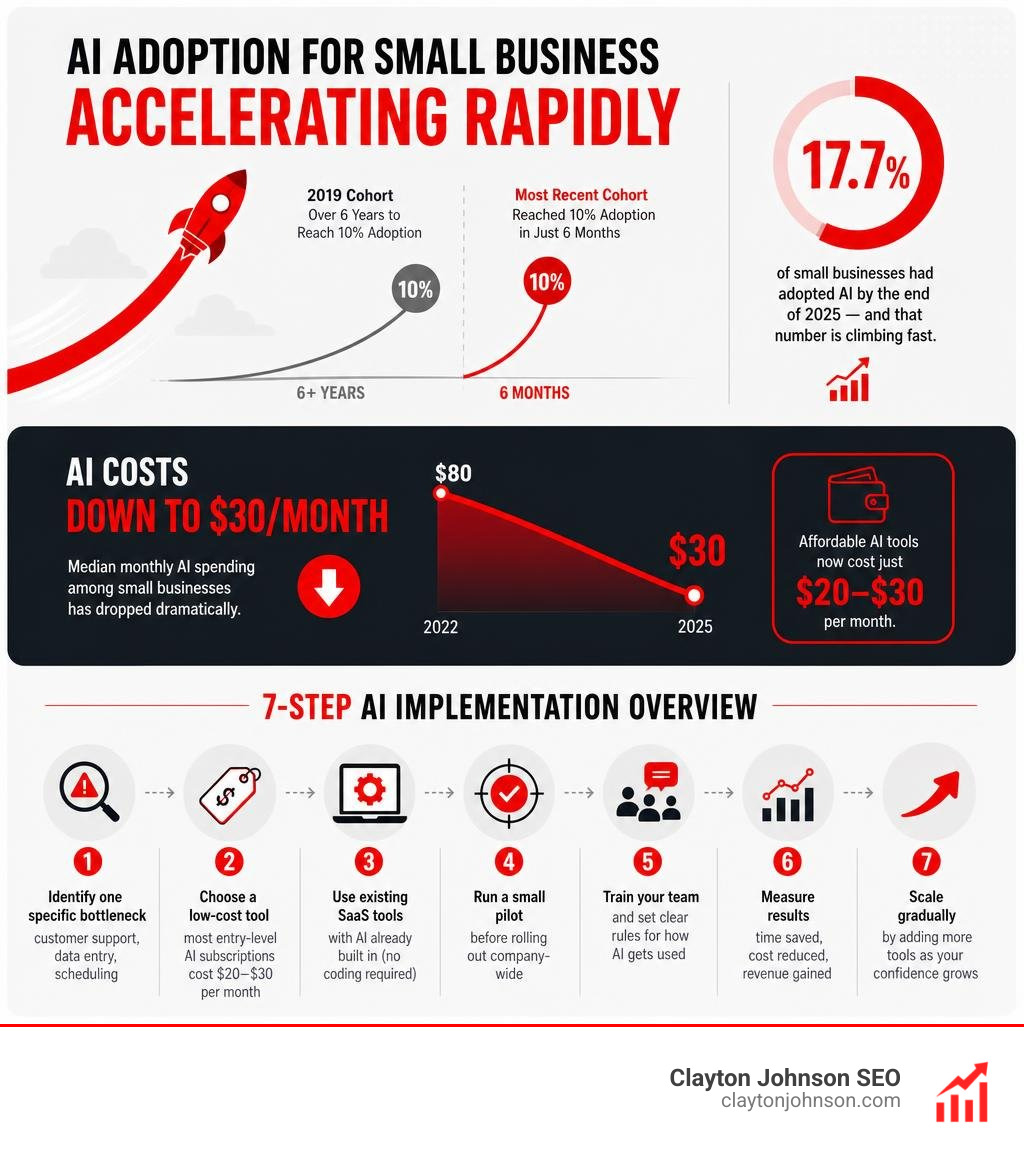
- Identify one specific bottleneck — customer support, data entry, scheduling — and start there
- Choose a low-cost tool — most entry-level AI subscriptions cost $20–$30 per month
- Use existing SaaS tools with AI already built in (no coding required)
- Run a small pilot before rolling out company-wide
- Train your team and set clear rules for how AI gets used
- Measure results — time saved, cost reduced, revenue gained
- Scale gradually by adding more tools as your confidence grows
By the end of 2025, roughly 17.7% of small businesses had adopted AI — and that number is climbing fast. The most recent cohort of small businesses reached a 10% adoption rate in just six months. For comparison, businesses that started in 2019 took over six years to hit that same milestone. That is nearly 13 times faster.
And the cost barrier? It has largely collapsed. Median monthly AI spending among small businesses dropped from around $80 in 2022 to roughly $30 by 2025, thanks to a wave of affordable generative AI tools priced at $20–$30 per month.
The gap between businesses using AI and those that are not is widening. Waiting is no longer a neutral choice.
I’m Clayton Johnson, an SEO strategist and founder of Clayton Johnson SEO, where I help small businesses build digital systems — including AI implementation for small business — that drive measurable growth. Over the past decade, I have worked at the intersection of search strategy, content, and AI-assisted marketing, giving me a front-row seat to how these tools can make or break a competitive advantage for smaller teams. In the sections below, I will walk you through everything you need to know to get started the right way.
The Current Landscape of AI Implementation for Small Business
Historically, small firms adopted new technologies much slower than large enterprises. High upfront software licensing fees, complex setups, and the need for dedicated IT staff kept small teams on the sidelines.
Today, that barrier has dissolved. Cloud delivery models and affordable subscription tiers mean a three-person startup can access the same advanced analytical power as a Fortune 500 enterprise.
As we look at the landscape in 2026, the transition from sporadic tool testing to consistent, daily business integration is clear. Small businesses are no longer just playing with free chatbots; they are embedding intelligent tools directly into their core operations. To understand how adoption splits across different business structures, let us look at the numbers.
| Business Metric | Employer Firms | Nonemployer Firms (Solopreneurs) |
|---|---|---|
| AI Adoption Rate (by end of 2025) | 26.1% | 15.3% |
| Primary Structural Advantage | Human capacity to manage and delegate tools | Zero-friction decision making and rapid testing |
| Key Operational Bottleneck | Staff coordination and training overhead | Limited hours in the day to execute workflows |
This gap highlights how different business structures approach technology. However, regardless of whether you have a team of fifty or operate as a solo founder, the velocity of adoption is accelerating across the board.
According to transaction data analyzing millions of small firms, the 2025 cohort of small businesses integrated AI into their setups 13 times faster than those in 2019. If you want to understand the deeper operational shifts behind who is adopting these tools and why, check out our guide on The AI Business Revolution: Who Is Using It and Why.
How Employer and Nonemployer Firms Approach AI Implementation for Small Business
The difference in how employer and nonemployer firms scale their AI setups comes down to resources versus agility.
Employer firms, adopting at nearly twice the rate of solopreneurs (26.1% vs. 15.3%), typically use AI to optimize existing human processes. They use tools to summarize team meetings, draft internal documentation, and help customer service reps reply to tickets faster.
For these firms, the challenge is not choosing a tool; it is organizing the team around it. If you are managing a team and wondering when to make the leap, read our breakdown on Why You Need to Rollout AI Right Now.
On the flip side, nonemployer firms (solo operators) use AI as an invisible, virtual partner. For a solo business owner, AI acts as a sounding board to brainstorm solutions, draft product descriptions, and manage social media scheduling.
Because they do not have to worry about training staff or changing company culture, solopreneurs can deploy new tools instantly. However, they must be careful not to fall into the trap of managing too many separate subscriptions, which can quickly drain time and money.
Industry-Specific Adoption: Knowledge-Intensive vs. Labor-Intensive Sectors
AI adoption is not distributed evenly across all sectors. Knowledge-intensive industries naturally lead the charge:
- Information: 39.3% adoption rate
- Professional Services: 30.3% adoption rate
- Educational Services: 29.5% adoption rate
In these sectors, the primary raw material is data, text, and code, making them perfect fits for early generative models.
By contrast, physical, capital-intensive, and labor-intensive industries have historically lagged behind:
- Construction: 8.9% adoption rate
- Transportation: 5.4% adoption rate
Yet, even in these physical fields, a massive shift is occurring. Generative AI now dominates paid AI services across all sectors, accounting for 66% of AI payments in transportation and 65% in construction.
Instead of building custom, multi-million dollar machine learning models, construction and transport companies are using accessible generative tools to draft proposals, analyze contracts, and automate customer communications.
Identifying High-Impact Processes for AI Integration
One of the biggest mistakes we see small business owners make is trying to sprinkle “AI magic” over their entire business all at once. Integrating tools just for the sake of it is a quick path to high software bills and frustrated employees.
To make your ai implementation for small business successful, you must focus on specific operational bottlenecks.

Before buying any new software, we highly recommend mapping your workflows. If you want to avoid common strategic pitfalls, read our guide on AI Strategy 101: Don’t Just Buy It, Plan It.
Auditing Your Workflows for AI Opportunities
To find the best places for automation, conduct a basic internal audit. Look for tasks that fit three criteria: they are highly repetitive, rely on digital data, and take up hours of valuable human time.
- Manual Data Entry: Moving customer details from an email into a CRM or spreadsheet is a prime candidate for automation.
- First-Tier Customer Support: Answering repetitive questions (“What are your hours?”, “Where is my order?”) can easily be offloaded to an automated assistant.
- Document Processing: Sifting through long proposals, RFPs, or supplier agreements to extract key pricing terms and dates.
If you find yourself overwhelmed trying to map these processes, you do not have to go it alone. Learn more about how expert guidance can help in our article Why Your Business Needs an AI Workflow Consultant Right Now.
Leveraging AI in Capital-Intensive and Labor-Intensive Industries
If your business operates in the physical world — like an automotive workshop, a local construction firm, or a shipping service — AI can still streamline your operations.
For instance, service businesses can use automated vision engines to eliminate manual data entry. A mechanic can take a photo of a handwritten vehicle inspection sheet or a parts receipt, and an AI-driven system can automatically update the database, calculate customer churn risk, and draft a follow-up text. This is the exact type of workflow made possible by projects like JH-Loo/NexH.AI , which uses multimodal vision models to bridge physical paper trails with digital databases.
Additionally, physical businesses can use AI to:
- Track traffic and delays: Avoid delivery and travel issues for field technicians.
- Optimize shipping rates: Use intelligent rate comparison engines to automatically choose the cheapest shipping carriers.
- Schedule preventive maintenance: Predict when machinery or fleet vehicles need service based on historic usage patterns.
Affordable and Accessible AI Tools to Start With
You do not need a massive enterprise budget to start using AI. In fact, 63% of small business AI users spend between $1 and $40 per month on their tools. The market has democratized, offering highly sophisticated software for the price of a couple of cups of coffee.
Here are some of the most accessible, low-cost tools to help you start:
- General Assistants: Platforms like ChatGPT or Claude offer general-purpose brainstorming, drafting, and analysis. In fact, Anthropic’s Introducing Claude for Small Business \ Anthropic offers specialized connectors to link your assistant directly with everyday tools like QuickBooks, PayPal, HubSpot, and Google Workspace.
- Meeting Recorders: Tools like Fathom or Otter.ai automatically record, transcribe, and summarize your video calls, pulling out key action items and syncing them directly to your CRM.
- Design and Content: Canva and basic generative design tools let you create professional social media graphics and marketing assets in minutes without needing professional design skills.
No-Code and Low-Code AI Solutions for Non-Technical Teams
The beauty of modern AI is that it uses natural language processing. You do not need to know how to code in Python or manage databases. If you can write an email in plain English, you can program an AI model.
No-code tools allow you to build custom workflows by simply describing what you want. For example, you can instruct a tool: “Whenever a new lead fills out our website form, read their message, summarize their main problem, and draft a personalized response for me to review.”
To demystify these concepts further, read our guide on AI Strategy and Implementation for People Who Hate Jargon.
Local-First and Open-Source AI Alternatives
If you handle highly sensitive customer data — like medical records, legal documents, or proprietary financial files — sending your data to public cloud-based models can be a security concern.
Fortunately, small businesses can now run powerful, lightweight AI models locally on standard office hardware. Using open-source software like Ollama, you can run private models directly on your own computers with zero ongoing API costs.
Developers and tech-savvy business owners have built incredible open-source frameworks to support this:
- Decision Support: Platforms like theSelfSa/biased provide open-source, local-first decision intelligence, allowing you to import CSV files and run “what-if” business scenarios without sending data to the cloud.
- Strategic Consulting: Projects like HendrySethiawan/sethry-ai-business-consultant demonstrate how ultra-lightweight models (like Qwen-0.6B) can run on low-resource environments to provide instant operational and financial advice without recurring subscription fees.
Moving from Sporadic Experimentation to Consistent Integration
Many small businesses start with “sporadic experimentation” — an employee uses a free chatbot to write an email once a week, or the owner uses it to brainstorm a blog post. While fun, this rarely moves the needle on your bottom line.
To get real value, you must move toward consistent, sustained operational integration.

By 2025, the ratio of consistent AI users to sporadic users rose to 1.8, and the percentage of small businesses paying for three or more specialized AI services grew to 9%. This shows a clear trend: successful businesses are building integrated tech stacks where tools talk to one another.
To learn how to transition your business out of the trial phase, read our guide on how to Escape the Pilot Purgatory and Scale Your AI Like a Pro.
Building a Phased AI Implementation for Small Business Roadmap
When you are ready to roll out AI systematically, we recommend a simple, phased approach to prevent your team from burning out or getting overwhelmed.

- Phase 1: The Pilot Project: Select a single department (like sales or customer support) and run a 30-day pilot with one specific tool.
- Phase 2: Review & Refine: Measure the actual time saved and gather feedback from the employees using the tool.
- Phase 3: Standardize: Document the prompts and workflows that worked, creating a simple internal playbook.
- Phase 4: Expand: Roll the tool out to other departments or introduce a second tool to solve a different bottleneck.
For a comprehensive template on how to structure this process, check out How to Build a Winning Enterprise AI Implementation Roadmap.
Deploying Multi-Agent Systems and Autonomous Workflows
As you advance, you can move from single-task tools to “multi-agent systems.” Instead of you manually copying and pasting text from one chatbot to another, specialized AI agents can work together to handle complex business processes autonomously.
For example, a typical multi-agent setup might look like this:
- An Orchestrator Agent (acting as the manager) receives a customer inquiry.
- It routes the financial questions to a Finance Agent and inventory questions to an Inventory Agent.
- The agents pull data securely from your business systems, collaborate on a solution, and present a drafted response to you for final approval.
This agentic approach is highly practical. Open-source codebases like AKKI0511/smallbizpal show how small businesses can run a secure, multi-agent digital team locally.
Similarly, the developer blueprint hynko431/Agent-A-Thon demonstrates how to connect accounting, e-commerce, and POS systems into a sequential pipeline. This ensures that downstream actions (like running a marketing campaign or ordering inventory) are automatically constrained by your real-time financial health and cash flow.
Managing Risks, Security, and Ethical Considerations
While the benefits of AI are massive, implementing it without clear guardrails can expose your business to serious risks. From data privacy leaks to copyright issues, you must protect your business’s intellectual property and maintain customer trust.
To keep your operations safe, read our complete guide on AI Implementation Best Practices: Don’t Let Your Bot Go Rogue.
Data Governance and Protecting Sensitive Information
The absolute golden rule of AI safety is: never input sensitive, proprietary, or customer data into free, public AI models.
Many free tools use your inputs to train their models. If you paste a confidential client contract or your company’s financial balance sheet into a public chatbot, that data could theoretically be surfaced to other users.
To protect your business:
- Use Enterprise-Grade Tools: Paid team plans (like Claude Team or ChatGPT Team) explicitly state in their privacy policies that they do not use your data to train their models.
- Isolate Private Data: If you deploy public-facing customer service bots, use a secure proxy layer to ensure the bot only has access to a sanitized, safe subset of your business data.
- Establish Clear Boundaries: Define what information is shareable (like public HR policies or marketing copy) and what is strictly confidential (like customer payment details or trade secrets).
To understand where to draw the line between automation and human oversight, read our guide on When to Use AI and When to Keep It Human.
Ethical AI Policies and Disclosure Best Practices
Maintaining customer trust is vital. If your customers feel like they are being tricked into interacting with a robot, you risk losing them.
We recommend adopting these ethical best practices:
- Human-in-the-Loop: Always have a human review, edit, and approve any content, email, or outreach campaign generated by AI before it is sent or published. This ensures your communication remains accurate, on-brand, and human.
- Public Disclosure: Consider publishing a simple, transparent statement on your website outlining how your business uses AI responsibly to improve customer service and efficiency.
- Verify for Infringement: Always double-check AI-generated designs, logos, or long-form copy to ensure they do not accidentally infringe on existing trademarks, copyrights, or patents.
Training Staff and Measuring ROI
The technical setup of an AI tool is often the easiest part. The hardest part? Getting your team to actually use it.
If your employees are worried that AI is going to replace them, they may resist using the tools or use them incorrectly.
To drive successful adoption, you must frame AI as an assistant designed to automate the boring, repetitive parts of their jobs, freeing them up to focus on more rewarding, creative, and strategic tasks. If you want to understand how to connect technology directly to business growth, read our article AI Alone Won’t Drive Revenue But This Will.
Building Organizational Capacity and AI Fluency
Building AI fluency within your team does not require expensive, multi-week training courses.
- Start with Hands-On Workshops: Run short, 30-minute sessions where team members can experiment with tools together.
- Share Winning Prompts: Create a shared document where employees can paste the exact prompts and workflows that saved them time.
- Encourage Small Wins: Celebrate when an employee uses an AI tool to solve a persistent bottleneck or save a few hours on a tedious task.
Measuring the Financial and Operational ROI of AI Spending
To ensure your AI investments are actually driving a competitive advantage, you must track their return on investment (ROI). Do not just look at the subscription costs; measure the operational impact.
- Time Saved: Track how many hours your team saves on automated tasks (e.g., spending 1 hour on monthly book closing instead of 10 hours).
- Response Times: Monitor whether your customer support response times decrease after implementing an AI assistant.
- Operational Accuracy: Measure whether automated data entry reduces manual typos and administrative errors.
By focusing on these metrics, you can easily justify your software spend and build a highly efficient growth engine. To learn more about structuring your business for modern scale, read our framework on The Rise of the AI Growth Operating System.
Frequently Asked Questions about Small Business AI
Do I need a dedicated tech team to implement AI in my small business?
No. Most modern AI tools feature intuitive, no-code interfaces and use natural language processing. You can manage them in plain English. For more complex integrations, you can use existing SaaS tools that feature built-in AI toggles, or work with managed service providers to help you set up secure connections.
How can I ensure my business data remains secure when using AI?
To keep your data secure, avoid inputting proprietary or customer information into free, public AI models. Instead, opt for enterprise-grade paid subscriptions, which protect your data privacy and do not use your inputs for training. Alternatively, you can run open-source models locally on your own hardware using tools like Ollama.
What is the average cost of implementing AI for a small business?
AI has become incredibly affordable. While early adopters in 2022 spent a median of $80 per month, the influx of entry-level generative AI tools has driven the median monthly spend down to roughly $30 by 2025. You can easily start with a single $20–$30 monthly subscription and scale your budget as you see measurable results.
Conclusion
AI implementation for small business is no longer a futuristic concept — it is a practical, highly accessible strategy that is actively leveling the playing field between small teams and massive corporations. By starting small, choosing low-cost tools, and keeping a human in the loop, you can eliminate operational bottlenecks and focus on what truly matters: growing your business.
At Clayton Johnson SEO, we help small businesses navigate the digital landscape by mapping and understanding their target audiences through strategic content and SEO services. Whether you are looking to build search visibility or integrate smarter workflows into your marketing, we are here to help you scale responsibly.
Ready to take the next step and ensure your automated systems are set up safely? Explore our comprehensive guide on AI Implementation Best Practices: Don’t Let Your Bot Go Rogue to build a secure, efficient, and growth-focused AI strategy today.