Intelligent Automation Tools: Making Robots Do the Boring Stuff

Why Intelligent Automation Tools Are the Growth Lever You Can’t Ignore
Intelligent automation tools combine AI, machine learning, and robotic process automation (RPA) to eliminate repetitive manual work — so your team can focus on decisions that actually move the needle.
Here are the top intelligent automation tools to know:
| Tool | Best For |
|---|---|
| UiPath | Enterprise RPA and agentic workflows |
| Automation Anywhere | Large-scale bot deployment |
| Zapier | No-code workflow automation across 8,000+ apps |
| Klippa DocHorizon | AI-powered document processing |
| Microsoft Power Automate | Microsoft ecosystem automation |
| Appian | BPM and low-code process automation |
| Pega | Intelligent decisioning and CRM automation |
The average office worker spends 10% of their time on manual data entry — more than 1,000 copy-paste actions every week. ��
That’s not a productivity problem. That’s a systems problem.
And it’s expensive. The business automation market is on track for massive growth, continuing to expand at a rapid annual rate. The organizations winning right now aren’t working harder — they’re automating smarter.
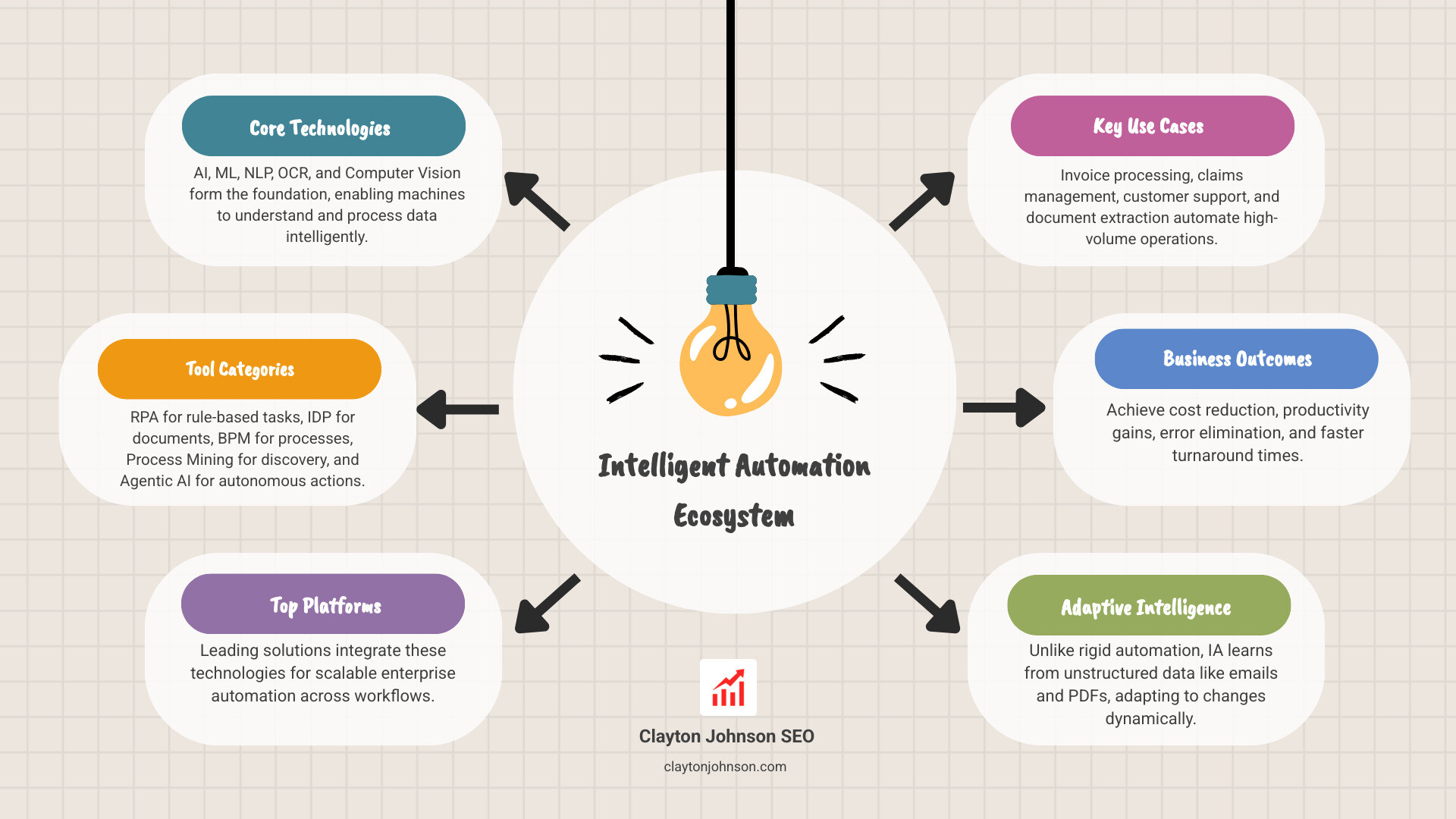
Traditional automation follows rigid rules. It breaks when anything changes. Intelligent automation is different. It learns. It adapts. It handles unstructured data like emails, PDFs, and scanned documents — not just clean spreadsheets.
The gap between businesses that use these tools and those that don’t is widening fast.
I’m Clayton Johnson — an SEO strategist and growth architect who has spent years building AI-assisted marketing workflows and studying how intelligent automation tools integrate into scalable business systems. In this guide, I’ll break down exactly how these tools work, which ones are worth your attention, and how to pick the right one for your stage and use case.
What are Intelligent Automation Tools?
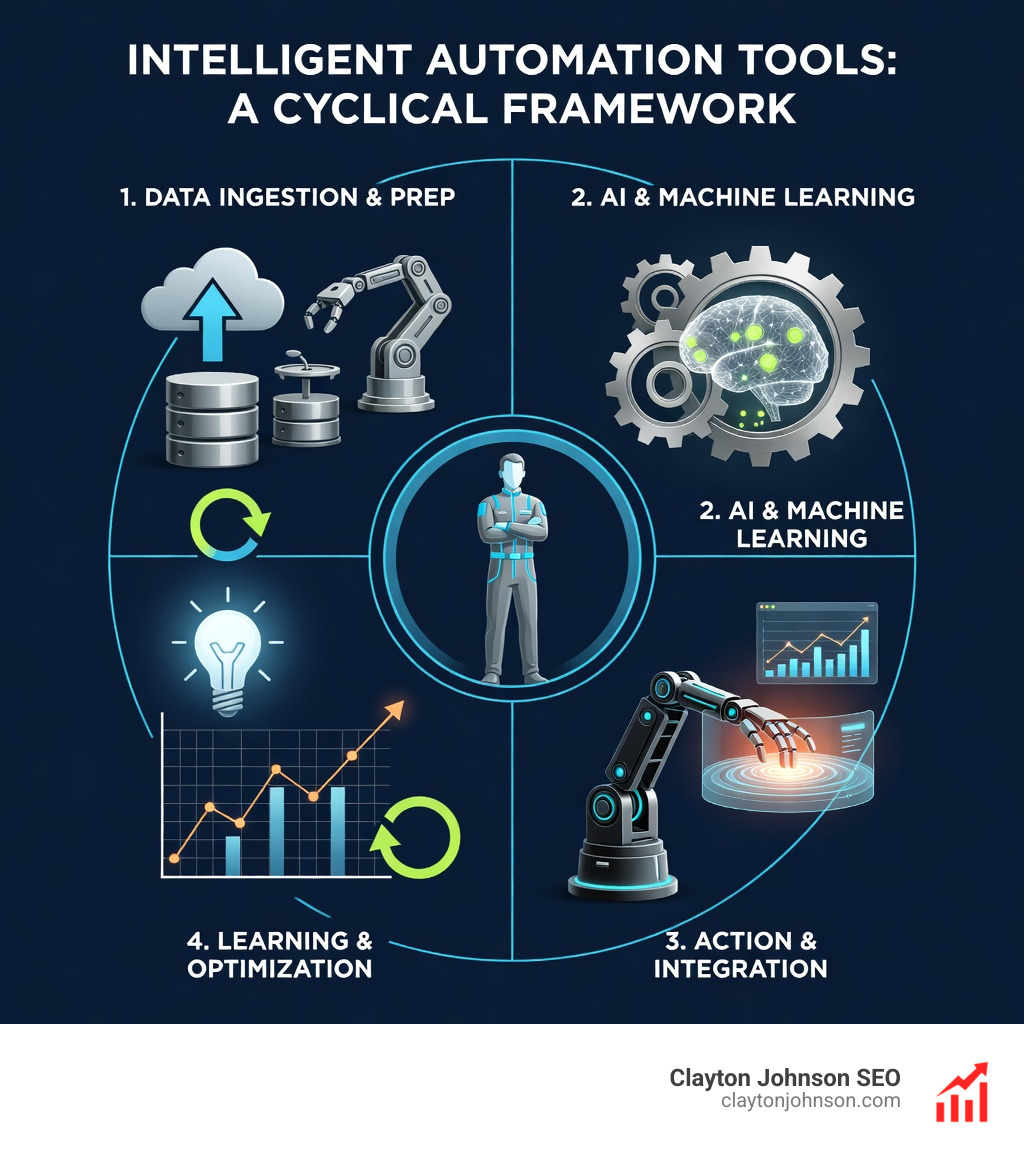
At its simplest, intelligent automation tools are the “brains” added to the “brawn” of traditional robotics. While traditional automation is great at following a strict “if this, then that” recipe, it falls apart the moment a customer sends a handwritten note instead of a digital form.
Intelligent automation (IA) bridges that gap. It refers to a suite of technologies that work collaboratively to optimize workflows. Instead of just moving data from Point A to Point B, these tools can understand what the data is, decide where it needs to go, and learn how to do it better next time.

Core Technologies in Intelligent Automation Tools
To understand how these platforms work, we need to look at the “ingredients” that make them intelligent. We often see these five pillars working together:
- Robotic Process Automation (RPA): These are the software robots that handle the repetitive clicks and keystrokes. Intelligent automation combines RPA and AI to move beyond simple rule-based tasks.
- Process Mining: This is the diagnostic layer. It analyzes your existing digital footprints to find bottlenecks and suggest what should be automated first.
- Intelligent Document Processing (IDP): Tools like Klippa DocHorizon use AI to read and extract data from unstructured sources like receipts or legal contracts.
- Business Process Management (BPM): This is the orchestration layer that ensures the human-in-the-loop and the robots are working in harmony.
- Agentic AI: The newest frontier. These are autonomous agents that can reason through complex problems and execute multi-step workflows without a human holding their hand every step of the way.
For a deeper dive into how these individual components are evolving, you can explore more info about AI tools on our platform.
How AI and ML Power Intelligent Automation Tools
Artificial Intelligence (AI) and Machine Learning (ML) are the engines under the hood. Traditional automation is static; intelligent automation tools are dynamic.
- Predictive Analytics: By looking at historical data, ML models can predict outcomes—like which invoices are likely to be fraudulent or when a piece of machinery in a Minneapolis factory might fail (predictive maintenance).
- Handling Unstructured Data: Over 80% of business data is unstructured (emails, voice notes, PDFs). Natural Language Processing (NLP) allows tools to “read” an email and understand the sentiment or intent.
- Computer Vision & OCR: These technologies allow robots to “see” and interpret visual information, such as identifying a face for security verification or converting a blurry photo of a receipt into machine-readable text.
If you’re ready to see this in action, many leaders try UiPath free to experiment with how these cognitive layers transform basic workflows into “thinking” systems.
Top Intelligent Automation Platforms for Enterprise Growth
Choosing a platform is like choosing a foundation for a skyscraper. If you pick one that can’t scale, your growth will eventually crack the base. We’ve evaluated the heavy hitters based on their ability to drive real-world ROI and their ease of integration.
| Feature | UiPath | Automation Anywhere | Zapier |
|---|---|---|---|
| Primary User | Enterprise IT/Devs | Large Scale Operations | Marketing/Ops/SMBs |
| Technical Barrier | Moderate (Low-code) | Moderate | Very Low (No-code) |
| Key Strength | End-to-end Orchestration | Cloud-native RPA | 8,000+ Integrations |
| AI Integration | Agentic AI & specialized ML | Pre-built “AARI” bots | Centralized AI Orchestrator |
For more insights on how these platforms fit into a larger corporate strategy, check out our guide on enterprise AI.
Leading RPA and Agentic Platforms
The “Big Three” in the enterprise space continue to dominate because they offer more than just bots—they offer ecosystems.
- UiPath: Currently ranked #1 for business orchestration. They have moved heavily into “Agentic Automation,” where agents think, robots do, and people lead. One customer, Omega Healthcare, saw a 100% increase in productivity and 50% faster turnaround on invoices using their suite.
- Automation Anywhere: A global leader known for its user-friendly, cloud-native platform. It’s particularly strong for businesses that need to deploy thousands of bots across different departments quickly.
- Blue Prism: Focused on the “digital workforce” concept. They are a favorite for highly regulated industries because of their focus on security and auditability.
- Hyperscience: A specialized player that excels at back-office efficiency. Their proprietary ML platform is legendary for handling messy, handwritten documents that other OCR tools give up on.
Specialized Tools for Document and Workflow Automation
Not every business needs a massive RPA infrastructure. Sometimes, you just need to solve a specific, painful problem—like an inbox full of 500 invoices.
- Klippa DocHorizon: This is our top pick for IDP. It achieves up to 99% data extraction accuracy and supports over 50 document types. It’s a “no-code” dream for teams that need to automate document workflows without hiring a developer.
- Rossum: A cloud-based OCR solution that uses AI to “understand” invoices and orders, making it a go-to for accounts payable teams.
- Vic.ai: An autonomous accounting platform. It doesn’t just scan invoices; it uses AI to handle the entire coding and approval process.
- Zapier: The “glue” of the internet. With over 3.4 million companies using it, Zapier has become a powerhouse for intelligent automation tools by allowing users to build AI-powered chatbots and agents that connect to their existing tech stack.
To understand the underlying tech that makes these tools so accurate, read more info about AI models.
Key Benefits and Industry Use Cases
The “Why” behind intelligent automation tools isn’t just about saving time—it’s about competitive leverage. When you automate the boring stuff, your human talent can focus on high-value strategy.

High-Impact Use Cases
We see the biggest wins in areas where data is high-volume and high-frequency:
- Invoice Processing: Instead of manual entry, IA tools extract data, verify it against purchase orders, and flag discrepancies. Johnson Controls saved $18 million and 900,000 hours by automating this one process.
- Claims Management: In the insurance world, IA can reduce claims processing from 27 days to just 12 hours.
- Customer Support: Conversational AI (like Boost.ai) handles the “Level 1” queries, while AI agents in Slack can summarize meeting notes or assign tasks based on a conversation.
- Accounts Payable automation: This is often the “gateway drug” for IA, providing immediate, measurable ROI by eliminating late fees and human error.
Industries Leading the IA Revolution
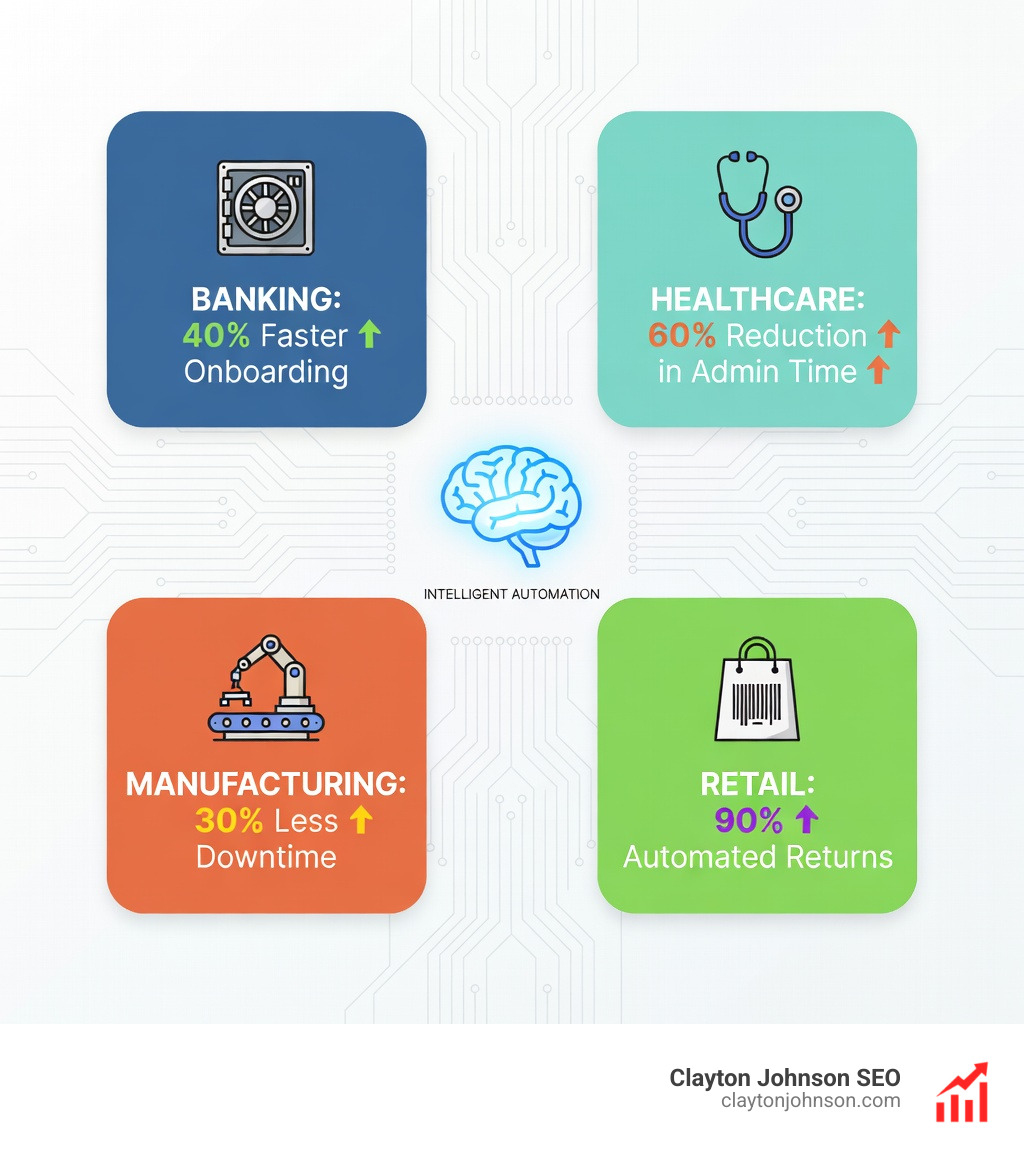
While every business can benefit, these four sectors are currently seeing the most compounding growth:
- Banking & Financial Services: From KYC (Know Your Customer) checks to loan processing and fraud detection.
- Healthcare: Automating patient scheduling, care gap analysis, and claims processing. AGS Health has famously used IA to revolutionize their revenue cycle management.
- Manufacturing: Using IoT sensors and IA for predictive maintenance and managing complex Bills of Materials (BOM).
- Insurance: “Insurance for insurance companies.” IA handles the massive administrative burden of underwriting and first notice of loss (FNOL).
For founders looking to track the success of these implementations, we have more info about financial metrics that matter.
Selecting and Implementing an Intelligent Automation Platform
Choosing the right tool is a strategic decision, not just a technical one. In our work at Demandflow, we emphasize that tactics without structure lead to “automation silos” that eventually break.
Selection Criteria
When evaluating intelligent automation tools, we recommend looking at these four factors:
- Integration Connectors: Does the platform have pre-built connectors for your CRM, ERP, and communication tools? Integrations are the “sturdy supports” that allow your automation to scale.
- Scalability: Can the tool handle 10 tasks today and 10,000 next month?
- Security & Compliance: This is non-negotiable. Look for AES-256 encryption, MFA, and SOC2 compliance, especially if you handle sensitive customer data.
- Ease of Use: Can your business analysts use it, or do you need a PhD in computer science? Low-code/no-code platforms are usually the best bet for long-term agility.
For more on optimizing your internal systems before you automate, see more info about process improvement.
Overcoming Implementation Challenges
Implementation is rarely a straight line. 67% of CIOs are taking a “cautious approach” to AI, and for good reason—unstructured growth can lead to chaos.
- Change Management: People are often afraid that “the robots are coming for my job.” The key is to frame IA as a “co-pilot” that removes the drudgery, not a replacement for human judgment. Check out more info about change management to help lead your team through this.
- Legacy Systems: Many Minneapolis businesses rely on older software that doesn’t “talk” to modern AI. RPA is the perfect bridge here, as it can interact with the user interface of old apps just like a human would.
- Data Silos: Automation only works if it has access to the data. Breaking down departmental silos is a prerequisite for end-to-end automation.
Frequently Asked Questions
What is the difference between RPA and IA?
Think of RPA as the “hands” that perform repetitive tasks (copy-pasting, moving files). IA is the “brain” that adds AI and machine learning, allowing the system to handle unstructured data, make decisions, and learn from its mistakes over time.
How do I choose the right automation tool?
Start with the problem, not the tool. Identify your biggest bottleneck (e.g., “it takes us 4 days to process a single invoice”). Then, look for a tool that specializes in that area—like Klippa for documents or Zapier for connecting multiple apps.
Is intelligent automation secure for sensitive data?
Yes, provided you choose enterprise-grade platforms. Leading tools offer granular permissions, data encryption at rest, and do not use your private company data to train their public AI models.
Conclusion: Future-Proofing with Structured Growth
Intelligent automation tools are no longer a luxury for the Fortune 500. They are the baseline for any company that wants to scale without linearly increasing their headcount and stress levels.
At Demandflow, we believe that clarity leads to structure, and structure leads to leverage. Automation is the ultimate leverage. By building a structured growth architecture, you aren’t just “buying a tool”—you’re installing a growth engine that compounds over time.
Whether you’re looking to automate your SEO content architecture or streamline your back-office operations, the goal is digital agility. Start small, pick one high-impact use case, and build from there.
Ready to build a system that works as hard as you do? Explore more info about growth systems and let’s start building your structured growth infrastructure.