How a Code Maker Python Engine Works Across Different Architectures
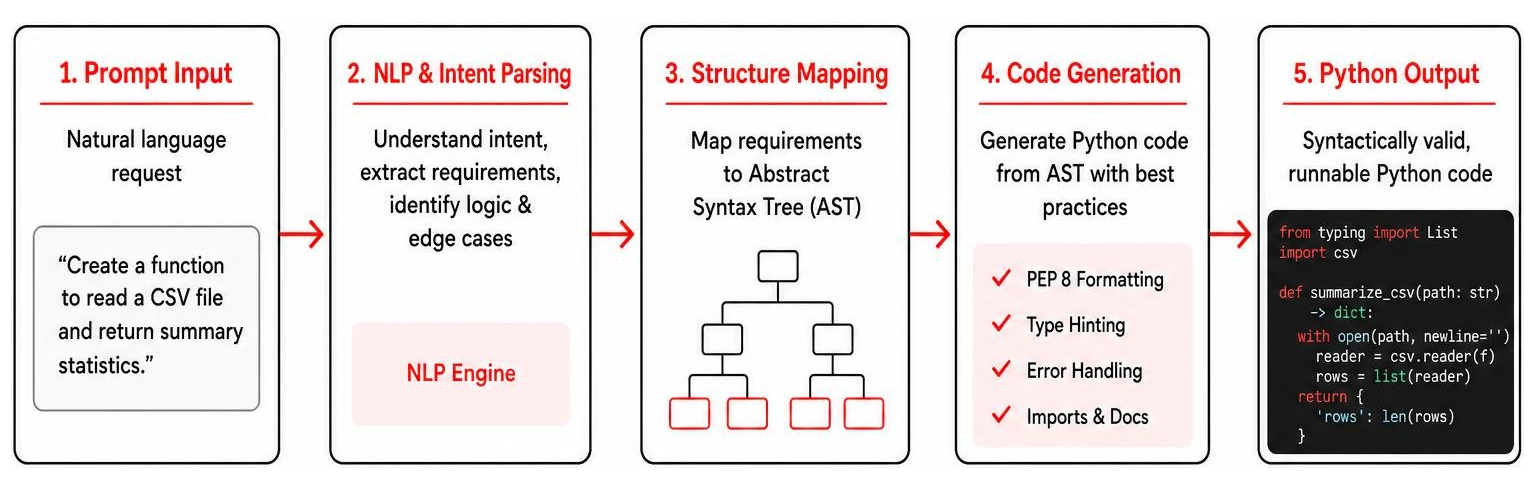
Understanding how a code maker python engine generates functional output requires looking under the hood of its underlying architecture. Code generators do not simply string words together; they process inputs through specialized translation pipelines to output syntactically valid, runnable Python scripts.
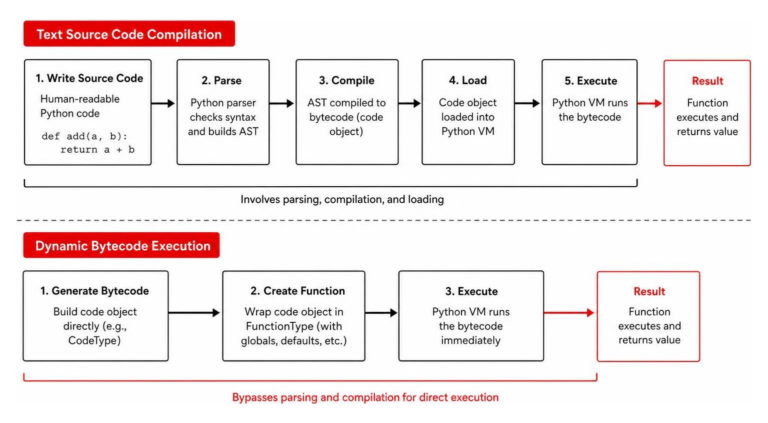
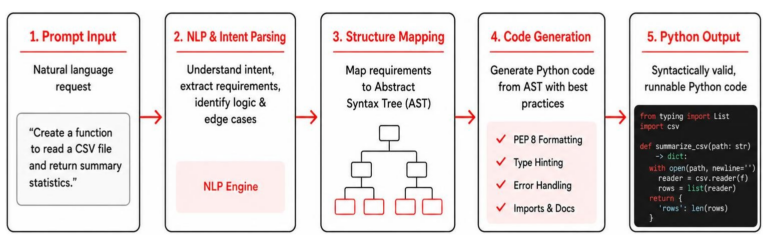
At the most basic level, modern AI generators convert natural language prompts into executable software using large language models (LLMs). When you submit a plain-English request, the engine uses Natural Language Processing (NLP) to parse the intent, identify required variables, logic flows, and edge cases, and map those requirements onto an Abstract Syntax Tree (AST). The engine evaluates the AST to build structured Python code that adheres to standard PEP 8 formatting rules, complete with classes, type hinting, and error handling wrappers.
Schema-driven engines operate slightly differently. Instead of taking unstructured text prompts, these tools parse structured definitions like XML, JSON, or SQL schemas. The engine reads the source definition once, runs a transformation pipeline using internal templating or AST manipulators, and emits boilerplate across target files automatically.
Types of Python Code Generators
The landscape of Python code generators expands across several distinct architectural categories:
- AI-Powered Generators: Tools like CodeConvert AI leverage advanced LLMs (including GPT-5.5, Claude Opus 4.7, and DeepSeek V4) to dynamically generate Python code from conversational prompts. They adapt instantly to diverse tasks, such as generating temperature conversion utilities or building full Django backends.
- Schema-Driven Engines: Tools like Cog parse declarative schemas to emit deterministic boilerplate. They excel at keeping data structures, C++ headers, or database models synchronized without relying on probabilistic AI outputs.
- Template Scaffolding: Frameworks such as aitoolmaker v0.1.0 generate complete application trees—like Streamlit micro-apps or static web tools—from pre-defined structural code layouts.
- Comment-Embedded Tools: Tools that embed executable generator scripts inside regular source code comment blocks allow developers to run inline logic without separating input templates from target code files.
Choosing the Right Code Maker Python Ecosystem
Selecting an optimal code maker python setup depends heavily on your existing development ecosystem, security posture, and project scope. Simple web-based converters work well for isolated snippets, but enterprise projects require deep context and repository integration.
To prevent prompt drift and generic outputs, modern development workflows rely on tools like harness-maker v0.39.0. Rather than deploying static system prompts, harness-maker profiles over 12 stack signals (such as frameworks, test runners, and CI configurations) across your project. It conducts an interactive 10-dimension interview to generate custom harness files that fit your exact stack rules. To learn more about selecting options for your tech stack, check out our comprehensive AI Coding Software Guide 2026.
Tool Comparison: AI Frameworks, Harnesses, and Code Generator Engines
Choosing the right code generation engine requires evaluating trade-offs between execution speed, safety features, multi-language support, and framework complexity.
| Tool | Core Architecture | Primary Focus | Key Advantage | Security Safeguards |
|---|---|---|---|---|
| Pythinker Code | Shell-Native Agent | Audit-first code review & debugging | Native terminal execution; ACP & MCP support | Diff critique prior to applying code edits |
| Python Maker Bot | Rust CLI / Axum Dashboard | AI code generation & auto-execution | Multi-provider LLMs; interactive web UI | Docker sandboxing, Ruff linting, Bandit scanning |
| Cog | Python Comment Engine | Schema synchronization & file output | In-place file edits across multiple target languages | Pure text execution; deterministic outputs |
| harness-maker | Project Profiler & Harness | Multi-IDE personalized AI scaffolding | Profiles 12+ repo signals; self-evolving rules | Mechanical pre-checks; grade-gated reviews |
| aitoolmaker | Streamlit / Web Scaffold | Instant AI micro-app generation | Generates complete UI apps in Python or HTML | Standard API key handling & isolated output paths |
Shell-Native Agents and Sandboxed Execution
Modern terminal-native code generators bring full AI development loops directly to the command line. A prime example is Alvaro5/python-maker-bot, a Rust-built engine that manages multi-turn Python script creation, streaming responses, and WebSocket integration via an Axum dashboard. Because automatically running generated code carries risks, Python Maker Bot features Docker container sandboxing, Ruff static analysis, and Bandit pre-flight security scans.
Similarly, Pythoughts-labs/pythinker-code takes an audit-first approach to AI engineering. Unlike tools that immediately rewrite files, Pythinker acts as an inline reviewer, scanning diffs for security vulnerabilities and root-causing runtime errors before offering code modifications. If you want to dive deeper into evaluating automated debugging tools, read our guide on The Best AI for Coding and Debugging.
Programmatic Tool Creation and Agent Frameworks
Beyond simple snippet generators, specialized Python libraries enable programmatic generation of full web tools and multi-agent workflows. Using MoustafaMohamed01/aitoolmaker, developers can generate functional Streamlit apps or web dashboards across pre-built tool types (like SQL generators and document summarizers) with minimal code:
- Initialize the builder with your preferred model and API key.
- Select your target output format (Streamlit Python application or static web export).
- Run the auto-generation function to build and launch your application interface.
For complex LLM architectures, xinhuangcs/agentmaker offers a lightweight framework for orchestrating AI agents with long-term memory, custom tools, and self-debugging capabilities in just four lines of Python code. It includes built-in observability features like DoctorHook and Trace Detective to automatically diagnose and fix failed agent steps. Explore our detailed breakdown in The Ultimate Guide to Generative AI Coding Tools.
Best Practices for Integrating Generated Python Code into Production
Integrating AI-generated Python code into production environments requires structured safeguards. Never copy raw AI output directly into main branches without verification.
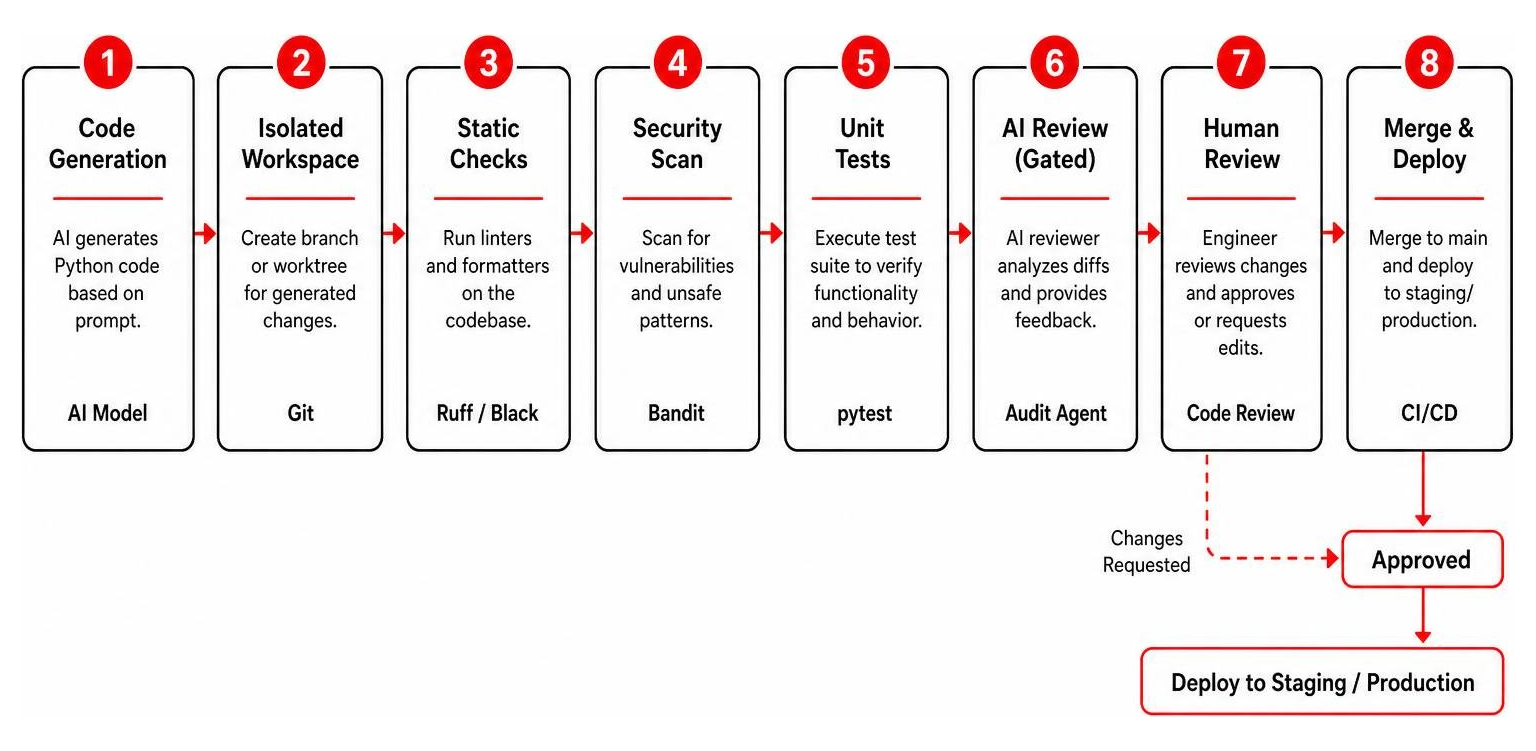
When using a code maker python engine, always run generated code inside isolated Git worktrees. This keeps experimental changes away from your working tree. Gate AI reviewer agents behind local mechanical checks (like pytest and ruff) so LLM evaluations run only on syntactically valid code.
Boosting Productivity with Code Maker Python Tools
Automated Python generators streamline repetitive development tasks across your engineering pipeline:
- Boilerplate Elimination: Automatically generate repetitive data classes, API serialization logic, or CRUD methods.
- Multi-File Scaffolding: Scaffold entire backend structures, configuration files, and testing setups simultaneously.
- Single Source of Truth: Keep application data models in sync across frontend and backend environments using schema-based generators.
- Rapid Prototyping: Build working proof-of-concept scripts in seconds using natural language descriptions.
For a broader look at how automated workflows boost team velocity, explore Why You Need an AI Code Generator Right Now.
Tailoring Generators to Project-Specific Standards
Off-the-shelf system prompts often produce code that conflicts with internal architecture standards. Tailoring generated output requires personalizing the generator’s underlying harness.
Tools like harness-maker use an interactive 10-dimension interview to capture team preferences regarding state management, concurrency, and test coverage. Furthermore, harness-maker tracks recurring codebase failure patterns—auto-proposing guardrail updates whenever a specific failure slug appears three or more times. It relies on @hm:user:* block-merge markers to preserve manual code edits during automated updates. Learn how to refine custom prompts in our guide to Mastering the Claude AI Code Generator for Faster Development.
Mitigating AI Hallucinations and Security Vulnerabilities
Despite their power, AI code generators are prone to hallucinations and security bugs. When requested to solve complex problems, models can generate plausible-sounding functions, arguments, or libraries that do not actually exist.

In legacy or specialized coding environments, AI tools may invent syntax, confuse variable scopes, or invent non-existent API parameters. Trusting generated code without verification can expose applications to serious security risks, including directory traversal bugs, unvalidated string executions, and context overflow errors.
Sandboxing, Scanning, and Static Analysis
Executing untrusted AI code requires a multi-layered security pipeline:
- Docker Container Sandboxing: Run generated scripts inside isolated containers with network access disabled and local files mounted as read-only.
- Static Security Analysis: Execute tools like Bandit to detect common vulnerabilities (such as hardcoded passwords, unsafe deserialization, or insecure imports) before running scripts.
- Linting and Syntax Validation: Pass code through
ruffand Python’s built-inpy_compilemodule to catch syntax errors early. - Ephemeral Virtual Environments: Execute scripts inside temporary virtualenvs to prevent dependency drift on host systems.
- Execution Timeouts: Set strict runtime limits (e.g., 30 seconds) to terminate runaway AI loops automatically.
To find cost-effective development tools with built-in safety features, read our roundup of AI Coding Tools Free.
The Future of AI-Assisted Python Code Generation in 2026 and Beyond
As we move through 2026, Python code generators are evolving from basic code-completion tools into fully autonomous, review-first engineering agents. Rather than jumping straight to editing files, modern agents analyze repository context, audit pull request diffs, and perform automated root-cause debugging.
Protocols like the Model Context Protocol (MCP) and Agent Client Protocol (ACP) allow code generators to seamlessly interface with external databases, local terminal runners, and modern IDEs. Developers are increasingly turning to local, open-weights models (such as Qwen2.5-Coder) running via Ollama or LM Studio to maintain data privacy while avoiding cloud API fees. When running local agent workflows, expand context window settings to at least 32,768 (ideally 131,072) tokens to prevent system prompt overflows.
For quick reference examples on integrating AI models with Python, check out our Cheat Sheet to Artificial Intelligence Python Code Examples.
Frequently Asked Questions About Python Code Makers
How do multi-provider LLM code generators handle different programming languages?
Multi-provider platforms convert high-level prompt logic into standardized Abstract Syntax Trees (ASTs) or language-agnostic intermediate representations. The engine then routes the request to an LLM optimized for the target language (such as Python, Rust, or C++) or uses multi-pass translation prompts to convert code across 50+ target environments cleanly.
Is AI-generated Python code immediately production-ready?
No. While modern AI code makers produce syntactically correct code that follows standard formatting conventions, the output requires human review, static security scanning, and unit testing before deployment. AI models can introduce subtle edge-case bugs, unoptimized loops, or security vulnerabilities that require human verification.
What is the safest way to execute untrusted AI-generated Python code?
The safest approach is running generated code inside a network-disabled Docker container with read-only file access and strict execution timeouts. Combining container isolation with pre-flight static analysis (using Bandit and Ruff) ensures untrusted code cannot harm host systems or leak private data.
Conclusion
At Clayton Johnson, we help companies streamline their workflows, optimize their technology stacks, and implement safe, modern software strategies. Leveraging a code maker python engine can significantly accelerate development velocity—provided you implement proper security controls, repository profiling, and automated testing pipelines.
To explore how advanced AI development strategies can transform your business workflows, visit our resource hub for AI Coding Solutions.